
- Top Pick: NVIDIA Shield Remote; Voice Search, Motion-Activated, Backlit Buttons, Customizable Menu Buttons, and IR Blaster to Control Your TV (930-13700-2500-100)
- Best Value: Voice Replacement Remote Control for NVIDIA Shield TV and NVIDIA Shield TV Pro Streaming Media Player 2015/2017/2019 All Models
- Premium Choice: P3700 Shield Voice Remote Control New Replacement Compatible with NVIDIA Shield TV and NVIDIA Shield TV Pro Streaming Media Player 2015/2017/2019 All Models


The NVIDIA Shield remote is the control at the heart of one of the best streaming devices you can own, and whether you need a replacement or simply want to know if it is any good, this review has you covered. With its backlit buttons, built-in voice control, motion-activated wake, and a clever remote locator, it aims to fix the frustrations of typical streaming remotes. But is the official Shield TV remote worth buying, and how do you solve the pairing problems owners sometimes hit? Below we cover the features, setup and common fixes, real buyer feedback, and honest value, so you can decide with confidence. Let us take a closer look at what this remote does well and where it falls short.
What the NVIDIA Shield Remote Offers
The Shield TV remote was designed to solve the annoyances of ordinary streaming remotes, and its feature list reflects that. From lighting to voice to a locator, it packs thoughtful touches into a compact, triangular design. Here is what sets it apart.
As an Amazon Associate we earn from qualifying purchases at no extra cost to you.



Design and Backlit Buttons
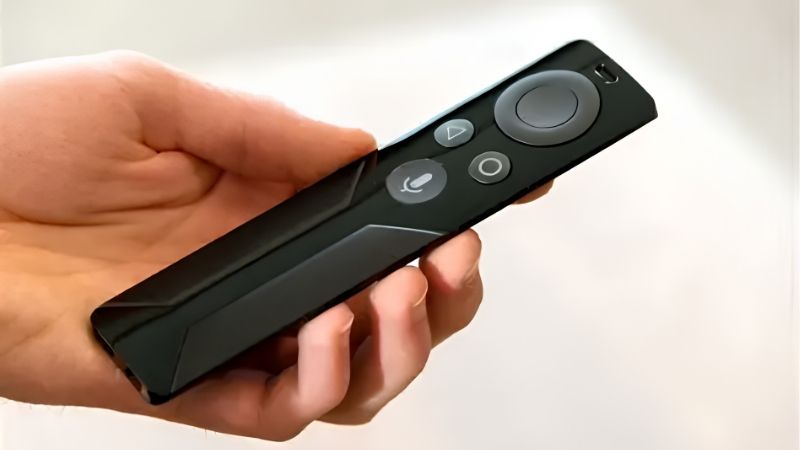
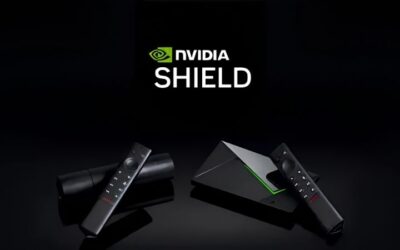
The remote’s distinctive Toblerone-style shape is easy to grip and hard to lose in a couch cushion. Its standout feature is motion-activated backlighting: pick it up in a dark room and the buttons illuminate automatically.
In practice, that backlighting is a genuine quality-of-life win for anyone who watches in the dark, a feature many premium remotes still lack. The build feels solid rather than cheap, matching the Shield’s premium reputation.
The triangular profile also has a practical side beyond looks. It sits naturally in the hand and is far easier to spot on a cluttered coffee table than the flat, slab-like remotes many streamers ship, which pairs nicely with the locator feature for anyone prone to misplacing things.
Voice Control and the Built-In Locator
A dedicated microphone enables voice search and Google Assistant, letting you find content, ask questions, or control smart-home devices by speaking. It is responsive and useful for skipping tedious on-screen typing.
The built-in remote locator is the clever party trick. If you misplace the remote, you can trigger it to beep from your phone or the Shield itself, then follow the sound. Anyone who has lost a remote between the sofa cushions will appreciate this.
These two features together, voice search and the locator, address the most common streaming-remote frustrations directly. They are the kind of touches you do not think about until you use a remote that lacks them, at which point going back feels like a real downgrade.
Compatibility and Batteries
The remote is designed for NVIDIA Shield TV devices, and it uses a replaceable coin-cell battery rather than a rechargeable pack, which means no charging cable but occasional battery swaps.
Practically, confirm which Shield model you own before buying a replacement, since compatibility matters. The replaceable battery is a mixed blessing: convenient in that you are never tethered to a charger, but it does mean keeping a spare coin cell on hand for when it runs low.
Setup, Pairing, and Fixing Common Problems
A remote is only as good as its reliability, and most owners set the Shield remote up in seconds. When problems do appear, they are usually easy to solve. Here is how to pair it and fix the issues people report most.
How to Pair the Shield Remote
Pairing is straightforward: with the Shield powered on, hold the remote close and press and hold the designated button until the device recognizes it. Fresh batteries make first-time pairing more reliable.
If you are setting up a replacement remote, the Shield’s on-screen instructions walk you through the process. Most users are up and running within a minute, with no app or account gymnastics required.
Fixing a Shield Remote That Is Not Working
When a remote stops responding, the usual culprit is the battery, so replace the coin cell first, as this resolves the majority of cases. If that fails, try re-pairing from scratch, which clears most connection glitches.
A quick restart of the Shield itself can also fix unresponsive behavior, and keeping the device software up to date helps prevent recurring issues. These simple steps solve the vast majority of remote problems without needing a replacement at all.
If none of these work, the issue may be the remote itself rather than the Shield, especially after a drop or spill. In that case, a replacement is the reliable fix, but it is always worth running through the battery, re-pair, and restart steps first, since they cost nothing and resolve most complaints owners report.
Battery Life and Everyday Reliability
Battery life from the coin cell is generally long, often many months of normal use, though heavy voice use can shorten it. When the remote starts behaving oddly or the range drops, a fresh battery is almost always the fix.
Day to day, most owners find the remote reliable once paired, with the backlighting and locator proving more useful than they expected. It is the kind of accessory you stop thinking about, which is exactly what you want from a remote.
That reliability is easy to underrate until you compare it with a flaky remote. Once paired and fitted with a good battery, the Shield remote tends to simply work session after session, letting you focus on what you are watching instead of fighting the controls.
Buyer Feedback, Pros and Cons, and Whether to Buy
To judge the Shield remote fairly, it helps to weigh owner feedback against the price. Drawing on the pattern of positive and critical reviews, here is the honest picture, including its clear pros and cons and who should buy it.
What Buyers Praise and Criticize
In the positive pattern, owners love the backlit buttons, the handy locator, and the responsive voice search, and replacement buyers are simply relieved to restore full control of their Shield. Many call it the best streaming remote they have used.
The critical pattern centers on price and the coin-cell battery. Some feel a replacement remote is expensive for what it is, and a few would prefer a rechargeable design over swapping batteries. Occasional reports of pairing hiccups also appear, though these are usually solved by the fixes above.
Pros and Cons of the NVIDIA Shield Remote
Here is the balanced summary:
| Pros | Cons |
|---|---|
| Motion-activated backlit buttons | Premium price for a remote |
| Voice control and built-in locator | Coin-cell battery, not rechargeable |
| Comfortable, easy-to-find design | Occasional pairing hiccups |
The balance sheet points to a genuinely good remote whose main drawbacks are cost and the battery type, neither of which undermines its core strengths.
Is It Worth Buying, and Alternatives
As a replacement for a lost or broken Shield remote, the official unit is the safest choice, restoring every feature including the locator and backlighting that third-party options often lack. For most owners, that full compatibility is worth the price.
If budget is the priority, some third-party remotes work with the Shield for less, but they typically drop features like the backlight or locator. For the complete experience, the official NVIDIA Shield remote remains the recommendation. If you need one, check the current price on Amazon to restore full control of your Shield.
Getting the Most from Your Shield Remote
Beyond the basics, the Shield remote has a few tricks that make daily use smoother. Learning them turns a good remote into a genuinely convenient one, and knowing when replacement beats repair saves you money. Here is how to squeeze the most from it.
Handy Shortcuts and Customization
You can customize certain buttons and lean on Google Assistant shortcuts to jump straight into apps or content by voice, cutting down on navigation. It is a small change that speeds up everyday use noticeably.
Exploring the Shield settings reveals options to tweak how the remote behaves, so it is worth a few minutes to tailor it to your habits. Once set, these shortcuts make the remote feel faster and more personal.
Controlling Your TV and Soundbar
The remote can control your TV’s power and volume through HDMI-CEC and infrared, meaning one remote often handles your whole setup. Setting this up removes the need to juggle multiple remotes for a movie night.
If volume or power control does not work at first, confirm HDMI-CEC is enabled on your TV, as manufacturers label it differently. Once configured, this single-remote convenience is one of the Shield remote’s most underrated strengths.
When a Replacement Makes Sense
If your remote is lost, physically damaged, or unresponsive after a battery swap and re-pair, a replacement is the sensible route to restore full function. The official unit brings back every feature, including the locator and backlight.
If the remote merely acts up occasionally, try the fixes first, since most issues are battery or pairing related. Reserve a purchase for genuine loss or damage, and buy the official remote to keep the complete experience intact.
It also helps to keep a spare coin-cell battery at home, since a dying battery mimics a broken remote and sends people shopping unnecessarily. A cheap battery in the drawer can save you the cost and wait of a replacement you did not actually need.
See More:
- Radeon drivers
- What is NVIDIA CUDA Toolkit
- 4080 Super vs 5060 Ti
- NVIDIA PhysX
- NVIDIA Game Ready Driver
Conclusion
The NVIDIA Shield remote is a thoughtfully designed accessory whose backlit buttons, voice control, and built-in locator genuinely improve the streaming experience, and its few drawbacks, price and a coin-cell battery, do little to dent its appeal. Most issues owners hit come down to a low battery or a quick re-pair, both easy fixes. As a replacement, the official remote restores every feature third-party options tend to miss. If you need to replace or upgrade your NVIDIA Shield remote, check today’s price to bring full, effortless control back to your setup.
Frequently Asked Questions
Which Shield devices does the current remote work with?
The redesigned remote introduced with the 2019 Shield TV works with the 2019 tube model, the 2019 Pro, and the 2017 and 2015 units, since pairing happens over Bluetooth rather than a proprietary link. Older 2015 and 2017 remotes also pair with newer boxes, so you can mix generations.
Does the remote control my TV volume and power?
Yes. It includes an infrared blaster alongside Bluetooth, so once you run the setup wizard and pick your television or receiver brand, volume, mute and power pass through to that device. If it fails, reposition the remote in line of sight and repeat the brand learning process.
What batteries does it use and how long do they last?
The 2019 remote runs on two CR2032 coin cells rather than a rechargeable pack, and typical use gives several months to a year. The motion-activated backlight is the biggest drain, so if you leave it somewhere it gets bumped constantly, expect noticeably shorter life.
My remote is lagging or unresponsive, how do I fix it?
Replace the batteries first, since low voltage causes intermittent Bluetooth dropouts long before the remote dies. Then unpair and re-pair by holding the back and home buttons together. Interference from 2.4GHz devices and USB 3.0 enclosures near the Shield is another common and easily missed cause.
Is the built-in remote finder worth anything in practice?
It is genuinely one of the better features. From the Shield app or by pressing the button on the device, the remote emits a tone so you can locate it under cushions. It only works while batteries have charge and the remote remains paired, so replace cells before they die completely.


Write Your Review
No reviews yet. Be the first to share your experience!