
DLSS 4 vs FSR 4 in late 2026 is really DLSS 4.5 vs FSR 4.1 and AMD’s Redstone suite, and the short answer is that NVIDIA still leads on image quality, especially in motion and at aggressive Performance presets, while AMD has closed most of the gap at Quality settings. ComputerBase’s blind tests in 2026 had readers prefer DLSS 4.5 in every game, yet reviewers such as XDA Developers found the two hard to tell apart during normal play. The bigger practical differences are support: DLSS works on every RTX card back to the 20 series, while FSR 4 needs a Radeon RX 9000 or, since June 2026, an RX 7000 card. Here is the full breakdown.
- Verdict at a glance
- What DLSS 4, DLSS 4.5, FSR 4 and Redstone actually are
- Feature comparison
- Image quality: what the blind tests and reviews found
- Performance cost
- Frame generation: DLSS MFG vs FSR frame generation
- Game support and adoption
- DLSS 4.5 in detail
- FSR 4.1 and Redstone in detail
- What about DLSS 5?
- How the choice affects which GPU to buy
- Recommended settings
- Common mistakes
- Products Mentioned in This Guide
- How we compared
- Sources
- Frequently Asked Questions
Quick answer: Our top pick in 2026 is The best image quality in motion — our #1 rated choice. See the full ranked comparison, alternatives and buying advice below.
Verdict at a glance
| If you want… | Pick | Why |
|---|---|---|
| The best image quality in motion | DLSS 4.5 | Won every game in ComputerBase’s February 2026 blind test; better temporal stability |
| Usable 4K Performance or Ultra Performance modes | DLSS 4.5 | TechSpot found DLSS 4.5 Performance can sometimes match FSR 4 Quality |
| A natural, less sharpened look at Quality settings | FSR 4.1 | Reviewers note FSR avoids over-sharpening and stays close to native |
| The most generated frames | DLSS 4.5 on RTX 50 | Dynamic Multi Frame Generation up to 6X |
| Support on older GPUs | DLSS | Super Resolution runs on all RTX cards from the 20 series up |
| Best value for frame rate per dollar | FSR 4 on an RX 9070 XT | Ties the RTX 5070 Ti in raster per Tom’s Hardware, often at a lower tier |
| Ray tracing denoising | DLSS Ray Reconstruction | Far wider game support than FSR Ray Regeneration |
What DLSS 4, DLSS 4.5, FSR 4 and Redstone actually are
Both brands now bundle several technologies under one name, which causes most of the confusion.
DLSS 4 arrived with the RTX 50 series in early 2025. It moved DLSS Super Resolution and Ray Reconstruction to a transformer AI model and added Multi Frame Generation, which on RTX 50 cards generates up to three extra frames per rendered frame (4X).
DLSS 4.5 was announced at CES 2026. It brings a second-generation transformer model for Super Resolution that NVIDIA says uses five times the compute of the original transformer and was trained on a larger dataset. It runs on all GeForce RTX GPUs. It also adds Dynamic Multi Frame Generation and a 6X mode, both exclusive to RTX 50, which generate up to five extra frames per rendered frame and adjust the multiplier on the fly.
FSR 4 launched with the Radeon RX 9070 series in 2025. It replaced AMD’s hand-tuned FSR 3.1 upscaler with a machine-learning model running on RDNA 4’s FP8 hardware.
FSR Redstone is AMD’s umbrella for its ML features, launched in December 2025: ML upscaling (FSR 4 and now 4.1), ML Frame Generation, Ray Regeneration for denoising ray-traced effects, and Radiance Caching. FSR 4.1 followed in March 2026 for RX 9000 cards with sharper output, and on June 22, 2026 AMD brought an INT8 version to RX 7000 cards through Adrenalin 26.6.2, according to Tom’s Hardware.
Feature comparison
| Feature | DLSS 4.5 | FSR 4.1 / Redstone |
|---|---|---|
| Upscaling model | 2nd-gen transformer (presets M and L), plus 1st-gen transformer preset K | ML model; FP8 on RX 9000, INT8 on RX 7000 |
| Upscaling GPU support | All GeForce RTX (20, 30, 40, 50 series) | RX 9000 and RX 7000 desktop; RX 6000 promised for 2027 |
| Frame generation | 2X on RTX 40; up to 4X MFG and up to 6X Dynamic MFG on RTX 50 | ML Frame Generation on RX 9000; FSR 3.1 frame generation on other GPUs |
| Ray tracing denoiser | Ray Reconstruction (transformer) | Ray Regeneration, RX 9000 only |
| Latency reduction | NVIDIA Reflex | AMD Anti-Lag 2 |
| Driver-level override | NVIDIA app DLSS Override for presets and frame generation | Adrenalin upgrade of FSR 3.1 games to FSR 4 where supported |
| Game support | Super Resolution override in 400+ games and apps; MFG in 250+ at CES 2026 | 415 games with at least one Redstone feature; ML frame generation in about 32 |
Image quality: what the blind tests and reviews found
ComputerBase blind tests
The most rigorous comparison this year came from German outlet ComputerBase, which ran a reader blind test across six games in February 2026, comparing DLSS 4.5, FSR 4 and native rendering with TAA. Tom’s Hardware reported that DLSS took 48.2 percent of all votes and won every game. Native TAA came second and FSR 4 third. In Cyberpunk 2077 the gap was much tighter. A follow-up blind test in May 2026 pitted DLSS 4.5 against the newer FSR 4.1, and DLSS won six of seven games, with many voters reporting that they could not see a difference.
TechSpot
TechSpot concluded that DLSS 4.5 generally produces a better image than FSR 4, to the point that DLSS 4.5 in Performance mode can sometimes match FSR 4 in Quality mode, though DLSS costs slightly more performance. In March, TechSpot found FSR 4.1 sharper than FSR 4.0 but still behind DLSS 4.5.
Wccftech
Wccftech’s game-by-game look called Cyberpunk 2077 roughly a tie overall, with DLSS ahead on disocclusion artifacts around foliage: noticeable with DLSS 4.5 only if you hunt for them, but visible in quick motion with FSR 4. In Hogwarts Legacy, DLSS was clearly ahead thanks to the sharper Preset M.
XDA Developers
XDA’s reviewer found FSR 4’s blur more noticeable in fast motion than DLSS 4.5’s, but said that during online play in Battlefield 6 and ARC Raiders the difference was very hard to spot. They also felt DLSS’s sharpening made ground textures look too crisp in one example, where FSR preserved the original look better.
The consensus
- DLSS 4.5 is ahead on temporal stability, fine detail in motion and disocclusion.
- The gap widens at Performance and Ultra Performance presets, which matters most at 4K.
- At Quality presets in normal play, many people cannot reliably tell them apart.
- FSR tends to look softer and closer to native; DLSS 4.5’s newer presets look sharper, which some players dislike.
Performance cost
Better models cost more compute. HotHardware found that RTX 50 cards handle DLSS 4.5’s new model as expected, but RTX 40 cards can lose up to 15 percent of their render frame rate moving from Preset K (DLSS 4) to Preset L (DLSS 4.5). HotHardware judged the trade generally worth it on RTX 40 but questionable on RTX 30 and older cards, which the new presets strain heavily.
NVIDIA’s own recommended setting in the NVIDIA app applies Preset M to Performance mode, Preset L to Ultra Performance, and Preset K to the other modes, which balances quality and cost. If you own an RTX 20 or 30 series card, staying on Preset K is often the better choice.
On the AMD side, the INT8 version of FSR 4.1 for RX 7000 cards exists because RDNA 3 lacks RDNA 4’s FP8 hardware. It brings ML upscaling to a much larger installed base, but the RX 7000 series does not get ML Frame Generation, Ray Regeneration or Radiance Caching, which still require RX 9000.
Frame generation: DLSS MFG vs FSR frame generation
This is where the two diverge most. On RTX 50 cards, DLSS 4.5 can generate up to five frames per rendered frame with the 6X mode, and Dynamic Multi Frame Generation picks the multiplier automatically based on what is on screen. NVIDIA positions 6X for 240Hz-plus displays with path tracing enabled. All features require GeForce Game Ready Driver 595.97 or newer.
AMD’s ML Frame Generation, part of Redstone, generates one frame per rendered frame on RX 9000 cards. According to AMD’s own list, the updated frame generation is available in about 32 games, far fewer than the 415 titles with any Redstone feature. Older FSR 3.1 frame generation still works on many GPUs, including NVIDIA and older Radeon cards.
The latency catch applies to both. Generated frames make motion look smoother but do not reduce input latency; your controls still respond at the base frame rate. A common recommendation is to reach a base frame rate around 60 fps before turning frame generation on, and to pair it with NVIDIA Reflex or AMD Anti-Lag 2. Higher multipliers help most on very high refresh-rate monitors and least in competitive shooters.
Game support and adoption
NVIDIA’s advantage here is breadth and age. DLSS has been in games since 2018, and the NVIDIA app’s DLSS Override can force the latest model into more than 400 games and apps without developer updates. At CES 2026 NVIDIA said over 250 games and apps supported DLSS 4 Multi Frame Generation.
AMD’s catalog has grown fast. Its December 2025 Redstone launch promised 200-plus upscaling games by year end, and by autumn 2026 AMD’s list showed 415 games with at least one Redstone feature, according to GameGPU’s summary of AMD’s update. Many of those are upscaling only. Ray Regeneration remains rare: RaytraceDB lists only Call of Duty: Black Ops 7 and Crimson Desert with official support as of September 2026.
More and more new AAA releases ship with both on day one. Gears of War: E-Day is a recent example that launched with DLSS 4.5 and FSR 4 support together.
DLSS 4.5 in detail
Reasons to pick: the best image quality in motion in 2026 testing; works on every RTX card; driver-level override upgrades older games; 6X Dynamic MFG on RTX 50; Ray Reconstruction in many path-traced games.
Reasons to skip: locked to NVIDIA hardware; Presets M and L cost noticeable performance on RTX 30 and older; some players find the new presets over-sharpened.
The catch: the most headline-grabbing features, Multi Frame Generation and the 6X mode, are RTX 50 only, so owners of older RTX cards get the upscaler improvements but not the frame multipliers.
FSR 4.1 and Redstone in detail
Reasons to pick: a huge leap over FSR 3.1; close to DLSS at Quality presets; natural, less sharpened image; now available on RX 7000 as well as RX 9000; Radeon cards often cost less for similar raster performance.
Reasons to skip: trails DLSS 4.5 in motion and at Performance presets; ML frame generation and Ray Regeneration in few games; RX 6000 owners wait until 2027.
The catch: RX 7000 owners get the ML upscaler only, not the rest of Redstone, so the full AMD feature set still requires an RX 9000 card.
What about DLSS 5?
NVIDIA announced DLSS 5 at GTC in March 2026, describing it as 3D-guided neural rendering: the game engine still renders geometry and scene structure, and an AI model then enhances lighting and material appearance based on each frame’s color and motion data. NVIDIA said it would launch in fall 2026 and requires an RTX 50 series card. Early reaction has been mixed, and NVIDIA added artist controls such as masking at SIGGRAPH 2026. DLSS 5 is a visual-fidelity feature rather than a frame-rate feature, so it does not replace DLSS 4.5 upscaling or frame generation.
How the choice affects which GPU to buy
Upscaling now shapes how a graphics card feels as much as raw speed. Tom’s Hardware’s GPU hierarchy, which measures native performance without upscaling, shows the RTX 5070 Ti and RX 9070 XT tied in 1440p raster, with the 5070 Ti about 19 percent ahead with ray tracing. Add DLSS 4.5’s quality edge at Performance presets and its broader frame generation, and the NVIDIA card pulls further ahead in path-traced games. If you mostly play rasterized games at Quality presets, FSR 4.1 is close enough that the Radeon’s typically lower pricing wins.
- 4K with path tracing: NVIDIA, because DLSS 4.5 Performance mode and Ray Reconstruction matter most here.
- 1440p competitive shooters: either. Turn frame generation off and use Quality upscaling or native.
- 1440p single-player on a budget: Radeon with FSR 4.1 is excellent value.
- Older RTX card owners: DLSS 4.5’s upscaler is a free upgrade; use Preset K on RTX 20 and 30 cards if performance drops.
- RX 7000 owners: update to Adrenalin 26.6.2 or newer to unlock FSR 4.1 upscaling.
Recommended settings
- 1080p: prefer native or DLAA/FSR Native AA if your GPU can manage. Upscaling from below 1080p shows artifacts on both.
- 1440p: Quality mode on either. With DLSS 4.5 on RTX 40 or 50, Balanced is also very clean.
- 4K: DLSS 4.5 Performance (Preset M) is the sweet spot for RTX cards; FSR 4.1 Quality or Balanced on Radeon.
- Frame generation: only once your base frame rate is near 60 fps; enable Reflex or Anti-Lag 2.
- Sharpening: if DLSS 4.5 looks too crisp, try Preset K or reduce in-game sharpening.
Common mistakes
- Judging by still screenshots. The biggest differences show up in motion, around foliage and disocclusion.
- Using frame generation to fix a low frame rate. Generated frames do not fix input lag at a 30 fps base.
- Leaving old DLSS presets in place. The NVIDIA app override can move older games to the newer model.
- Assuming FSR 4 works on any GPU. FSR 4 and 4.1 ML upscaling need RX 9000 or RX 7000; other GPUs fall back to FSR 3.1.
- Running Presets M or L on an RTX 20 or 30 card without checking frame rate. The newer model can cost more than it gains on older hardware.
Products Mentioned in This Guide
These are the specific graphics cards discussed above when weighing how DLSS 4.5 and FSR 4.1 affect which GPU to buy.
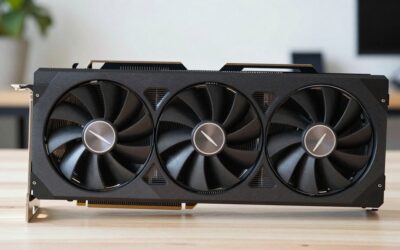
GIGABYTE GeForce RTX 5070 Ti Gaming OC 16G
As an Amazon Associate we earn from qualifying purchases at no extra cost to you.

Ties the RX 9070 XT in 1440p raster but leads with ray tracing, and gets the full DLSS 4.5 stack including Dynamic Multi Frame Generation and the 6X mode.
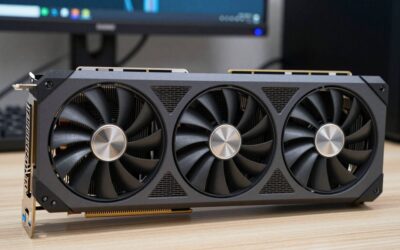
GIGABYTE Radeon RX 9070 XT Gaming OC 16G

Our value pick for frame rate per dollar, with FSR 4.1, ML Frame Generation and Ray Regeneration, and excellent for rasterized 1440p games at Quality presets.
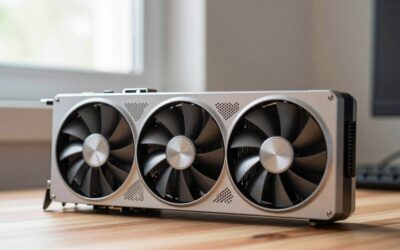
ASRock Radeon RX 7900 XTX Phantom Gaming 24GB OC

The RX 7000 card that gained FSR 4.1 ML upscaling with Adrenalin 26.6.2, though it does not get ML Frame Generation or Ray Regeneration.
How we compared
We compared these using manufacturer specifications and announcements, independent image-quality analyses and blind tests from the sources named above, and owner reports. We did not bench-test these technologies ourselves. Where outlets disagreed, we reported both views.
Sources
- NVIDIA GeForce News, CES 2026 announcements and DLSS 4.5 Dynamic Multi Frame Generation release
- NVIDIA Newsroom, DLSS 5 announcement
- HotHardware, DLSS 4.5 SDK and preset performance analysis
- ComputerBase, DLSS 4.5 vs FSR 4 and FSR 4.1 blind tests (as reported by Tom’s Hardware)
- Tom’s Hardware, blind test coverage, FSR 4.1 for RX 7000 and GPU Benchmarks Hierarchy 2026
- TechSpot, DLSS 4.5 vs FSR 4 and FSR 4.1 image quality analyses
- Wccftech, DLSS 4.5 vs FSR 4 Redstone upscaling comparison
- XDA Developers, DLSS 4.5 vs FSR Redstone comparison
- AMD GPUOpen, FSR SDK 2.3 announcement
- AMD, FSR technologies page and Redstone game list
- VideoCardz, FSR Redstone launch coverage
- GameGPU, FSR Redstone game count update
- RaytraceDB, games with Ray Regeneration
- TechPowerUp, SIGGRAPH 2026 DLSS 5 coverage
Frequently Asked Questions
Is DLSS 4.5 better than FSR 4?
Yes, on balance. Blind tests by ComputerBase and analyses by TechSpot found DLSS 4.5 ahead, mainly in motion and at Performance presets. At Quality settings the difference is small and many players cannot tell them apart.
Can I use FSR 4 on an NVIDIA card?
Not officially. FSR 4 and 4.1 ML upscaling run on Radeon RX 9000 and RX 7000 cards. NVIDIA and older Radeon cards can use FSR 3.1 in games that support it.
Does DLSS 4.5 work on RTX 20 and 30 series cards?
Yes, the Super Resolution model works on all RTX cards, but HotHardware found the new presets strain older cards, so Preset K may give better overall results there.
What is the difference between DLSS 4 and DLSS 4.5?
DLSS 4.5 adds a second-generation transformer upscaling model for all RTX cards, plus Dynamic Multi Frame Generation and a 6X mode for RTX 50 cards.
Does FSR 4.1 work on the RX 7900 XTX?
Yes. AMD added FSR 4.1 upscaling for RX 7000 desktop cards with Adrenalin 26.6.2 in June 2026, using an INT8 model. ML Frame Generation and Ray Regeneration still need RX 9000.
Is frame generation worth using?
For single-player games on high refresh-rate displays, yes, once you have a decent base frame rate. For competitive shooters, most players leave it off because it does not reduce input latency.
Which has more games, DLSS or FSR 4?
DLSS, especially counting NVIDIA’s driver-level override for 400-plus games. AMD’s Redstone list has grown to 415 games with at least one feature, but ML frame generation and Ray Regeneration are in far fewer titles.
Should upscaling decide which GPU I buy?
It should be a major factor. If you plan to play path-traced games at 4K, DLSS gives NVIDIA a real edge. For rasterized games at 1440p, FSR 4.1 is close enough that price should decide.
Ready to decide? Our #1 pick for 2026 is The best image quality in motion.
Live price & availability on Amazon.



Write Your Review
No reviews yet. Be the first to share your experience!