
A gaming PC without built-in wireless leaves two bad options: a long Ethernet cable across the room, or a weak connection from a cheap dongle that drops at the worst moment. A good WiFi adapter fixes that. It gives a desktop the same modern wireless as a laptop, with a stable link to the router, low latency for online matches, and enough bandwidth for downloads and streaming at the same time.
The five adapters below cover the two ways to add wireless to a desktop. PCIe cards slot inside the case and suit a PC that stays at one desk, while USB adapters plug in from the outside and suit a PC with no free slot or a player who moves the adapter between machines. Every pick here supports WiFi 6 or WiFi 6E, dual-band or tri-band operation, and current WPA3 security.
As an Amazon Associate, we earn from qualifying purchases.
Quick Answer
For most gaming PCs, buy the TP-Link Archer TX3000E: a PCIe WiFi 6 card with an Intel chipset, a magnetized antenna base, and Bluetooth for controllers and headsets. Choose the TP-Link Archer TXE75E for the 6 GHz band of WiFi 6E, or the ASUS AX3000 PCIe adapter. Pick the NETGEAR Nighthawk A8000 for WiFi 6E over USB, and the TP-Link Archer TX20U Plus for a budget USB adapter.
Table of Contents
- Quick Answer
- 1. TP-Link Archer TX3000E
- 2. TP-Link Archer TXE75E
- 3. ASUS AX3000 WiFi 6 PCIe Adapter
- 4. NETGEAR Nighthawk A8000
- 5. TP-Link Archer TX20U Plus
- How to Choose a WiFi Adapter for a Gaming PC
- Who Should Skip a WiFi Adapter
- Frequently Asked Questions
- Final Verdict
- Product and ASIN Reference
1. TP-Link Archer TX3000E
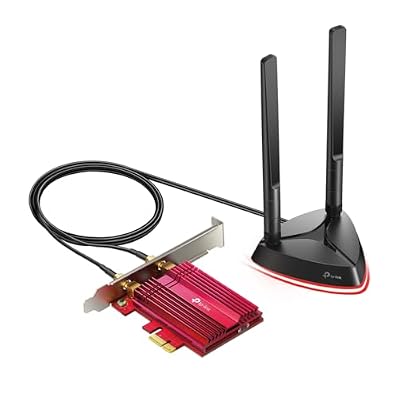
Best overall pick for a gaming PC with a free PCIe slot
The Archer TX3000E leads this guide because it covers the essentials of desktop wireless in one card. It is a PCIe WiFi 6 adapter built on an Intel WiFi 6 chipset, with dual-band speeds up to 2402 Mbps on 5 GHz and 574 Mbps on 2.4 GHz, plus OFDMA and MU-MIMO. The two high-gain antennas sit on a magnetized base with a cable, so the antennas can sit on top of the desk for a clearer signal instead of hiding behind the case.
Bluetooth is built in, so controllers, headsets, and keyboards pair directly with the PC without a separate dongle. The card supports WPA3 security, works with Windows 11 and Windows 10 in 64-bit only, and includes a low-profile bracket for smaller cases.
Specs
- Brand: TP-Link
- Model: Archer TX3000E
- Standard: WiFi 6, dual band
- Speed: Up to 2402 Mbps on 5 GHz, 574 Mbps on 2.4 GHz
- Interface: PCI Express x1
- Chipset: Intel WiFi 6
- Antennas: Two high-gain antennas on a magnetized base
- Bluetooth: Built in, version 5.3
- Security: WPA3
- System: Windows 11 and Windows 10, 64-bit only
- Tier: Mid-range
2. TP-Link Archer TXE75E

Best WiFi 6E pick for a 6 GHz router
The Archer TXE75E is the WiFi 6E card in this guide, and the 6 GHz band is the reason it earns the slot. WiFi 6E adds a third band that fewer neighboring networks use, so a gaming PC gets a cleaner channel with less interference. The card is tri-band with speeds up to 2402 Mbps on 6 GHz, 2402 Mbps on 5 GHz, and 574 Mbps on 2.4 GHz, built on an Intel AX210 chipset.
Like the TX3000E, it uses a magnetized antenna base with two high-gain antennas and a cable, so the antennas can sit clear of the case, and Bluetooth 5.3 is built in for controllers and headsets. It needs a WiFi 6E router to use the 6 GHz band, and it runs on Windows 11 and Windows 10 in 64-bit only.
Specs
- Brand: TP-Link
- Model: Archer TXE75E
- Standard: WiFi 6E, tri-band
- Speed: Up to 2402 Mbps on 6 GHz, 2402 Mbps on 5 GHz, 574 Mbps on 2.4 GHz
- Interface: PCI Express x1
- Chipset: Intel AX210
- Antennas: Two high-gain antennas on a magnetized base
- Bluetooth: Built in, version 5.3
- Security: WPA3
- System: Windows 11 and Windows 10, 64-bit only
- Tier: Premium
3. ASUS AX3000 WiFi 6 PCIe Adapter

Best second PCIe pick for a WiFi 6 setup
The ASUS AX3000 PCIe adapter is the second PCIe card in this guide, and it matches the TX3000E on the numbers that matter. It is a dual-band WiFi 6 card with speeds up to 2402 Mbps on 5 GHz and 574 Mbps on 2.4 GHz, using a 160 MHz channel width, OFDMA, and MU-MIMO. Two external antennas connect to the card, and Bluetooth 5.0 is built in.
The card fits a standard PCI Express x1 slot and supports WPA3 security. It runs on Windows 11 and Windows 10 in 64-bit only.
Specs
- Brand: ASUS
- Standard: WiFi 6, dual band
- Speed: Up to 2402 Mbps on 5 GHz, 574 Mbps on 2.4 GHz
- Interface: PCI Express x1
- Antennas: Two external antennas
- Bluetooth: Built in, version 5.0
- Security: WPA3
- Features: 160 MHz channel width, OFDMA, MU-MIMO
- System: Windows 11 and Windows 10, 64-bit only
- Tier: Mid-range
4. NETGEAR Nighthawk A8000

Best USB pick for WiFi 6E without opening the case
The Nighthawk A8000 is the WiFi 6E USB adapter in this guide, and it is the pick for a PC with no free PCIe slot. It is a tri-band USB 3.0 adapter with speeds up to 3 Gbps across the 6 GHz, 5 GHz, and 2.4 GHz bands. The adapter plugs into a USB 3.0 port, so it works on a desktop or a laptop and can move between machines without opening a case. The A8000 is a compact stick with a foldable antenna design that adjusts for signal direction. It is a Windows-only adapter, so it suits a gaming PC rather than a console or a Mac.
Specs
- Brand: NETGEAR
- Model: Nighthawk A8000
- Standard: WiFi 6E, tri-band
- Speed: Up to 3 Gbps
- Interface: USB 3.0
- Antennas: Adjustable, foldable design
- Compatibility: WiFi 6 and WiFi 6E routers and mesh systems
- System: Windows PC
- Tier: Premium
5. TP-Link Archer TX20U Plus

Best budget pick for a USB adapter with strong antennas
The Archer TX20U Plus is the budget pick in this guide, and it earns the slot on antenna design rather than raw speed. It is a dual-band WiFi 6 USB adapter with speeds up to 1201 Mbps on 5 GHz and 574 Mbps on 2.4 GHz, and two high-gain 5 dBi antennas that adjust to aim at the router. A 1-meter USB 3.0 cable lets it sit on the desk away from the interference behind the case.
The TX20U Plus supports MU-MIMO and OFDMA for steadier connections, WPA3 security, and beamforming to focus the signal toward the router. It needs no PCIe slot and installs with an auto driver on supported Windows systems.
Specs
- Brand: TP-Link
- Model: Archer TX20U Plus
- Standard: WiFi 6, dual band
- Speed: Up to 1201 Mbps on 5 GHz, 574 Mbps on 2.4 GHz
- Interface: USB 3.0, with 1-meter cable
- Antennas: Two high-gain 5 dBi adjustable antennas
- Security: WPA3
- Features: MU-MIMO, OFDMA, beamforming
- System: Windows 11 and Windows 10
- Tier: Budget
How to Choose a WiFi Adapter for a Gaming PC
Decide between PCIe and USB first
A PCIe card suits a desktop that stays at one desk, with stronger antennas on a base. A USB adapter suits a PC with no free slot, a small case, or a player who moves the adapter between machines. PCIe cards also tend to run cooler under sustained load, while USB adapters are easier to install and remove.
Match the adapter to the router
A WiFi 6E adapter only uses its 6 GHz band with a WiFi 6E router; on a WiFi 6 router it falls back to 5 GHz and 2.4 GHz. Check the router standard before paying for a 6E card. A WiFi 6 adapter needs a WiFi 6 router to reach its top speeds, though it still works on older routers at lower speeds.
Look at the antennas, not just the speed number
The headline speed is a maximum under ideal conditions. In a real room, antenna placement matters more: a magnetized base or a cable lets the antennas sit on the desk with a clear path to the router, while antennas stuck behind a metal case lose signal.
Check the operating system
Every adapter here runs on Windows, and most of the PCIe cards need Windows 11 or Windows 10 in 64-bit only. None of these five is a pick for a Mac or a console. Check the system requirements before ordering, and check that the PC has a free PCIe x1 slot for a card or a free USB 3.0 port for a USB adapter.
A note on WiFi adapter recalls
No CPSC recall covers WiFi adapters as a class, and none covers any pick here.
Who Should Skip a WiFi Adapter
Skip a WiFi adapter if the PC already has built-in WiFi 6 or WiFi 6E, since a second adapter adds nothing. Skip the PCIe cards if the case has no free PCIe x1 slot, and pick a USB adapter instead. Skip the WiFi 6E picks if the router is WiFi 5 or older, because the 6 GHz band sits unused. Skip every adapter here if a wired Ethernet cable already reaches the desk, since a cable still gives the lowest latency.
Frequently Asked Questions
Are PCIe WiFi adapters better than USB adapters for gaming?
For a desktop that stays at one desk, yes, usually. A PCIe card sits inside the case with stronger antennas and a steadier connection under sustained load. A USB adapter is easier to install and move between machines, but a PCIe card remains the first choice for a fixed gaming PC.
Do I need a WiFi 6E adapter for a WiFi 6 router?
No. A WiFi 6E adapter works on a WiFi 6 router, but it falls back to the 5 GHz and 2.4 GHz bands and the 6 GHz band sits unused. Buy one only when the router already supports WiFi 6E, or when a router upgrade is planned soon.
Can a WiFi adapter replace Ethernet for competitive gaming?
It can come close on a clean 5 GHz or 6 GHz channel with a strong signal, but a cable still gives the lowest and most consistent latency. A WiFi adapter is the right pick when a cable cannot reach the desk; when one can, use the cable.
Why does my gaming PC need a WiFi adapter at all?
Many desktop motherboards ship without wireless, especially budget and older boards. A WiFi adapter adds wireless to a PC that only has Ethernet, so the PC can connect where no cable reaches and pair Bluetooth controllers and headsets.
Final Verdict
For most gaming PCs, buy the TP-Link Archer TX3000E: a PCIe WiFi 6 card with an Intel chipset, a magnetized antenna base, and built-in Bluetooth. Choose the TP-Link Archer TXE75E when the router supports WiFi 6E, or the ASUS AX3000 PCIe adapter as a second PCIe option. Pick the NETGEAR Nighthawk A8000 for WiFi 6E over USB, and the TP-Link Archer TX20U Plus for a budget USB adapter with high-gain antennas.



Write Your Review
No reviews yet. Be the first to share your experience!