
The Ryzen 7 9700X is an eight-core Zen 5 gaming processor with a boost clock up to 5.5 GHz per AMD, and it is fast enough that the graphics card, not the CPU, sets the frame rate in almost every modern game at 1440p and 4K. Pairing it well is mostly about matching the GPU tier to your monitor, then checking the cooler size, power connector and memory capacity that separate one partner card from another.
The five picks below are built around the GeForce RTX 5070, the card this processor pairs with most naturally, plus one RTX 5070 Ti step up. Every pick is pinned to one exact listing, because the same model name is sold in several cooler and clock variants. The GIGABYTE Gaming OC is the balanced pick, the ASUS TUF is the heavy-duty cooler, the ZOTAC Solid OC is the slim two-slot option, the PNY is the budget route, and the MSI Ventus 3X OC is the 16GB step up.
As an Amazon Associate, we earn from qualifying purchases.
Quick Answer
The RTX 5070 is the natural partner for the Ryzen 7 9700X at 1440p: the GIGABYTE Gaming OC is the balanced pick, the ASUS TUF is the premium cooler, the ZOTAC Solid OC the compact two-slot option, the PNY OC the budget route, and the MSI RTX 5070 Ti Ventus 3X OC the step up for 4K.
How to Choose a Graphics Card for the Ryzen 7 9700X
Match the card to the monitor, not the CPU
With eight Zen 5 cores feeding it, a 9700X keeps an RTX 5070 or 5070 Ti busy at 1440p and 4K in effectively every current title, so buy for the display. A 1440p high-refresh monitor is the sweet spot for the four RTX 5070 cards here. A 4K monitor, or a buyer who wants maximum texture settings with ray tracing, is the case for the 16GB RTX 5070 Ti. At 1080p the processor becomes the limit in lightly threaded esports titles first, which means the pairing is balanced rather than wasted.
Memory capacity is the real dividing line
The RTX 5070 carries 12GB of GDDR7 on a 192-bit bus; the RTX 5070 Ti carries 16GB on a 256-bit bus, with more cores as well. For 1440p play in current releases, 12GB with DLSS upscaling is a workable capacity. The extra memory on the Ti is longevity insurance: texture-heavy games at 4K, heavy mod lists and local AI workloads all consume frame buffer, and capacity cannot be added later.
Factory clocks differ less than coolers
Published boost clocks here run from 2512 MHz on the reference-clocked PNY to 2640 MHz in the ASUS TUF’s OC mode — a spread worth a few frames at most. What you live with daily is the cooler: the TUF is a 3.125-slot card 329 mm long, the ZOTAC Solid OC a true two-slot card 304.4 mm long, and the rest sit between. Measure your case clearance before choosing on clock speed.
Power delivery and the 16-pin connector
Every card here uses a single 16-pin 12V-2×6 connector and ships with an adapter for older power supplies; a native cable from an ATX 3.1 supply is the cleaner install. Recommended supply capacity runs from 650W for most RTX 5070 models to 750W for the ASUS TUF and the RTX 5070 Ti. Seat the connector fully until it clicks. One caution from the recall record: CableMod’s 12VHPWR angled adapters, versions 1.0 and 1.1, were recalled in February 2024 for overheating, and the recalled adapters should not be used.
The 5 Best Graphics Cards for the Ryzen 7 9700X
1. GIGABYTE GeForce RTX 5070 Gaming OC 12G

The Gaming OC is the balanced pick: the highest published boost of the standard-clock RTX 5070 group at 2625 MHz per GIGABYTE, on a full triple-fan WINDFORCE cooler with a Dual BIOS switch for performance or silent fan profiles. GIGABYTE adds a reinforced structure and a support holder in the box, and the warranty runs four years with online registration per GIGABYTE, the longest cover in this group.
Specs
– GPU: NVIDIA GeForce RTX 5070, 6,144 CUDA cores
– Boost clock: 2625 MHz per GIGABYTE
– Memory: 12GB GDDR7, 192-bit, 28 Gbps
– Cooling: WINDFORCE triple-fan with Dual BIOS per GIGABYTE
– Outputs: 3 x DisplayPort 2.1b, 1 x HDMI 2.1b
– Power: 1 x 16-pin connector
– Warranty: 4 years with online registration per GIGABYTE
– Tier: Mid-range
Choose it for the strongest all-round spec in the RTX 5070 tier. Skip it if your case cannot take a full-length triple-fan card.
2. ASUS TUF Gaming GeForce RTX 5070 OC Edition

The TUF is the durability pick. ASUS rates it at 2610 MHz boost in default mode and 2640 MHz in OC mode, cooled by three axial-tech fans on a 3.125-slot shroud, with military-grade components and a protective PCB coating per ASUS. It is also the connectivity pick: two HDMI 2.1b ports alongside three DisplayPort 2.1b outputs suit a monitor plus TV setup. The trade is size and appetite: ASUS recommends a 750W power supply, and compact cases need not apply.
Specs
– GPU: NVIDIA GeForce RTX 5070, 6,144 CUDA cores
– Boost clock: 2610 MHz default, 2640 MHz OC mode per ASUS
– Memory: 12GB GDDR7, 192-bit, 28 Gbps
– Size: 329 x 140 x 62.5 mm, 3.125-slot per ASUS
– Outputs: 2 x HDMI 2.1b, 3 x DisplayPort 2.1b
– Power: 1 x 16-pin connector, 750W recommended PSU per ASUS
– Tier: Premium
Choose it for the toughest cooler and the extra HDMI port. Skip it if your case has under 330 mm of GPU clearance.
3. ZOTAC GAMING GeForce RTX 5070 Solid OC

The Solid OC is the fit-anywhere pick. At 304.4 x 115.8 x 41.6 mm it is a genuine two-slot card, so it leaves the neighbouring slot free and fits smaller cases that reject 3-slot designs, while still running a triple-fan IceStorm 2.0 cooler with fan stop at idle and a metal backplate. The factory boost is 2542 MHz per ZOTAC, a small step above reference, and ZOTAC includes a GPU support stand in the box. SPECTRA RGB lighting is the one flourish on an otherwise plain, compact card.
Specs
– GPU: NVIDIA GeForce RTX 5070, 6,144 CUDA cores
– Boost clock: 2542 MHz per ZOTAC
– Memory: 12GB GDDR7, 192-bit, 28 Gbps
– Size: 304.4 x 115.8 x 41.6 mm, 2-slot per ZOTAC
– Cooling: IceStorm 2.0, three 90 mm BladeLink fans, fan stop
– Power: 250W, 1 x 12V-2×6 connector, 650W recommended PSU per ZOTAC
– Tier: Mid-range
Choose it for a two-slot build that still wants triple-fan cooling. Skip it if you want the highest factory clock in this tier.
4. PNY GeForce RTX 5070 OC Triple-Fan

The PNY is the budget route to the same GPU. It runs the reference 2512 MHz boost clock per PNY behind a plain triple-fan, two-slot cooler with no lighting, and that restraint is the point: the silicon, the 12GB of GDDR7 and the DLSS 4 feature set are identical to the pricier cards, and the savings come out of the shroud rather than the performance. PNY also sells an ARGB version under a separate listing; this pick is the standard model, so check the listing title if lighting matters.
Specs
– GPU: NVIDIA GeForce RTX 5070, 6,144 CUDA cores
– Boost clock: 2512 MHz per PNY
– Memory: 12GB GDDR7, 192-bit, 28 Gbps
– Cooling: Triple-fan, 2-slot per PNY
– Outputs: 3 x DisplayPort 2.1b, 1 x HDMI 2.1b
– Power: 1 x 16-pin connector, 650W recommended PSU
– Tier: Budget
Choose it to put the budget into the GPU itself rather than the cooler. Skip it if you want a factory overclock or case lighting.
5. MSI GeForce RTX 5070 Ti 16G Ventus 3X OC
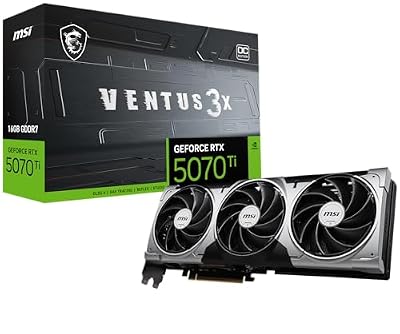
The Ventus 3X OC is the step up for buyers already eyeing a 4K monitor. The RTX 5070 Ti brings 8,960 CUDA cores and 16GB of GDDR7 on a 256-bit bus, and MSI clocks it at 2482 MHz boost, or 2497 MHz in its Extreme Performance profile, behind a triple-fan TORX Fan 5.0 cooler with a metal backplate, in deliberately plain Ventus styling with no lighting. The card draws 300W per MSI and calls for a 750W supply, so confirm your power supply before treating it as a drop-in upgrade from the 5070 tier.
Specs
– GPU: NVIDIA GeForce RTX 5070 Ti, 8,960 CUDA cores
– Boost clock: 2482 MHz, 2497 MHz Extreme Performance per MSI
– Memory: 16GB GDDR7, 256-bit, 28 Gbps
– Cooling: Triple-fan TORX Fan 5.0, metal backplate per MSI
– Outputs: 3 x DisplayPort 2.1b, 1 x HDMI 2.1b
– Power: 300W, 1 x 16-pin connector, 750W recommended PSU per MSI
– Tier: Premium
Choose it for 4K headroom and the longer useful life of 16GB. Skip it if you game at 1440p and would rather keep the step-up money for a monitor.
Who Should Skip These Cards
Skip this tier if you game at 1080p on a standard-refresh monitor, where a cheaper card already saturates the display. Skip the larger coolers if your case is a compact build with limited length or slot clearance; only the ZOTAC here is a true two-slot card, and even it is over 300 mm long. Skip the RTX 5070 if you already own an RTX 4070 Super, which sits close enough that the move reads as a side-grade. And skip every pick if your power supply is an older unit under 650W with no headroom for a 250W to 300W card.
Frequently Asked Questions
Will the Ryzen 7 9700X bottleneck an RTX 5070 or 5070 Ti?
At 1440p and 4K, no: the graphics card reaches its limit first in effectively every current game. At 1080p with low settings in esports titles the processor can set the ceiling instead, but that reflects the monitor and settings, not a pairing problem.
Is 12GB of VRAM enough for 1440p gaming?
For current releases at 1440p, yes, particularly with DLSS upscaling reducing the render load. The honest pressure points are 4K texture settings, heavy mod lists and content creation workloads. If those describe your use, the 16GB RTX 5070 Ti in this guide is the safer long-term buy.
What power supply do these five cards need?
A quality 650W unit covers the PNY, ZOTAC and GIGABYTE RTX 5070 models. ASUS rates the TUF at 750W and MSI rates the 5070 Ti Ventus at 750W with a 300W draw. All five use one 16-pin connector; push it in until it clicks, and do not use the recalled CableMod angled adapters.
Does the factory overclock difference actually matter?
Barely. The spread from 2512 MHz to 2640 MHz is worth a small single-digit frame difference in GPU-bound games. Cooler size, fan noise under load, warranty length and whether the card physically fits your case will matter more over the years you own it.
Final Verdict
Pair the 9700X with the card your monitor demands. Most buyers should take the GIGABYTE Gaming OC for its clock, cooler and four-year warranty. Choose the ASUS TUF for the toughest build and dual HDMI, the ZOTAC Solid OC for a two-slot case, the PNY to spend the least on the same GPU, and the MSI RTX 5070 Ti Ventus 3X OC when 4K or a long upgrade cycle justifies the step up. Confirm the exact model name on the listing before ordering, since every one of these GPUs is also sold in near-identical variants.






Write Your Review
No reviews yet. Be the first to share your experience!