
A stream deck is a small panel of programmable keys beside the keyboard that turns multi-step actions into single presses. Mute the microphone, switch a scene in OBS Studio, play a sound clip, or launch a game, all without alt-tabbing out of a match or hunting through menus mid-stream. For a gaming setup built around an NVIDIA card, the deck is the control surface for the broadcast side of the desk: the GPU renders the game, and the deck runs everything around it.
The five decks below cover the range that matters: a compact six-key starter, an eight-key touch-point model, the fifteen-key standard, a dial-equipped console, and a thirty-two-key panel for setups that run many scenes. Each key carries a small screen showing what it does, and all five work with the streaming apps a gaming desk already runs. Key count is the first decision, because a deck that is too small forces constant page switching, while one that is too large eats desk space.
As an Amazon Associate, we earn from qualifying purchases.
Quick Answer
For most gaming setups, buy the Elgato Stream Deck MK.2: fifteen customizable LCD keys, a detachable cable, and swappable faceplates. Choose the Mini for the smallest desk, the Neo for eight keys plus touch points, the Plus for dials and a touch strip, and the XL for thirty-two keys.
Table of Contents
- Quick Answer
- 1. Elgato Stream Deck Mini
- 2. Elgato Stream Deck Neo
- 3. Elgato Stream Deck MK.2
- 4. Elgato Stream Deck Plus
- 5. Elgato Stream Deck XL
- How to Choose a Stream Deck for Gaming
- Who Should Skip a Stream Deck
- Frequently Asked Questions
- Final Verdict
- Product and ASIN Reference
1. Elgato Stream Deck Mini

Best budget pick for a small desk
The Stream Deck Mini is the smallest deck in this guide, and that small size is its selling point. Six customizable LCD keys sit in a compact body that fits beside a keyboard on a crowded desk, or in front of a monitor where a larger panel would block the view. Each key shows its own icon, folders let six physical keys hold far more than six actions, and drag-and-drop setup keeps the learning curve short.
Six keys cover the essentials for a simple stream: mute, scene switching, a sound clip, and a couple of app launches. The trade is growth: a setup that adds scenes, sources, and lighting will outgrow six keys and live inside folders, which costs a second tap for anything buried a page deep.
Specs
- Brand: Elgato
- Keys: 6 customizable LCD keys
- Folders: Multi-action pages for extra actions
- Setup: Drag-and-drop, multi-action sequencing
- Connection: USB
- Compatibility: Mac and PC
- Tier: Budget
2. Elgato Stream Deck Neo
Best compact pick with touch controls
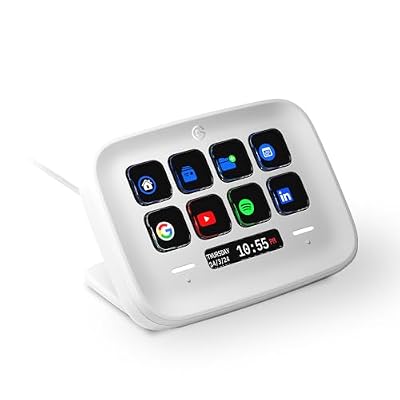
The Stream Deck Neo adds two ideas the Mini lacks: eight customizable keys instead of six, and two touch points that act as extra controls without taking up key space. The touch points sit above the key grid, so the Neo handles a few more jobs than its size suggests. It suits desks where the deck does double duty, running stream controls during a broadcast and app shortcuts during work or study.
The Neo suits a desk short on space but not short on jobs: eight keys plus two touch points cover mute, scene switching, app launching, and workflow shortcuts. The trade is the middle ground it occupies: it has no dials for volume, and a heavy multi-scene stream will still want the fifteen or thirty-two key panels below.
Specs
- Brand: Elgato
- Keys: 8 customizable LCD keys
- Extra controls: 2 touch points
- Setup: Drag-and-drop
- Connection: USB
- Compatibility: Mac and PC
- Tier: Budget
3. Elgato Stream Deck MK.2

Best overall pick for most gaming setups
The Stream Deck MK.2 is the standard deck, and it leads this guide because fifteen keys hit the sweet spot for a gaming stream. Fifteen customizable LCD keys hold the full working set for most broadcasts: scene switching, microphone mute, chat controls, sound clips, lighting, and app launches, with room left for folders. The stand is removable and adjustable, and the faceplate swaps out, so the deck can match the desk.
The MK.2 earns the lead on flexibility as much as on key count. A detachable USB-C cable can be replaced or routed cleanly, and the plugin library covers OBS Studio, Twitch, YouTube, Discord, Spotify, and smart lighting. The trade is desk space: fifteen keys need a wider footprint than the Mini or the Neo, and there are no dials, so volume still runs through keys or the streaming app.
Specs
- Brand: Elgato
- Keys: 15 customizable LCD keys
- Stand: Removable, adjustable, magnetic
- Faceplate: Swappable
- Connection: Detachable USB-C
- Software: Stream Deck software, plugin library
- Compatibility: Mac and PC
- Tier: Mid-range
4. Elgato Stream Deck Plus

Best premium pick for audio control
The Stream Deck Plus is the only deck here with dials, and the dials change how the deck feels in use. Four rotary dials sit below eight LCD keys, and a touch strip runs across the front, so volume, microphone level, and lighting brightness become turns and swipes instead of repeated key presses. The dials also act as buttons when pressed, and the Plus doubles as an audio mixer through Wave Link software, balancing game audio, voice, music, and chat on the deck itself.
The Plus is the pick for a setup where audio is half the job: a streamer who rides microphone and game volume live will use the dials constantly, and the touch strip adds page navigation without spending a key. The trade is key count: eight keys is fewer than the MK.2, so a scene-heavy stream leans on folders more, and the Plus takes a wider footprint because the dials need their own row.
Specs
- Brand: Elgato
- Keys: 8 customizable LCD keys
- Dials: 4 rotary dials, pressable
- Touch strip: Customizable, page navigation
- Audio: Wave Link mixing support
- Connection: USB-C
- Software: Stream Deck software, plugin library
- Compatibility: Mac and PC
- Tier: Premium
5. Elgato Stream Deck XL

Best large pick for multi-scene streams
The Stream Deck XL is the biggest deck in this guide, with thirty-two customizable LCD keys in a four-by-eight grid. Thirty-two keys hold an entire broadcast on one page: every scene, every source toggle, every sound clip, and every chat command, all visible at once with no folder diving. The magnetic stand holds the panel at a readable angle. For a dual-PC stream or a broadcast with many scenes, the XL is the only deck here that fits the whole control surface on a single page.
The trade is size and simplicity. The XL needs a clear stretch of desk beside the keyboard, and a streamer who only mutes and switches scenes will leave most of its keys empty. It has no dials, so audio still runs through keys or the streaming app.
Specs
- Brand: Elgato
- Keys: 32 customizable LCD keys
- Layout: Four-by-eight grid
- Stand: Detachable, magnetic
- Connection: Detachable USB
- Software: Stream Deck software, plugin library
- Compatibility: Mac and PC
- Tier: Premium
How to Choose a Stream Deck for Gaming
Count the actions before counting the keys
List the actions the deck must run on one page: scene switches, microphone mute, camera toggle, sound clips, chat commands, and app launches. Six keys suit a simple stream, eight keys plus touch controls suit a mixed desk, fifteen keys suit a regular broadcast, and thirty-two keys suit a multi-scene setup. Folders multiply any deck, but a buried action costs a second tap, so the keys used every minute belong on the top page.
Decide whether dials earn their row
Only the Stream Deck Plus has dials, and dials are the deciding feature for audio-heavy streams: turning a dial to ride microphone or game volume is faster and finer than tapping a key repeatedly, and the touch strip adds page navigation without spending a key. If audio levels rarely change mid-stream, the fifteen-key MK.2 gives more keys for the same desk space.
Measure the desk before choosing the panel
A deck sits beside the keyboard, in front of the monitor, or between the keyboard and a microphone arm, and each spot has a different width budget. The Mini fits almost anywhere, the Neo and the MK.2 need a standard stretch of desk, and the XL needs the widest clear space. A detachable cable can be swapped for a longer run or routed behind the desk, and a deck tilted toward the user reads better than one lying flat.
Check the software and the apps it must control
Every deck here runs the same Stream Deck software and plugin library, so the difference is the apps it must drive. Confirm the streaming app, chat app, music app, and lighting system each have a plugin before buying, and check the platform, because some advanced features are Windows-only. All five work with OBS Studio, Streamlabs, Twitch, YouTube, and Discord.
A note on stream deck recalls
No CPSC recall covers stream decks or macro keypads as a class, and none covers any pick here. A stream deck has no battery and no heating element, and it draws power over USB, so the recall classes that affect heated gear, batteries, and mains-powered appliances do not apply here.
Who Should Skip a Stream Deck
Skip a stream deck if the stream is simple enough for keyboard shortcuts: a solo streamer who only mutes and switches scenes may never use more than a few hotkeys. Skip the XL if the desk is narrow, because a panel that blocks the monitor is worse than a smaller deck that fits. Skip the Plus if audio levels rarely change mid-stream, because the dials add width without adding value. Skip any deck if the streaming app has no plugin support for the actions needed.
Frequently Asked Questions
How many keys does a stream deck need for gaming?
Six keys cover a simple stream with mute, scene switching, and a couple of clips. Fifteen keys cover a regular broadcast with scenes, sources, chat, and lighting on one page. Thirty-two keys suit a multi-scene setup where every control must stay visible.
Do stream decks work with OBS Studio?
Yes, every deck here works with OBS Studio through the Stream Deck software and its plugin library, which also covers Streamlabs, Twitch, YouTube, Discord, and Spotify.
Are dials worth it on a stream deck?
Dials are worth it when audio levels change live during a stream, because turning a dial is faster and finer than tapping a key repeatedly. The Stream Deck Plus is the only pick here with dials, and it also adds a touch strip and audio mixing support.
Can one stream deck control lights and apps as well as the stream?
Yes, the plugin library covers smart lighting, music apps, and everyday software alongside streaming apps, so one deck can run scene switches, lighting changes, and app launches together.
Final Verdict
For most gaming setups, buy the Elgato Stream Deck MK.2: fifteen customizable LCD keys, a detachable cable, and swappable faceplates. Choose the Mini for the smallest desk, the Neo for eight keys plus touch points, the Plus for dials and a touch strip, and the XL for thirty-two keys on one page.




Write Your Review
No reviews yet. Be the first to share your experience!