
Grand Theft Auto VI launched on November 19, 2026, for PlayStation 5 and Xbox Series X|S, published by Rockstar Games, and no PC version has been announced. It is the kind of release that fills hard drives with saved clips: long sessions and moments players want to keep or stream. Because the game lives on consoles for now, recording has to happen outside the box, and that job falls to a capture card.
A capture card sits between the console and the TV, passing the picture through to the screen while sending a copy to a PC for recording or streaming. For long sessions, two numbers matter more than everything else: the passthrough ceiling, which decides whether the picture on your TV stays exactly as the console sends it, and the capture ceiling, which decides the quality of the footage you keep. The five cards below span that trade, from HDMI 2.1 models that pass 4K at high refresh rates to a PC-free recorder.
As an Amazon Associate, we earn from qualifying purchases.
Quick Answer
For most players recording GTA VI from a PlayStation 5 or Xbox Series X|S, the Elgato Game Capture 4K S is the balanced pick, with 4K60 capture and passthrough over one USB cable. Choose the Elgato 4K X or the AVerMedia Live Gamer Ultra 2.1 for HDMI 2.1 high-refresh TVs, and the AVerMedia Live Gamer Portable 2 Plus to record long sessions with no PC running.
How to Choose
Passthrough and capture are different numbers
The passthrough figure is what your TV receives while you play; the capture figure is what the PC records, and they rarely match. A card can pass 4K60 to the screen yet record at 1080p60, fine for most uploads but a downgrade if you archive footage at the resolution you played. Read both numbers on every card, not just the bigger one in the product name.
HDMI 2.1 versus HDMI 2.0
HDMI 2.1 cards such as the 4K X and the Live Gamer Ultra 2.1 pass through 4K at 120 Hz and above, plus variable refresh rate, so a high-refresh TV keeps every display feature the consoles offer. HDMI 2.0 cards top out at 4K60 passthrough, which still covers a standard 4K TV completely. If your display is a 120 Hz model, only an HDMI 2.1 card avoids capping it.
VRR passthrough
Variable refresh rate smooths frame pacing on supported TVs, and it only survives the trip through a capture card if the card explicitly passes it. Both HDMI 2.1 cards here pass VRR, the AVerMedia can record VRR footage at set resolutions in its own software, and the Game Capture 4K S passes VRR over HDMI 2.0. The Portable 2 Plus does not support VRR, and AVerMedia publishes a firmware update for it to prevent black screens in VRR setups.
Interface and latency
USB bandwidth sets the capture ceiling. The 10 Gbps USB 3.2 Gen 2 cards carry the highest capture formats; plug one into a slower 5 Gbps port and Elgato states that capture resolution drops. The 5 Gbps cards work with almost any modern laptop, and the Portable 2 Plus uses USB 2.0 because its hardware encoder does the work on the device. Play on the passthrough TV output rather than the PC preview, which always carries some delay.
HDR capture and software
HDR passthrough is common; HDR capture is not. On both Elgato cards and the Ultra 2.1, HDR capture is Windows only, and the Portable 2 Plus does not support HDR at all. Software matters too: OBS Studio works with all five cards, Elgato Studio covers the Elgato pair, AVerMedia Streaming Center unlocks the Ultra 2.1’s highest capture modes and VRR recording, and RECentral runs the Portable 2 Plus in PC mode. Before recording, turn off HDCP in the console’s system settings, because an encrypted signal records as a black screen.
The 5 Best Capture Cards for Long GTA VI Sessions
1. Elgato Game Capture 4K X

Tier: Premium | Best for: HDMI 2.1 TVs and the highest USB capture ceiling
The 4K X is Elgato’s flagship USB card and the one that asks the least compromise from a high-refresh setup. Its HDMI 2.1 input and output pass up to 2160p144 with HDR and VRR, plus ALLM, so the TV keeps the console’s full display features during marathon sessions. Capture peaks at 2160p144 in SDR, with HDR capture up to 2160p30, 1440p60 or 1080p120 on Windows. Two limits matter: passthrough drops to 4K120 on displays using Display Stream Compression, and DSC signals cannot be captured.
Specs
– Interface: USB-C, USB 3.2 Gen 2 (10 Gbps)
– HDMI input and output: HDMI 2.1
– Max passthrough: 2160p144 with HDR and VRR; 1440p240; 1080p240
– Max capture: 2160p144 SDR; HDR up to 2160p30, 1440p60 or 1080p120
– HDR capture: Windows only
– Software: Elgato Studio, 4K Capture Utility, OBS Studio
2. AVerMedia Live Gamer Ultra 2.1
Tier: Premium | Best for: 5.1 audio capture and VRR recording
AVerMedia’s HDMI 2.1 card matches the 4K X on passthrough, reaching 2160p144 with HDR and VRR and stretching to 1080p360. Its capture story depends on software: through AVerMedia Streaming Center on Windows it records up to 2160p144 in MJPEG and can record VRR sources at 1440p60, 1080p120 or 1080p240, while macOS capture tops out at 2160p60 and HDR capture is Windows only. It is also the only card here that captures 5.1 multi-channel audio, and its headset and gamepad jacks record party chat without splitters.
Specs
– Interface: USB 3.2 Gen 2 Type-C (10 Gbps)
– HDMI input and output: HDMI 2.1
– Max passthrough: 2160p144 with HDR and VRR; 1440p240; 1080p360
– Max capture: 2160p144 on Windows via Streaming Center; 2160p60 on macOS
– HDR capture: HDR10, Windows only
– Audio: 5.1 multi-channel capture; 4-pole 3.5 mm headset and gamepad jacks
– Dimensions and weight: 120 x 70 x 27.6 mm; 115 g
3. Elgato Game Capture 4K S

Tier: Mid-range | Best for: 4K60 TVs and a simple one-cable setup
The 4K S is the current mid-range Elgato card, built around HDMI 2.0 and a 5 Gbps USB-C connection. Passthrough runs to 4K60 with HDR10 and VRR, and capture matches it at 4K60 in SDR, with 1440p144 and 1080p240 modes below that. HDR capture reaches 1080p60 and is Windows only. A 3.5 mm analog audio input covers commentary, and the card works as a plug-and-play UVC device in OBS Studio and Elgato Studio.
Specs
– Interface: USB-C, USB 3.2 Gen 1 (5 Gbps)
– HDMI input and output: HDMI 2.0
– Max passthrough: 4K60 with HDR10 and VRR; 1440p144
– Max capture: 4K60 SDR; 1440p144; 1080p240
– HDR capture: up to 1080p60, Windows only
– Audio: 3.5 mm analog line input
4. ASUS TUF Gaming Capture Box CU4K30

Tier: Mid-range | Best for: party chat recording and 1440p play
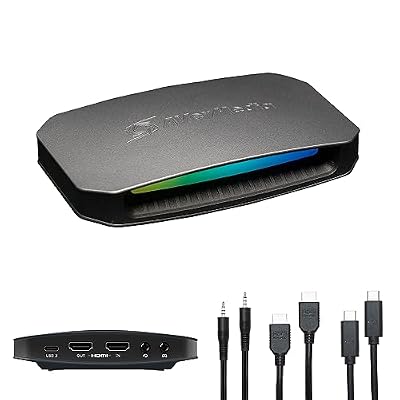
The CU4K30 is ASUS’s metal-bodied USB capture box, certified for OBS Studio, with an aluminum alloy chassis and RGB lighting. Its HDMI 2.0 passthrough reaches 4K60 with HDR, 1440p144 and 1080p240, while capture tops out at 4K30, with 1440p60 and 1080p120 beneath it, for players recording at 1080p or 1440p. Headset and gamepad jacks handle party chat recording, a feature the Elgato cards leave out.
Specs
– Interface: USB 3.2 Gen 1 Type-C
– HDMI input and output: HDMI 2.0
– Max passthrough: 4K60 with HDR; 1440p144; 1080p240
– Max capture: 4K30; 1440p60; 1080p120
– VRR passthrough: not stated
– Audio: 3.5 mm headset and gamepad jacks for party chat
5. AVerMedia Live Gamer Portable 2 Plus
Tier: Budget | Best for: recording long sessions with no PC at all
The Portable 2 Plus is the endurance pick. Its PC-free mode records 1080p60 gameplay straight to a microSD card, with hardware encoding on the device, so a long session never depends on a PC staying awake. Use an exFAT card and recording runs continuously; a FAT32 card splits files roughly every 4 GB. Passthrough reaches 4K60, though HDR and VRR are not supported. In PC mode it is a UVC device, but AVerMedia lists no Apple silicon Mac support.
Specs
– Interface: USB 2.0 (Micro USB), UVC plug and play
– HDMI input and output: HDMI 2.0
– Max passthrough: 4K60; HDR not supported
– Max capture: 1080p60
– PC-free mode: records to microSD, Class 10 or faster, up to 128 GB, card not included
– Record format: MPEG-4 (H.264 with AAC) and MJPEG, hardware encoding
– Dimensions and weight: 147 x 57 x 47 mm; 185.5 g
Who Should Skip
Skip capture cards entirely if the consoles’ built-in clip features cover your needs for short clips. Skip the two HDMI 2.1 cards if your TV is a 4K60 model, since their passthrough headroom would go unused. Skip the Portable 2 Plus if you play with HDR or VRR turned on, stream live rather than record, or use an Apple silicon Mac. Skip the CU4K30 if you want to archive footage at 4K60, and skip every USB card here if your only free ports are USB 2.0, where capture resolutions fall sharply.
Frequently Asked Questions
Do you need to change a setting on the console before recording?
Yes. Turn off HDCP in the system settings on the PlayStation 5 or the Xbox before you start, because both consoles encrypt their HDMI output when HDCP is on and every card here records an encrypted signal as a black screen. Media apps stay protected either way.
Can you record a long GTA VI session without a PC running?
Yes, with the Live Gamer Portable 2 Plus. Its PC-free mode writes 1080p60 footage to a microSD card using its own hardware encoder. Format the card as exFAT so a long session records continuously instead of splitting roughly every 4 GB, within the published 128 GB card limit.
Will a capture card lower the picture quality on your TV?
Not if the passthrough ceiling covers your display mode. The TV receives the passthrough signal, not the captured one, so a 4K60 TV loses nothing through any card here. A downgrade only appears when the console’s output exceeds the card’s passthrough limit, which is why 120 Hz TV owners need an HDMI 2.1 card.
Is any capture card in this guide under a safety recall?
No. A check of CPSC recall records found no recall covering any of these five cards, their makers’ capture card lines, or game capture cards as a category. The checks that matter before a long session are the practical ones above: HDCP off, the right USB port speed, and enough free storage for hours of footage.
Final Verdict
Match the card to the TV first and the archive second. Owners of HDMI 2.1 high-refresh displays should take the Elgato 4K X or the AVerMedia Live Gamer Ultra 2.1, the AVerMedia ahead on audio, the Elgato ahead on software polish. For a 4K60 TV, the Elgato 4K S records everything the screen shows, and the ASUS CU4K30 adds party chat jacks for group sessions. To press record and play for hours with no PC involved, the Portable 2 Plus is the only card built for that.





Write Your Review
No reviews yet. Be the first to share your experience!