
Verdict at a glance
Updated October 2026. The RTX 5090 is a 575W, 32GB card, so the best prebuilts pair it with a top gaming CPU, a named 1000W-plus ATX 3.1 power supply, dual-channel DDR5 and strong airflow.
- Verdict at a glance
- Top Rtx 5090 Prebuilt Pcs Ultimate Picks for 2026
- More RTX 5090 prebuilts worth considering
- RTX 5090 prebuilt spec comparison
- Why Prebuilt Makes Sense at the Flagship Tier
- Specifications That Must Surround a 5090
- Vetting Integrators and Avoiding Halo Traps
- Value Math and Timing
- Related Guides
- How we compared
- More RTX 5090 prebuilt questions
- Frequently Asked Questions
- Build vs buy: where the money goes in an RTX 5090 system
- What to check before buying an RTX 5090 prebuilt
- Related Articles
- Related Guides
- Best overall: Skytech Gaming O11 Vision with Ryzen 7 9800X3D and RTX 5090, a fast gaming CPU, X870 board, 1000W Gold ATX 3 PSU and 360mm AIO.
- Best for creators: Skytech Legacy 4 or MSI Infinite ZS with the 16-core Ryzen 9 9950X3D, for gaming plus heavy rendering.
- Best premium chassis: Alienware Area-51 with Core Ultra 9 285K, a 1500W Platinum PSU and a positive-pressure airflow design.
- Best for maximum memory and storage: Panorama XL with Ryzen 9 9950X3D, 128GB DDR5 and a 3-year warranty.
Top Rtx 5090 Prebuilt Pcs Ultimate Picks for 2026
Here are our current top rtx 5090 prebuilt pcs ultimate picks, compared on published specifications, component quality, and features.


Prebuilt systems carrying the RTX 5090 represent the summit of off-the-shelf gaming in 2026, and for once the prebuilt route makes unusual sense: flagship GPU supply often flows to system integrators first. Here is how to buy one intelligently.
As an Amazon Associate we earn from qualifying purchases at no extra cost to you.


As an Amazon Associate we earn from qualifying purchases. Product prices and availability are accurate as of the date/time indicated.
More RTX 5090 prebuilts worth considering
The listings above lean heavily on two integrators. The systems below add major-brand and boutique options. Component details come from manufacturer and retailer listings and published reviews; always confirm the exact configuration in the listing you buy, since integrators change parts between batches.
Alienware Area-51 (AAT2250) with Core Ultra 9 285K and RTX 5090
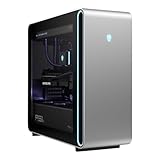
Dell revived the Area-51 name in 2025 for its flagship desktop. This configuration pairs an Intel Core Ultra 9 285K with an RTX 5090, 64GB of DDR5, a 4TB SSD, a 360mm liquid cooler and Wi-Fi 7. RTX 5090 versions use a 1500W 80 Plus Platinum power supply, which gives large headroom over NVIDIA’s 1000W recommendation. The case uses a positive-pressure design: two 180mm front fans, two 140mm bottom fans and the radiator fans all pull air in, and the resulting pressure pushes heat out through the rear vents.
Who it’s for: buyers who want a major-brand system with onsite or depot support options, premium build quality and a huge PSU margin.
Strengths: 1500W Platinum PSU, 64GB of RAM, large SSD, tool-friendly case, and Dell’s support network.
Drawbacks: the motherboard and power supply use the ATX12VO standard, so you cannot easily reuse them with standard retail parts later. Reviews were mixed on noise at full load, and Gamers Nexus criticized some airflow details. The 285K is behind AMD’s X3D chips in pure gaming.
How it compares: more polished and better supported than most boutique builds, but less upgrade-friendly than the Skytech and Panorama systems built from standard parts.
MSI Infinite ZS with Ryzen 9 9950X3D and RTX 5090
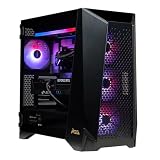
MSI’s Infinite ZS pairs AMD’s 16-core Ryzen 9 9950X3D with an RTX 5090, 32GB of DDR5, a 2TB Gen5 NVMe SSD, 2.5GbE LAN and Wi-Fi. Retailer listings for this model (9NVZ-2261US) list a 1300W 80 Plus Gold power supply and 360mm liquid cooling, housed in MSI’s Prospect 700RL case.
Who it’s for: gamers who also render, compile or edit, and want a major-brand system with a 16-core X3D chip.
Strengths: excellent CPU for gaming and productivity, Gen5 SSD, 1300W PSU, and liquid cooling.
Drawbacks: listings show an entry-level B840 motherboard, which limits CPU tuning and expansion for a flagship build. 32GB of RAM is the practical minimum at this tier, and MSI’s own PSU guide suggests more than 1300W for Ryzen 9 plus RTX 5090 systems used for heavy overclocking.
How it compares: similar CPU to the Skytech Legacy 4 and Panorama XL 9950X3D systems, with a stronger brand warranty network but a cheaper motherboard.
CyberPowerPC Gamer Supreme with Ryzen 9 9950X and RTX 5090

This CyberPowerPC configuration combines a 16-core Ryzen 9 9950X with an RTX 5090, 64GB of DDR5, a 4TB PCIe Gen4 SSD and Windows 11 Home. It gives you more memory and storage than many competing systems at a similar tier.
Who it’s for: creators and streamers who want 64GB of RAM and lots of storage alongside flagship gaming performance.
Strengths: 64GB of RAM, 4TB of storage, and 16 cores for heavy multitasking.
Drawbacks: the standard 9950X lacks 3D V-Cache, so it trails the 9800X3D and 9950X3D in gaming, especially at 1440p. The listing does not name the PSU brand and model clearly, so ask the seller before buying.
How it compares: better for productivity than the 9800X3D systems, but not the fastest choice for pure gaming.
XIDAX Prebuilt with Core Ultra 9 285K and RTX 5090

XIDAX is a US boutique integrator. This configuration uses a 24-core Intel Core Ultra 9 285K, an RTX 5090, 64GB of DDR5 and a 2TB SSD. Boutique builders typically use retail-standard motherboards, power supplies and cases, which makes later upgrades straightforward.
Who it’s for: buyers who prefer a boutique build with standard parts and want an Intel platform for productivity.
Strengths: 64GB of RAM, a strong multithreaded CPU, and standard components.
Drawbacks: the listing’s short title does not name the PSU, motherboard or cooler, so request a full parts list. The 285K is behind AMD X3D chips in gaming.
How it compares: a boutique alternative to the Alienware Area-51 with the same CPU and GPU, likely easier to upgrade but with a smaller support network.
Skytech Gaming PC with Ryzen 7 9800X3D and RTX 5090

This newer Skytech desktop pairs the Ryzen 7 9800X3D with an RTX 5090, 32GB of DDR5 and a 2TB SSD. The 9800X3D is one of the fastest gaming CPUs available, which matters with an RTX 5090 because the card can expose CPU limits even at 1440p.
Who it’s for: gamers who want the strongest gaming CPU for the RTX 5090 and do not need 16 cores.
Strengths: excellent gaming CPU pairing, efficient power, and a configuration built for frame rate rather than workstation specs.
Drawbacks: 32GB of RAM and 2TB of storage are the minimum at this tier. Check the listing for the PSU model, motherboard chipset and cooling.
How it compares: a close alternative to the Skytech O11 Vision in our main picks; compare the case, cooler and PSU details and choose the better-specified listing.
RTX 5090 prebuilt spec comparison
| System | CPU | GPU | RAM | PSU (as listed) | Warranty | Price tier |
|---|---|---|---|---|---|---|
| Skytech O11 Vision | Ryzen 7 9800X3D | RTX 5090 32GB | 32GB DDR5-6000 | 1000W Gold ATX 3 | Check listing | Premium |
| Skytech Legacy 4 | Ryzen 9 9950X3D | RTX 5090 32GB | Check listing | Check listing | Check listing | Premium |
| Panorama XL (9950X3D) | Ryzen 9 9950X3D | RTX 5090 32GB | 128GB DDR5 | Check listing | 3 years | Flagship |
| Panorama XL (7800X3D) | Ryzen 7 7800X3D | RTX 5090 32GB | 32GB DDR5 | Check listing | 3 years | Premium |
| Alienware Area-51 | Core Ultra 9 285K | RTX 5090 32GB | 64GB DDR5 | 1500W Platinum (ATX12VO) | Dell warranty, varies by region | Flagship |
| MSI Infinite ZS | Ryzen 9 9950X3D | RTX 5090 32GB | 32GB DDR5 | 1300W Gold | MSI warranty | Premium |
| CyberPowerPC Gamer Supreme | Ryzen 9 9950X | RTX 5090 32GB | 64GB DDR5 | Check listing | Check listing | Premium |
| XIDAX (285K) | Core Ultra 9 285K | RTX 5090 32GB | 64GB DDR5 | Check listing | Check listing | Premium |
| Skytech (9800X3D) | Ryzen 7 9800X3D | RTX 5090 32GB | 32GB DDR5 | Check listing | Check listing | Premium |
“Check listing” means the detail is not stated clearly in the product title. Treat a missing PSU brand and model as a reason to ask questions before buying.
Why Prebuilt Makes Sense at the Flagship Tier
The 5090 era revived an old truth: when a GPU is scarce or priced chaotically at retail, system integrators with allocation become the rational source. A well-specified prebuilt bundles the flagship card at something near its intended value, adds warranty coverage across the whole machine, and spares buyers the connector anxieties and power-supply guesswork that accompany the highest-wattage consumer GPU ever sold. Boutique integrators and the major brands’ halo lines both play here. The premium over self-assembly, when one exists at all, buys integration testing on a machine whose components genuinely stress each other. At this tier, convenience and access align.

Specifications That Must Surround a 5090
A flagship GPU exposes every corner cut around it. Demand a current flagship-class CPU, since the 5090 hits processor limits even at 1440p; anything mid-range strangles the purchase. Power supply quality is non-negotiable: a reputable 1000W-plus ATX 3.1 unit with native 12V-2×6 cabling, named by brand and model in the listing, not described vaguely. Cooling must match, meaning a large liquid cooler for the CPU and a case with genuine airflow rather than a glass box. Memory should start at 32GB of fast DDR5, storage at 2TB NVMe. Integrators that hide component brands on a machine like this are telling you something. Listen.
Vetting Integrators and Avoiding Halo Traps
The flagship prebuilt market mixes superb engineering with cynical badge-selling. Separate them with three checks. First, transparency: every major component identified by model, not category. Second, thermals: independent reviews showing sustained-load behavior, because flagship parts in airflow-starved showcases throttle expensively. Third, service: warranty length, depot versus onsite, and the integrator’s repair reputation in owner communities. Beware configurations pairing the 5090 with last-generation platforms or single-channel memory to hit price points, the classic halo trap. A boutique machine with documented components and honest airflow beats a flashier listing with mystery internals every single time.

Value Math and Timing
Flagship prebuilts hold a peculiar value position: when GPU street prices inflate, complete systems frequently cost less than their parts; when retail normalizes, the integration premium reappears. Run the comparison at purchase time against current component pricing, including the power supply and cooling a 5090 demands. Timing follows GPU supply cycles, with the best configurations and prices appearing after launch turbulence settles. Configure storage and memory minimally if upgradeable, both are trivial DIY additions later, and put budget into the CPU, PSU, and case instead. A 5090 system bought thoughtfully serves a full upgrade cycle as the GPU around which everything else rotates.
Related guides on our site: Best RTX 3060 Laptops in 2026: Top Entry-Level Gaming Laptops · Best RTX 4060 Laptops in 2026: Best Budget Gaming Notebooks · Best RTX 4070 Laptops in 2026: Top Mid-Range Gaming Notebooks · Best RTX 5070 Laptops in 2026: Sweet Spot Gaming Notebooks · Best RTX 5080 Laptops in 2026: High-End Gaming Notebooks.
How we compared
Updated October 2026. We compared RTX 5090 prebuilts using manufacturer and retailer listings for component details, NVIDIA’s RTX 5090 specifications and power guidance, and independent system reviews from publications such as PC Gamer, Gamers Nexus, Tom’s Guide and XDA, plus owner reports. We did not bench-test these systems ourselves. Where a listing does not state a component clearly, we have marked it rather than guessed.
More RTX 5090 prebuilt questions
What power supply does an RTX 5090 prebuilt need?
NVIDIA’s guidance is a 1000W minimum. With a 16-core CPU or overclocking, 1200–1500W adds margin. The unit should be ATX 3.1 with a native 12V-2×6 cable.
Is 32GB of RAM enough for an RTX 5090 PC?
For gaming, yes. For 4K video editing, 3D rendering or local AI work alongside gaming, 64GB is more comfortable. Either way, make sure it runs in dual-channel mode.
Which CPU is best with an RTX 5090 for gaming?
AMD’s Ryzen 7 9800X3D and 9850X3D lead most gaming benchmarks, with the 16-core Ryzen 9 9950X3D close behind and better for productivity. Intel’s Core Ultra 9 285K is strong for multithreaded work but trails the X3D chips in games.
Can I upgrade an RTX 5090 prebuilt later?
Systems built from standard ATX parts, such as most boutique builds, are easy to upgrade. Some major-brand systems use proprietary motherboards or ATX12VO power supplies, which limit future part swaps. Check this before buying if you plan to keep the case for years.
Frequently Asked Questions
Is a prebuilt RTX 5090 PC cheaper than self-assembly?
Sometimes, particularly when GPU street prices run above list. Integrator allocation can make complete systems cost near or below parts pricing. Compare against live component prices when you shop.
What CPU should come with an RTX 5090 prebuilt?
A current flagship-class gaming CPU. The 5090 exposes processor limits even at 1440p, so mid-range CPUs in these systems waste substantial GPU performance.
What should I check first in a 5090 prebuilt listing?
The power supply brand and model. A 1000W-plus ATX 3.1 unit from a reputable maker is mandatory; vague PSU descriptions signal corner-cutting throughout the machine.
Build vs buy: where the money goes in an RTX 5090 system
The table below shows the approximate share of total component cost in a typical RTX 5090 gaming build, so you can judge a prebuilt’s value without relying on exact prices that change weekly. Shares are estimates based on typical retail component tiers in 2026 and will shift with GPU and memory pricing.
| Component | Typical share of a self-built RTX 5090 PC | What to look for in a prebuilt |
|---|---|---|
| RTX 5090 graphics card | About 55–65% | Named board partner and cooler model |
| CPU | About 8–12% | Ryzen 7 9800X3D/9850X3D, Ryzen 9 9950X3D, or Core Ultra 9 |
| Motherboard | About 4–7% | B850/X870 or Z890 with a good VRM, not an entry-level chipset |
| Memory | About 4–8% | 32GB or more, two sticks, DDR5-6000 or faster |
| Power supply | About 4–6% | Named 1000W-plus ATX 3.1 unit with native 12V-2×6 cable |
| Storage | About 3–6% | 2TB or more NVMe from a named brand |
| Case and cooling | About 5–8% | Mesh front panel, 360mm AIO or large air cooler |
| Windows license | About 2–3% | Activated retail or OEM license included |
Because the GPU dominates the cost, a prebuilt is good value when the system price is close to the cost of the RTX 5090 itself plus a fair price for everything else. If a system costs far more than the sum of its parts, you are paying for brand or styling; if it costs less, check that the integrator has not cut corners on the PSU, motherboard or memory.
What to check before buying an RTX 5090 prebuilt
- PSU brand, model and wattage. NVIDIA recommends at least 1000W for the RTX 5090. Look for a named unit from an established maker, ATX 3.1 compliance and a native 12V-2×6 cable. Avoid listings that only say “1000W PSU”.
- RAM channels. Make sure memory is installed as two (or four) matched sticks running in dual-channel mode. A single stick halves memory bandwidth and can noticeably hurt frame rates and 1% lows.
- Memory speed and EXPO/XMP. Confirm the rated speed (DDR5-6000 is ideal on AM5) and whether the profile is enabled out of the box.
- Motherboard chipset. For a flagship GPU, B850, X870/X870E or Z890 boards are preferable to entry-level A620 or B840 boards, which offer fewer features and weaker power delivery.
- CPU cooling and airflow. A 360mm AIO or high-end air cooler and a case with a mesh front or strong intake fans keep both the CPU and the 575W GPU from throttling.
- Power connector routing. Ask whether the integrator uses a native 12V-2×6 cable and avoids sharp bends near the GPU connector. This matters for a card of this power level.
- Warranty and support. Check parts and labor coverage length, whether shipping is covered for repairs, and whether opening the case to upgrade voids the warranty.
- Bloatware and OS. Prefer systems with clean Windows installs and a genuine license.
Write Your Review
No reviews yet. Be the first to share your experience!