
A mechanical gaming keyboard is a switch decision before it is anything else: the switch sets the actuation point, the sound and the fatigue over a long session, and everything else on the board is built around it. The five picks below are judged on published switch data, layout, keycap material and connection options, not on lighting effects.
Every pick is pinned to one exact listing, because keyboard lineups reuse one name across switch types, colors and regional layouts that all carry different listings. The five picks run from the gasket-mounted ASUS ROG Azoth to the aluminum HyperX Alloy Origins.
As an Amazon Associate, we earn from qualifying purchases.
Quick Answer
For most players, the ASUS ROG Azoth is the pick: a gasket-mounted 75 percent board with pre-lubed ROG NX switches, tri-mode wireless and an OLED control screen. The Razer BlackWidow V4 Pro is the full-size macro flagship, the Logitech G915 X TKL the low-profile wireless option, the Corsair K65 Plus Wireless the compact value, and the HyperX Alloy Origins the budget route.
How to Choose a Mechanical Gaming Keyboard
Switch feel is the real decision
Linear switches press straight down with no bump, tactile switches add a felt bump at actuation, and clicky switches add an audible click on top of the bump. Published actuation figures cluster between 1.8 and 2.0 mm for standard switches, with operating force between 45 and 50 grams on the picks here. This guide covers mechanical switches only: magnetic Hall effect boards with adjustable actuation and rapid trigger are a different buy, covered by their own roundups, and optical boards are a third category again.
Layout decides desk space
Full-size boards keep the number pad and suit spreadsheet work between matches. Tenkeyless boards drop the pad and free mouse room, which is why they dominate gaming desks. A 75 percent board compresses the function row and navigation keys into a tighter block, and a 96 percent layout squeezes a number pad back into roughly a tenkeyless footprint. Measure the space your mouse hand needs before choosing, not after.
Hot-swap sockets and keycaps decide longevity
A hot-swappable board lets you pull a failed or unwanted switch and press in a replacement without soldering, which turns a dead key from a warranty claim into a two-minute fix. Keycap material matters just as much over years: doubleshot PBT legends cannot wear off and the caps resist shine, while doubleshot ABS stays brighter under RGB lighting but smooths with use. Four of the five picks below use PBT; the Razer is the ABS exception, and its doubleshot legends at least cannot fade.
Wireless adds modes and a battery to manage
Modern 2.4 GHz gaming wireless polls at 1,000 Hz, the same rate as a wired connection, so the cable is no longer the speed argument it once was. What wireless adds is a battery figure to plan around, quoted by every maker with the lighting off, plus Bluetooth pairing for a second machine. Wired boards skip all of that and never need charging mid-session. Check the exact switch variant and layout on the listing before ordering, since each name below sells in several. No CPSC recall covers gaming keyboards as a class or any of the five picks here.
The 5 Best Mechanical Gaming Keyboards
1. ASUS ROG Azoth
The Azoth is the enthusiast pick: a 75 percent board built like a custom keyboard, with a gasket mount, silicone dampening and pre-lubed ROG NX mechanical switches that are hot-swappable. The pinned listing carries the NX Brown tactile switches in the black finish. An OLED display and a three-way control knob handle volume, lighting and settings on the board itself, tri-mode connectivity covers 2.4 GHz wireless, Bluetooth and wired play, and ASUS includes a switch lubing kit in the box. The limits are the compressed 75 percent navigation cluster and premium pricing.
Specs
– Layout: 75 percent per ASUS
– Switches: ROG NX Brown mechanical, hot-swappable and pre-lubed per ASUS
– Mounting: Gasket mount with silicone dampening per ASUS
– Connectivity: 2.4 GHz SpeedNova wireless, Bluetooth and wired USB per ASUS
– Keycaps: Doubleshot PBT per ASUS
– Display: OLED with three-way control knob per ASUS
– Battery: Up to 2,000 hours with lighting off per ASUS
– Tier: Premium
Choose it for the best typing feel and build in this group. Skip it if you need a number pad or a full function row with gaps.
2. Razer BlackWidow V4 Pro
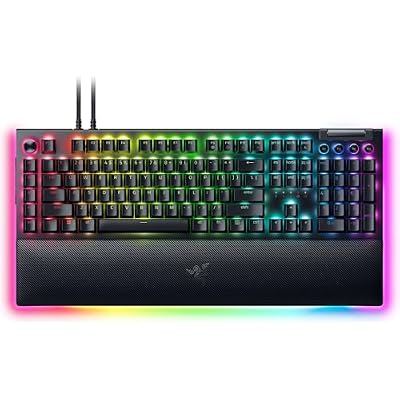
The BlackWidow V4 Pro is the control-desk pick: a full-size wired board with a Razer Command Dial, a media roller and eight dedicated macro keys down the left side. The pinned listing carries Razer Green mechanical switches, the tactile and clicky option, rated by Razer at 100 million keystrokes, and the listing data names Snap Tap support through Razer’s software. A magnetic leatherette wrist rest is included. The trade-offs are size and sound: it is the widest board here, it is wired only, and clicky switches are the wrong choice for a shared room.
Specs
– Layout: Full-size with 8 dedicated macro keys per Razer
– Switches: Razer Green mechanical, tactile and clicky per listing data
– Actuation: 1.9 mm with 50 g operating force per Razer
– Lifespan: 100 million keystrokes per Razer
– Controls: Command Dial and media roller per Razer
– Keycaps: Doubleshot ABS per listing data
– Extras: Magnetic wrist rest and Snap Tap support per listing data
– Connectivity: Wired, detachable USB Type-C per Razer
– Tier: Premium
Choose it for macros, media control and a full-size layout. Skip it if your desk is narrow or your room is shared.
3. Logitech G915 X Lightspeed TKL
The G915 X TKL is the low-profile pick: a tenkeyless board just 23 mm tall per Logitech, with short-travel GL mechanical switches under doubleshot PBT keycaps and a brushed aluminum top case. The pinned listing carries the GL Tactile switches in black. Lightspeed 2.4 GHz wireless is the gaming connection, with Bluetooth and wired USB as the other modes, and Logitech rates the battery at up to 36 hours with the backlight at full brightness, rising sharply as brightness drops. Low-profile switches feel closer to a fast laptop keyboard than to the tall boards here, which is the point for some players and the deal-breaker for others.
Specs
– Layout: Tenkeyless, low-profile per Logitech
– Switches: GL Tactile low-profile mechanical per listing data
– Connectivity: Lightspeed 2.4 GHz, Bluetooth and wired USB per Logitech
– Keycaps: Doubleshot PBT per Logitech
– Case: Brushed aluminum top plate per Logitech
– Battery: Up to 36 hours at full backlight brightness per Logitech
– Height: 23 mm per Logitech
– Tier: Mid-range
Choose it for a slim wireless board that leaves a desk looking tidy. Skip it if you prefer tall keycaps and deep key travel.
4. Corsair K65 Plus Wireless
The K65 Plus Wireless is the compact value pick: a 75 percent board with hot-swappable, pre-lubricated MLX Red linear switches, dual-layer sound dampening and PBT dye-sub keycaps, a combination that used to cost far more. The pinned listing is the black and gray finish. Connectivity is tri-mode, with 2.4 GHz Slipstream wireless, Bluetooth and wired USB, and Corsair rates the battery at up to 266 hours on the 2.4 GHz connection with the lighting off. A rotary dial handles volume. The limits are the compressed 75 percent navigation cluster and linear-only switch choice from Corsair’s own lineup.
Specs
– Layout: 75 percent, 81 keys per Corsair
– Switches: Corsair MLX Red linear mechanical, hot-swappable and pre-lubricated per listing data
– Connectivity: 2.4 GHz Slipstream, Bluetooth and wired USB Type-C per Corsair
– Keycaps: PBT dye-sub per Corsair
– Sound dampening: Dual-layer per Corsair
– Battery: Up to 266 hours on 2.4 GHz with lighting off per Corsair
– Dimensions: 320 x 136 x 35 mm per Corsair
– Tier: Mid-range
Choose it for a quiet, compact wireless board with real dampening. Skip it if you want tactile or clicky switches from the factory.
5. HyperX Alloy Origins
The Alloy Origins is the budget route done properly: a full-size board in an aircraft-grade aluminum body, where most boards at its tier are plastic. The pinned listing carries HyperX Red linear switches, which HyperX rates at 1.8 mm actuation, 45 g operating force and 80 million keystrokes. It is wired over a detachable USB Type-C cable, with per-key RGB lighting, three keyboard tilt angles and HyperX’s NGENUITY software for macros and lighting profiles. There is no hot-swap socket and no wireless mode; what the money buys instead is the frame, the switches and a compact footprint for a 104-key board.
Specs
– Layout: Full-size, 104 keys in a compact frame per HyperX
– Switches: HyperX Red linear mechanical per listing data
– Actuation: 1.8 mm with 45 g operating force per HyperX
– Lifespan: 80 million keystrokes per HyperX
– Body: Aircraft-grade aluminum per HyperX
– Connectivity: Wired, detachable USB Type-C per HyperX
– Lighting: Per-key RGB with NGENUITY software per HyperX
– Feet: Three adjustable tilt angles per HyperX
– Tier: Budget
Choose it for an aluminum full-size board at the lowest commitment here. Skip it if you want wireless or swappable switches.
Who Should Skip Mechanical Gaming Keyboards
Skip this entire category if you want rapid trigger or per-key adjustable actuation, because those are magnetic Hall effect features that no mechanical switch can offer. Skip the clicky Razer if anyone sleeps or works within earshot. Skip the compact boards if your games or your job lean on a number pad. And skip mechanical switches altogether if you type all day and prefer the short, quiet travel of a membrane or low-profile laptop keyboard; only the Logitech here splits that difference.
Frequently Asked Questions
Are mechanical keyboards actually faster for gaming?
Only marginally, and not because of the switch label. Standard mechanical switches actuate around 1.8 to 2.0 mm and poll at 1,000 Hz wired or on gaming-grade 2.4 GHz wireless. The real gains are feel, consistency and lifespan. Players chasing the lowest possible latency should look at magnetic rapid trigger boards instead.
Which switch type is best for gaming?
Linear switches are the common gaming default because the press is smooth from top to bottom, and three of the five picks here ship linear. Tactile switches suit players who also type a lot and want confirmation of each press. Clicky switches give the clearest feedback and the most noise. On a hot-swappable board the choice is reversible, which is the strongest argument for buying one.
Is 2.4 GHz wireless fast enough for competitive play?
Yes, on the gaming-grade implementations in this guide. The Azoth, G915 X and K65 Plus all poll at 1,000 Hz over their 2.4 GHz connections, the same rate as their wired modes. Bluetooth is the slow mode and is meant for a second machine or casual play. What wireless really costs is battery management, not speed.
What does hot-swappable actually get me?
It lets you replace a switch with a puller instead of a soldering iron. That covers three jobs: reviving a dead or chattering key, changing the feel of the whole board by fitting a different switch set, and mixing switches, such as linears on the movement keys and tactiles elsewhere. Check pin compatibility before ordering loose switches, since not every switch fits every socket.
Final Verdict
Buy on switch feel first and layout second. Most players should take the ASUS ROG Azoth for its gasket-mounted build and tri-mode wireless. Choose the Razer BlackWidow V4 Pro for a full-size macro desk, the Logitech G915 X TKL for low-profile wireless, the Corsair K65 Plus Wireless for a damped compact board, and the HyperX Alloy Origins for an aluminum frame at the budget tier. Confirm the exact switch variant and color on the listing before ordering, since every name here sells in several versions.






Write Your Review
No reviews yet. Be the first to share your experience!