
If you want internet radio on an existing stereo, a network streamer such as the WiiM Mini, Pro or Ultra is the most flexible pick, while a self-contained set like the Sangean WFR line suits bedside or desk use and a network receiver such as the Yamaha or Denon models suits a full hi-fi setup. The best choice depends on whether you need a speaker built in, what outputs your amp accepts and how you want to browse stations.
- What an internet radio tuner actually does
- Comparison table
- WiiM: the flexible streamer family
- Sangean and Roberts: radios that work out of the box
- Network players and receivers for hi-fi systems
- Pick X if… decision table
- Choosing: features that matter
- Common mistakes
- Alternatives
- Setup and everyday use
- Sound quality considerations
- Frequently Asked Questions
As an Amazon Associate we earn from qualifying purchases at no extra cost to you.
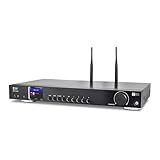
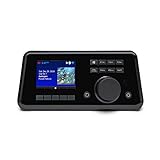
What an internet radio tuner actually does
An internet radio tuner connects to your home network and plays stations streamed from the internet, so you are not limited by local broadcast range. Most devices pull station lists from a directory service, and many also play music from services you subscribe to or from files on your network. For a gamer, a streamer connected to a desk amp or powered speakers gives you background radio without leaving a PC audio app running.
There are three product shapes. Streamer boxes have no speaker and output to an amp. Table radios include speakers and often DAB or FM too. Network receivers add amplification for passive speakers.
Comparison table
| Option | Type | Best for | Maker-stated highlights | Limits |
|---|---|---|---|---|
| WiiM Mini | Streamer | Adding radio to powered speakers on a budget | Compact, analog and optical outputs, app control | No built-in speaker or amp |
| WiiM Pro / Pro Plus | Streamer | Stereo systems wanting better outputs and Wi-Fi | Ethernet option, app and voice-assistant support as listed by the maker | Needs a separate amp |
| WiiM Ultra | Streamer | Hi-fi owners wanting more inputs and a display | Expanded connections and a hardware interface per the maker | Premium tier for a streamer |
| Sangean WFR series | Table radio | Bedroom, kitchen or desk listeners | Built-in speaker, internet radio plus other broadcast bands on some models | Sound limited by size |
| Roberts Stream series | Table radio | Traditional radio feel, DAB and internet in one | Wood-style cabinet, multiple bands | Fewer streaming-app features |
| Denon DNP-800NE | Network player | Hi-fi separates users | Internet radio, streaming and digital outputs | Premium tier; no amplifier |
| Yamaha network receivers (R-N and similar) | Receiver | Passive speakers plus radio in one unit | Built-in amplifier with internet radio and network audio | Large footprint |
WiiM: the flexible streamer family
WiiM has become a common recommendation in audio forums and from outlets like What Hi-Fi and Sound and Vision for adding streaming to existing gear. The line spans the compact Mini, the more capable Pro and Pro Plus, and the larger Ultra, all controlled from the maker’s app. The practical benefit is that you plug into an existing amp or powered speaker and keep the system you already own. The trade-off is that you rely on a phone app for most functions, which some buyers prefer to a dial.
Sangean and Roberts: radios that work out of the box
If you want a device you can switch on and tune without a separate amp, the Sangean WFR family and Roberts Stream models are the common names. These include speakers and station presets, and many offer FM or DAB where available in your region. Reviewers usually say they are easy to set up and have decent room-filling sound, though they will not match a hi-fi system. They suit a desk, a bedside table or a workshop.
Network players and receivers for hi-fi systems
Denon’s DNP-800NE is a network player for separates systems. Yamaha’s network receivers combine amplification, radio and streaming for passive speakers. Both suit buyers who care about audio quality and want a physical remote and front-panel controls. They sit at the mid-to-premium tier, and you should compare power ratings with your speakers’ needs as listed by their makers.
Pick X if… decision table
| If you… | Pick |
|---|---|
| Already have an amp or powered speakers and want radio cheaply | WiiM Mini |
| Want Ethernet and better outputs for a stereo | WiiM Pro or Pro Plus |
| Want a premium streamer with a richer interface | WiiM Ultra or Denon DNP-800NE |
| Want a one-box radio for a desk or bedroom | Sangean WFR series |
| Want a traditional look with DAB and internet | Roberts Stream series |
| Have passive speakers and want one device | Yamaha network receiver |
Choosing: features that matter
- Outputs: analog RCA, optical, coax or HDMI ARC. Match them to your amp or speakers.
- Station directory: check which services the maker lists; some use open directories, others partner services.
- Connectivity: Wi-Fi band support and an Ethernet port for stability.
- Control: app, remote or front-panel buttons. If you dislike phone apps, look for a physical interface.
- Presets: favorite stations on buttons are useful for non-technical household members.
- Extra bands: DAB or FM matter if you also want local broadcasts.
- Multi-room: some brands group several units to play the same station.
Common mistakes
- Buying a streamer with no plan for amplification or speakers.
- Assuming every device supports every streaming service; the maker’s list is the authority.
- Ignoring Wi-Fi coverage at the spot where the device will sit.
- Choosing a radio for a region without the broadcast band you want.
- Forgetting that app-only control means a phone is required for setup.
Alternatives
Bluesound’s Node, Cambridge Audio’s streamers, Marantz network receivers and smart speakers from major platforms can all play internet radio. Even a PC with a browser or a media app works, though it ties up the computer. Compare stated outputs, supported services and app quality for each.
Setup and everyday use
Setup usually means joining the device to your Wi-Fi through the maker’s app or on-screen menu, then choosing a station directory and saving favorites as presets. Place the unit within good range of your router, or use the Ethernet port if one is provided, because dropouts are the most common complaint with any streamed audio. Reviewers also note that station lists change over time as broadcasters move streams, so a favorite may occasionally need to be re-added. If you plan to connect the device to a PC desk setup, an optical or analog input on your powered speakers keeps things simple and avoids driver issues. Keep firmware updated through the maker’s app, since updates often add services and fix connection bugs.
Sound quality considerations
Internet radio quality depends mostly on the station bitrate, so even an excellent streamer cannot make a low-bitrate stream sound rich. Better outputs and a good amplifier still help with clarity. Table radios trade sound for convenience, while separates give more headroom. Match the product’s strengths to your listening room and expectations rather than chasing specifications alone.
Frequently Asked Questions
Do I need a subscription for internet radio?
Most internet radio stations stream free, and directories are usually included by the device maker. Subscription music services are separate and optional.
What is the difference between a tuner and a streamer?
A traditional tuner receives broadcast signals, while an internet radio tuner or streamer receives audio over your network. Some table radios include both.
Can I use one with my existing speakers?
Yes, a streamer connects to an amplifier or powered speakers through analog or digital outputs. Check that the output types match your gear.
Does internet radio use a lot of data?
Stream bitrates vary by station, but a typical stream uses modest data compared with video. If you have a metered connection, check station bitrates.
Will it work without a phone?
Table radios and network receivers usually offer buttons and remotes. Streamer boxes often depend on an app, at least for first setup.





Write Your Review
No reviews yet. Be the first to share your experience!