
A filament runout sensor has one job: notice when filament stops being present, and pause the printer before it spends hours printing air. The catch is fit. Most sensors sold today are not universal accessories. They are printer-family parts, shaped for a specific extruder, board connector, and firmware routine. A sensor for an Ender or CR machine will not fit a Bambu Lab P1, and a Bambu Hall board will not help a K-series Creality printer. This guide groups its picks by printer family first and detection method second. Read the compatibility line in each section before anything else.
- Quick Answer
- How to Choose
- Creality Filament Runout Sensor Kit for Ender and CR Series
- Creality Filament Runout Sensor for K1 Series and K2 SE CFS Upgrade
- HOCENWAY Filament Detection Board for Creality K2 Plus
- 3DTOOLS Extruder Filament Sensor for Bambu Lab P1P and P1S
- Bulto Filament Sensor Replacement for Bambu Lab A1 and A1 Mini
- Who Should Skip It
- FAQ
- Final Verdict
- Product and ASIN Reference
As an Amazon Associate, we earn from qualifying purchases.
Quick Answer
Start with your printer family, not with a brand name. Creality Ender and CR owners should look first at the bracket-style Creality runout kit. K1 and K2 owners need the small break-detection parts made for their CFS-era extruders. Bambu Lab P1 and A1 owners need their own Hall-style boards. No pick here crosses families.
How to Choose
The first decision is detection style. The simplest sensors are presence switches. Filament passing through the body holds a lever or micro-switch closed, and when the filament ends or snaps, the switch opens and the firmware pauses the print. That design is proven and easy to understand, and it is what the classic Creality bracket kit uses. Its limit is scope: a presence switch cannot tell moving filament from jammed filament, so a clog can still waste a print while filament sits motionless inside the body.
The second style is the Hall-effect board used inside several Bambu Lab extruders. A magnet and a Hall sensor watch a small lever that responds to filament presence and, on P-series machines, to the filament cutter lever as well. The board sits exactly where the printer expects it. The trade-off is total specificity: these boards are replacement parts for one extruder design, not add-on modules you can move between printers.
Next, consider where the sensor lives. A bracket sensor mounted before the extruder, like the Creality kit, is easy to reach, inspect, and replace. A board buried inside the extruder housing, like the K2 Plus board or the Bambu boards, is protected and precisely positioned, but fitting it means opening the toolhead and handling small screws and connectors.
Then check the electrical and firmware side. Older Creality machines need a 32-bit mainboard for the bracket kit, and some Ender models need a firmware flash before the pause routine is active, according to the listing itself. Internal boards avoid that question, but they raise a different one: order the board for the exact model generation. K1, K2 SE, and K2 Plus parts look similar in photos and are not interchangeable by guesswork, and the same caution applies to Bambu A1 versus P1 hardware.
Finally, be honest about what a runout sensor cannot do. Presence and Hall boards here detect absence, and in some cases lever position. They do not measure flow or prove that melted filament is leaving the nozzle. Encoder-based smart sensors that watch actual filament movement exist as a separate class, but the verified listings for this guide were dominated by printer-specific presence parts, so this roundup does not pretend otherwise.
Creality Filament Runout Sensor Kit for Ender and CR Series

This is the classic add-on pattern for older Creality machines: a sensor body with a metal filament guider, a mounting plate for the Ender line, a connecting wire, and a blue indicator light that stays lit while filament is feeding and goes out when it runs out. The listing describes an intelligent pause with memory printing, meaning the printer stops when material is cut off and resumes after reloading. For owners of an Ender-3, Ender-3 Pro, Ender-3 V2, Ender-3 Max, Ender-6, or one of the many CR-10 variants named by the seller, this is the most straightforward route to runout protection.
The seller states the kit is only for 32-bit mainboards, naming versions 4.2.2 and 4.2.7, and that the Ender-3 V2, Ender-3, and Ender-3 Pro need a firmware flash before use. One honesty note: the listing’s technical fields name the brand as Lokkr while the title presents it as an official Creality sensor, so check the seller identity before ordering.
Specs
| Spec | Value |
|---|---|
| Filament diameter | 1.75 mm |
| Nominal voltage | 5 V |
| Current | 20 mA |
| Output voltage | 24 V |
| Indicator | Blue LED, on while filament feeds |
| Included parts | Sensor, mounting plate, filament wire |
| Mainboard requirement | 32-bit, versions 4.2.2 or 4.2.7 |
Creality Filament Runout Sensor for K1 Series and K2 SE CFS Upgrade

This small break-detection sensor sits at the extruder position on K1-series machines fitted with the CFS multi-color upgrade, and on the K2 SE in the same upgrade path. The listing says this newer part installs directly at the extruder rather than upstream, so it catches a break closer to where filament is consumed. Installation, as described by the seller, means removing the extruder housing, seating the module in its fixed position, and tightening the positioning screws.
Compatibility is narrow. The listing names the K1, K1C, K1 SE, K1 Max, and K2 SE, each as part of the CFS upgrade system. It is not the part for the larger K2 Plus covered below. Availability signals have varied between captures, with a featured offer shown in one and none in another, so confirm stock on the live listing before relying on it for an urgent repair.
Specs
| Spec | Value |
|---|---|
| Brand | Creality |
| Compatibility | K1, K1C, K1 SE, K1 Max, K2 SE with CFS upgrade |
| Detection focus | Filament break and supply interruption |
| Install position | At the extruder, under the housing |
| Special features listed | Precision break detection, easy installation |
| UPC | 198549044859 |
HOCENWAY Filament Detection Board for Creality K2 Plus
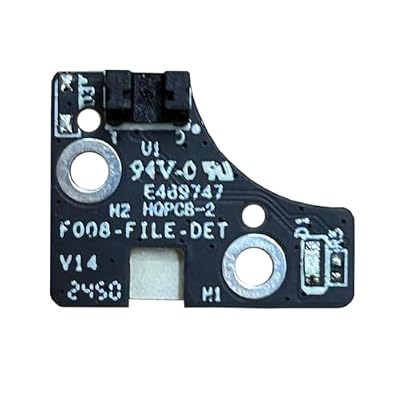
The K2 Plus uses a detection board inside its extruder, and this HOCENWAY listing is that part: a small filament sensor module, described as a material break detector board for the K2 Plus and K2P Combo. It is a replacement for a board that, when it fails or false-triggers, can block loading, unloading, and calibration routines, so its audience is owners restoring a function the printer already had rather than hobbyists adding a new feature.
The board is tiny, with listed dimensions under an inch in each direction. Fitting it is delicate internal work, and Creality’s troubleshooting for this family points to related causes such as residual filament, a deformed PTFE tube, or a displaced spring. Rule those out first, and order the board when the detector itself is the remaining suspect.
Specs
| Spec | Value |
|---|---|
| Model | K2 Plus Filament Detection Board |
| Compatibility | Creality K2 Plus, K2P Combo |
| Product dimensions | 0.71 x 0.55 x 0.34 inches |
| Item weight | 0.071 ounces |
| Manufacturer | HOCENWAY |
| Date first available | March 17, 2025 |
3DTOOLS Extruder Filament Sensor for Bambu Lab P1P and P1S

On Bambu Lab’s P series, filament sensing lives inside the extruder, and this 3DTOOLS part is the original-style sensor for the P1P and P1S. The listing gives it two jobs: filament detection and filament cutter lever detection, which matters because the P-series extruder uses its cutter during filament changes, especially in multi-material workflows. A failing sensor here can therefore disturb the load, unload, and cut sequence as well as missing a runout.
The listing names the model simply as P1 Series, gives a manufacturer part number, and lists the item at 20 grams. One honesty note: the material field reads Polylactic Acid, which describes filament rather than a sensor board, so treat that field as a listing error and judge the part by its model and part number. Availability needs a live check: one capture showed add-to-cart and Amazon shipping, while a summary view showed no featured offer, with other sellers present.
Specs
| Spec | Value |
|---|---|
| Model | P1 Series |
| Manufacturer part number | 3DT-FILAMENT-SENSOR |
| Compatibility | Bambu Lab P1P, P1S |
| Detection | Filament presence, cutter lever |
| Item weight | 20 grams |
| Filament diameter | 1.75 millimeters |
Bulto Filament Sensor Replacement for Bambu Lab A1 and A1 Mini

The A1 series takes a different sensing approach from the P series, and this Bulto replacement follows it: a feed Hall board, model Hall-A1-FAE010-J, described as an extruder hot-end filament monitoring kit for the Bambu Lab A1 and A1 Mini. Hall sensing watches a magnetic target rather than relying on a simple filament-held switch contact, and on the A1 platform this board works alongside the AMS lite ecosystem, where the printer needs to know feeding status during frequent automatic filament changes.
The listing describes it as an A1 Series Filament Sensor with a plug mount and digital output, in a package of 4.1 by 2.1 by 1.3 inches at 0.7 ounces. It also lists an upper temperature rating of 300 degrees Celsius, reflecting its neighborhood near the hot end. This is a model-locked replacement: it fits the A1 extruder design and no other printer here.
Specs
| Spec | Value |
|---|---|
| Model | Hall-A1-FAE010-J |
| Compatibility | Bambu Lab A1, A1 Mini |
| Mounting type | Plug mount |
| Output type | Digital |
| Item weight | 0.7 ounces |
| Package dimensions | 4.1 x 2.1 x 1.3 inches |
Who Should Skip It
Skip every pick here if your printer already pauses reliably on runout. Replacing a working internal board adds risk without adding protection. Skip the Creality bracket kit if your machine still runs an 8-bit mainboard, since the listing limits it to 32-bit boards. Skip the K-series and Bambu boards if your model generation differs by even one suffix, because these parts are not cross-compatible. And skip this category if your real problem is clogging or tangled spools: presence sensors here do not watch filament movement, so they will not catch a jam while filament remains in the path.
FAQ
Will one of these sensors fit any FDM printer?
No. Every pick here is tied to a printer family or a specific model range. The Creality bracket kit is the broadest, covering many Ender and CR machines on 32-bit boards, while the K-series and Bambu boards each fit only the extruder designs named in their sections.
Does a runout sensor resume the print automatically?
The sensor only reports that filament is gone. Pausing, parking the toolhead, and resuming after a reload are firmware jobs. The Creality bracket listing describes a pause with memory printing on supported boards, but older Ender models may need a firmware flash first.
Can these sensors detect a clog or a tangled spool?
The presence and Hall boards in this guide mainly detect whether filament is there, and the P-series board also watches the cutter lever. A clog with filament still sitting in the sensor will usually not trigger them. Movement-based encoder sensors are the class designed for that job, and they need matching firmware configuration.
What should I check before replacing an internal sensor board?
First rule out simple causes: a leftover filament stub, debris in the path, a deformed guide tube, a displaced spring, or a loose connector. Creality’s troubleshooting for the K2 family names several of these. If the detector still misreports with a clean path and firm connections, a replacement board is the reasonable next step.
Final Verdict
There is no single winner here, because there is no single fit. Ender and CR owners on 32-bit boards get the clearest upgrade path from the Creality bracket kit, provided they accept the possible firmware flash and check the seller identity behind its mixed listing fields. K1 and K2 SE owners in the CFS ecosystem, and K2 Plus owners restoring a failed detector, each have exactly one relevant part here. Bambu Lab owners split the same way, between the P-series sensor with its added cutter-lever role and the A1 Hall board. Buy by extruder first, detection method second.
Product and ASIN Reference
| Product | ASIN |
|---|---|
| Creality Filament Runout Sensor Kit for Ender and CR Series | B0B3168BXT |
| Creality Filament Runout Sensor for K1 Series and K2 SE CFS Upgrade | B0FB366KSP |
| HOCENWAY Filament Detection Board for Creality K2 Plus | B0F1XFQGHY |
| 3DTOOLS Extruder Filament Sensor for Bambu Lab P1P and P1S | B0F1FQ15D6 |
| Bulto Filament Sensor Replacement for Bambu Lab A1 and A1 Mini | B0FCML2YMR |


Write Your Review
No reviews yet. Be the first to share your experience!