
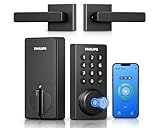
- Top Pick: Philips WiFi Keypad Deadbolt with Handle, Built-in WiFi, APP Remote Control | Smart Locks for Front Door, Voice & Fingerprint Unlock, Flexible Codes, Auto-Lock, Backlit Keypad, Come with Door Lever
- Best Value: TEEHO TE001 Keyless Entry Deadbolt with Keypad for Front Door, Matte Black | ANSI Grade 3 Security, 20 User Codes, Low Battery Alert, IP54 Waterproof, One Touch Lock, Anti-Peep Password & 2 Backup Keys
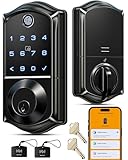
- Premium Choice: Keypad Smart Door Knob Lock, Yamiry Keyless Entry Digital Lock with Handle | Electronic Code Knob for Front Door, Easy Installation, 20 User Codes & 2 Backup Keys, Auto Lock, Backlit Keypad
A good digital door lock is the one that matches how people actually enter your home: a keypad suits households with children, guests and cleaners; a fingerprint model suits adults who want quick, keyless entry; and a Wi-Fi or Matter model suits people who want remote codes and alerts. Choose by entry method first, connectivity second and brand third.
As an Amazon Associate we earn from qualifying purchases at no extra cost to you.


Three kinds of digital door lock
Shoppers searching for a digital lock find three overlapping categories. Understanding them helps you avoid paying for features you will not use.
- Keypad locks: enter a code on buttons or a touchscreen. Most keep a physical key as backup.
- Biometric locks: read a fingerprint, sometimes with a keypad and key as well. Ultraloq and Eufy are among the makers that list fingerprint models.
- Connected locks: add Wi-Fi, Bluetooth, Z-Wave, Thread or Matter for remote control and automation. Schlage, Yale, Kwikset and Aqara all list models in this category.
Quick comparison
| Type | Typical makers | Best for | Trade-off |
|---|---|---|---|
| Basic keypad deadbolt | Schlage, Kwikset, Yale | Simple code entry with no network | No remote access |
| Wi-Fi keypad deadbolt | Schlage Encode line, Yale Assure Lock 2 versions, Kwikset Halo | Remote codes and alerts | More battery use; relies on a good signal |
| Fingerprint lock | Ultraloq, Eufy, Kwikset Halo Touch class | Fast, keyless entry for adults | Sensor may struggle with wet or worn fingers |
| Matter and Thread lock | Aqara, some newer Schlage and Yale models | Smart-home users with a compatible hub | Needs a border router for full features |
| Retrofit lock | Level, August-style add-ons | Renters and keeping existing keys | Depends on the existing deadbolt |
Makers update product names often, so confirm the exact connectivity and security grade on the maker’s page for the variant you want.
What to compare before buying
Security grade
Locks are graded by ANSI/BHMA from Grade 3 up to Grade 1. Grade 1 is the toughest and typically listed on premium models. Grade matters because a smart lock is still a bolt on a door, and a bolt that fails under force is not secured by a good app.
Entry methods
Many locks combine methods. A keypad plus a physical key gives a failsafe. A fingerprint reader is convenient, though reviewers point out that cold, wet or dirty fingers can fail to read. If someone in the household has trouble with fingerprints, a keypad is safer.
Connectivity and ecosystem
Built-in Wi-Fi is simple but drains batteries faster. Bluetooth is low power but needs a phone nearby unless a bridge is added. Z-Wave, Zigbee and Thread suit larger smart homes with a hub. Apple Home users may prefer Home Key support, which the maker lists on selected Schlage models.
Power and backup
Most digital locks run on AA batteries and warn you before they run out. A key cylinder or an external contact for a temporary battery is a worthwhile backup. If a lock has no mechanical backup, plan for what you will do if the electronics fail.
Finish and weather
Exterior locks face rain, cold and sun. Look for the maker’s stated operating temperature range and weather resistance. Heavily exposed doors benefit from a model with a stated weather rating.
Fit and compatibility
- Bore and backset: Standard residential doors use a 2-1/8 inch bore and either a 2-3/8 or 2-3/4 inch backset. Most digital locks include adjustment for both.
- Door thickness: Check the stated range, typically around 1-3/8 to 2 inches.
- Existing hardware: A full-replacement lock needs a prepared door. A retrofit needs a compatible deadbolt, so confirm with the maker’s list.
- Metal and glass doors: Special doors may need different backplates or an installer. Follow the manual.
- Frame strength: Reinforce the strike plate with long screws into the stud. A strong lock on a weak frame offers little protection.
Budget tiers
Budget tier
Basic keypad models from Kwikset, Schlage and others give code entry without a network. They are well suited to rental properties and secondary doors.
Mid-range tier
Wi-Fi and fingerprint models from Ultraloq, Eufy, Yale and Kwikset provide remote access and richer features at a moderate tier. Many households find this tier covers all they need.
Premium tier
Schlage Encode Plus, higher-grade Yale versions and Matter-capable Aqara locks offer premium hardware, tighter ecosystem integration and sometimes tap-to-unlock.
Pick this if
| If you | Pick |
|---|---|
| Have children or share the home with guests | Keypad lock with temporary codes |
| Want to unlock without a phone or key | Fingerprint lock with keypad backup |
| Manage a rental or vacation property | Wi-Fi lock with remote code management |
| Use Apple Home | Lock that lists Home Key support |
| Rent and cannot replace hardware | Retrofit lock that keeps your key |
| Want no network risk at all | Offline keypad lock |
Setup habits that keep a digital lock reliable
Set individual codes for each person so that one can be removed without changing the rest, and delete temporary codes when a visit ends. Change any factory default code during setup, and avoid obvious sequences such as birthdays or repeated digits. Test the lock with the door open before relying on it, so that you can confirm the bolt extends fully into the strike plate. Keep spare batteries where you can reach them without needing the door, and replace the cells as soon as the low-battery warning appears rather than waiting for the last attempt. If the bolt drags or stalls, check door alignment first, because a door that has shifted with the seasons is the most common cause and a heavy-handed motor will wear out sooner when forced.
Common mistakes
- Choosing a fingerprint lock for a household with young children or someone with worn fingerprints.
- Buying Wi-Fi without checking signal strength at the door.
- Skipping the physical key or battery backup.
- Ignoring the lock grade in favor of app features.
- Leaving a default code or sharing one code with many people instead of using individual codes.
Alternatives
- Lever-handle digital locks: useful for interior or commercial-style doors, with easy operation.
- Smart door-lock add-ons: keep your hardware while adding motorized control.
- A good conventional deadbolt with a video doorbell: offers visibility and strong hardware without a digital lock.
Frequently Asked Questions
Are digital door locks safe from hacking?
No device is risk-free, but reputable makers use encryption and issue updates. Keep firmware current, use strong account credentials and consider an offline keypad lock if you want no network exposure.
What if the power fails?
Locks use batteries that send low warnings. Most also provide a key cylinder or contacts for temporary power, which you should confirm in the listing.
Can I give guests temporary codes?
Most keypad and connected locks allow multiple user codes, and connected models can schedule temporary access. Offline locks usually require entering codes at the door.
Do I need a hub?
Wi-Fi locks do not, though Z-Wave, Zigbee or Thread models typically do. The maker’s listing will state what is required.
Which is better, a deadbolt or a lever lock?
For exterior entry, a deadbolt is the usual choice because of its strong bolt. Lever locks are more convenient and common on interior doors.
Will it fit my existing door?
Most fit standard prepared doors. Measure bore, backset and thickness, and read the maker’s compatibility notes before buying.





Write Your Review
No reviews yet. Be the first to share your experience!