
- Top Pick: Virtual Reality Headset, Adjustable 3D VR Glasses for iPhone Android Device | with100 Degree Wide Angle Lens, Anti-Blue Eyes Protected- 3D VR Glasses Virtual Reality Headset for 4.7-7.2 inch Phones
- Best Value: COCERKET VR Headset with Bluetooth Controller, Universal Virtual Reality Glasses for iPhone & Android 4.7-7" Phones, HD Adjustable Pupil Distance & Focus, Heat Dissipation
- Premium Choice: 3D VR Glasses VR Virtual Reality Headset Support 360°Panorama Large Screen Anti Bluelight Adjustable Pupil Distance Preven-t Fatigue Goggles for Movies Games,for 4.5-7inch Phones
If you want VR from a phone, the honest answer is that phone-slot headsets are now a legacy category: a budget Cardboard-style viewer works for simple 360-degree video, while a standalone headset like the Meta Quest 3S gives far better results and uses your phone only as a companion. If your goal is a big virtual screen from a phone, display glasses that connect over USB-C are a third option.
As an Amazon Associate we earn from qualifying purchases at no extra cost to you.

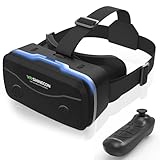


First, Decide What You Mean by VR on a Phone
People searching this phrase usually want one of three things, and each points to a different product.
- Phone-in-a-holder VR: a plastic or foam viewer with lenses. Your phone provides the screen and sensors.
- A headset that pairs with your phone: a standalone headset that uses a phone app for setup, casting and store access.
- Display glasses driven by your phone: wearable screens that mirror your phone for games, video and streaming apps.
The State of Phone-Based VR
The big phone-VR platforms from a few years ago, Samsung’s Gear VR and Google’s Daydream, have been discontinued by their makers. Google’s Cardboard design remains an open specification, so many third-party viewers still follow it, but there is no active flagship platform behind them. That means app support is thin and mostly limited to simple experiences, 360-degree video and a handful of older games.
Quick Comparison
| Option | Best for | Key points | Limits |
|---|---|---|---|
| Cardboard-style phone viewer | Trying VR on the cheapest budget | Phone sits in the front; lens spacing and size vary by model | Basic tracking, no controllers, small game library |
| Meta Quest 3S | Real VR gaming with phone as companion | Standalone chip (Snapdragon XR2 Gen 2, per Meta); the Meta phone app handles setup and casting | Phone does not power the headset |
| Meta Quest 3 | Higher image quality, mixed reality | Sharper display, pancake lenses (per Meta) | Mid-range to premium tier |
| Display glasses such as XREAL or VITURE models | Big-screen gaming and video from a phone | Connect over USB-C when the phone supports video output | Not true VR on many models; compatibility depends on the phone |
Phone-Slot Viewers: What to Check
These viewers are inexpensive, so the main risk is a poor fit rather than a bad price. A few details decide whether one works for you.
- Phone size: makers list a maximum phone width or screen size. Large modern phones, especially with a thick case, may not fit.
- Lens adjustment: adjustable lens spacing and focus help avoid blurry or uncomfortable viewing.
- Head strap and padding: a plain handheld viewer is fine for short clips, but a strap is easier on long viewing.
- Heat and battery: a phone running a 3D app can warm up and drain quickly, so shorter sessions are sensible.
- Phone screen resolution: a sharper phone display usually looks better through the lenses, although the lenses limit the improvement.
Bear in mind that viewers do not track your hands, and head tracking relies on the phone’s motion sensors, so experiences are basic compared with a dedicated headset.
Standalone Headsets Used With a Phone
A standalone headset is where most gamers should end up. The Meta Quest 3S and Quest 3 both run games on their own chip. Meta’s phone app is used for account setup, browsing the store, and sometimes casting what you see to a screen. Neither headset uses your phone for processing, so it does not matter what phone you own, other than being able to install the companion app on iOS or Android.
Reviewers at UploadVR and Road to VR frame the Quest 3S as the sensible entry point, with the Quest 3 offering a sharper picture and better lenses for buyers who read text or play for hours. Both support controllers, hand tracking and a large library that older phone viewers cannot match.
Display Glasses Connected to a Phone
XREAL, VITURE and RayNeo are among the makers selling wearable display glasses that plug into a phone over USB-C. These show a large virtual screen for streaming, console remote play and some mobile games. Compatibility is the key issue: the phone’s USB-C port must support video output over DisplayPort Alternate Mode, and not every Android phone does. Apple has stated that iPhone 15 models and later with USB-C can output video, but you should read the glasses maker’s compatibility list for your specific phone. These products are better thought of as personal displays than full VR, since many models offer limited head tracking compared with a headset.
Pick X If You Want…
| If you want… | Pick |
|---|---|
| To try VR for as little as possible | A Cardboard-style viewer sized for your phone |
| Real VR games with controllers | Meta Quest 3S |
| Clearest image for long sessions | Meta Quest 3 |
| A big private screen on the go | Display glasses with USB-C video output |
| Casting and companion features from your phone | Either Quest headset with the Meta app |
Budget Tiers
- Budget: a generic phone viewer, or the Quest 3S if you can stretch.
- Mid-range: Quest 3S or display glasses.
- Premium: Quest 3, or higher-end display glasses with better optics.
Common Mistakes
- Buying a viewer without checking the maker’s maximum phone size.
- Expecting a phone viewer to deliver console-style gaming.
- Assuming every USB-C phone can drive display glasses.
- Ignoring age guidance. Meta publishes minimum ages for its headsets and recommends supervising younger users.
- Using a phone viewer for long sessions, which can cause eye strain or discomfort.
Frequently Asked Questions
Can I use any phone with a VR headset?
For phone-slot viewers, the phone has to fit the holder and have motion sensors. For Quest headsets, any phone that can run the Meta companion app is enough, since the headset has its own processor. For display glasses, the phone must support video output over USB-C.
Are Cardboard-style viewers still worth buying?
They are fine for watching 360-degree video or testing the idea cheaply. App support has faded since the major phone-VR platforms ended, so most gamers will outgrow them quickly.
Do I need a high-end phone for phone VR?
A newer phone with a sharp screen and good sensors generally gives a better image in a viewer. It does not matter for a standalone headset, which does its own processing.
Do display glasses count as VR?
Not in the full sense. Many models act as a screen floating in front of you, with limited or no room-scale tracking. They suit video and casual gaming, while a headset suits immersive games.
Is VR safe for kids?
Makers publish minimum ages and advise supervision and regular breaks. Follow the manual, and speak with a doctor if a child has concerns about vision or dizziness.
Will a phone viewer harm my phone?
A viewer itself does not damage a phone, but heavy 3D use can warm the device and drain the battery. Take breaks, remove a thick case if it traps heat, and stop if the phone becomes very hot.







Write Your Review
No reviews yet. Be the first to share your experience!