
- Top Pick: 18650 Battery Charger for 3.7V/3.6V Li-ion Batteries 26650 18650 21700 14500 16340(RCR123), Ni-MH/Ni-Cd AA AAA C Batteries-Upgraded
- Best Value: IMREN 18650 Battery Charger,21700 Battery Charger for 3.7V 14500 10400 18500 18350 18650 18700 20700 21700 22650 26650 Li-ion Battery,1.2V Ni-MH/Ni-Cd Battery,4 Bay 18650 USB C Charger
- Premium Choice: 18650 Battery Charger, Ledorr Smart Universal Battery Charger with LCD Dispaly for 3.7V/3.6V Rechargeable Batteries Li-ion 2170 26650 14500 16340 18650, Ni-MH/Ni-Cd AA AAA C Batteries
The best 18650 charger for most people is a multi-bay smart charger with independent channels, selectable current and automatic cut-off, from established makers such as XTAR, Nitecore, Opus or Panasonic’s Eneloop-style brand for general cells, while a simple single-bay USB charger works for one flashlight. Choose a charger that supports lithium-ion chemistry, shows charge status and lists safety protections. This guide explains what to check and how to charge safely.
As an Amazon Associate we earn from qualifying purchases at no extra cost to you.


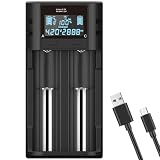

At a Glance: Charger Types
| Type / example brands | Best for | Features makers list | Limit |
|---|---|---|---|
| 2 to 4 bay smart charger (XTAR, Nitecore) | Flashlight and vape-free hobby use, pairs of cells | Independent channels, selectable charging current, LCD or LED status | Capacity varies, so check the cell’s own rated current |
| Advanced analyzer charger (Opus, XTAR with screen) | Enthusiasts who test capacity and internal resistance | Displays voltage and capacity; Opus models often offer test modes | More settings to learn |
| Single-bay USB charger | One cell, travel | Compact, USB powered | Slow and basic |
| Multi-chemistry charger (Nitecore Intellicharger line) | Mixed AA, AAA, 18650 households | Handles NiMH and lithium-ion | Must select correct mode and slot |
| 8-bay charger (XTAR, Opus) | Battery packs, e-bike repairs, large collections | Many slots with independent control | Large and needs a good power source |
Know What an 18650 Is
An 18650 is a cylindrical lithium-ion cell about 18 millimeters wide and 65 millimeters long. It powers flashlights, power banks, laptop packs and many hobby devices. Standard lithium-ion cells have a nominal voltage of 3.6 or 3.7 volts and a full-charge voltage of about 4.2 volts, according to cell data sheets. Many are protected, with a small circuit at the end; others are unprotected button-top or flat-top cells. Always match the charger to the cell chemistry shown on the label.
Features That Matter
Independent charging channels
Each bay should have its own circuit so cells of different capacities or charge states do not interact. This is the biggest difference between serious chargers and cheap ones.
Selectable current
Choose a charger with adjustable current, often in steps such as 0.5 A, 1 A or higher, or a charger that sets current automatically. The cell manufacturer’s data sheet gives the standard charge rate and the maximum. Charging at a slower rate is gentler and is often recommended when you do not need speed.
Cut-off and termination
A good charger uses a constant current then constant voltage profile and stops when the charge current drops to a low termination level. Look for automatic shut-off at full charge.
Protection features
Makers list protections such as reverse polarity, short circuit, over-temperature and over-charge protection. Reverse polarity matters because inserting the cell the wrong way is easy to do. Buy a model that clearly states these protections instead of an unbranded unit that does not.
Cell size and bay design
Check that the bay fits the length of your cell, including protected cells that are longer than unprotected ones. Spring-loaded contacts should hold the cell firmly. Wide bays can also accept 26650 or 21700 cells, which is handy if you have other formats.
Display and information
LED lights show charging or full. LCD models give voltage or percent. Analyzers can show capacity, internal resistance and discharge tests, which enthusiasts use to reject worn cells.
Power input
Some chargers use USB-C with a wall adapter, others a dedicated power supply. Look at the input requirement in the manual. A weak USB adapter may limit charging speed or cause the charger to stay in a low-power mode.
Charging Safety
Lithium-ion cells can be hazardous if damaged, overcharged or charged on the wrong chemistry setting. Follow these steps, and read the manual from the charger and the cell maker.
- Use a charger designed for lithium-ion cells, and select the right mode if the charger offers several.
- Do not charge cells with torn wrap, dents, swelling, leaks or heat damage. Dispose of them at a battery recycling point.
- Charge on a hard, non-flammable surface and keep away from carpet, bedding and clutter.
- Do not leave charging unattended for long periods, and do not charge in a hot car.
- Never mix old and new cells, or different brands, in the same device pack.
- If a cell becomes hot, smells or swells while charging, unplug the charger and move away. Do not use it again.
Budget Tiers
| Tier | Typical choice | Trade-off |
|---|---|---|
| Budget | Basic two-bay charger from a recognized brand with LED indicators | Fewer settings and little information |
| Mid-range | XTAR or Nitecore four-bay with an LCD and selectable current | Good for most households and hobbyists |
| Premium | Opus or similar analyzer, 8-bay or high-output model | More complexity and size |
Pick X If You Want Y
| If you … | Choose |
|---|---|
| Own one flashlight and a spare cell | A two-bay smart charger from a known maker |
| Want to see capacity and spot weak cells | An analyzer-style charger such as an Opus |
| Charge AA, AAA and 18650 cells | A multi-chemistry charger from Nitecore or XTAR |
| Rebuild a pack or manage many cells | An 8-bay with independent channels |
| Travel light | A compact USB single-bay charger |
| Want gentle, slow charging for longevity | A charger with adjustable low current settings |
Common Mistakes
- Choosing a cheap charger with no stated protections or brand.
- Charging at a rate above the cell data sheet recommends because the charger can.
- Assuming all 18650 cells are the same. Capacity, discharge rating and protection differ widely.
- Buying cells with inflated capacity claims. Reputable makers list realistic numbers and data sheets.
- Charging damaged cells or letting cells sit fully charged in heat for long periods.
- Using the wrong mode on a multi-chemistry charger.
Alternatives
If your device has a built-in USB-C port, many modern flashlights charge the cell inside the light, which is convenient but less informative than an external charger. Power banks with replaceable 18650 cells use their own charging circuit. For maintaining many cells, a dedicated analyzer helps you find those that fall short. For high-power devices, consider newer 21700 cells and a charger that supports them.
Frequently Asked Questions
How long does an 18650 take to charge?
It depends on capacity and charging current. Divide the capacity by the charging current for a rough estimate, and expect extra time for the final constant-voltage phase. A slower rate is gentler on the cell.
Can I charge an 18650 in a phone charger?
No. A phone charger is not a lithium-ion cell charger. Use a charger designed for 18650 cells with the proper cut-off and protections.
Do I need a charger with a display?
Not always. LEDs are enough for basic use, but a display helps you see voltage and spot problems, which is useful if you own many cells.
Are protected cells different to charge?
They charge the same way, but they are slightly longer and may not fit every bay. The protection circuit is a safeguard, not a substitute for a good charger.
What do I do with a worn-out 18650?
Do not throw it in household trash. Take it to a battery recycling drop-off, and tape the terminals to prevent shorting.
Can I leave cells on the charger overnight?
Quality chargers stop at full charge, but makers generally advise against unattended charging. Charge where you can respond, and unplug when finished.







Write Your Review
No reviews yet. Be the first to share your experience!