
- Top Pick: GETPALS Wireless Charger iPhone Charging Station for Apple Multiple Devices | 3 in 1 Charger Stand for iPhone 18 Pro Max 17 17e 16 16e 15 14 13 12 & Watch Series 12-2 SE Ultra & Airpods 5 4 3 Pro, Black
- Best Value: 3 in 1 Mag-Safe Wireless Charger Stand for iPhone Apple Watch AirPods | Adjustable Blue Ambient Light,15W Magnetic Charging Station for iPhone 18 17 16 15 14 13 12 Series wireless charging station
- Premium Choice: Anker Prime 25W Qi2.2-Certified Palm-Sized 3-in-1 Foldable MagSafe Charger | Travel-Ready Charging Station, AirCool Wireless Charger for iPhone 18 Pro, Apple Watch, AirPods(Adapter Included,Non-Battery)
A multi-device charging station suits a gamer best when it matches the phone you carry, because a Qi2 or MagSafe-style pad suits a recent iPhone, a plain Qi stand suits most Android phones, and a three-in-one station suits anyone who also wears a watch and uses earbuds during long sessions. The right pick is decided by compatibility, cable and power-brick quality, and how the stand sits on a crowded desk, not by headline wattage alone.
As an Amazon Associate we earn from qualifying purchases at no extra cost to you.
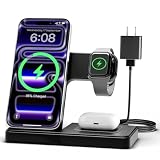


Quick comparison of charging station types
| Type | Best for | Typical stated capability | Limits |
|---|---|---|---|
| Single upright stand (Qi) | Android phone owners who watch video or take calls while charging | Makers commonly list 10W to 15W output | Case thickness and coil alignment affect charging |
| Magnetic Qi2 pad or stand | Recent iPhone owners and Qi2-ready Android phones | Qi2 certification allows up to 15W; the Qi2.2 update raises this to 25W for supported phones | Needs a supported phone or a magnetic case for a firm hold |
| Three-in-one station | Phone, watch and earbuds on one desk spot | Combined output split across coils | Watch pad is brand-specific; bulky footprint |
| Flat multi-pad mat | Two phones or phone plus earbuds | Per-pad output usually lower than a single stand | Phone must lie flat, so notifications are harder to see |
| Wireless charger with wired ports | Desks short on sockets | USB ports add to total power budget | Wired and wireless output share one adapter |
What to check before choosing
Standard support
Qi is the long-running open standard. Qi2 adds a magnetic alignment ring, and the Wireless Power Consortium describes it as bringing magnetic positioning to the wider ecosystem. Recent iPhones support Qi2-style charging, and several Android makers have added support on newer phones. An older phone without the magnetic ring will still charge on a Qi2 pad, but it will not snap into place unless you add a magnetic case or ring.
Power supply included or not
Many stations ship without a wall adapter, or include a cable only. The maker will state the adapter required for full speed. Using a weaker adapter usually means slower charging, so read the product listing for the stated adapter rating before buying.
Certification and safety
Look for a station that states Qi or Qi2 certification and lists over-temperature and foreign-object protection. Those features are described by makers, not guaranteed by the category, so confirm they are listed for the specific model. Keep chargers away from bedding and do not cover them while in use, as the maker’s manual will advise.
Case and accessory thickness
Thick cases, metal plates, wallet attachments and popsockets can interrupt wireless charging. If you use a heavy-duty case, a stand with a generous coil area or a magnetic alignment system is more forgiving.
Brands to shortlist in 2026
These makers have long-running charging lines and appear regularly in tech-outlet roundups. Confirm the exact model year and specifications on the maker’s page, as lineups are refreshed often.
- Anker: Offers MagGo-branded Qi2 pads and stands, including multi-device stations. The maker markets certified Qi2 and Qi2.2 products with a mix of stands and folding travel options.
- Belkin: Sells BoostCharge Pro Qi2 stands and three-in-one stations, many designed around Apple devices and described by the maker as certified.
- Satechi: Known for aluminum desk-friendly stands and multi-device docks that match laptop and monitor setups.
- UGREEN: Sells Qi2 stands and three-in-one chargers positioned at the budget to mid-range tier.
- Spigen and ESR: Offer magnetic Qi2 stands and kickstand-style chargers, often marketed with case-compatibility notes.
- Logitech and Razer: Gaming peripheral brands that have shown charging stands and docks aimed at desk setups; check whether a current model is on sale in your region.
Pick by buyer
| Pick this if you… | Choose | Why |
|---|---|---|
| Use a recent iPhone and want fast, tidy charging | Certified Qi2 or Qi2.2 magnetic stand | Magnetic alignment keeps the coil lined up |
| Use a mainstream Android phone without magnets | Qi stand with a wide coil area | Forgiving placement and upright viewing |
| Own an Apple Watch and earbuds as well | Three-in-one station with a watch pad | One cable and one adapter for three devices |
| Travel often with your gaming laptop | Folding magnetic charger | Packs flat and charges in a hotel or at an event |
| Have two phones on the desk | Dual-pad mat or two stands | Each device gets its own coil |
| Want the lowest-cost reliable option | Budget certified Qi stand | Basic output, but still with the safety protections the maker lists |
Budget tiers explained
At the budget tier, expect a single-coil Qi stand with modest output, a bundled cable, and no adapter. Mid-range stations usually add certified Qi2 support, a sturdier base and better thermal protection. The premium tier adds metal or heavy bases, multiple coils, a dedicated watch charger and sometimes a bundled high-wattage adapter. Reviewers at outlets such as The Verge, Wired and Tom’s Guide commonly note that paying more primarily buys build quality and extra devices, not dramatically faster phone charging, because the phone itself limits how much power it accepts.
Gamer-specific considerations
Long sessions with a phone used as a second screen, for chat or a companion app, favor an upright stand that holds the screen at eye level. If you stream, a stand with a low-glare finish and no bright indicator LED is less distracting on camera. Wireless charging also generates warmth, and a phone running a game while charging will warm further, so many gamers charge between matches and play on battery, or use a wired connection during demanding sessions. If your phone offers a battery-protection or charge-limit mode in its settings, it can be worth enabling while the phone sits on a charger all day.
Common mistakes
- Buying a Qi2 stand for a phone that does not support Qi2 and expecting magnetic hold.
- Assuming the box includes a wall adapter and ending up with slow charging.
- Forgetting that a watch charging puck for one brand rarely works with another brand’s watch.
- Using a thick case with metal plates or card holders behind it.
- Placing the station on a cluttered desk next to metal objects, which the maker may flag as foreign-object interference.
- Judging by maximum wattage without checking what the phone actually accepts wirelessly.
Alternatives to a wireless station
A fast wired charger remains quicker and cooler for most phones, and a short braided cable on a desk clip is cheap and durable. A power bank with a magnetic back is handy for travel and keeps charging even when you leave the desk. For people who mainly want to tidy cables, a desk shelf with built-in USB-C ports may be more useful than a wireless pad.
Frequently Asked Questions
Is wireless charging slower than wired?
Generally yes. Wireless transfer loses some energy as heat, and phones accept less power wirelessly than through a cable. For overnight or desk top-ups the difference rarely matters, but for a quick boost between matches a cable is faster.
Do I need Qi2 or is regular Qi enough?
Regular Qi works with most phones and is often cheaper. Qi2 matters if your phone supports magnetic alignment, because it keeps the phone centered and allows the higher output the standard describes.
Will a case stop my phone from charging?
Thin plastic or silicone cases usually work. Thick cases, metal parts and attached wallets can block or reduce charging, and the charger maker’s manual typically lists the maximum case thickness it supports.
Can one station charge a phone, watch and earbuds?
Yes, three-in-one stations are made for that. Check that the watch pad is compatible with your specific watch brand and that your earbuds case supports wireless charging.
Is it safe to leave a phone on a wireless charger overnight?
Certified chargers include temperature and foreign-object protection that the maker describes. Keep the unit uncovered, use the adapter the maker specifies, and stop using any charger that becomes unusually hot or shows damage.
Why does my phone charge slowly on a stand?
Common causes are a low-rated adapter, a misaligned coil, a thick case or a warm phone throttling its input. Try removing the case, repositioning the phone and using the adapter the maker lists.







Write Your Review
No reviews yet. Be the first to share your experience!