


AMD 7800 XT drivers are what keep this excellent 1440p Radeon card running at its best, whether you are fixing a crash, chasing more frames, or setting up a fresh build in 2026. The right AMD Adrenalin driver, installed cleanly, makes a real difference to stability and performance on the RX 7800 XT. This review explains what the latest Adrenalin drivers offer, what owners report, and how to install and troubleshoot them, so you can get the most from your RX 7800 XT with confidence. On a card this capable, a healthy driver is what lets you actually enjoy the performance you paid for, rather than losing it to avoidable crashes and stutter.
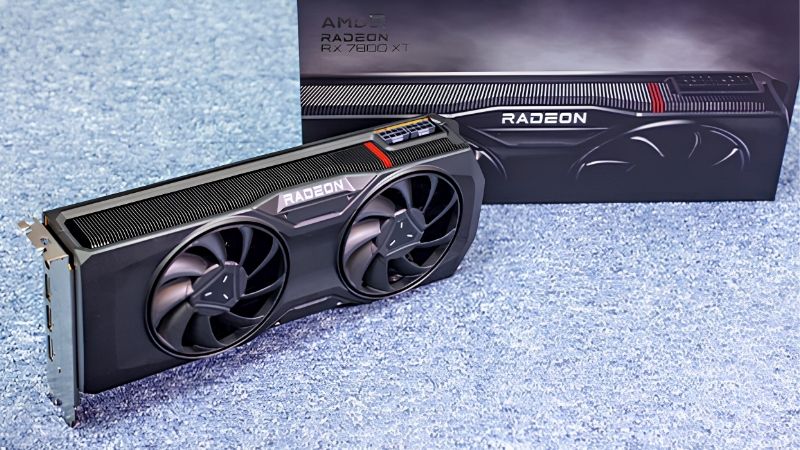
RX 7800 XT Drivers Overview and Who Needs Them
Before the fixes, it helps to know what AMD’s software actually does and which driver branch fits your use. For a capable 1440p card, keeping the driver healthy is one of the simplest ways to protect both performance and stability. It costs nothing but a few minutes, which makes it the best-value habit any RX 7800 XT owner can build into their routine.
As an Amazon Associate we earn from qualifying purchases at no extra cost to you.


What the Latest Adrenalin Drivers Offer
AMD supports the RX 7800 XT through its Adrenalin software, which bundles the driver with performance tools, tuning options and features like FSR. Regular updates optimise new games and fix known issues.
On a 16GB, RDNA 3 card with 3,840 stream processors, these updates help maintain the smooth 1440p performance the 7800 XT is built for. On a card with this much capability, an outdated driver can quietly leave frames on the table, so staying current directly protects the experience you paid for.
Keeping Adrenalin current is one of the easiest ways to protect the card’s performance, since AMD frequently ships game-day optimisations for major releases. Updating around the launch of a game you are excited about is a simple habit that often unlocks noticeably better performance on day one.
Recommended (WHQL) vs Optional Drivers: Which to Pick
AMD offers two driver branches, and the right choice depends on your priorities. Recommended (WHQL) drivers are certified and stable, and are the safe default for most owners.
Optional drivers arrive sooner with day-one game support and new features, but with slightly less validation, so they can occasionally introduce a bug.
For maximum stability, pick Recommended; for the newest game support, pick Optional. Both install directly through the Adrenalin app in a few clicks. There is no penalty for switching between them, so many owners run Recommended most of the time and only move to Optional when a new game specifically calls for it.
What Users Say: Driver Ratings Round-Up
Across owner feedback, the positive pattern is consistent: praise for strong performance, useful FSR gains, and the feature-rich Adrenalin app that bundles tuning and monitoring in one place. Owners often single out this software as a genuine advantage of the card, since it puts overclocking, recording and performance metrics behind a single, polished interface.
The complaints focus on occasional driver timeouts or crashes on some setups, the need for a DDU clean install after a bad update, and the odd Adrenalin app quirk.
The balanced read is that a clean install resolves most problems, and owners who install carefully and update sensibly rarely face lasting issues, while messy installs cause the majority of complaints. The recurring lesson across reviews is that how you install the driver matters at least as much as which version you install, so a careful clean install prevents most of the trouble before it starts.
How the RX 7800 XT Performs With Updated Drivers
Drivers only matter for what they do in real use. Here is how the RX 7800 XT behaves on current Adrenalin drivers, the issues owners most often meet, and how to keep the card stable over time.
1440p Performance and FSR on Current Drivers
With up-to-date drivers, the RX 7800 XT is a strong 1440p performer, delivering smooth high-refresh gameplay across the large majority of titles, helped by its generous 16GB buffer.
FSR, improved through Adrenalin updates, reclaims meaningful frames in supported games, letting the card stretch further in demanding titles without a large drop in image quality. Combined with the 16GB buffer, this makes the 7800 XT comfortable at 1440p in even the most demanding recent releases when settings are tuned sensibly.
Practical takeaway: staying current on Adrenalin and using FSR where available is exactly how owners keep the 7800 XT feeling fast as game requirements climb. Each new wave of releases leans harder on both raw performance and upscaling, so an up-to-date Adrenalin stack is what lets the card keep pace year after year.
Common RX 7800 XT Driver Issues and Fixes
The typical problems are driver timeout errors, black screens and crashes to desktop, and nearly all trace back to a corrupted or conflicting driver install rather than the hardware.
The reliable fix is a clean reinstall using DDU in Safe Mode to remove the old driver completely before installing the latest Adrenalin package, which resolves the large majority of these issues. It takes only about fifteen minutes and clears problems that hours of smaller tweaks often cannot, which is why it is the fix experienced owners reach for first.
If a specific release misbehaves, rolling back to the last stable driver is a quick workaround, and disabling clashing overlays often clears up stubborn crashes or stutter. Recording tools, monitoring apps and game launchers can all interfere with a driver, so temporarily switching them off is a fast way to confirm whether the driver is truly at fault.
Keeping Your RX 7800 XT Drivers Stable
Stability comes from good habits. Update through the Adrenalin app or AMD’s official site rather than third-party tools, and favour Recommended drivers unless you need an Optional release for a specific game.
Once a driver runs well, there is no need to install every new version; update for the games you play or the problems you need solved. This measured approach avoids the small risk that comes with every new release and keeps you on a driver you already know is stable.
Keep a known-good driver saved offline so you can roll back quickly if an update causes trouble, a simple safeguard on a card you rely on for gaming. When the 7800 XT is your main way to play, the ability to revert a bad update in minutes turns a potential lost evening into a minor inconvenience.
Getting the Most From Your RX 7800 XT in 2026
Drivers keep the 7800 XT healthy, but they work within the card’s fixed limits. This section weighs the pros and cons, shows the cleanest install method, and explains when an upgrade makes more sense than another driver update.
Pros and Cons of the RX 7800 XT and Its Driver Support
The honest balance sheet, based on the card’s strengths and the recurring themes in driver feedback.
| Pros | Cons |
|---|---|
| Feature-rich Adrenalin software and tuning | Occasional driver timeouts on some setups |
| Strong 1440p performance with 16GB VRAM | Optional drivers can introduce rare bugs |
| Regular FSR and game-day optimisations | A bad update may require a DDU clean install |
| Good stability once cleanly installed | Drivers cannot add raw performance |
With well-maintained drivers, the RX 7800 XT stays a dependable, high-value 1440p card for years of gaming. Its blend of strong performance, a generous 16GB buffer and a feature-rich software suite is exactly why it remains a popular recommendation in this class.
How to Install and Update RX 7800 XT Drivers Cleanly
For routine updates, the Adrenalin app’s built-in update is fast and usually all you need to stay current.
For persistent problems, run DDU in Safe Mode to remove the old driver, then install the latest Adrenalin package fresh, which is the professional approach that fixes stubborn cases. It clears out any leftover files from previous installs, which is why it succeeds where a simple update over the top often does not.
Always download the driver before removing the old one, so you are never left without working graphics part-way through the process.
When Drivers Can’t Help: Time to Upgrade?
Drivers can optimise and stabilise, but they cannot add raw power. If the RX 7800 XT is struggling at your target settings even on the latest driver, the card itself is the limit rather than the software.
For consistently high settings in the most demanding new games or a move to 4K, a more powerful card delivers gains that no driver update can match. Driver optimisation keeps the 7800 XT at its best, but it cannot conjure the extra horsepower that a higher tier of card provides.
If you have kept your drivers current and still want more performance, comparing modern GPU prices is the logical next step, and you can review current options through the links on this page. Weigh the cost of an upgrade against how much longer the 7800 XT will meet your needs, and let that balance guide the decision.
See More:
Conclusion
Keeping your AMD 7800 XT drivers current and cleanly installed is the simplest way to protect the smooth 1440p performance this Radeon card is known for, and it resolves the timeouts, crashes and black screens that catch out so many owners. Choose Recommended drivers for stability or Optional for the newest game support, lean on FSR, and use a clean DDU reinstall whenever a bad update strikes. When even the latest AMD 7800 XT drivers cannot deliver the performance you want, that is the signal to consider an upgrade. Compare current GPU prices through the links on this page, and decide whether a more capable card is the better long-term choice.
Frequently Asked Questions
Which Adrenalin settings should I enable on an RX 7800 XT?
Start with AMD Fluid Motion Frames 2 for supported single player titles, Anti-Lag for competitive shooters, and FreeSync matched to your monitor refresh range. Radeon Chill is useful for capping power in menu-heavy games. Leave Radeon Boost off in shooters, since its dynamic resolution drop during fast camera movement is very visible at 1440p.
What power supply and connectors does the card need?
The RX 7800 XT draws roughly 263 watts board power and uses two standard 8-pin PCIe connectors, not the 12V-2×6 plug. A quality 650 watt unit is workable with a mid-range CPU, but 700 to 750 watts gives comfortable headroom for transient spikes. Use two separate cables rather than one daisy-chained pigtail.
How do I fix high idle power on multiple monitors?
RDNA 3 cards can hold memory clocks high when monitors run mismatched refresh rates or resolutions. Set both displays to the same refresh rate, or drop the secondary panel to 60 Hz, and enable the display compression option if available. Newer Adrenalin releases improved this substantially, so make sure you are not on an old 2023 or 2024 build.
Is 16GB of VRAM enough for 1440p and 4K?
Yes. 16GB on a 256-bit GDDR6 bus is comfortable for maxed 1440p including ray tracing in most titles, and remains adequate at 4K when you use FSR quality upscaling. It is the main reason the card ages better than 12GB competitors, since texture packs and frame generation both add to the memory footprint.
Why do I get driver timeouts after undervolting?
An undervolt that passes a benchmark can still fail during low-load transitions, which is when RDNA 3 crashes most often. Raise the minimum voltage by 15 to 25 millivolts, avoid lowering the maximum clock too aggressively, and test with a mix of light menus and heavy scenes. Reset tuning to default before installing any new driver.











Write Your Review
No reviews yet. Be the first to share your experience!