
- Top Pick: msi Gaming RTX 3050 Ventus 2X 6G OC Graphics Card (NVIDIA RTX 3050, 96-Bit, Boost Clock: 1492 MHz, 6GB GDDR6 14 Gbps, HDMI/DP, Ampere Architecture)
- Best Value: ASRock Radeon RX 7900 XTX Phantom Gaming 24GB OC Graphics Card, 2615 MHz Boost Clock, 24GB GDDR6, DisplayPort 2.1, HDMI 2.1, Triple Fan Cooling
- Premium Choice: ASRock Radeon RX 6500 XT Phantom Gaming D 4GB OC Graphics Card, 2820 MHz Boost Clock, AMD RDNA 2 Architecture, GDDR6, Dual Fan Cooling, DisplayPort 1.4, HDMI 2.1
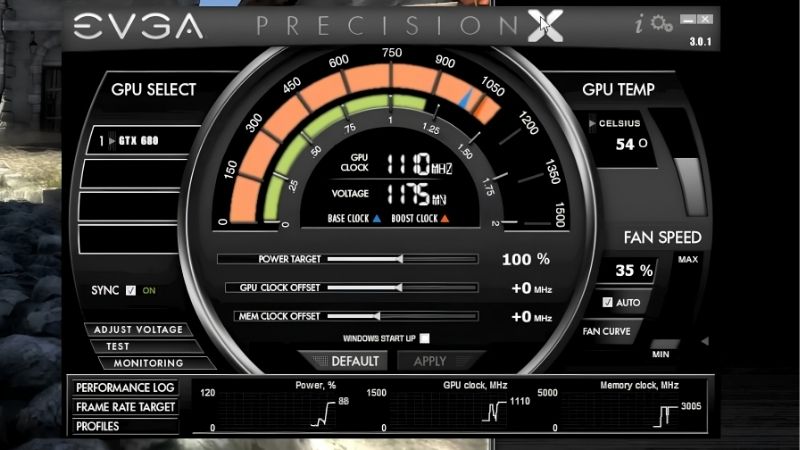
What is GPU boost clock is a question that matters more than most buyers realize, because this number often decides the real speed your card runs at while gaming. In simple terms, the GPU boost clock is the higher frequency a graphics card automatically reaches when conditions allow, above its guaranteed base clock. Modern Nvidia cards rarely sit at their base speed; they dynamically push higher whenever power and temperature permit. Understanding how boost clock works helps you read spec sheets accurately, keep your card running fast, and avoid paying for headline numbers you may never actually see. This guide breaks it all down clearly.
Understanding What GPU Boost Clock Is
To use this spec wisely, you first need to see how a modern GPU manages its own speed. Boost clock is not a fixed setting but a moving target the card chases in real time, and that behavior explains a lot about real performance.
As an Amazon Associate we earn from qualifying purchases at no extra cost to you.





Base Clock vs Boost Clock
The base clock is the guaranteed minimum speed a GPU will maintain under load, even in tough conditions. The boost clock is the higher speed the card aims for when there is thermal and power headroom.
Manufacturers advertise both, but the boost clock is the one you usually experience while gaming. In practice, a well-cooled card often runs above even its rated boost figure for stretches, then settles as it warms.
This is why two cards with the same base clock can feel different. The one that sustains a higher boost for longer delivers more real performance, even if the headline numbers look similar.
How GPU Boost Dynamically Works
Nvidia’s GPU Boost technology constantly monitors temperature, power draw, and voltage, then adjusts the clock speed many times per second. When everything is within limits, it pushes the frequency up to extract more performance.
The moment any limit is reached, whether heat, power, or voltage, the card eases the clock back down to stay safe and stable. This happens automatically and invisibly while you play.
The takeaway is that boost clock is opportunistic. The cooler and better-powered your card, the more often it can hold those higher speeds rather than backing off.
What Limits the Boost Clock
Three main factors cap how high a card boosts. Temperature is usually the biggest, as cards reduce clocks once they approach a thermal threshold to protect themselves.
Power limits matter too, since a card can only boost as far as its allotted wattage allows. Finally, the silicon’s own quality sets a ceiling, as not every chip can reach the same frequency at a given voltage.
These limits interact in real time, which is why boost behavior changes with conditions. On a cool day in a well-ventilated case, your card may hold near its peak clock for long stretches. In a warm room or a cramped case, the same card hits its thermal limit sooner and settles lower. Understanding that the advertised boost is a best-case ceiling, not a constant, is the key to setting realistic expectations and to knowing where you can claw back performance through better cooling.
Why GPU Boost Clock Matters for Performance
This spec is not just a number on a box; it directly shapes the frame rates you actually get. Because boost behavior depends on conditions, understanding it helps you predict and protect your card’s real-world speed, and it explains why two seemingly similar cards can perform quite differently once they are running hard in a real system.
Boost Clock and Real Frame Rates
Higher sustained boost clocks translate fairly directly into more frames per second, especially in games that lean on the GPU’s core speed. A card that holds its boost delivers smoother, faster gameplay.
However, clock speed is only one ingredient. Memory bandwidth, core count, and architecture all shape final performance, so a higher boost clock does not automatically mean a faster card across different models.
The clearest way to judge real performance is to look at benchmark frame rates, which already account for how well each card sustains its boost in practice.
The Pros and Cons of Chasing High Boost Clocks
Buying a card mainly for a high advertised boost clock can pay off, but it carries risks worth knowing before you spend extra.
Pros:
- A higher sustained boost clock usually means more frames in core-bound games.
- Factory-overclocked cards can squeeze out extra performance with no tuning needed.
- Strong cooling lets a high-boost card hold its speed longer.
Cons:
- Advertised boost figures are not guaranteed and depend on cooling and power.
- The real-world gain over a standard model is often small for a higher price.
- Higher clocks can mean more heat, noise, and power draw.
The balanced view is that boost clock deserves attention but not obsession. Within similar cards it is a fair hint at performance, yet a slightly higher advertised number rarely justifies a big price jump on its own. What you are really paying for with the best models is a cooler and power design strong enough to sustain those clocks. Judge the whole package, and the boost figure becomes useful context rather than a marketing hook.
Factory Overclocks and Custom Cards
Many board partners sell custom cards with higher advertised boost clocks than Nvidia’s reference design. These factory overclocks come with beefier coolers and tweaked power limits to sustain the extra speed.
The catch is value. The performance gain from a factory overclock is usually modest, often just a few percent, so it is worth paying for only when the price difference is small or the cooler is genuinely better.
What often makes a custom card worthwhile is not the clock number itself but everything built to support it. A stronger cooler, a sturdier power delivery, and quieter fans can matter more in daily use than the small frequency bump. So when you weigh a factory-overclocked model, look at the cooler quality and noise reviews rather than the headline clock, since those features are what you will actually notice while gaming, long after the few extra megahertz fade into the background.
How to Get the Most From Your GPU Boost Clock
Once you own a card, much of its boost performance is in your hands. A few simple choices about cooling, power, and setup decide how often your GPU hits and holds its highest speeds. Here is how to make the most of it without any risky tinkering.
Keeping Temperatures Low for Higher Boost
Since heat is the main limit on boost, good cooling is the most effective way to unlock performance. The cooler your GPU runs, the longer it sustains its highest clocks instead of throttling back.
Ensure your case has solid airflow with clear intake and exhaust paths, and keep the card’s fans and heatsink free of dust. These small habits can noticeably raise sustained boost clocks at no cost.
For an extra margin, a mild custom fan curve that spins the fans up sooner trades a little noise for cooler temperatures and steadier boost.
Power Limits and Tuning
Many cards let you raise the power limit slightly through tuning software, giving the GPU more headroom to maintain higher clocks. This is a safe and effective way to gain a little extra sustained performance.
Conversely, undervolting can keep boost clocks high while lowering heat and power draw, a popular tweak for quieter, cooler systems. Both approaches reward a little experimentation with measurable, real-world gains.
The good news is that this tuning is reversible and low-risk when done in small steps. Free tools let you nudge the power limit up or the voltage down, then test stability in a game or benchmark before going further. Many owners find that a careful undervolt actually raises their sustained boost clock, because the card runs cooler and therefore throttles less, giving them more performance and lower temperatures at the same time.
Choosing a Card by Its Boost Clock
When comparing cards, treat the boost clock as one factor alongside cooling quality and overall specs rather than the deciding number. A well-cooled standard card often beats a poorly cooled high-clock one in sustained use.
To find the right balance, compare current graphics cards and their verified prices through the links on this page, weighing boost clock against cooler design and value. A quick check now helps you pick a card that holds its speed where it counts.
When you compare models of the same GPU, look past the advertised boost number to the cooler and the reviews. A version with a larger, quieter cooler will usually sustain higher real clocks than a cheaper model with a flashier rated boost but weaker cooling. The best value is often a solidly cooled card at a sensible price, rather than the highest-clocked edition carrying a premium for a gain you may never fully see in practice.
See More:
Final Thoughts on GPU Boost Clock
To wrap up, the GPU boost clock is the higher, dynamic speed your graphics card reaches when temperature and power allow, and it usually defines the real performance you feel while gaming. Understanding what is GPU boost clock helps you read spec sheets honestly, since advertised numbers depend on cooling and power rather than being guaranteed. Keep your card cool, give it a little power headroom, and judge cards by sustained performance and value rather than headline clocks, and you will get the fastest, most consistent experience your GPU can deliver. Treat the boost figure as a starting point, let real benchmarks and cooler quality guide your final choice, and your card will reward you with steady, reliable speed exactly when your games demand it most, frame after frame.
Top-Rated Picks


Editor's Pick
GIGABYTE GeForce RTX 3060 Gaming OC 12G (REV2.0) Graphics Card, 3X WINDFORCE Fans, 12GB 192-bit GDDR6, GV-N3060 Video Card


| Product | Brand | Rating | Reviews | Price |
|---|---|---|---|---|
| MSI GeForce RTX 3060 Ventus 2X 12G OC, Gaming Graphic… | — | ★ 4.7 | 4.5k | $635.00 |
| GIGABYTE GeForce RTX 3060 Gaming OC 12G (REV2.0) Grap… | — | ★ 4.7 | 3.2k | $479.00 |
| EVGA GeForce GTX 1060 3GB GAMING, ACX 2.0 (Single Fan… | EVGA | ★ 4.6 | 3.4k | $247.79 |
| MSI Gaming GeForce GTX 1660 Super 192-bit HDMI/DP 6GB… | — | ★ 4.7 | 2.2k | $232.60 |
| MSI GeForce RTX 4060 Ti Ventus 3X 8G OC (8GB GDDR6/PC… | — | ★ 4.7 | 1.3k | $998.00 |
Frequently Asked Questions
Is boost clock a guaranteed speed?
No. The advertised boost clock is a typical figure the card should reach under normal conditions, not a ceiling or a promise. In practice a well-cooled card often runs above its rated boost in light scenes and drops below it in heavy ones, because the algorithm adjusts continuously to power, temperature and voltage.
Why does my card not hold its boost clock?
The most common reasons are hitting the power limit, reaching the temperature target around 83 degrees Celsius, or reaching the voltage ceiling. Monitoring software shows the current limiting reason. Improving case airflow, cleaning dust, and raising the power limit slider where available all help sustain higher clocks for longer.
What is the difference between base clock and boost clock?
Base clock is the minimum frequency the card guarantees under sustained heavy load within its power and thermal specification. Boost clock is the opportunistic higher frequency it reaches when conditions allow. Modern cards spend nearly all their time near or above boost, so base clock is largely a legacy specification.
Does a higher boost clock mean a faster card?
Only within the same architecture and model. Clock speed cannot be compared across different generations or vendors because core counts, cache and instruction throughput differ enormously. A factory overclocked card with 100MHz more boost typically delivers one to three percent more performance than the reference version of the same model.
Is undervolting better than overclocking?
For most people yes. Lowering voltage while holding the clock steady reduces power draw and temperature, which often lets the card sustain higher clocks in long sessions than a stock configuration that throttles. The result is similar or better performance with less heat, less fan noise and lower power consumption.










Write Your Review
No reviews yet. Be the first to share your experience!