
- Top Pick: NIMO 17.3" AI Laptop for Business & Productivity, AMD Ryzen 5 6600H
- Best Value: HP OmniBook 7 Flip 16 inch 2-in-1 Next Gen AI PC, 2K Touchscreen Display, Intel Core Ultra 5 226V, 16 GB RAM, 512 GB SSD, Intel Arc 130V GPU, Windows 11 Home, Copilot+ PC, Glacier Silver, 16-au0000nr
- Premium Choice: Acer Aspire 14 AI Copilot+ PC – Intel Core Ultra 5 226V & 14” WUXGA Touch – NPU: Up to 40 Tops – GPU: Up to 53 Tops | Intel Arc 130V | 16GB LPDDR5X | 1TB Gen 4 SSD | Wi-Fi 6E | A14-52MT-59DP


Editor's Pick
EVGA GeForce GTX 1060 3GB GAMING, ACX 2.0 (Single Fan), 3GB GDDR5, DX12 OSD Support (PXOC) Graphics Cards 03G-P4-6160-KR


The best gpu for productivity turns hours of waiting into minutes, accelerating video editing, 3D rendering, photo work and increasingly local AI tasks. For creative work, what matters is VRAM capacity, CUDA acceleration and hardware encoders rather than raw gaming frame rates. Using current benchmarks, creator feedback and pricing, this guide ranks the top productivity cards, shows what each delivers across editing, rendering and AI, and explains how 2026’s AI-driven market shapes the smart buy. Let’s find the card that gets your work done faster without overspending.
As an Amazon Associate we earn from qualifying purchases at no extra cost to you.






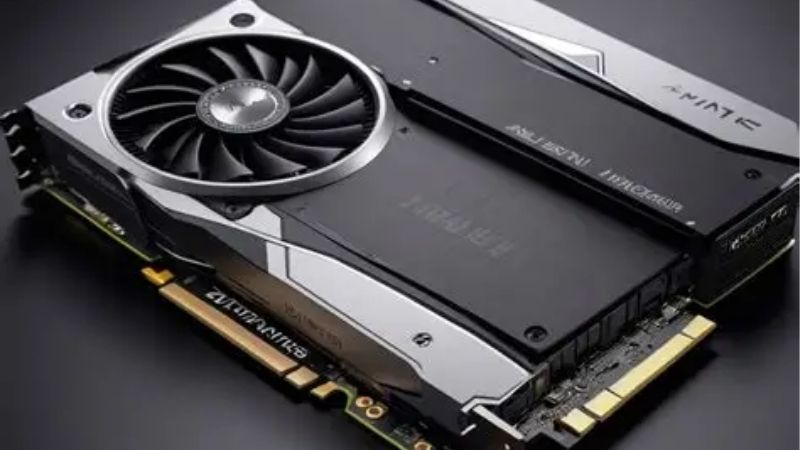
Quick Picks: Best GPU for Productivity at a Glance
If you are short on time, these three cards cover the main creative needs, balancing VRAM, CUDA power and price so you can match a card to your workflow without working through every review below.
Best Overall: Nvidia RTX 5070 Ti ($749, 16GB) – the ideal blend of CUDA power, VRAM and encoders for creators.
Best Budget: Nvidia RTX 5060 Ti 16GB ($429) – 16GB of VRAM at a price that suits side hustles and starters.
Best Premium: Nvidia RTX 5090 ($1999, 32GB) – massive memory for heavy 3D and local AI work.
| Card | VRAM | Price | Best For |
|---|---|---|---|
| Nvidia RTX 5070 Ti | 16GB | $749 | All-round creation |
| Nvidia RTX 5060 Ti 16GB | 16GB | $429 | Budget creators |
| Nvidia RTX 5090 | 32GB | $1999 | Heavy 3D and AI |
Best Overall: Nvidia RTX 5070 Ti
The RTX 5070 Ti is the best all-round productivity card because it pairs 16GB of VRAM with strong CUDA throughput and dual NVENC encoders that dramatically speed up video exports. For editors and 3D artists alike, it removes the most common bottlenecks.
It handles 4K editing in Premiere and DaVinci Resolve smoothly, accelerates Blender rendering through OptiX, and runs mid-sized AI models without strain. At $749 it offers the best balance of capability and cost for serious creators.
Its only real limit is the 16GB buffer for the very largest scenes or models. For the overwhelming majority of creative projects, it never holds you back.
Best Budget: Nvidia RTX 5060 Ti 16GB
The 16GB RTX 5060 Ti is a standout for budget-conscious creators because that generous memory buffer punches far above its $429 price for content work. It is ideal for side hustles, students and anyone starting out in editing or 3D.
It accelerates timeline editing, exports video quickly thanks to NVENC, and handles entry-level AI image generation comfortably. For the money, it delivers a genuinely professional-feeling experience.
Raw compute is a step below the pricier options, so the heaviest renders take longer. For everyday creative tasks, though, it is remarkable value.
Best Premium: Nvidia RTX 5090
For creators whose work involves massive 3D scenes or serious local AI, the RTX 5090 and its 32GB of VRAM remove the ceilings that frustrate smaller cards. Large models and high-resolution renders fit with room to spare.
Its enormous CUDA core count slashes render times, turning overnight jobs into short waits. For studios and power users, that speed translates directly into more billable output.
It is expensive and power-hungry, so it is overkill for light editing. For heavy professional workloads, the productivity gains make it worthwhile.
In-Depth Reviews of the Top Productivity Cards
The right creative card depends on whether your work is editing-led, render-heavy or AI-focused, so here is a closer look at how each option performs across the tasks that fill a creator’s day, from quick edits to overnight renders. The right match depends as much on your software as on raw specifications.
RTX 5070 Ti: The Creator’s Sweet Spot
In real-world use, the 5070 Ti makes 4K editing feel fluid, with smooth scrubbing and fast exports that keep you in the flow. Blender and Resolve both lean on its CUDA cores to cut waiting dramatically.
Creators repeatedly describe it as the card that finally makes their software feel instant, without the flagship price. It is the practical benchmark for productivity in 2026.
The card also shines in mixed workflows, switching from a Premiere export to a Blender render without missing a beat, which suits the generalist creators who wear many hats.
RTX 5060 Ti 16GB: The Value Starter
For newcomers, the 16GB 5060 Ti delivers a taste of professional speed at an accessible price, handling 1080p and 4K editing and light 3D with ease. The memory buffer is the unsung hero that keeps it relevant.
It is the card that lets a growing creator work efficiently without a major investment. As skills and projects scale, it remains a capable secondary or backup card.
Its low power draw and quiet operation also make it ideal for compact creator builds, where space and noise matter as much as raw output.
RTX 5090: The No-Compromise Choice
Benchmarks show the 5090 crushing render and AI workloads that bring lesser cards to a crawl, thanks to its memory and compute headroom. For the most demanding creators, nothing else comes close in the prosumer space.
It is the card you buy when waiting costs you money and large models are part of your daily work. For that audience, it is a straightforward investment in productivity.
For local AI in particular, the 32GB buffer lets creators run larger image and language models on their own machine, avoiding cloud costs and keeping sensitive projects private.
Pros and Cons of a Productivity GPU
Choosing a card for creative work involves clear benefits and a few trade-offs, so here is an honest look at the pros and cons tied to building a productivity-focused machine.
The Strengths That Speed You Up
Pros: Strong CUDA acceleration across creative apps, dual NVENC encoders for fast exports, and VRAM options from 16GB to 32GB that suit everything from editing to AI. These directly cut the time you spend waiting.
Nvidia’s Studio drivers add stability tuned for creative software, and the broad CUDA ecosystem means almost every professional tool is optimized for these cards. That software support is a real advantage.
The Trade-Offs to Consider
Cons: The premium card is expensive and power-hungry, and even the value picks ask you to weigh VRAM against raw compute. Pure gaming value is not the point here, so do not judge these cards on frame rates alone.
For very light creative use, a high-end card is more than necessary. Matching the card to your real workload is what protects your budget.
Who Should Buy a Productivity GPU
These cards suit video editors, 3D artists, photographers and AI hobbyists who want their software to feel fast and responsive. The time saved across a week of work quickly adds up.
Casual users with occasional editing needs can get by with a cheaper card. Step up to a high-VRAM option only when your projects genuinely demand it.
How 2026’s AI Boom Affects Productivity GPUs
Creative buyers are increasingly affected by the AI gold rush, since local AI tools and the silicon that powers them share the same hardware pipeline, so 2026’s market forces matter to productivity shoppers too.
AI Demand Is Reshaping the Market
A key development is the United States allowing Nvidia to sell its H200 data center chips to China, reopening huge demand for advanced silicon. That demand competes for the same manufacturing capacity that produces high-VRAM creator cards.
At the same time, local AI tools for image generation and language models are pushing creators toward higher-memory cards, increasing demand from the productivity side as well. Both trends point toward sustained pressure on the most capable cards.
Prices Have Steadied, Not Fallen
After the steep climb of late 2025, creator-class GPU pricing has leveled off through 2026. Companies such as Framework have noted this relative stability while cautioning that the market remains volatile and could shift again.
It is a plateau rather than a recovery, and the AI demand means prices may not drop soon. Creators should plan around today’s pricing rather than waiting for a discount that may not come.
What This Means for Creators Now
New supply is being built, with CXMT expanding DDR5 output and Micron constructing two new fabrication plants in Idaho, but these are not expected to run fully until around 2027 to 2028. Real relief is therefore years away.
For anyone earning from creative work, waiting years for uncertain price drops rarely pays off. Buying the right card now and using it to produce more is almost always the better return.
Buying Guide and FAQs
A few final fundamentals will help you choose the right productivity card and avoid paying for capability you will not use.
What to Look For in a Productivity GPU
Prioritize VRAM first, since running short on memory can stop a render or AI task outright. Then weigh CUDA performance for your main software and confirm the card has the NVENC encoders that speed up video exports.
Check that your power supply and case can support the card you choose, especially for the flagship. Matching the card to your specific creative tools is what delivers the best value.
Is Nvidia Better Than AMD for Productivity?
For most creative work, Nvidia holds a clear edge thanks to the CUDA ecosystem, OptiX rendering and NVENC encoders that creative software is heavily optimized around. That broad support reduces friction across nearly every tool.
AMD cards can perform well in specific applications and offer strong raw value, but the software optimization story still favors Nvidia. For dependable, accelerated creative work, Nvidia is the safer choice.
See More:
How Much VRAM Do I Need for Creative Work?
For 4K editing and moderate 3D, 16GB is a comfortable amount in 2026. For heavy rendering or sizable local AI models, stepping up to 24GB or 32GB removes the most common limits.
If local AI is central to your workflow, prioritize the largest buffer you can afford, since model size depends directly on VRAM. For mixed creative tasks, 16GB is the practical sweet spot.
A useful rule is to check the memory needs of your single most demanding tool, then buy a card that clears it comfortably, since that one application usually sets your real requirement.
To sum up, the best gpu for productivity in 2026 is the RTX 5070 Ti for its all-round blend of CUDA power, VRAM and encoders, with the RTX 5060 Ti 16GB for budget creators and the RTX 5090 for heavy 3D and AI. With AI demand keeping the market tight and real price relief years away, buying the right card now and putting it to work beats waiting for an uncertain drop. Check current pricing on these cards through the links above before you buy. As an Amazon Associate we may earn from qualifying purchases.
Frequently Asked Questions
Which GPU features matter most for productivity work?
VRAM capacity, encoder quality and compute ecosystem matter more than gaming frame rate. NVENC with AV1 support accelerates video export, CUDA unlocks the widest software support in Adobe, Blender and DaVinci Resolve, and a large memory buffer prevents crashes when working with high resolution timelines or complex 3D scenes.
How much VRAM do creative applications need?
For 1080p and 4K video editing, 12GB is comfortable. For 8K footage, heavy After Effects compositions, large Blender scenes or local AI models, 16GB to 24GB makes a real difference. Running out of VRAM in these workloads causes application errors and dramatic slowdowns rather than a gentle performance drop.
Is NVIDIA better than AMD for content creation?
For most creative software, yes. CUDA and OptiX have broader and more mature support in Blender Cycles, DaVinci Resolve neural features, Adobe accelerated effects and AI plugins. Radeon cards offer strong raw compute and good value, but you should verify your specific applications support them before buying.
Do I need a workstation card instead of a GeForce card?
Most creators do not. GeForce cards deliver the same or better raw performance for video editing, 3D rendering and photo work. Workstation cards add ECC memory, certified drivers for CAD and simulation software, larger VRAM options and better multi-display reliability, which matters mainly in professional engineering environments.
Does the video encoder quality actually matter?
Yes, for streaming and fast exports. Modern NVENC and AMD AV1 encoders offload H.264, HEVC and AV1 encoding from the CPU, letting you export timelines far faster and stream at higher quality per bitrate. Dual encoder cards can split large exports across both units for additional speed.











Write Your Review
No reviews yet. Be the first to share your experience!