
A GPU fan bracket screws into a free PCI expansion slot and holds standard case fans beside or below your graphics card, so those fans blow air directly onto the card instead of relying on case airflow drifting past. Most brackets are mounts only and you supply the fans, although a few designs in this category arrive with fans already fitted.
This guide is not about exhaust blowers, the enclosed slot fans that pull air out of the rear of a case, and it is not about replacement GPU fans, the model-specific parts that swap onto a card’s own cooler. A bracket does neither job. It adds new fans in a new position, aimed at the card’s intake side, backplate, or the memory and voltage regulator area its stock cooler serves poorly. The five brackets below cover dual, triple, and four-fan layouts in 80mm through 140mm sizes.
As an Amazon Associate, we earn from qualifying purchases.
Quick Answer
For most builders, the Maxmoral Dual Fan Mount Rack is the best GPU fan bracket because its two racks accept 80mm through 140mm fans and position them flexibly below a card. Builders with only small fans should pick the Maxmoral Triple bracket or the uxcell dual rack, while the ThtRht rack suits simple 90mm and 120mm pairs.
How to Choose
Start with fan size, because the bracket must match the fans you own or plan to buy. Compact 80mm and 90mm fans fit the triple and small dual racks and suit tight cases, while 120mm and 140mm fans move more air at lower speeds and need wider racks. Check hole spacing as well as diameter, and default to standard 25mm thick fans unless clearance below the card forces slimmer models.
Next, count free expansion slots and measure the gap. Every bracket anchors at a slot opening, and its fans extend inward below or beside the card. Measure from the card’s fan side down to the power supply shroud or the next card, and compare that distance with fan thickness plus the frame. Confirm the bracket fans will not sit so close to the card’s own intakes that the two fan sets fight each other.
Decide how many fans you need. Two fans aimed along the card cover most single-card builds. Three smaller fans spread air across a long card and its memory area. Four-fan frames suit extra-long cards or split use across two locations. More fans also means more cables and splitters to plan for, so match the count to a real thermal problem.
Consider material and hardware. Metal racks with a baked or varnished finish stay rigid under two or three fans and resist slow flex that makes fans buzz against a frame. Plastic racks are lighter and work fine for a pair of small fans. Either way, confirm the package includes slot screws, fan screws, and any joining buckles.
Finally, plan power and direction. The bracket is passive; your fans still need motherboard headers, a hub, or an adapter, and speed control comes from that connection. Orient every fan to blow toward the card’s intake side, and keep cables clear of the blades.
Maxmoral Dual Fan Mount Rack

The Maxmoral Dual Fan Mount Rack, model DFMRPSB-B2, is the most flexible option here. The package contains two metal racks rather than one, and each mounts into PCI slot space so you can position fans below or beside the graphics card. Run a pair side by side under a long card, spread them across two slot positions, or use one rack and keep the second for another build.
Its standout feature is fan size range: the listing supports 80mm, 90mm, 120mm, and 140mm fans, so spares already in your parts drawer will very likely fit. The racks are metal with a black baked paint finish for rust resistance, and the set includes two expansion connecting buckles plus mounting screws. At 3.53 ounces, the hardware adds little load while feeling like a permanent fixture. Aim one fan at the card’s intakes and the second across the back half and memory area, and this single purchase covers most layouts. The honest limitation is that no fans are included, so budget for fans and a splitter if your board is short on headers.
Specs
| Spec | Detail |
|---|---|
| Brand | Maxmoral |
| Model | DFMRPSB-B2 |
| Fan sizes supported | 80mm, 90mm, 120mm, 140mm |
| Fans held | 2 fans across 2 racks |
| Material | Metal, black baked paint finish |
| Mounting | PCI expansion slot |
| Included hardware | 2 racks, 2 connecting buckles, screws |
| Fans included | No |
| Weight | 3.53 ounces |
Maxmoral Triple Fan Mount Bracket

The Maxmoral Triple Fan Mount Bracket, model 3FAN-BRACE-89, is a single compact brace that holds three fans in one PCI slot position. Those fans are the smaller standard sizes, 80mm or 90mm, which makes this bracket a strong fit for small and mid-size cases where 120mm fans will not fit under the card, and for long cards that benefit from airflow spread across three points.
The brace is metal with a black stoving varnish finish, remarkably light at 0.32 ounces, and about 3.15 inches wide with a low, roughly one-inch profile. The package includes one brace, four fan connectors, and matched fixing screws. Your three fans connect to your board or hub as usual, ideally through one splitter so they share a speed. Choose this bracket when your problem is coverage rather than fan size: three 90mm fans beneath a long card feed its intakes evenly and push air across the backplate and memory chips. The trade-offs are clear, since it cannot accept 120mm or 140mm fans and still needs a genuinely free slot with clear space below the card.
Specs
| Spec | Detail |
|---|---|
| Brand | Maxmoral |
| Model | 3FAN-BRACE-89 |
| Fan sizes supported | 80mm, 90mm |
| Fans held | 3 fans on 1 brace |
| Material | Metal, black stoving varnish finish |
| Mounting | Single PCI expansion slot |
| Included hardware | 1 brace, 4 fan connectors, fixing screws |
| Fans included | No |
| Weight | 0.32 ounces |
Maxmoral Four Fan Mounting Rack 2-Pack

The Maxmoral Four Fan Mounting Rack 2-Pack, model FMRSBRGC-B2, is the high-capacity option, built around two frames that together hold four full-size fans. This set is cut for 120mm and 140mm fans only, so it suits builders who already run standard tower fans and want that same size blowing directly at the graphics card. Join the frames with the included expansion buckle for one long run beneath an extra-long card, or mount one frame by the GPU and use the second elsewhere in the system.
Construction matches the rest of the range, with metal frames, a black baked paint finish, and supporting screws and fasteners in the box. The set weighs 3.53 ounces, so even a loaded frame stays manageable for the slot screws. This is deliberately more bracket than most builds need: four large fans consume real room and can crowd a mid-tower. Buy it when a dual rack would leave part of a long, hot card unserved.
Specs
| Spec | Detail |
|---|---|
| Brand | Maxmoral |
| Model | FMRSBRGC-B2 |
| Fan sizes supported | 120mm, 140mm |
| Fans held | 4 fans across 2 frames |
| Material | Metal, black baked paint finish |
| Mounting | PCI expansion slot |
| Included hardware | 2 frames, screws, expansion buckle |
| Fans included | No |
| Weight | 3.53 ounces |
uxcell Dual Fan Rack Mount PCI Slot Cover Bracket

The uxcell Dual Fan Rack Mount takes a slot-cover approach. It is a flat dual rack that mounts at the PCI slot cover position and holds two fans in the 80mm to 90mm range, moving air across the video card area from the rear of the case. That shallow format suits builds where a deeper frame would foul the card, a cable run, or a neighboring expansion card, and where two modest fans are enough to break up the pocket of warm air under a graphics card.
The design keeps things minimal: mount your own 80mm or 90mm fans with standard screws and secure the assembly at the slot opening like a normal blanking plate. The result sits flush and tidy, which also suits workstations and home servers with passively cooled or low-profile cards needing a gentle wash of air. Because the fans sit at the slot line, airflow may cross the card’s edge rather than hit its intake face squarely in some cases, so check the angle before ordering.
Specs
| Spec | Detail |
|---|---|
| Brand | uxcell |
| Model | Dual Fan Rack Mount |
| Fan sizes supported | 80mm, 90mm |
| Fans held | 2 fans |
| Material | Metal rack |
| Mounting | PCI slot cover position |
| Included hardware | Rack bracket |
| Fans included | No |
| Best for | Compact and low-profile builds |
ThtRht Dual Fans Mount Rack
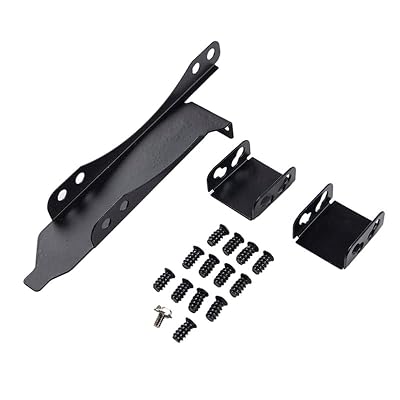
The ThtRht Dual Fans Mount Rack is the straightforward plastic alternative in this guide. It holds up to two fans, accepts both 90mm and 120mm sizes, and mounts at a PCI slot bracket position so the pair sits beside the graphics card and blows across its cooler. That size pairing covers the two most common spare fan sizes in gaming builds, so most buyers can populate it immediately.
The package is notably complete for a simple rack, with thirteen screws included covering fan-to-frame and frame-to-case fastening. The bracket itself is plastic with metal screws, which keeps it light and easy to handle in a crowded case, though it lacks the rigid feel of the steel Maxmoral frames and is best kept to standard weight fans. Plan on roughly two slot positions of clearance once the fans are fitted.
Specs
| Spec | Detail |
|---|---|
| Brand | ThtRht |
| Model | Dual Fans Mount Rack |
| Fan sizes supported | 90mm, 120mm |
| Fans held | Up to 2 fans |
| Material | Plastic bracket, metal screws |
| Mounting | PCI slot bracket |
| Included hardware | 13 screws |
| Fans included | No |
| Fan positions | 2 |
Who Should Skip It
Skip GPU fan brackets if your case has no free expansion slot below or beside the graphics card, because every product here anchors at a slot opening and needs clear space for its fans. Small form factor owners should measure twice, since a bracket plus a standard fan often collides with the power supply shroud or the card itself. If your card already runs cool and quiet under load, a bracket only adds cables, dust surfaces, and noise sources.
Also skip this category if you need a different product. A card with a failed stock fan needs a model-matched replacement fan. A case that traps hot air needs better intake and exhaust planning, and a rear exhaust blower follows a different airflow path than these intake-side brackets. If heat comes from dried thermal paste or clogged fins, service the card first.
FAQ
Do GPU fan brackets include the fans?
Usually not. Most brackets in this guide, including all three Maxmoral racks, the uxcell rack, and the ThtRht rack, are mounting hardware only, and you supply standard case fans in the sizes each bracket supports. That is often an advantage because you can fit quiet fans you already own, but budget for fans and possibly a splitter cable when comparing total cost.
Will a fan bracket fit under a triple-slot graphics card?
Only if there is still a free slot opening and enough clear depth below the card for the bracket plus fan thickness. A triple-slot card in a mid-tower often leaves one usable slot position, which suits a slim dual rack, while a card reaching the bottom slots or sitting close to the shroud leaves no room. Measure the gap from the card’s fan side to the next obstruction before ordering.
Should the bracket fans blow toward or away from the GPU?
For direct cooling, orient them to blow toward the graphics card’s intake side, feeding the card’s own fans with cooler air and washing the backplate and memory area. Blowing away turns the setup into a weak exhaust helper, a job handled better by case exhaust fans.
How are bracket fans powered and controlled?
The bracket itself is passive, so power comes from how you connect the fans mounted on it. Most builders use a motherboard header with a splitter for two or three fans, a powered fan hub, or an adapter for a fixed speed. Control and monitoring come from that header or hub, so a PWM fan set gives the quietest result because it can idle slowly when the card is cool.
Final Verdict
The Maxmoral Dual Fan Mount Rack is the best GPU fan bracket for most people, thanks to its two metal racks, broad 80mm to 140mm fan support, and included joining hardware. The Maxmoral Triple bracket is the pick for small fans and long cards, the Four Fan rack serves large cases, the uxcell rack fits compact slot-cover installs, and the ThtRht rack is the simple choice for a 90mm or 120mm pair. Match the bracket to your spare fans and free slot space, and any of the five will put real airflow where your card can use it.
Product and ASIN Reference
| Product | ASIN |
|---|---|
| Maxmoral Dual Fan Mount Rack | B09KZYJB81 |
| Maxmoral Triple Fan Mount Bracket | B07PZWVQ4K |
| Maxmoral Four Fan Mounting Rack 2-Pack | B0B3MFQYKG |
| uxcell Dual Fan Rack Mount PCI Slot Cover Bracket | B00W8TU9GG |
| ThtRht Dual Fans Mount Rack | B0BX92XRKS |


Write Your Review
No reviews yet. Be the first to share your experience!