
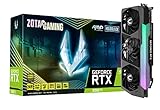
- Top Pick: ZOTAC Gaming GeForce RTX™ 3090 Ti AMP Extreme Holo 24GB GDDR6X 384-bit 21 Gbps PCIE 4.0 Gaming Graphics Card, HoloBlack, IceStorm 2.0 Advanced Cooling, Spectra 2.0 RGB Lighting, ZT-A30910B-10P
- Best Value: Nvidia RTX 3090 TI Founders Edition (Renewed) Founder Video Graphics Card
- Premium Choice: Sapphire 21323-01-20G AMD Radeon RX 7900 XT Gaming Graphics Card with 20GB GDDR6, AMD RDNA 3, Black
For pure rasterized gaming the RX 7900 XT is the better buy, matching or slightly beating the RTX 3090 Ti at 150 W lower power, while the RTX 3090 Ti is the stronger choice for ray tracing, DLSS image quality and 24 GB workloads such as local AI.
This is an unusual matchup: a former $1,999 Nvidia halo card against AMD’s second-tier $899 RDNA 3 card. The fact that the cheaper, newer card trades blows with the older flagship is the core of the story, and the right answer depends on how much weight ray tracing and software features carry.
As an Amazon Associate we earn from qualifying purchases at no extra cost to you.



Specs at a Glance
| Spec | RTX 3090 Ti | RX 7900 XT |
|---|---|---|
| Architecture | Ampere (8 nm) | RDNA 3.0 (5 nm) |
| Release date | 27 January 2022 | 3 November 2022 |
| Launch MSRP | $1,999 | $899 |
| Shaders | 10752 CUDA cores | 5376 stream processors |
| Boost clock | 1860 MHz | 2394 MHz |
| VRAM | 24 GB GDDR6X | 20 GB GDDR6 |
| Bus / bandwidth | 384-bit / 1.01 TB/s | 320-bit / 800.0 GB/s |
| Cache | 6 MB L2 | 6 MB L2 + 80 MB L3 |
| TDP | 450 W | 300 W |
| Power connectors | 1x 16-pin | 2x 8-pin |
| Length / width | 336 mm / 3-slot | 276 mm / 2-slot |
| Outputs | 1x HDMI 2.1, 3x DP 1.4a | 1x HDMI 2.1a, 2x DP 2.1, 1x USB-C |
On paper the RTX 3090 Ti has more memory, more bandwidth and twice the shader count, but AMD’s higher clocks and 80 MB of Infinity Cache close most of that gap in games.
Gaming Performance Without Ray Tracing
TechSpot’s launch review listed the RX 7900 XT’s rasterization as faster than the RTX 3090 Ti, and KitGuru recorded it ahead of the RTX 3090 Ti in several titles, including Cyberpunk 2077 at 1440p without ray tracing. TechPowerUp’s relative performance data puts the two close together, with the 7900 XT a few percent ahead at 1440p and the gap narrowing at 4K where the 3090 Ti’s bandwidth helps.
- 1080p: essentially even, often CPU-limited.
- 1440p: RX 7900 XT roughly 0-8% ahead depending on the game suite.
- 4K: roughly even, within about 5% either way.
As a loose example, a game running at about 80 fps at 4K high on one card will usually land somewhere in the mid-70s to mid-80s on the other. Individual titles swing more widely, and results vary with CPU, settings and patch level.
Gaming Performance With Ray Tracing
With ray tracing enabled the RTX 3090 Ti takes a clear lead. TechSpot’s review measured the RX 7900 XT about 11-13% behind the RTX 3090 Ti in Dying Light 2 with RT at 1440p and 4K, about 24% behind in Guardians of the Galaxy with RT and roughly 29% behind in Cyberpunk 2077 with Ultra RT at 1440p. In those tests the 7900 XT performed close to an RTX 3080 Ti or RTX 3090.
A reasonable summary is that the RTX 3090 Ti is roughly 10-30% faster in ray-traced games, with the largest gaps in heavy RT and path-traced titles. Anyone who plans to play with ray tracing on should weigh that heavily.
Upscaling: DLSS 4 vs FSR 3.1
The RTX 3090 Ti supports DLSS Super Resolution with the DLSS 4 transformer model and Ray Reconstruction, which noticeably improves ray-traced image quality. It does not support DLSS Frame Generation, which requires an RTX 40 card or newer, though it can use FSR 3 frame generation in supported games.
The RX 7900 XT relies on FSR 3.1 upscaling and frame generation, plus AMD Fluid Motion Frames at the driver level. AMD’s FSR 4 machine-learning upscaler was designed for the RX 9000 series, so RX 7000 buyers should assume FSR 3.1 in most games. At aggressive upscaling ratios, DLSS generally holds detail better, which partly offsets the 7900 XT’s raster lead in demanding titles.
VRAM: 24 GB vs 20 GB
Both cards have more memory than games currently require at 4K. Approximate needs in 2026:
- 1440p: 12 GB is comfortable; both cards have a large surplus.
- 4K ultra with ray tracing: 14-16 GB covers almost every title; both are well covered.
- Local AI, 3D rendering, heavy modding: the RTX 3090 Ti’s 24 GB plus CUDA support is a real advantage.
Power, PSU and Connectors
The RTX 3090 Ti is rated at 450 W against 300 W for the RX 7900 XT. That 150 W gap is significant for heat, noise and electricity cost, especially since raster performance is similar.
PSU sizing worked example
- RTX 3090 Ti: 450 W + 150 W (high-end CPU) + 150 W headroom = about 750 W. Nvidia recommended 850 W, and a quality 850-1000 W ATX 3.x unit is advisable because of transient spikes.
- RX 7900 XT: 300 W + 150 W + 150 W = about 600 W; a quality 750 W unit, in line with AMD’s guidance, is enough.
Electricity difference
Gaming for 20 hours a week, the 150 W difference adds up to about 3 kWh per week, or roughly 156 kWh per year. At $0.15 per kWh that is around $23 per year, more in regions with higher energy prices, plus the extra cooling demand in summer.
Connectors and size
The RTX 3090 Ti uses a single 16-pin (12VHPWR) connector, needing a native cable or an adapter from multiple 8-pin cables, fully seated with no sharp bend near the plug. The RX 7900 XT uses two standard 8-pin plugs. The 3090 Ti reference spec is 336 mm long and three slots thick, against 276 mm and two slots for the RX 7900 XT, so the AMD card fits far more cases.
Value and Used Prices
At launch MSRP, treating raster performance as roughly equal (100 each):
- RTX 3090 Ti: 100 / $1,999 = 0.050 points per dollar.
- RX 7900 XT: 100 / $899 = 0.111 points per dollar.
The RX 7900 XT offered more than twice the raster value at launch. On the 2026 used market, the RTX 3090 Ti generally sells for about $650-$800, held up by demand from AI users, while the RX 7900 XT sells for about $480-$580. For gaming-only buyers, that price gap strongly favors the Radeon. Used RTX 3090 Ti cards should be checked for heat marks on the 16-pin connector and for worn thermal pads on the memory.
Decision Table
| Buyer profile | Better choice |
|---|---|
| 1440p or 4K raster gaming on a budget | RX 7900 XT |
| Ray tracing on in most games | RTX 3090 Ti |
| 750 W PSU, mid-size case | RX 7900 XT |
| Local AI or CUDA rendering plus gaming | RTX 3090 Ti |
| High refresh 4K monitor needing DP 2.1 | RX 7900 XT |
Current cards such as the RX 9070 XT and RTX 5070 Ti land in a similar or higher performance bracket at far lower power and add FSR 4 or DLSS frame generation, so they are worth comparing for anyone not set on a used card.
Noise, Heat and Everyday Use
The 150 W power gap shapes the daily experience as much as the frame rate does. A 450 W card dumps considerably more heat into the case and the room, which usually means faster fan speeds on the GPU and on the case fans. Large partner RTX 3090 Ti coolers handle this well, but the system as a whole tends to run louder than an equivalent RX 7900 XT build. Both cards respond to undervolting: many RTX 3090 Ti owners lower voltage to cut power by a significant margin with little performance loss, and the RX 7900 XT can be tuned similarly in AMD’s Adrenalin software. Results vary from sample to sample.
Frequently Asked Questions
Is the RX 7900 XT as fast as the RTX 3090 Ti?
In rasterized games it is roughly equal and often slightly faster, according to TechSpot and KitGuru. With ray tracing enabled, the RTX 3090 Ti is typically 10-30% faster. The answer depends mainly on whether ray tracing is used.
Why is the RTX 3090 Ti so expensive used?
Its 24 GB of GDDR6X and CUDA support make it attractive for local AI and rendering work, not just gaming. That demand keeps used prices higher than its gaming performance alone would justify. Gaming-focused buyers usually get more for their money elsewhere.
Can a 750 W PSU run an RTX 3090 Ti?
It can with a modest CPU, but it leaves little margin for the card’s transient power spikes. Nvidia recommended 850 W, and a quality ATX 3.x unit with a native 16-pin cable is the safer choice. The RX 7900 XT is comfortable on a quality 750 W unit.
Does the RX 7900 XT have enough VRAM for 4K?
Yes. Its 20 GB is more than current games need at 4K with maximum textures. Memory is not a limiting factor for this card in gaming.
Which card is better for streaming and video encoding?
Both include hardware encoders for H.264 and HEVC, and the RX 7900 XT adds AV1 encoding, which Ampere’s encoder lacks. Nvidia’s NVENC is widely supported in streaming software and is known for good H.264 quality. AMD’s AV1 encoding on RDNA 3 is a solid option for platforms that accept AV1.
Ready to decide? Our #1 pick for 2026 is the Architecture.
Live price & availability on Amazon.








Write Your Review
No reviews yet. Be the first to share your experience!