
- Top Pick: ASRock Radeon RX 7900 XTX Phantom Gaming 24GB OC Graphics Card, 2615 MHz Boost Clock, 24GB GDDR6, DisplayPort 2.1, HDMI 2.1, Triple Fan Cooling
- Best Value: PowerColor Hellhound AMD Radeon RX 7900 XTX Graphics Card
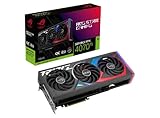
- Premium Choice: ASUS ROG Strix NVIDIA GeForce RTX 4070 Ti OC Edition Gaming Graphics Card (PCIe 4.0, 12GB GDDR6X, HDMI 2.1a, DisplayPort 1.4a), 3 Year Warranty
Choose the RX 7900 XTX for 4K and high-refresh 1440p raster gaming, where it is roughly 15-30% faster and has double the VRAM; choose the RTX 4070 Ti if ray tracing, DLSS with frame generation and lower power draw matter more to you than raw raster speed. The XTX is the more future-proof card on memory, while the 4070 Ti is the more efficient and feature-rich one.
As an Amazon Associate we earn from qualifying purchases at no extra cost to you.


Setting the Scene
The RX 7900 XTX launched in November 2022 at $999 as AMD’s RDNA 3 flagship. The RTX 4070 Ti followed in January 2023 at $799, after NVIDIA rebranded it from the cancelled “RTX 4080 12GB.” That $200 launch gap bought a lot of extra hardware on the AMD side: double the memory, nearly double the bandwidth and a wider bus. NVIDIA countered with a smaller, more efficient chip and stronger ray tracing. Both are previous-generation cards in 2026, superseded by RTX 50 and RX 9000.
Head-to-Head Specs
| Spec | RX 7900 XTX | RTX 4070 Ti |
|---|---|---|
| Architecture | RDNA 3.0 | Ada Lovelace |
| Release date | 3 November 2022 | 3 January 2023 |
| Launch MSRP | $999 | $799 |
| Shaders | 6144 stream processors | 7680 CUDA cores |
| Boost clock | 2498 MHz | 2610 MHz |
| Process | 5 nm | 4 nm |
| TDP | 355 W | 285 W |
| Memory | 24 GB GDDR6 | 12 GB GDDR6X |
| Bus width | 384-bit | 192-bit |
| Bandwidth | 960.0 GB/s | 504.2 GB/s |
| Cache | 6 MB L2 + 96 MB L3 | 48 MB L2 |
| Interface | PCIe 4.0 x16 | PCIe 4.0 x16 |
| Power connectors | 2x 8-pin | 1x 16-pin |
| Length / width | 287 mm, 2-slot | 285 mm, 2-slot |
| Outputs | 1x HDMI 2.1a, 2x DP 2.1, 1x USB-C | 1x HDMI 2.1, 3x DP 1.4a |
The memory subsystem is the defining difference. The RTX 4070 Ti’s 192-bit bus and 504.2 GB/s bandwidth lean on its 48 MB L2 cache, which works well at 1440p but becomes a bottleneck at 4K. The RX 7900 XTX’s 384-bit bus and 960 GB/s give it far more headroom at high resolutions.
Raster Performance
According to published review data, the RX 7900 XTX leads the RTX 4070 Ti by roughly 15-30% in rasterized games. TechPowerUp’s relative performance charts put the gap at up to about 30% at 4K, while comparisons at 1080p show it closer to 13-15% because of CPU limits. Hardware Unboxed and GamersNexus results for the closely related RX 7900 XT, which itself edges the 4070 Ti in raster, support that ordering, with the XTX roughly 20% above the XT at 4K.
In approximate terms that vary with settings, CPU and patch, the RX 7900 XTX typically delivers 70-110 fps at 4K high in recent demanding titles, while the RTX 4070 Ti tends to land around 55-85 fps. At 1440p both cards comfortably exceed 100 fps in most games, and the gap feels smaller.
Ray Tracing Flips the Result
With ray tracing enabled, the picture changes. In synthetic RT tests the two cards are roughly even, but in RT-heavy games such as Cyberpunk 2077, Alan Wake 2 and Black Myth: Wukong, the RTX 4070 Ti frequently matches or beats the XTX, and with path tracing it pulls clearly ahead. Lighter RT implementations, such as RT shadows or reflections only, still tend to favor the XTX thanks to its raster headroom. Your game library decides which card is faster here.
DLSS 4 vs FSR 3.1
The RTX 4070 Ti supports DLSS 4 Super Resolution with the transformer model and DLSS Frame Generation (2x). Multi Frame Generation is limited to RTX 50 cards. The RX 7900 XTX supports FSR 3.1 upscaling and frame generation plus AMD Fluid Motion Frames 2, but not FSR 4, which is limited to RX 9000. DLSS generally produces cleaner images at the same internal resolution, which lets the 4070 Ti use more aggressive upscaling to close some of the raster gap at 4K.
VRAM Headroom: 24 GB vs 12 GB
This is the XTX’s biggest long-term advantage. A practical VRAM guide for 2026 games:
- 1080p: 8-10 GB is enough for high settings in most games.
- 1440p: 10-12 GB covers high to ultra settings; some titles with ray tracing and frame generation push toward 12 GB.
- 4K: 12-16 GB is typical at ultra, and RT plus frame generation can exceed 12 GB in the heaviest games.
The RTX 4070 Ti’s 12 GB is fine at 1440p but already tight in a few 4K titles with RT and frame generation enabled, since frame generation itself consumes VRAM. The XTX’s 24 GB will not run out in games for the foreseeable future and is useful for content creation and local AI models.
Power, PSU and Fit
The RX 7900 XTX is rated at 355 W versus 285 W for the RTX 4070 Ti, a 70 W gap that reviews confirm in real gaming loads. Using GPU TDP + CPU + about 150 W headroom with a 150 W CPU:
- RX 7900 XTX: 355 + 150 + 150 = 655 W, so a quality 750-850 W PSU is the safe target.
- RTX 4070 Ti: 285 + 150 + 150 = 585 W, so a quality 700 W PSU is sufficient.
The XTX uses two standard 8-pin connectors, while the 4070 Ti uses a 16-pin connector with an adapter on most models. Reference lengths are almost identical at 287 mm and 285 mm, both two slots, though many partner cards for both are thicker and longer, so check your case’s GPU clearance.
Value at Launch and Today
With the RTX 4070 Ti at 100 and the RX 7900 XTX at about 122 (midpoint of 15-30%):
- At MSRP: 4070 Ti $799 / 100 = $7.99 per point; XTX $999 / 122 = about $8.19 per point. Raster value was close to even.
- Used, with an RX 7900 XTX usually $650-$800 and an RTX 4070 Ti usually $450-$550: XTX midpoint $725 = about $5.94 per point; 4070 Ti midpoint $500 = $5.00 per point.
On the used market the 4070 Ti is cheaper per raster frame, while the XTX buys more VRAM and 4K headroom. Current alternatives like the RTX 5070 Ti and RX 9070 XT should be compared too, as both offer 16 GB and newer upscaling.
Pick X If, Pick Y If
| Situation | Pick |
|---|---|
| 4K gaming, mostly raster | RX 7900 XTX |
| 1440p with ray tracing and DLSS | RTX 4070 Ti |
| Path tracing in Cyberpunk 2077 or Alan Wake 2 | RTX 4070 Ti |
| Want maximum VRAM for longevity or AI | RX 7900 XTX |
| 650-700 W PSU and quiet, cool build | RTX 4070 Ti |
| Used budget around $500 | RTX 4070 Ti |
| Used budget around $700+ | RX 7900 XTX, or a new RX 9070 XT / RTX 5070 Ti |
Used Buying Tips
Early reference RX 7900 XTX cards had a vapor chamber defect that caused hotspot temperatures above 100°C; AMD replaced affected units, so check hotspot temperatures under load before buying a reference model. For the RTX 4070 Ti, inspect the 16-pin connector and adapter. Ask for proof of purchase on both, since transferable warranties can still apply.
Display Outputs and Efficiency Details
The RX 7900 XTX offers DisplayPort 2.1 outputs and a USB-C port on its reference design, which helps with the newest 4K high-refresh monitors that exceed DisplayPort 1.4a bandwidth. The RTX 4070 Ti uses DisplayPort 1.4a with Display Stream Compression for those modes, which works well in practice for most users. In efficiency, the 4070 Ti delivers more frames per watt in most reviews, runs cooler and tends to be quieter on comparable coolers, which matters in small or poorly ventilated cases.
Bottom Line
The RX 7900 XTX is the stronger raster card with far more VRAM and is the better 4K choice for players who do not prioritize ray tracing. The RTX 4070 Ti is cooler, more efficient and better in heavy ray tracing with DLSS frame generation, making it the better 1440p RT card. Match the card to your resolution and your game library.
Frequently Asked Questions
Is the RX 7900 XTX faster than the RTX 4070 Ti?
In rasterized games, yes, by roughly 15-30% according to published reviews, with the larger lead at 4K. In heavy ray tracing and path tracing, the RTX 4070 Ti often matches or beats it.
Is 12 GB of VRAM enough on the RTX 4070 Ti?
It is enough for 1440p in nearly all games. At 4K with ray tracing and frame generation, a few demanding titles can exceed 12 GB, so texture settings may need lowering.
Does the RX 7900 XTX support FSR 4?
Not officially; AMD limits FSR 4 to RX 9000 cards. The XTX supports FSR 3.1 upscaling and frame generation, plus AMD Fluid Motion Frames 2 at the driver level.
What PSU do I need for an RX 7900 XTX?
A quality 750-850 W unit is the safe choice with a high-end CPU. The card uses two standard 8-pin connectors, so no adapter is needed.
Which is better for streaming?
Both cards support AV1 hardware encoding. NVIDIA’s NVENC has broader software support and slightly better quality in many streaming setups, which gives the RTX 4070 Ti a small edge for streamers.
Ready to decide? Our #1 pick for 2026 is the Architecture.
Live price & availability on Amazon.








Write Your Review
No reviews yet. Be the first to share your experience!