
- Top Pick: TEAMGROUP T-Force Vulcan Z 512GB SLC Cache 3D NAND TLC 2.5 Inch SATA III Internal Solid State Drive SSD (R/W Speed up to 530/470 MB/s) T253TZ512G0C101
- Best Value: Patriot P210 512GB Internal SSD – SATA 3 2.5" – Solid State Drive – P210S512G25
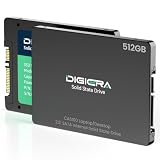
- Premium Choice: DIGIERA 512GB 2.5" SATA SSD III, Internal Solid State Read 550MB/s Write 520MS/s, CAS100 Internal SATA SSD for Desktop Laptop PC NAS
The best 512GB SSD for most people in 2026 is a mid-range PCIe 4.0 NVMe drive like the WD Black SN7100 or Samsung 990 EVO Plus — fast enough for gaming, Windows, and content work, at roughly $40–$55, without paying the premium that only sequential-speed benchmarks justify.
As an Amazon Associate we earn from qualifying purchases at no extra cost to you.



Why 512GB Still Makes Sense (and When It Doesn’t)
512GB remains the sweet spot for a boot drive paired with larger secondary storage, for laptop upgrades on a budget, and for handhelds that accept M.2 2230/2280 modules. After Windows (~40GB), a few large games (100–150GB each), and apps, you’ll have ~200GB usable — workable, but tight. If you install more than three AAA titles at once, step up to 1TB; the price jump is usually only $25–$35.
The Contenders, Compared
Specs tell part of the story. What matters more is sustained write behavior once the SLC cache fills, and real random read speed, which drives game load and app launch times.
| Drive | Interface | Seq. Read / Write | Random Read (QD1-ish real-world feel) | Endurance (TBW) | Typical Price |
|---|---|---|---|---|---|
| WD Black SN7100 | PCIe 4.0 x4, DRAM-less (HMB) | 7,250 / 6,800 MB/s | Excellent for class | 300 TBW | $45–$55 |
| Samsung 990 EVO Plus | PCIe 4.0 x4 / 5.0 x2 | 7,250 / 6,300 MB/s | Excellent | 300 TBW | $45–$60 |
| Crucial T500 | PCIe 4.0 x4, DRAM | 7,200 / 5,700 MB/s | Best-in-class (DRAM helps) | 300 TBW | $50–$60 |
| WD Blue SN580 / SN5000 | PCIe 4.0 x4, DRAM-less | ~4,150 / 4,150 MB/s | Good | 300 TBW | $35–$45 |
| Kingston NV3 | PCIe 4.0 x4, DRAM-less | 6,000 / 4,000 MB/s | Adequate | 160–320 TBW (varies) | $30–$40 |
| SATA class (e.g. Crucial MX500) | SATA III | 560 / 510 MB/s | Fine for old systems | 180 TBW | $35–$45 |
Interface Compatibility: Check Before You Buy
All the NVMe drives above are backward compatible — a Gen4 drive works in a Gen3 slot, just capped around 3,500 MB/s. The traps are elsewhere:
- M.2 slot vs. M.2 protocol: Some older boards have M.2 slots that only accept SATA drives. Check your manual — an NVMe drive in a SATA-only slot won’t be detected at all.
- 2230 vs. 2280 length: Steam Deck, ROG Ally, and many thin laptops need 2230 modules; your choice narrows to drives like the SN740/SN7100 2230 variants.
- Heatsink clearance: PS5 requires a heatsink; laptops often have zero clearance for one. Buy the bare drive and add the motherboard’s own heatsink where possible.
A Worked Example: Why Sequential Speed Is Mostly Marketing
Game loading is dominated by random 4K reads, not sequential throughput. Consider a 12GB game load:
- At a realistic mixed random read speed of ~60 MB/s effective for a SATA drive vs. ~100+ MB/s for a mid-range NVMe, the load takes roughly 200 seconds vs. 120 seconds.
- Upgrading from a 6,000 MB/s drive to a 7,400 MB/s flagship changes random performance by maybe 10–15% — a few seconds, not a different experience.
Where high sequential writes do matter: copying a 100GB file. A drive whose SLC cache exhausts after ~40GB may drop to 400–600 MB/s for the remainder, while a DRAM-equipped drive like the T500 sustains writes far more gracefully. If you regularly move large video files, that difference is real.
Endurance: TBW Numbers in Context
300 TBW sounds abstract, so translate it: writing 40GB/day (heavy for a typical user), you’d hit 300TBW in about 20 years. Warranty is five years. For gaming and OS use, endurance is a non-issue on any reputable drive. It only becomes a buying factor for scratch disks, surveillance recording, or constant video editing workloads — and in those cases you should buy a larger drive anyway, since TBW scales with capacity.
Which Drive for Which Buyer
| Your situation | Pick | Why |
|---|---|---|
| Modern gaming PC, Gen4 slot | SN7100 or 990 EVO Plus | Top-tier real-world speed, fair price |
| Content work, frequent large file writes | Crucial T500 | DRAM + better sustained writes |
| Older Gen3 laptop upgrade | WD Blue SN580/SN5000 | Gen4 speed is wasted; save the money |
| Tightest possible budget | Kingston NV3 | Cheapest reputable option; verify TBW on the specific unit |
| System with only SATA M.2 or 2.5″ bay | MX500-class SATA | Only compatible option; still transforms boot times vs. HDD |
| PS5 expansion | Any Gen4 drive ≥5,500 MB/s + heatsink | Sony’s requirement; SN7100 class qualifies |
FAQ
Is 512GB enough for gaming in 2026?
As a dedicated OS + apps drive, yes. As your only game storage, you’ll manage installs constantly — 1TB is the more comfortable minimum.
Do I need a heatsink?
On desktops with airflow, DRAM-less Gen4 drives rarely throttle. In cramped laptops or PS5, yes — or choose a cooler-running mid-range drive.
Gen3 vs. Gen4 — will I notice?
For gaming and everyday use, no. For large sequential transfers, yes. Buy for the slot you have, not the spec you’d like.









Write Your Review
No reviews yet. Be the first to share your experience!