
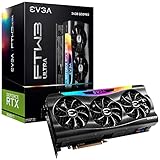
- Top Pick: EVGA GeForce RTX 3090 Ti FTW3 Ultra Gaming, 24G-P5-4985-KR, 24GB GDDR6X, iCX3, ARGB LED, Backplate, Free eLeash
- Best Value: NVIDIA Titan RTX Graphics Card (Renewed)
- Premium Choice: ZOTAC Gaming GeForce RTX 5070 Solid OC DLSS 4 12GB GDDR7 192-bit 28 Gbps PCIE 5.0 Gaming Graphics Card, IceStorm 2.0 Cooling, Spectra RGB Lighting, ZT-B50700J-10P
Buying a graphics card for ray tracing is less straightforward than choosing the model with the biggest number on the box. Many buyers overpay for an older flagship, underestimate power and case requirements, or focus on traditional rasterized frame rates while ignoring ray-tracing performance, upscaling support, and frame-generation quality. Others buy a card with enough raw speed but too little VRAM for high-resolution textures.
This GPU buying guide for ray tracing focuses on the details that matter when lighting effects, reflections, shadows, and path tracing are part of your gaming plans. A premium-looking cooler does not automatically mean better performance, and a renewed card can be excellent value only when its age, warranty, and power requirements make sense.
As an Amazon Associate we earn from qualifying purchases at no extra cost to you.


Decide These 3 Things First
- Choose your resolution and ray-tracing level. Decide whether you are targeting 1080p, 1440p, or 4K, and whether you want selective ray tracing or demanding path tracing.
- Set a complete system budget. Include the power supply, case upgrades, extra fans, and possibly a higher-resolution monitor. A graphics card listed at $500 may require another $100 to $250 in supporting hardware.
- Decide how long you will keep it. For a two-year upgrade cycle, a lower-VRAM card can be reasonable. For four or more years, prioritize VRAM capacity, modern ray-tracing hardware, and a current upscaling and frame-generation feature set.
Size and Case Fit
Graphics cards have grown dramatically, and physical fit is a common source of returns. Check the card’s length, height, thickness, and power-connector position against your case before ordering. A card measuring 330 millimeters may fit in a large ATX case but leave no room for a front radiator or drive cage. Many high-end models occupy three or more expansion slots, potentially blocking adjacent PCIe slots.
For a safer fit, leave at least 25 millimeters of clearance beyond the card’s stated length and keep 30 to 40 millimeters of open space around the fans whenever possible. Measure the distance from the rear expansion slots to the nearest front obstruction, not just the case’s advertised maximum GPU length. Also check whether the side panel presses against a modern high-power connector; the connector and cable often need 35 millimeters or more of bending room.
Large cards can weigh 1.5 to 2.5 kilograms. Use a support bracket for long triple-fan designs, especially if the card is mounted horizontally. A sagging PCB can stress the slot and make installation less secure.
Material and Cooler Construction
Cooler construction affects temperature consistency, noise, and durability more than decorative lighting. Look for a substantial heatsink with multiple copper heat pipes or a vapor chamber, a full-length backplate, and fans using dual-ball or fluid-dynamic bearings. Aluminum fin stacks are standard; copper contact plates are especially useful because copper transfers heat efficiently from the GPU and memory modules.
Most ray-tracing cards should have at least two fans, while cards drawing roughly 300 watts or more generally benefit from a thick triple-fan cooler. A larger heatsink can run fans more slowly, but it adds weight and consumes more slots. Fan-stop operation at idle is useful, although it should not be treated as a performance feature.
Backplates improve rigidity and appearance, but they do not guarantee lower temperatures. Plastic shrouds are perfectly serviceable if the underlying heatsink and fan design are good. Avoid paying a large premium solely for RGB lighting, interchangeable trim, or branding.
Ray-Tracing Performance and Features
Ray tracing is accelerated by dedicated hardware, so conventional graphics benchmarks are not enough. Compare performance in the games you actually play, using the same resolution, ray-tracing preset, and upscaling mode. A card that is fast in rasterized games may lose ground once reflections, global illumination, or path tracing are enabled.
For 1080p ray tracing, a current midrange card with dedicated ray-tracing cores can be adequate. For 1440p, a strong midrange or upper-midrange model is the practical target. For 4K ray tracing, consider a high-end card with at least 16GB of VRAM, especially if you use ultra textures or mods.
Upscaling can make ray tracing playable, but it is not free of trade-offs. Quality modes generally look better than performance modes, while frame generation can increase displayed smoothness without reducing input latency as much as a true increase in rendered frames. Look for support across the games you play rather than buying solely for a feature label. A target of 60 rendered frames per second is a better starting point than chasing a high generated-frame counter.
VRAM, Memory, and Construction Quality
VRAM matters when ray tracing is combined with high-resolution textures, large game worlds, and 4K output. A practical baseline is 8GB for entry-level 1080p, 12GB for mainstream 1440p, and 16GB or more for long-term 4K use. These are buying guidelines, not guarantees: poorly optimized games can exceed them, while efficient titles may use less.
Memory bandwidth also influences performance. GDDR7 and wide memory buses can provide strong throughput, but capacity remains important. Do not choose a 12GB card over a 16GB card solely because its memory speed is higher. Also verify the memory type and bus width rather than relying on a retailer’s abbreviated title.
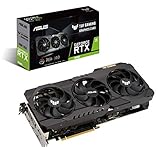
Older flagship cards illustrate the trade-off. An EVGA GeForce RTX 3090 Ti with 24GB can offer substantial memory capacity, but a listing near under $2,200 is difficult to justify when it lacks newer feature support and efficiency improvements. An ASUS TUF RTX 3090 OC at about $2,000 raises the same concern. A renewed NVIDIA Titan RTX around $1,100 may have professional appeal, but it is an older design and should be purchased only with a clear warranty and return policy.
Power, Cooling, and System Compatibility
Check the card’s total board power and recommended power supply, not just the connector type. An entry-level ray-tracing card may use 115 to 180 watts and work comfortably with a quality 550-watt supply. A mainstream card may draw 200 to 260 watts and call for 650 to 750 watts. High-end cards can approach or exceed 400 watts and commonly need an 850- to 1,000-watt supply.
Use a reputable power supply with the correct native cable whenever possible. Avoid sharply bending high-power connectors beside the plug, and make sure every required connector is fully seated. Your processor matters too: an older four-core CPU can limit frame rates at 1080p, even when the GPU has ample ray-tracing capability.
Case airflow should include at least two 120-millimeter intake fans and one rear exhaust fan for a typical gaming system. High-power cards benefit from three or four total case fans, with a clear path for cool air to reach the GPU.
Price Tiers and Value
Budget ray-tracing cards generally cost about $300 to $500. They are best for 1080p, moderate settings, and buyers willing to use upscaling. Expect compromises in VRAM, ray-tracing quality, or future-proofing.
Midrange models typically fall between $500 and $850. This is the strongest value category for 1440p ray tracing, particularly when the card has 12GB to 16GB of VRAM, a modern encoder, and reliable frame-generation support. For example, a ZOTAC RTX 5070 Solid OC listed around $800 is more relevant to a current build than an older flagship if its software support, power use, and warranty are stronger.
Premium cards cost roughly $850 to $1,600, with some listings far above that range. They are appropriate for 4K, high refresh rates, and demanding path tracing, but performance gains should be weighed against monitor resolution and electricity use. A card priced above $1,800 needs a specific justification, such as unusually high VRAM, a professional workload, or a substantial discount relative to newer alternatives.
Warranty, Returns, and Delivery
Prefer a manufacturer warranty of at least three years, or confirm exactly how much coverage remains on a used card. A renewed product should include a written return window of at least 30 days and a warranty that covers fan failure, overheating, and memory problems. Confirm whether the warranty follows the original buyer; some manufacturers restrict transfer.
During delivery, inspect the box for crushed corners and photograph the packaging before installation. The card should be held by molded inserts rather than loose paper. After installation, check that the fans spin under load, the display outputs work, and the card is recognized at its advertised memory capacity. Keep the packaging until the return period ends.
Assembly is usually straightforward, but large cards may require a support bracket and two people to install safely. Remove shipping films before use, connect power cables directly, and update drivers only after the system is stable.
Spec Checklist
| Spec | Budget | Mid | Premium |
|---|---|---|---|
| Target resolution | 1080p | 1440p | 1440p high refresh or 4K |
| VRAM | 8GB | 12GB–16GB | 16GB–24GB |
| Typical card power | 115W–180W | 200W–300W | 300W–450W |
| Recommended PSU | 550W–650W | 650W–850W | 850W–1,000W |
| Cooler | Two fans | Two or three fans | Three fans or equivalent large heatsink |
| Card clearance | 250–310mm; two slots | 280–340mm; two to three slots | 310–360mm; three to four slots |
| Typical price | $300–$500 | $500–$850 | $850–$1,600 |
Red Flags
- A card is priced close to or above a newer model despite using older ray-tracing hardware.
- The listing omits VRAM capacity, power requirements, dimensions, or the exact model number.
- A used or renewed card has no clear warranty, return period, or seller identity.
- The power supply recommendation is missing for a card drawing more than 250 watts.
- The cooler is too large for your case, blocks several slots, or leaves no room for its power cable.
- The seller advertises frame-generation figures without stating the rendered frame rate or image-quality mode.
- The product has been used for mining, has damaged fan blades, or shows corrosion and bent fins.
FAQ
How much VRAM is enough for ray tracing?
Eight gigabytes is suitable for many 1080p builds, but 12GB is a better minimum for 1440p. Choose 16GB or more for 4K, extensive mods, and a longer ownership period.
Is an older 24GB card better than a newer 12GB card?
Not automatically. The older card may have more memory but weaker ray-tracing acceleration, higher power use, and less current software support. Compare game performance, feature support, warranty, and total system cost.
Do I need a new power supply?
Possibly. Confirm wattage, connector compatibility, age, and quality. A modern 650-watt supply may suit a midrange card, while a high-end model can require 850 to 1,000 watts and dedicated power cables.
Should I buy a factory-overclocked model?
Only if the price difference is small and the cooler is suitable. Factory overclocks usually provide modest gains, while a larger heatsink, better warranty, or more VRAM can deliver greater practical value.











Write Your Review
No reviews yet. Be the first to share your experience!