
- Top Pick: GIGABYTE GeForce RTX 5060 WINDFORCE OC 8G Graphics Card, Cooling System, 8GB 128-bit GDDR7, PCIe 5.0, Manufactured by NVIDIA, DisplayPort & HDMI – Video Output Interface, GV-N5060WF2OC-8GD Video Card
- Best Value: ASUS Prime GeForce RTX 5070 12GB GDDR7 OC Edition Gaming Graphics Card
- Premium Choice: GIGABYTE GeForce RTX 5070 Ti Eagle OC ICE SFF 16G Graphics Card, 16GB 256-bit GDDR7, PCIe 5.0, WINDFORCE Cooling System, GV-N507TEAGLEOC ICE-16GD Video Card
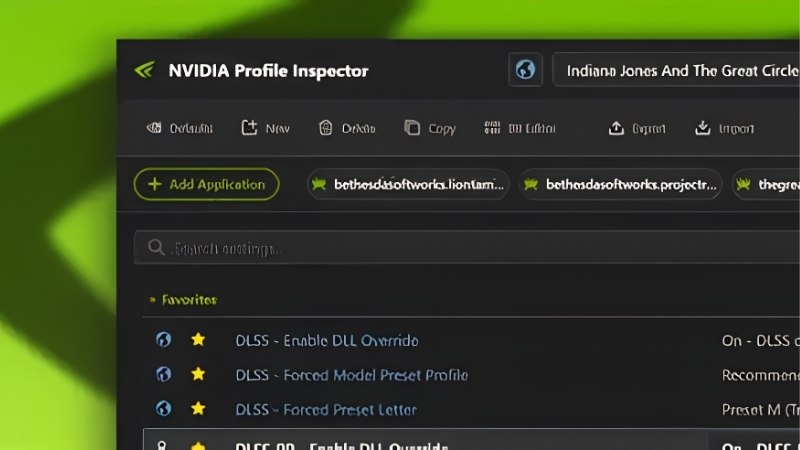
NVIDIA Profile Inspector Revamped is the tool you reach for when the NVIDIA Control Panel refuses to expose the switch you know exists. You probably have it open on the same screen as this page right now, which is exactly why this is written and not filmed — you cannot search a video for a setting name. This page covers what Revamped actually exposes, which settings produce measurable frames and which are folklore, the download trap that catches people, and an honest look at what free tuning cannot fix in the 2026 hardware market.
What NVIDIA Profile Inspector Revamped Actually Is
Most guides describe this tool as if there is one of it. There are now two actively maintained versions that have diverged significantly, plus a scattering of stale mirrors. Getting this wrong wastes an afternoon at best and installs something unpleasant at worst, so it is worth two minutes before you download anything.
The Fork Story: Why Two Tools Exist Now
The original NVIDIA Profile Inspector by Orbmu2k sat abandoned for years. Community forks appeared to fill the gap, and NVPI Revamped — maintained by xHybred — was built to consolidate all of those improvements into one maintained version.
Then the original came back. Orbmu2k’s repository is active again and shipping releases. The Revamped maintainer’s own position is that the two projects have gone in separate directions and both will continue. That is the honest state of things: not a fork versus a dead original, but two live tools with overlapping but different feature sets.
Practically, Revamped tends to be first to expose brand-new driver toggles, while the original has rebuilt its own reference data and UI. Neither is wrong. Pick one and stay on it, because .nip profiles and setting names do not always line up cleanly between them.
Which Download Is the Real One
This is the part that matters more than any setting below. Search the repository name and you will find a dozen accounts hosting copies — BlackSwanBay, d3willlt-ui, d0x360, Barzobius and others. Most are stale forks. Some are just mirrors. You cannot tell by looking at the readme, because they copied it.
The maintained Revamped project is xHybred/NvidiaProfileInspectorRevamped, currently at v7.2.0.0 released 7 July 2026, distributed through GitHub Releases and Nexus Mods. Verify the account name, not the repository name.
One more practical requirement: the tool must run elevated. It writes to the NVIDIA driver profile database through the Driver Settings API, and without administrator privileges your changes will appear to apply and then silently do nothing. If your edits are not sticking, this is why.
What Revamped Exposes That the Control Panel Does Not
The Control Panel shows a curated subset of the driver profile database. Revamped shows the database. The gap includes settings that are otherwise invisible without hand-editing a CustomSettingNames.xml file.
The list worth knowing: DLSS overrides including Ray Reconstruction and Frame Generation entries, RTX HDR, RTX Dynamic Vibrance, image sharpening, custom Resizable BAR values, NVIDIA’s Shader Pre-Compile option, frame rate limiters, texture filtering and compatibility flags. The v7.0.0.0 release added Dynamic MFG support along with fixed 4x and 6x Frame Generation.
This is the forward-looking argument for the tool. NVIDIA ships driver features faster than it exposes them in the Control Panel, and the 7.2.0.0 changelog explicitly notes preparation for future driver features. A tool that surfaces new toggles on release day is worth more over a card’s lifetime than any single tweak in it.
Worth knowing what the two projects share, because it saves you from chasing a feature in the wrong tool. Both edit the same underlying driver profile database through the same API, so neither can expose anything the driver does not already contain. Both handle .nip export and import. Both let you build a custom profile for a game the driver database does not recognise — which is the single most useful capability here for anyone running modded, emulated, or older titles that never received an official profile.
The Settings That Matter and How Not to Break Things
Now the part you actually came for. The honest framing: most settings in this database do nothing for your frame rate. A small number do a lot. The difference between a useful session and a wasted evening is knowing which is which before you start changing values.
Dynamic MFG, 4x and 6x Frame Generation
This is the highest-impact category Revamped currently exposes, and it is where NVIDIA’s proprietary stack pays off. Forcing Multi Frame Generation modes — fixed 4x, fixed 6x, or Dynamic MFG — into titles that do not offer the toggle natively is the single biggest measurable change available in the tool.
The caveats are real and worth stating plainly. Frame generation consumes VRAM rather than saving it, so a 12GB card gets closer to its ceiling, not further from it. It adds latency, which matters in competitive titles and does not in single-player. And the generated frames only mean something if your panel can display them — 6x MFG on a 60Hz monitor is a number in an overlay, not an experience.
The second tier of genuinely useful settings is less exciting and more reliable. A frame rate limiter set slightly below your refresh ceiling does more for perceived smoothness than most people expect, because frame time consistency reads as smoothness far more than peak averages do. Custom Resizable BAR values can help in titles where the driver did not enable it by default. Texture filtering and negative LOD bias fix specific shimmer problems.
Everything else is largely folklore. If a forum post promises double-digit gains from a compatibility flag with no explanation of the mechanism, assume it is placebo and test it yourself with a frame time graph rather than a feeling.
Export First: The .nip Backup Habit
Before you change a single value, export. Select your profile, use Export for one profile or export all customized profiles from the export menu, and keep the .nip file somewhere outside the application folder.
The reason is not paranoia. Driver updates can overwrite the profile database, and a setting that was fine on one driver branch can cause a black screen on the next. A .nip export is a thirty-second insurance policy against reinstalling your driver stack at midnight. Do it before every driver update, not just before every tweak.
Pros and Cons of Revamped Versus the Original
Pros of Revamped: Usually first to support new driver toggles — Dynamic MFG, fixed 4x and 6x FG, and Shader Pre-Compile arrived here early. Settings are reorganised into groups that make sense rather than raw driver ordering. The search field applies as you type and clears with escape, which matters when you are hunting one flag among hundreds. Exposes entries that require XML editing on stock NVPI. Faster load, better error messages, more themes including dark modes.
Cons: The naming collision with a dozen mirror repositories is a genuine hazard for anyone who does not read the account name. Two diverging tools mean community guides may reference setting names or layouts you do not have. It requires elevation, which some environments will not permit. And it is a driver-database editor, not a magic wand — it exposes settings, it does not make your GPU faster.
Why Tuning Beats Upgrading in the 2026 Market
There is a reason interest in this tool has climbed rather than faded. When new hardware gets more expensive, the value of extracting everything from hardware you already own goes up in exact proportion. The market conditions here are worth understanding, because they change the calculation on whether to tweak or buy.
Prices Stopped Climbing. They Did Not Fall.
Component and laptop pricing has continued to drift upward rather than settle, and graphics cards have absorbed most of that pressure. There is real positive news alongside it, and it deserves an accurate reading rather than optimism: prices have stopped climbing as steeply as they did in late 2025, and manufacturers have reported a stretch of relative stability while still warning that volatility is not over.
Read that precisely. A plateau at an elevated level is still an elevated level. The upgrade you postponed did not get cheaper — it stopped getting more expensive quite as fast. In that environment, a free tool that unlocks 4x frame generation on a card you already own is not a hobbyist toy. It is the highest return-on-investment move available to you this year.
What Free Tuning Can and Cannot Fix
Be clear-eyed about the ceiling. Profile tweaking can force frame generation into unsupported titles, correct texture filtering, cap frame rates to stabilise frame times, enable Resizable BAR where the driver did not, and apply RTX HDR or Dynamic Vibrance where the Control Panel refuses. Those are real gains and they cost nothing.
It cannot add VRAM. It cannot fix an unstable power supply — and a marginal PSU produces exactly the crashes people spend weeks blaming on driver settings, especially once frame generation raises transient power spikes. It cannot make a 60Hz panel display 200 fps. Those three limits account for most of the “I tweaked everything and nothing improved” posts you will read.
Where Your Money Actually Goes Further
This is the honest recommendation for a tweaker in this market: the GPU is usually the worst thing to buy right now, and the two things around it are usually the best.
If you have unlocked 4x or 6x MFG and you are on a 60Hz or 75Hz panel, a high-refresh monitor converts that setting from a benchmark number into something you can see — and it costs a fraction of a card upgrade. If your system crashes under load after enabling frame generation, a quality power supply with headroom for transient spikes fixes what no setting will. Both are worth pricing before you consider replacing a card that a free tool can still improve.
See More:
- NVIDIA
- NVIDIA DeepStream
- NVIDIA GPU driver update
- NVIDIA GeForce NOW download
- NVIDIA RTX A2000 12GB driver
Final Verdict on NVIDIA Profile Inspector Revamped
NVIDIA Profile Inspector Revamped earns its place on a tweaker’s machine for one reason: it exposes driver features on the day they ship, not whenever the Control Panel catches up. Dynamic MFG, fixed 4x and 6x Frame Generation, Shader Pre-Compile and custom ReBAR values are all available here and nowhere else in a friendly interface.
Three rules make it worth using rather than dangerous. Download from xHybred’s account and no other — the mirror forks are the real risk in this ecosystem. Run it elevated or nothing you do will save. Export a .nip before you touch anything and before every driver update.
Set expectations correctly and it delivers. This is a driver-database editor, not free performance from nowhere. It will not add VRAM, stabilise a failing power supply, or make a 60Hz panel show you the frames it just generated. In a year where GPU prices have plateaued high rather than fallen, the smart sequence is: tune first with this tool, then fix the panel or the power supply if that is what is holding you back, and treat a new card as the last resort rather than the first.
Frequently Asked Questions
Is the revamped Profile Inspector safe to use?
Yes, it only writes to the same driver profile database the NVIDIA Control Panel uses, so nothing is flashed to the card and no voltage is altered. The risk is misconfiguration causing crashes or graphical corruption. Export your profile settings before experimenting so you can restore the driver defaults instantly.
Which settings genuinely improve games?
The frame rate limiter version 3 for tight pacing, negative LOD bias paired with clamped texture filtering to sharpen upscaled images, low latency mode, and the DLSS preset override that forces the newer transformer model into older titles. Most other flags either duplicate control panel options or do nothing on modern drivers.
Can it force DLSS 4 into games that ship older versions?
Yes. You can select a newer DLSS preset per profile and the driver substitutes its own bundled library, which usually reduces ghosting and improves detail retention over the launch-era model a game shipped with. Results vary by engine, and a few titles with strict file validation will refuse the override.
Does it work on GTX cards or only RTX?
Core functions like the frame limiter, LOD bias, texture filtering and prerendered frames work on any supported GeForce card including Pascal. DLSS and Reflex related toggles require RTX hardware with tensor cores, and multi frame generation options only appear on Blackwell parts, since the flag is meaningless elsewhere.
How do I undo a change that broke a game?
Open the affected profile, right click the modified setting and choose restore default, or use the toolbar option to reset the entire profile. If the driver database itself is confused, a clean driver reinstall rebuilds it. Keeping an exported backup file makes recovery a ten second job instead of guesswork.
Thinking About a GPU Upgrade?
If driver and app tweaks are not enough, these in-stock RTX 50-series cards cover the main budget tiers.
As an Amazon Associate we earn from qualifying purchases at no extra cost to you. Prices as of Oct 5, 2026 and subject to change.












Write Your Review
No reviews yet. Be the first to share your experience!