
NVIDIA G-Sync appears on monitor spec sheets in three different tiers, and the marketing does an efficient job of blurring the differences between them. One tier costs nothing extra. One adds roughly 100 to 150 dollars to the price of an otherwise identical panel. This review separates the tiers with numbers rather than adjectives, gives you a compatibility table you can scan against the monitor you already own, and answers the question most buyers actually have: whether any of it is worth paying for in 2026.
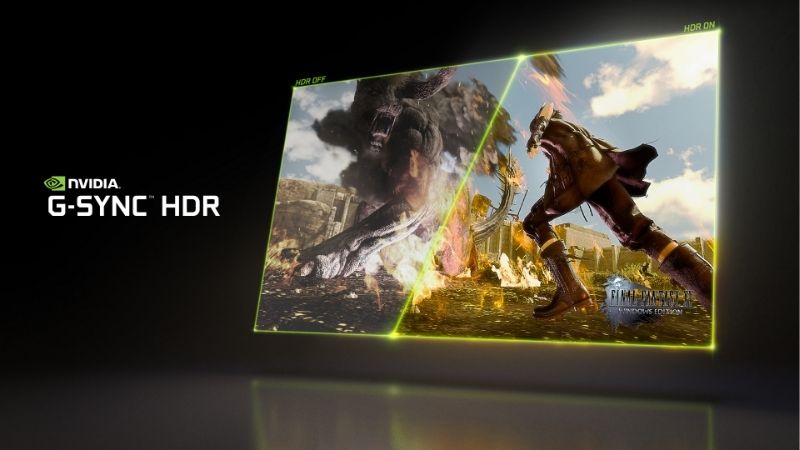
What NVIDIA G-Sync Does and Why Screen Tearing Happens
Variable refresh rate technology solves a specific, measurable problem, and understanding that problem is what lets you judge whether the premium is justified for your setup. The short version: your GPU and your monitor operate on independent clocks that were never designed to agree with each other. Everything G-Sync does follows from forcing them to.
The Refresh Rate Mismatch, Explained With Numbers
A 60Hz monitor refreshes every 16.67 milliseconds, without exception, regardless of what the GPU is doing. Your GPU renders frames whenever it finishes them — perhaps 43fps in one scene, 71fps in the next. Nothing synchronises these two timings.
When a new frame arrives mid-refresh, the monitor displays the top portion of the old frame and the bottom portion of the new one simultaneously. That horizontal seam is screen tearing. It is not a defect. It is the expected outcome of two unsynchronised clocks.
G-Sync inverts the relationship. Instead of the GPU racing a fixed refresh interval, the monitor waits and refreshes the instant a frame is ready. Render at 43fps and the panel refreshes at 43Hz. The mismatch cannot occur because there is no fixed interval to miss.
G-Sync vs V-Sync vs FreeSync: The Real Differences
| V-Sync | FreeSync | G-Sync Compatible | Native G-Sync | |
|---|---|---|---|---|
| Eliminates tearing | Yes | Yes | Yes | Yes |
| Added input lag | High | Minimal | Minimal | Minimal |
| Stutter below range | Severe | Varies | Varies | Handled |
| Extra monitor cost | 0 | 0 | 0 | ~100 – 150 |
| Requires NVIDIA GPU | No | No | Yes | Yes |
| Variable overdrive | No | No | No | Yes |
V-Sync was the original fix and it works by making the GPU wait, which caps framerate and adds input lag — often 30 to 50ms. It trades one problem for a worse one.
FreeSync and G-Sync Compatible are the same underlying thing: VESA Adaptive-Sync. NVIDIA’s certification programme tests these panels and validates the ones that behave. The technology is identical; the badge is a quality filter.
Low Framerate Compensation: The Feature That Matters Most
Every VRR monitor has a working range — commonly 48Hz to 144Hz. Below the floor, VRR has nothing to do, because a panel cannot refresh at 30Hz without visible flicker.
Low Framerate Compensation solves this by duplicating frames. Render 35fps, and the monitor displays each frame twice at 70Hz. You stay inside the VRR window and the transition is invisible.
This is the detail worth internalising: native G-Sync modules implement LFC universally. Adaptive-Sync panels implement it only when the maximum refresh is at least 2.4 times the minimum. A 48-75Hz monitor fails that ratio and has no LFC at all — which is precisely where cheap “G-Sync Compatible” badges stop meaning anything.
The Three G-Sync Tiers and What You Actually Get
The tier system is where most purchasing mistakes happen, because the names imply a simple good-better-best ladder and the reality is not a ladder at all. Two of the three tiers involve genuinely different hardware inside the monitor. The third is largely a marketing designation layered on top of an HDR specification that has itself been quietly relaxed over time.
G-Sync Compatible: The Budget Tier
No module, no additional hardware, no price premium. NVIDIA tests an existing Adaptive-Sync monitor and certifies that it holds up: no flickering, no blanking, a usable refresh range.
The requirement is an NVIDIA GPU from the GTX 10-series or newer, connected over DisplayPort — or HDMI if you are on RTX 30-series or later. The monitor needs no NVIDIA involvement whatsoever beyond passing the test.
For the overwhelming majority of buyers this tier is the correct answer, and the reason is straightforward arithmetic: it delivers most of the benefit for zero additional cost. The certified list runs to hundreds of models and grows continually.
Native G-Sync: The Module Tier
A native G-Sync monitor contains a dedicated NVIDIA hardware module — an FPGA with onboard memory. It replaces the standard scaler entirely. That component is the source of the price premium.
What the module buys you is variable overdrive. Pixel response time needs different voltage at different refresh rates; a fixed overdrive setting tuned for 144Hz produces visible ghosting at 60Hz. The module adjusts overdrive continuously as refresh rate shifts. Adaptive-Sync panels cannot do this — they pick one setting and live with the compromise.
It also guarantees a VRR range down to 1Hz via frame doubling, and it guarantees LFC regardless of panel ratio. These are real, measurable advantages. Whether they justify 100 to 150 dollars depends entirely on how much time you spend at fluctuating framerates.
G-Sync Ultimate and Pulsar: The Premium Tier
G-Sync Ultimate originally demanded 1000-nit peak HDR brightness. That requirement was later relaxed to less precise language, which means an Ultimate badge no longer guarantees the brightness the tier was created to signify. Read the actual nit rating, not the badge.
G-Sync Pulsar is the more interesting development and represents where the technology is heading. It combines variable refresh with backlight strobing — two features that were historically mutually exclusive, because strobing requires fixed timing. Pulsar varies the strobe with the refresh rate, targeting motion clarity comparable to CRT displays while keeping VRR active. Availability remains limited to a small number of high-end panels.
Pros and Cons of Paying for NVIDIA G-Sync
Owner sentiment splits along a predictable line, and it is not the line the marketing draws. Nobody disputes that VRR works. The arguments are about which tier, at what price, and whether the module premium survives contact with a spreadsheet. Both positions have merit and both deserve stating plainly.
Where G-Sync Genuinely Earns Its Price
The strongest case is a fluctuating framerate. If you play demanding titles at 45 to 90fps, VRR transforms the experience, and the module’s variable overdrive keeps motion clean across that entire swing rather than at one tuned point.
The second case is ultrawide and high-refresh panels where ghosting is most visible. Owners upgrading from fixed-overdrive monitors consistently report the difference is obvious rather than subtle.
The third is longevity. A module-equipped monitor behaves identically in five years. It is not dependent on firmware updates that may never arrive.
The Complaints Owners Actually Report
The recurring criticism is the premium itself. Two monitors with the same panel, one with a module, one certified Compatible — and reviewers frequently struggle to identify the module version blind at steady framerates.
The second complaint is the fan. Some module-equipped monitors include active cooling, and a small fan in a silent room is a genuine irritation that no spec sheet mentions.
The third is vendor lock-in. A native G-Sync monitor with an AMD GPU falls back to no VRR at all. If there is any chance you switch GPU brands, that 150 dollars evaporates.
How to Check If Your Current Monitor Already Supports It
Many buyers already own a certified monitor without knowing. Check before you spend anything:
- Open NVIDIA Control Panel. If Set up G-SYNC appears in the left sidebar, your monitor is recognised. If it does not appear, your monitor is not certified or is connected on the wrong port.
- Confirm your cable. DisplayPort works on GTX 10-series and newer. HDMI VRR requires RTX 30-series or later.
- Enable Adaptive-Sync or FreeSync in the monitor’s own OSD menu. It ships disabled on a surprising number of models, which is the single most common reason a certified monitor appears not to work.
- Verify with the NVIDIA Pendulum Demo, which lets you toggle VRR live and see tearing appear and disappear.
Monitor Prices in 2026: Buy Now or Wait?
There is a timing question sitting underneath every monitor purchase this year, and it connects to G-Sync more directly than it first appears. A G-Sync monitor is inert without an NVIDIA GPU, which means you are not pricing one component — you are pricing a pair, and both sit downstream of the same constrained supply chain.
Why Component Costs Are Still Elevated
Laptop and PC component prices have continued trending upward rather than reverting to 2024 levels. Memory sits at the centre of this, and memory is what makes GPU pricing move. The G-Sync module itself contains an FPGA and onboard DRAM — it is exposed to exactly the same cost pressure.
The practical consequence is that the 100 to 150 dollar module premium is not obviously going to shrink. If anything, the components inside that module are pricier to source now than when the tier was introduced.
The real good news deserves an honest hearing. The rapid escalation of late 2025 has eased off. Framework has reported a stretch of comparative calm, coupled with a blunt warning that it does not consider the turbulence finished. Levelling off is not coming down — and that difference decides whether waiting makes sense.
The Supply Relief That Arrives in 2027-2028
Supply does loosen eventually, and you should know the dates before postponing anything. Micron has two Idaho fabrication plants going up. CXMT in China has opened as an additional DDR5 source for OEMs. Both meaningfully add capacity.
Neither arrives soon. The Idaho plants are not scheduled to come online until 2027 to 2028. That is the earliest realistic point at which added supply could push consumer prices down.
What This Means for Your Purchase Timing
Assemble the pieces. Prices have plateaued but not fallen. Meaningful relief is a 2027-2028 event. Waiting means running an unsynchronised display for two years to chase a discount nobody has committed to delivering.
The rational move is to buy the tier that fits, now, rather than waiting for the premium tier to get cheaper. For most buyers that means a certified Compatible panel with a refresh ratio above 2.4x — which costs nothing extra and sidesteps the pricing question entirely.
Compare the current price of a certified G-Sync Compatible monitor against the native module version of the same panel before deciding — for many buyers the gap between them is larger than the visible difference justifies.
See More:
- NVIDIA
- NVIDIA DeepStream
- NVIDIA GPU driver update
- NVIDIA GeForce NOW download
- NVIDIA RTX A2000 12GB driver
Conclusion
NVIDIA G-Sync is worth understanding precisely because the three tiers are not a quality ladder. The Compatible tier costs nothing and solves tearing completely. The module tier adds variable overdrive and guaranteed LFC for roughly 100 to 150 dollars — real benefits, but ones that reward a specific use case rather than every buyer.
Check whether the monitor on your desk is already certified before spending anything. If you are buying new, prioritise a refresh range above 2.4x over the badge on the box, because that ratio determines whether LFC exists and LFC matters more than the tier name.
And given that component prices have plateaued rather than fallen, with real supply relief not arriving until the 2027-2028 window, waiting for the premium tier to get cheaper is a bet against a schedule that is already public.
Frequently Asked Questions
What is the difference between G-Sync and G-Sync Compatible?
Native G-Sync monitors contain an NVIDIA hardware module handling variable refresh, variable overdrive and low framerate compensation. G-Sync Compatible displays are VESA Adaptive-Sync panels that NVIDIA has validated to work without artifacts. The module gives better overdrive tuning across the refresh range; compatible panels are far cheaper and usually good enough.
Do I need a specific cable or port?
DisplayPort is required for the full feature set on most monitors. HDMI variable refresh works on HDMI 2.1 televisions and newer displays, but many older G-Sync monitors expose the feature only over DisplayPort. Use a certified DisplayPort 1.4 or 2.1 cable, since marginal cables cause flicker and blanking at high refresh rates.
Should I cap my frame rate when using G-Sync?
Yes. Set an in-game or driver frame limit three to five frames below your maximum refresh, keep V-Sync enabled in the control panel, and enable Reflex or low latency mode. This keeps you inside the variable refresh window, avoids tearing at the ceiling, and minimizes latency better than leaving frames uncapped.
Does G-Sync work with AMD graphics cards?
G-Sync Compatible displays are just Adaptive-Sync panels, so they work with FreeSync on Radeon cards. Monitors with the older dedicated NVIDIA module generally do not support variable refresh on AMD hardware, though newer module-equipped displays have added Adaptive-Sync passthrough. Check the specific model before assuming compatibility.
What is G-Sync Pulsar and do I need it?
Pulsar combines variable refresh with variable backlight strobing to reduce motion blur without the usual brightness and flicker penalties of fixed strobing. It requires a new hardware module and a supported display. It is a genuine improvement for competitive players sensitive to motion clarity, and irrelevant for everyone else.
As an Amazon Associate we earn from qualifying purchases at no extra cost to you.









Write Your Review
No reviews yet. Be the first to share your experience!