
The Nvidia Quadro K4200 is a legendary professional workstation graphics card built on the Kepler architecture that once dominated the enterprise computing landscape. Designed primarily for computer-aided design (CAD), content creation, and 3D modeling pipelines, this legacy graphics processing unit was engineered to prioritize computing stability over raw frame rates. While modern gaming-focused processors offer higher clock speeds and flashier technologies, professional environments require highly specialized drivers that prevent viewport crashes during critical production hours.
Architectural Legacy and Technical Performance Benchmarks
The physical layout of workstation graphics cards determines how effectively they manage demanding computational workflows. Looking at older workstation components requires analyzing how well their original silicon has aged against the demands of modern productivity applications.
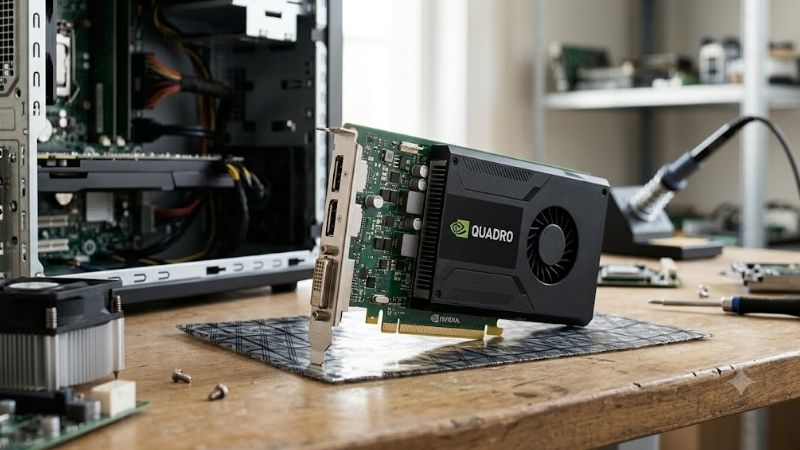
Kepler Architecture and Core Specifications Breakdown
Beneath the metal shroud of this graphics card lies the Kepler GL GK104 graphics processor, which represents a highly refined era of Nvidia chip manufacturing. Built on a 28nm process node, the GPU features 1344 CUDA cores and operates at a base clock speed of 771 MHz, which can boost up to 784 MHz under intense compute loads. Equipped with 4GB of GDDR5 memory running across a 256-bit bus interface, the card delivers a total memory bandwidth of 173 GB/s, ensuring steady data transit for textured viewports.
Unlike consumer GeForce cards from the same era, this workstation processor is engineered with a modest TDP rating of just 108W. This low power draw allows the card to operate efficiently inside standard office workstations without requiring massive multi-fan cooling solutions or heavy power supply upgrades. The single-slot layout features one DVI port and two DisplayPort outputs, allowing users to drive multiple high-resolution displays concurrently with minimal cable clutter.
Check the latest price on Amazon:
CAD, 3D Modeling, and Rendering Performance in 2026
When evaluating the card inside modern design environments, the value of certified drivers becomes immediately apparent. In programs like Autodesk AutoCAD, SolidWorks, and Blender, the GPU manages complex wireframe viewports and assemblies with surprising smoothness, surpassing newer consumer cards that lack optimized driver support. The enterprise software ensures that vertex calculations and viewport panning remain highly stable, preventing the sudden crashes that can ruin hours of work.
However, when pushed into demanding 3D rendering pipelines, the architectural age of the silicon begins to show. Because the Kepler architecture lacks modern ray-tracing hardware and tensor cores, rendering tasks in Blender Cycles or V-Ray rely entirely on traditional CUDA compute pathways. This results in significantly longer render times compared to modern architecture solutions, making it more suitable as an interactive viewport accelerator rather than a primary render node.
Real-World Benchmark Scores and Synthetic Limitations
In synthetic benchmarks like SPECviewperf, which measures real-world graphic performance across industry-standard software, the card holds its own in traditional solid modeling tests. It achieves respectable scores in Siemens NX and Catia viewports, providing a stable, fluid experience at 1080p resolutions. The hardware scheduling queues are optimized to handle massive geometric models without dropping critical detail frames.
Conversely, testing the card on modern DirectX 12 or Vulkan benchmarks reveals its hardware bottlenecks. The Kepler design was built primarily for DirectX 11 pipelines, and attempting to run modern, low-overhead graphical APIs results in severe performance degradation. While it remains a highly capable utility tool for legacy applications, it struggles to maintain stable rendering throughput in applications that demand modern computing APIs.
Market Positioning, Global Supply Constraints, and News Impact
The hardware ecosystem in 2026 is undergoing massive structural shifts that directly impact the availability and pricing of both consumer and professional components. Understanding these macroeconomic changes is essential to making smart purchasing decisions for your production environment.
Geopolitical Shifts: NVIDIA H200 AI Chips and Enterprise Priorities
A major policy adjustment by the United States government allowed NVIDIA to resume exporting its advanced H200 AI processors directly to enterprise clients in China. This geopolitical decision has dramatically reshaped the global semiconductor manufacturing landscape, shifting how silicon foundries prioritize their production lines. Because high-margin enterprise AI contracts for chips like the H200 yield astronomical profits, consumer-facing graphics cards and budget professional components have faced highly restricted manufacturing runs.
For everyday users and small business owners, this shift means that modern budget-tier workstation cards are rarely restocked at their original retail prices. As enterprise demands continue to absorb the lion’s share of global silicon fabrication, older professional cards have experienced a massive resurgence in demand. Refurbished hardware provides an excellent, high-stability alternative for budget-conscious users who cannot afford the inflated prices of modern professional hardware.
The Ripple Effect: Rising Component Prices and Hardware Inflation
Simultaneously, the technology market is experiencing a steady upward trend in the retail pricing of gaming laptops, pre-built workstations, and raw PC components. Increased transportation fees, rising raw material costs, and global foundry capacity limitations have caused component prices to climb steadily month over month. This inflation makes building or upgrading a workstation increasingly expensive for students, freelancers, and small engineering firms.
Given this current trajectory of component pricing, securing reliable, functional hardware early is a highly practical and strategic financial move. Instead of waiting for prices to drop, buying a highly capable, refurbished professional card allows you to keep working without overstretching your budget. To protect yourself from future price spikes, check the latest price on Amazon for workstation components to assemble your system before hardware costs rise further.
Upgrading Your Workstation Setup Safely on a Tight Budget
Integrating older workstation components into your system requires careful planning to ensure maximum compatibility and system longevity. While the graphics card features a highly efficient 1080p display output, pairing it with modern processors and high-speed storage is crucial to prevent system bottlenecks. For those looking to build a reliable workstation, investing in solid secondary storage is an excellent way to breathe new life into older computing rigs.
A fast solid-state drive combined with reliable power delivery will ensure that your legacy professional GPU operates in a highly stable environment. If you want to future-proof your overall system performance, check the latest price on Amazon for NVMe solid-state drives to eliminate long boot times and application loading lag. Additionally, ensuring your physical setup has high-quality connections is essential to prevent signal loss during long editing sessions.
Consumer Sentiment Analysis and Final Purchase Verdict
Analyzing how a graphics card performs in everyday workflows requires looking at the shared experiences of real-world users who rely on the hardware daily. This section breaks down consumer feedback and highlights key alternatives for your system.
Pros and Cons of the Nvidia Quadro K4200 Workstation GPU
Every piece of computing hardware represents a balance of compromises, particularly when looking at vintage enterprise components. Weighing these benefits and drawbacks is essential to ensure the card fits your daily computing routines.
Pros:
- Extremely stable certified drivers for professional design applications like SolidWorks and AutoCAD.
- Low power consumption of only 1080p workspace limits, requiring no heavy power supply upgrades.
- Single-slot design fits easily into small form factor (SFF) office workstations and pre-built OEM machines.
- Highly affordable acquisition cost for students and budget-conscious freelancers.
Cons:
- Kepler architecture is classified as legacy, meaning it no longer receives active game-ready driver updates.
- Lacks modern hardware-accelerated ray tracing or AI-driven tensor core features.
- Limited to 4GB of GDDR5 memory, which can bottleneck complex 4K rendering pipelines.
Amazon Reviews Breakdown: What Verified Buyers Actually Say
A close examination of consumer reviews reveals a highly consistent pattern of user satisfaction and specific hardware complaints. In positive 4-star and 5-star reviews, verified buyers frequently praise the card for its incredible reliability in older production systems. Users note that upgrading an office PC with this card completely resolved display flickering and crash issues in 2D and 3D drafting applications, turning generic office machines into capable budget workstations.
Conversely, critical 2-star and 3-star reviews highlight the challenges of using legacy hardware in modern software environments. Several users pointed out that because the card relies on Kepler-era drivers, certain ultra-modern creative suites display warning messages upon startup. Others mentioned that while the card is exceptional for design work, it is highly unoptimized for modern 3D gaming, struggling to maintain playable frame rates in newer titles.
Best Alternatives and Upgrading Paths in 2026
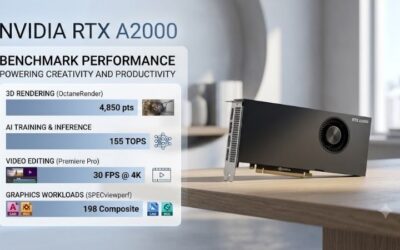
If your daily tasks require advanced rendering capabilities or support for modern graphics APIs, looking at alternative GPU architectures is highly recommended. Modern budget workstation cards, such as the Nvidia T1000 or the RTX A2000, offer newer architecture benefits like GDDR6 memory and dedicated ray-tracing hardware, though they carry higher price tags. Checking out newer hardware tiers is a smart move if you plan to handle massive 4K video editing projects or intensive machine learning algorithms.
If you are ready to secure a highly capable professional graphics card or explore modern components to build out your drafting setup, check the latest price on Amazon for workstation GPUs to find the ideal match for your workflow. Upgrading your graphics hardware is one of the most direct ways to boost your system’s rendering productivity and eliminate daily pipeline slowdowns.
Conclusion
Weighing the performance capabilities of the Nvidia Quadro K4200 shows that it remains a highly valuable utility tool for budget-conscious professionals and students in 2026. While its Kepler architecture cannot compete with modern high-end options for heavy rendering, its certified drivers and low power draw offer incredible stability for AutoCAD and SolidWorks workflows. Given the rising prices of electronics and global chip supply limitations this year, choosing reliable, refurbished workstation hardware is a smart, budget-friendly strategy to keep your design projects running smoothly.
Frequently Asked Questions
Is the Quadro K4200 still usable for professional work in 2026?
Only for very light workloads. It is a Kepler generation card from 2014 with 4GB of GDDR5 and 1344 CUDA cores. Basic CAD viewports, 2D work, and multi-monitor office use still function, but modern viewport rendering, GPU raytracing, and any AI accelerated tool will be unusably slow or unsupported.
Does NVIDIA still release drivers for the K4200?
No. Kepler based Quadro products moved to legacy status years ago, so there are no new feature or security driver branches. You are limited to archived driver packages, which increasingly conflict with current Windows builds and with application requirements that assume newer CUDA compute capability levels.
Will it run current CAD and 3D applications?
Increasingly not. Modern releases of SolidWorks, Revit, Blender, and similar tools require newer OpenGL, Vulkan, or CUDA compute capability than Kepler exposes. Even where an application launches, certified driver support has lapsed, so you lose the qualification that was the main reason to choose a Quadro in the first place.
What power and slot requirements does it have?
The K4200 is a single-slot card rated at roughly 108W with one 6-pin PCIe power connector, which makes it easy to fit in slim workstation chassis. That low profile and modest draw are its remaining advantages, since many modern replacements need more slots and more power delivery.
What should I upgrade to instead?
For CAD and viewport work, a current RTX A-series or RTX professional card gives certified drivers, far more VRAM, and hardware ray tracing. If certification is not required, a consumer RTX card with 12GB or more delivers dramatically better performance per dollar for rendering and general 3D work.
As an Amazon Associate we earn from qualifying purchases at no extra cost to you.





Write Your Review
No reviews yet. Be the first to share your experience!