

Nvidia Jetson TX2 helped define what compact, power-efficient edge-AI computing could look like, packing real GPU-accelerated intelligence into a module small enough for drones, robots and embedded devices. Years after its debut, it is now a mature, entry-level platform rather than a cutting-edge one, but it still has a place for the right project. This review examines what the Jetson TX2 offers, how it performs in real edge-AI work, where it fits in 2026, and whether it is still a sensible buy for you. The short answer is that it is a fine low-power learning platform, provided you keep your expectations matched to its age.
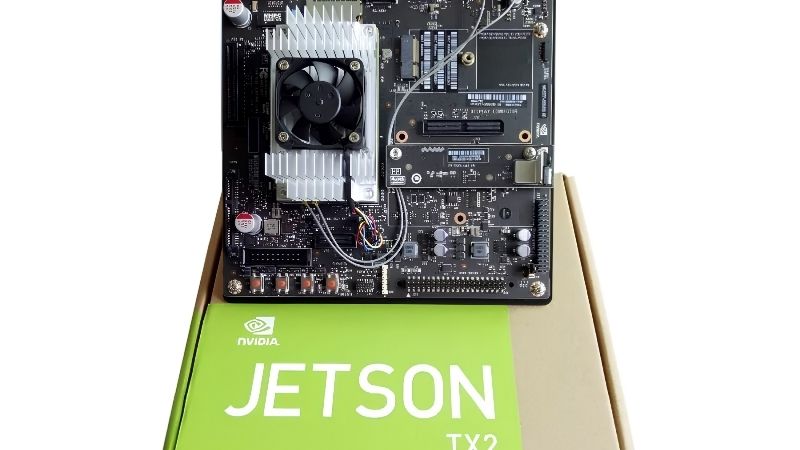
What the Nvidia Jetson TX2 Is
To judge the TX2 fairly, it helps to know exactly what it is and what it was built to do. It is an embedded AI computing module, worlds apart from a gaming graphics card in both purpose and audience.
As an Amazon Associate we earn from qualifying purchases at no extra cost to you.




Overview of the Jetson TX2
The Jetson TX2 is a small, energy-efficient system-on-module built to run AI and computer-vision workloads directly on a device. It brings GPU acceleration to embedded projects, letting hardware make intelligent decisions without depending on a cloud connection. That ability to think locally is what turns a simple device into an autonomous one capable of reacting on its own.
Typically paired with a carrier board for development, it offers the ports and interfaces needed to connect cameras, sensors and networking. This makes it a practical foundation for building robots, smart cameras and other autonomous devices. The carrier board turns the bare module into a workbench-ready system you can start wiring sensors into right away.
At its core, the TX2 is about bringing AI to the edge in a compact, low-power form. That focus on efficient on-device intelligence has always been its defining characteristic. Everything else about the module, from its size to its software, follows from that single design goal.
Key Specs and AI Performance
The TX2 combines an Nvidia GPU with a multi-core ARM processor and a modest pool of shared memory, all on an efficient, compact module. This blend delivers respectable AI inference performance for lightweight edge applications. For tasks that do not require a large model, it provides more than enough capability in a very small package.
Its shared memory lets both the processor and GPU work from the same pool, which helps with vision tasks despite the module’s small size. It is well suited to running efficient AI models rather than the largest, most demanding networks. Choosing a compact, optimised model over a heavyweight one is the usual way to get strong results from this hardware.
By modern standards its performance is entry-level, but for many simple edge tasks it remains perfectly adequate. The key is matching the workload to what this compact, efficient module was designed to handle. Push it toward the largest modern networks and it will struggle, but keep the task lean and it performs steadily.
Who the Jetson TX2 Is For
The TX2 is aimed at developers, students and companies building low-power embedded AI devices rather than at gamers or general users. Its strengths shine in projects where size and energy use matter more than raw speed.
Robotics hobbyists, educational settings and makers of battery-powered smart devices are the natural audience. For them, the module offers a proven, efficient way to add on-device intelligence to a compact product. Its long track record means many of the design questions a newcomer faces have already been answered by others.
For anyone needing high performance or working outside embedded AI, the TX2 is not the right tool. Recognising its focused, efficiency-first purpose is essential before buying. Buyers who expect a general-purpose computer are the ones most likely to come away disappointed with it.
Real-World Performance and Use
Specs only tell part of the story, so here is how the Jetson TX2 behaves in actual projects, from AI workloads to software and power behaviour.
Edge AI and Robotics Workloads
In practice, the TX2 handles lighter edge-AI tasks such as basic object detection, image classification and robotics control running directly on the device. This local processing keeps latency low and removes the need for a constant network connection. For a mobile robot or a remote camera, that independence from the network is often the whole point of using edge hardware.
It suits applications like small autonomous robots, smart cameras and simple inspection systems where efficient, on-device AI is the priority. Within those limits, it performs reliably and predictably for its class. That predictability is a genuine virtue in embedded design, where surprises in the field are far more costly than in a lab.
For learning and prototyping, it runs common AI frameworks well enough to develop and test real ideas. That accessibility is a big reason it became a popular teaching and maker platform. Being able to prototype a working concept on affordable hardware lowers the barrier to entry for edge AI considerably.
JetPack Software and Ecosystem
Like other Jetson products, the TX2 is supported by Nvidia’s JetPack software, which pairs a Linux operating system with AI libraries and development tools. This mature software base makes getting started far easier than raw hardware alone would allow.
Developers can tap widely used AI frameworks and computer-vision libraries, all adapted to run on the module. This shared ecosystem also means skills learned on the TX2 carry over to newer Jetson boards later. Time invested learning the platform is therefore not wasted, even when you eventually move to more powerful hardware.
A large community and plenty of documentation mean solutions to common problems are usually easy to find. For students and beginners, that support is as valuable as the hardware itself. Knowing help is only a forum search away makes the whole platform far less intimidating to start with.
Power Efficiency and Thermals
Power efficiency is the TX2’s calling card, with very low consumption that suits battery-powered and always-on embedded devices. It offers power modes to balance performance and consumption for a given project. Being able to cap power for a battery-powered build, then raise it on the bench, gives developers useful flexibility.
Because it draws so little power, thermal demands are modest, though sustained workloads still benefit from sensible cooling in a finished product. This low-heat, low-power profile is exactly what many embedded designs need.
This efficiency, rather than raw speed, is the core of the TX2’s lasting appeal. For projects where every watt counts, that balance remains genuinely useful. In always-on or off-grid deployments, that frugality can matter more than any benchmark figure ever could.
Value, Age and Alternatives
Whether the TX2 is worth buying depends on your goals, its age, and the options around it. Here is an honest assessment of its trade-offs in 2026.
Pros and Cons of the Jetson TX2
Here is the honest ledger for the Nvidia Jetson TX2, based on how it performs in real embedded projects.
Pros: very low power draw, compact form factor, solid JetPack software support, a strong community, and reliable performance for light edge AI. Cons: entry-level performance by today’s standards, an older platform, and limited headroom for demanding modern AI models.
The pattern is clear: for simple, low-power edge-AI projects the TX2 is still capable and well supported, while heavier work will quickly outgrow it. Its value hinges on keeping the project within its modest limits. Buy it for the right task and it delivers; buy it hoping for cutting-edge speed and it will disappoint.
Where It Stands in 2026
It is only fair to note that the TX2 is an older module, and newer Jetson generations now offer far greater performance and efficiency. That makes it a legacy, entry-level choice rather than a current flagship.
For basic learning, low-cost prototyping and simple embedded devices, that older status is not necessarily a problem, and the mature software can be an advantage. Established projects and tutorials make it an approachable starting point. For a first foray into embedded AI, that depth of existing material can smooth over many early frustrations.
The catch is that any performance-hungry or future-facing project will likely need newer hardware. Buyers should be clear-eyed about the module’s limits before committing to it. A quick check of your project’s performance ceiling against the module’s capability prevents an expensive mismatch later.
Alternatives and Who Should Buy
Anyone needing more performance should look to Nvidia’s newer Jetson modules, which deliver much greater AI power for demanding modern applications. These are the right choice for advanced or production-grade edge AI.
For budget-conscious learners, hobbyists and simple low-power devices, the TX2 can still make sense, particularly if available cheaply. Its efficiency and support suit projects that do not need current-generation speed. Where a task is genuinely light, paying for newer, faster hardware simply buys headroom that will sit unused.
The decision comes down to whether you need modern performance or a proven, low-power platform for modest tasks. Matching the module to your real goals is what matters most.
See more:
- Nvidia gear store
- Nvidia number of employees
- Nvidia Jetson Xavier Developer Kit
- GeForce graphics driver
Final Verdict: Is the Nvidia Jetson TX2 Worth It?
The Nvidia Jetson TX2 remains a capable, remarkably efficient platform for light edge-AI and robotics work, backed by mature JetPack software and a helpful community. Its clear limitation is age, as newer Jetson modules now offer far more performance, so any demanding or future-facing project is better served by current hardware. For students, hobbyists and simple low-power embedded devices, though, the TX2 can still be a sensible and affordable choice, especially when found at a good price. Weigh your performance needs honestly against its efficiency-first design, and check current pricing and availability on the Nvidia Jetson TX2 through the link below before you buy.
Frequently Asked Questions
Is the Jetson TX2 still worth using in 2026?
Only for maintaining existing deployments or very light edge workloads. It pairs a 256 core Pascal GPU with 8GB of LPDDR4 and delivers roughly 1.3 TFLOPS in half precision, which modern vision and language models comfortably exceed. New projects should start on an Orin class module instead.
What software support does it still receive?
The TX2 is capped at the JetPack 4.6 series on Linux for Tegra 32.x, which means older CUDA, cuDNN, and TensorRT versions and an Ubuntu 18.04 base. Modern frameworks increasingly drop support for that stack, so expect to pin dependencies or build packages from source.
Can it run modern AI models?
Small quantised vision models and classical detectors such as older YOLO variants run acceptably. Transformer based models and current large vision language models will not fit in 8GB at usable speed. If your project needs contemporary model architectures, the compute and memory here are the hard limits.
What power does it need?
The module operates in configurable power modes typically between 7.5 and 15 watts, which is its main strength for embedded deployment. The developer kit uses a 19V barrel supply. That efficiency is why TX2 modules remain in service in field equipment where replacing hardware is expensive.
What should I upgrade to?
The Jetson Orin Nano is the natural successor for low power edge work, offering dramatically higher AI throughput, more memory bandwidth, and current JetPack support. Orin NX and AGX Orin cover heavier workloads. All of them run modern CUDA and TensorRT, which resolves the software stagnation problem.



Write Your Review
No reviews yet. Be the first to share your experience!