
- Top Pick: NVIDIA GeForce RTX 3070 8GB GDDR6 PCI Express 4.0 Graphics Card – Dark Platinum and Black
- Best Value: CyberGeek GeForce RTX 5090 Triple Fan Graphics Card, 32GB GDDR7, 28 Gbps, 512-bit, 3352 AI Tops, DLSS 4, AI Content Creation, Local LLM Inference, DP 2.1b UHBR20 x3, HDMI 2.1b, with GPU Holder
- Premium Choice: NVIDIA GeForce RTX 4070 Founder's Edition (FE) Graphics Card – Titanium and Black (900-1G141-2544-000)
NVIDIA GeForce graphics card is a search that usually means one thing: you have decided you need one and you have no idea which. The model numbers do not help — 5060, 5060 Ti, 5070, 5070 Ti, 5080, 5090, some with two different memory sizes under the same name. This page does not start with the cards. It starts with the one thing that actually decides your answer, gives you every tier in a single scannable table, and tells you honestly what the 2026 market means for when to buy. Ten minutes of reading, no video required.
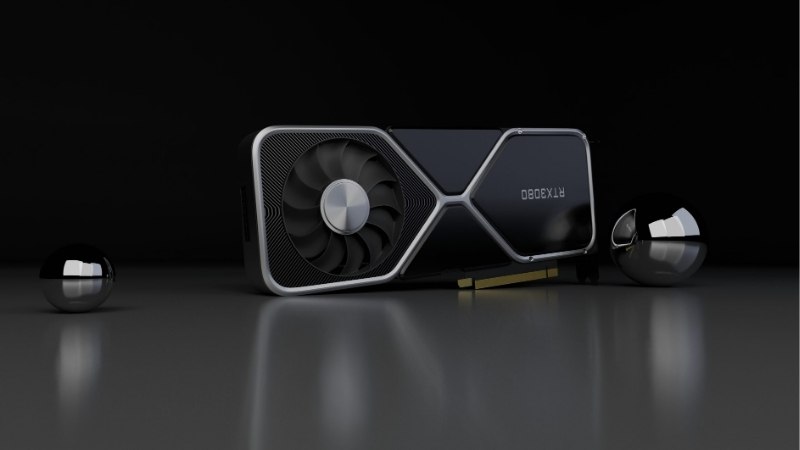
Start With Your Monitor, Not the Model Number
Here is the mistake that costs beginners the most money: choosing a card first and then wondering why it did not feel like the benchmarks promised. Your monitor sets the ceiling on everything a graphics card can do for you. A card that renders 200 frames per second into a 60Hz panel is showing you 60. Work outward from the screen and the choice narrows itself.
Resolution Decides Your Tier
This is the single most useful mapping in this article, and it is not complicated. At 1080p, an RTX 5060 or 5060 Ti is sufficient and anything above is money you will not see. At 1440p — the resolution most new builds target — the RTX 5070 or 5070 Ti is the bracket. At 4K, you are looking at the RTX 5080 or 5090, and there is no budget path that changes this.
The reason is that pixel count scales the work almost linearly. 1440p is roughly 1.8 times the pixels of 1080p; 4K is roughly four times. Buying a 5090 for a 1080p monitor does not make your games look better — it makes your frame counter larger while your CPU becomes the limit.
Refresh Rate Decides Whether Frame Generation Matters
The headline feature of this generation is DLSS 4 Multi Frame Generation: the card generates additional frames using AI rather than rendering them, multiplying your frame rate in supported titles. DLSS 4.5 has since improved the underlying transformer model further.
Whether that feature is worth anything to you is decided entirely by your panel. On a 144Hz, 165Hz or 240Hz monitor, MFG turns a 90 fps game into something genuinely smoother, and it is a real reason to choose GeForce. On a 60Hz monitor it produces a bigger number in an overlay and nothing you can see.
Practical translation: if you are on a 60Hz screen and choosing between a more expensive card and a cheaper card plus a high-refresh monitor, the monitor is almost always the better purchase. That is the least-repeated advice in this category and the most reliable.
The Mistake Almost Every First Build Makes
The power supply. Beginners budget for a card and forget that the card needs feeding, then diagnose the resulting crashes as driver problems and spend a week reinstalling software that was never broken.
A marginal PSU under a modern GPU produces exactly the symptoms people blame on drivers: random restarts under load, black screens, crashes that only happen in demanding scenes. Frame generation makes this worse by raising transient power spikes. Budget the supply alongside the card, not after it — and check your case length before ordering, because partner cards run from about 200 mm to 330 mm and a card that does not physically fit is a return, not a lesson.
The GeForce Tiers, and What Each One Needs From Your PC
Now the cards. This is the table to scan — it is built around the two numbers that actually matter to a first-time buyer rather than the ones in the marketing material. Launch prices are the reference point; see the section below for why the number you will pay is different.
The Complete Lineup in One Table
| Card | VRAM | Board power | Suggested PSU | Launch MSRP | Target |
|---|---|---|---|---|---|
| RTX 5060 | 8GB GDDR7 | 145W | 550W | $299 | 1080p |
| RTX 5060 Ti 8GB | 8GB GDDR7 | 180W | 600W | $379 | 1080p |
| RTX 5060 Ti 16GB | 16GB GDDR7 | 180W | 600W | $429 | 1080p / entry 1440p |
| RTX 5070 | 12GB GDDR7 | 250W | 650W | $549 | 1440p |
| RTX 5070 Ti | 16GB GDDR7 | 300W | 750W | $749 | 1440p high refresh |
| RTX 5080 | 16GB GDDR7 | 360W | 850W | $999 | 4K |
| RTX 5090 | 32GB GDDR7 | 575W | 1000W | $1,999 | 4K maximum |
Two traps in that table. The RTX 5060 Ti exists in 8GB and 16GB versions under nearly the same name — they are not the same product and the $50 gap is the best money in the lineup. And the PSU column is not optional reading; going from a 5070 to a 5070 Ti may quietly add a power supply to your bill.
VRAM: The Number That Decides How Long the Card Lasts
Every other specification is a performance question. VRAM is a cliff. When a card runs out of memory it does not get gradually slower — it stutters, because textures are being swapped in and out. Benchmarks showing average frame rates hide this completely, which is why a card can look fine in a chart and feel bad in your hands.
The practical guidance for 2026: 8GB is workable at 1080p today and is the first thing that will fail. 12GB is adequate for 1440p now and is the RTX 5070’s real weakness. 16GB is the number that ages, which is why the 5060 Ti 16GB and the 5070 Ti are the two best long-term value picks in the stack.
Worth knowing: frame generation consumes VRAM rather than saving it. The card with the smaller buffer pays a memory tax to use the feature you bought it for.
One more thing beginners get told wrongly. Memory speed and memory size are different specifications, and only one of them is a cliff. A card with faster GDDR7 but 8GB will still stutter when it runs out; a card with slower memory and 16GB will not. When two cards are close on price, count the gigabytes before you compare anything else — it is the specification that decides whether you are shopping again in two years or in five.
Pros and Cons of Choosing GeForce
Pros: DLSS 4.5 remains the best upscaler available and Multi Frame Generation has no competing equivalent. Ray tracing performance leads at every tier. NVENC is the standard for streaming and recording. CUDA matters if you ever touch video editing, 3D rendering or AI tools. Driver support is broad and games are optimised for these cards first. The feature set keeps improving through software updates after purchase.
Cons: You pay a premium for that ecosystem, and AMD frequently offers more raw rasterisation performance and more VRAM at the same price. NVIDIA has been consistently less generous with memory — 12GB on a $549 card is the clearest example. And at the entry tier, 8GB in 2026 is a compromise you will feel before the card is old.
What 2026 Pricing Means for When You Buy
Every price in the table above is a launch figure, and almost none of them describe reality. Before you decide which card, it is worth understanding what decides when — and whether the instinct to wait for a better price is sound.
Almost Nothing Sells at MSRP
Component and laptop pricing has continued drifting upward rather than settling, and graphics cards have absorbed a large share of that pressure. The cause is memory: GDDR7 supply is tight, and every card in the table is built on it.
Supply-side decisions have not helped. Reports indicated NVIDIA planned to cut RTX 50 series production by up to 40% in early 2026 — less supply against undiminished demand does not produce discounts. Expect to pay above the launch numbers above, and treat any figure you read, including these, as a starting point rather than a quote.
The Slowdown Is Real, but It Is a Plateau
There is genuine good news and it deserves accurate reading rather than either doom or optimism. Prices have stopped climbing as steeply as they did in late 2025, and manufacturers have reported a stretch of relative stability while still warning that volatility is not over.
Read that precisely: stopped climbing steeply is not the same as falling. A plateau at an elevated level is still elevated. If your plan was to wait until cards return to their launch prices, the market has not signalled that and there is no mechanism in view that would deliver it soon.
New Supply Does Not Arrive Until 2027–2028
Real relief is coming. OEMs can now source DDR5 from Chinese suppliers such as CXMT, and Micron is building two fabrication plants in Idaho. That is genuine capacity, not speculation.
The catch is the calendar: those plants do not run until 2027–2028. Nothing they produce affects a price you pay this year or next. Put the three facts together — prices still drifting up, a plateau rather than a decline, and no new capacity for two years — and waiting stops being a strategy and becomes a bet against every signal available.
If you have your monitor sorted and know your tier, it is worth checking current listings on the card you have chosen along with a power supply rated for it, because the pricing above will not hold and the supply is not improving on a timeline that helps you.
See More:
- NVIDIA
- NVIDIA DeepStream
- NVIDIA GPU driver update
- NVIDIA GeForce NOW download
- NVIDIA RTX A2000 12GB driver
Final Verdict on Choosing an NVIDIA GeForce Graphics Card
Choosing an NVIDIA GeForce graphics card comes down to three decisions, made in this order. Look at your monitor first: 1080p means a 5060 or 5060 Ti, 1440p means a 5070 or 5070 Ti, 4K means a 5080 or 5090, and no amount of budget changes that mapping. Check your refresh rate second, because Multi Frame Generation is a genuine reason to buy GeForce on a 144Hz panel and worth nothing on a 60Hz one. Budget the power supply third, before you discover it.
If you want a single recommendation with no conditions attached: the RTX 5060 Ti 16GB at 1080p and the RTX 5070 Ti at 1440p are the two cards in this lineup whose VRAM will not become the reason you replace them. That is the specification that decides how long your money lasts.
On timing, the honest answer is uncomfortable but consistent. Prices are above launch figures, the slowdown is a plateau rather than a decline, production has been trimmed, and new memory capacity does not arrive until 2027 or 2028. There is no cheaper window coming that is worth waiting through. Work out your tier from your screen, price the card and a supply that can feed it, and buy on today’s numbers.
Frequently Asked Questions
How much VRAM do I actually need in 2026?
8GB is now the bare minimum and already limits 1440p ultra settings with ray tracing. 12GB is comfortable for 1440p, and 16GB is the sensible target for 4K or for anyone touching local AI models, video editing or heavily modded games. Buying 8GB today shortens the useful life of the card considerably.
Will a new GeForce card fit my case?
Check three numbers before ordering: card length, slot thickness, and height from the PCIe bracket. Modern triple-fan designs commonly run 320 to 360mm long and occupy three to four slots. Mini and ITX variants exist around 200 to 250mm. Measure from the rear bracket to your drive cage or front radiator.
What power supply should I pair with a mid-range GeForce card?
Follow NVIDIA’s system recommendation rather than just the board power: roughly 550W for a 5060 class card, 650W for a 5070, 750W for a 5070 Ti, and 850W for a 5080. An ATX 3.1 unit with a native 12V-2×6 cable avoids adapter clutter and handles transient spikes without tripping protection.
Does the x60, x70, x80 naming still map to resolution?
Loosely. Treat x60 as a 1080p high refresh card, x70 as 1440p, x80 as 4K with upscaling, and x90 as uncompromised 4K and workstation use. Upscaling blurs those lines, so a 5070 with DLSS Quality can serve 4K adequately if you accept a lower internal render resolution.
Should I buy the Founders Edition or a partner card?
Partner cards usually cool better and run quieter thanks to larger heatsinks, at the cost of size and often price. Founders Edition boards are compact and well engineered but harder to find. Factory overclocks add only two to four percent, so prioritize cooler quality, warranty terms and physical fit instead.
As an Amazon Associate we earn from qualifying purchases at no extra cost to you.





Ready to decide? Our #1 pick for 2026 is the Card.
Live price & availability on Amazon.










Write Your Review
No reviews yet. Be the first to share your experience!