
Short answer: A few millimeters of GPU sag is normal and harmless. Sag becomes a real risk once the card visibly tilts in the PCIe slot, stresses the solder joints or the PCB, or bends the power cable. If your card is a 3-slot, 1.5 kg model, a support bracket is cheap insurance — and often free with a zip tie.
What GPU Sag Actually Is
GPU sag is the downward droop of a card installed horizontally in a standard ATX case. It is held at two points — the PCIe x16 slot and the I/O bracket screw — so everything forward of those, usually two thirds of the cooler, hangs unsupported and rotates slightly around the slot.
The reason it became a mainstream topic is mass. A GTX 1060 weighed roughly 750 g; a modern triple-fan flagship with a vapor chamber and full-length backplate can push 2.0–2.5 kg across 3 to 4 slots. Coolers grew to handle 300–600 W, but the mounting standard — one slot, one screw — did not.
Two design details make it worse: heatsink mass sits at the far end of the card, maximizing leverage, and many boards use a PCB shorter than the shroud, so the stiff part of the card ends early.
Is GPU Sag Bad? What Actually Breaks
Most sag is cosmetic. But there are four genuine failure paths, in order of how often they show up.
1. PCIe slot solder joints
The slot is surface-mounted to the board. Constant leverage plus thermal cycling can, over years, fatigue its solder joints or crack the retention tab. The symptom is intermittent, not dramatic: the GPU drops to x8 or x1, vanishes from POST after a case move, or throws whea-logger errors. Steel-reinforced slots resist twisting but do not remove the load.
2. The card’s own PCB
This is the failure that actually kills cards. A long PCB under constant bending stress can crack inner copper layers or the solder under a heavy component — memory modules, VRM chokes, or the GPU package. It shows up as artifacting, memory errors under load, or a card that works cold and fails warm.
3. Riser cables and vertical mounts
A vertical mount removes hanging sag but makes the riser connector the pivot, and cheap PCIe 4.0/5.0 risers are already marginal for signal integrity. A twisted or partly seated riser causes link-training failures that look exactly like a dying GPU. Buy a riser rated for your PCIe generation and verify link speed in GPU-Z.
4. Power connector strain
Covered in its own section below — this is the one that changed the calculus for 2026 hardware.
How Much Sag Is Acceptable, and How to Measure It
There is no official spec, so use a practical test rather than eyeballing it through a tinted side panel.
- Look at the slot gap. With the case upright and the panel off, sight along the PCIe slot: the gold fingers should sit parallel to it. Daylight opening at the rear of the slot means the card is levering out — fix it now.
- Measure the drop. Rest a ruler or a straightedge along the top edge of the expansion slot covers and measure the gap to the top edge of the card at its far end. Under about 2 mm is normal. 2–5 mm is common on heavy cards and worth supporting. Over 5 mm means real bending, not just slop in the bracket.
- Check the PCB, not the shroud. Shine a light between backplate and cooler — a curved shroud can hide a straight PCB, and vice versa.
- Retest after transport. Cars and vans apply far more force than gravity, so re-seat and re-check after any move — this is when slots crack.
If you are still choosing parts, sag load is worth factoring into your case and airflow decisions and into the motherboard you pick — reinforced slots and a stiff, well-standoffed board tray both help.
GPU Support Bracket Types Compared
“Support bracket” covers five quite different products. The right one depends on the room between your card and the PSU shroud.




| Type | Typical cost | Clearance impact | Best for |
|---|---|---|---|
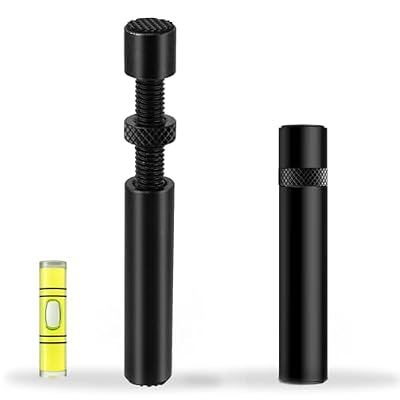
| Adjustable pillar / jack stand | Low to mid | Sits on the PSU shroud; blocks some bottom-intake airflow and takes floor space | Most standard ATX builds — simplest, most rigid, height-adjustable |
| Fishing line / wire from the top | Free to very low | Zero footprint below the card; nothing blocks airflow | Cases with a top radiator rail or mesh top to anchor to; small-form-factor builds |
| Anti-sag arm mounted to the case | Mid | Attaches to a spare expansion slot or the rear fan frame; minimal airflow blockage | Builds where the PSU shroud is too far below the card for a pillar |
| Vertical GPU mount + riser | Mid to high | Consumes 3–4 slots and moves the card near the side panel — can raise temps | Showcase builds with glass panels and enough side-panel clearance |
| Support built into the card / bundled brace | Included | None — designed for that exact card | Anyone whose card shipped with one; always use it before buying anything |
On pillar types, the useful ones have fine-thread or spring-loaded height adjustment and a soft contact pad. Cheap fixed-height blocks either do nothing or pry the card out of the slot, which is worse than sag — the goal is to hold the card level, not jack it up. Magnetic bases also only work in steel cases.
The 12VHPWR / 12V-2×6 Angle
On cards using 12VHPWR or the revised 12V-2×6 connector, sag stops being cosmetic. The connector sits on the top edge and the cable must bend away toward the PSU, but the spec calls for no bend within roughly 35 mm of the plug.
Sag works against that twice over: it tilts the card so the cable meets the side panel at a sharper angle, and droop after the plug is seated puts lateral load on the housing. That is what produces partially seated plugs, uneven current across the six 12 V pins, and melted connectors. A bracket that keeps the card level buys back a few millimeters of cable clearance.
Practical rules: seat the plug until it clicks and the latch is flush, check for no visible gap, route the cable upward or straight out rather than immediately down, and use a 90-degree adapter only if it is reputable and rated for full wattage. In a narrow case this argues for a PSU with native 12V-2×6 cabling rather than stacking adapters, and it is worth reading alongside general GPU power connector safety guidance.
Free Fixes That Work
You do not need to buy anything to fix most sag.
- Fishing line or braided cord. Loop it around the card near the far end — through a fin gap or the shroud, never a fan — and anchor it to the top radiator rail or a fan screw. Invisible from the front, and it blocks no airflow.
- Zip tie to the case. Same idea with a cable tie; add a piece of tape or heatshrink where it contacts the shroud so it does not scuff.
- A rigid object underneath. A LEGO stack or a cut dowel on the PSU shroud works fine, as long as it is non-conductive, clear of intake fans, and touching the backplate rather than exposed components.
- Tighten and re-seat. Loose I/O bracket screws cause a surprising share of apparent sag. Re-seat the card, confirm the latch is engaged, then tighten both screws with the case upright.
- Turn the case on its side. Temporary, but it is the correct answer for shipping a built PC or moving house.
Troubleshooting: When It Is Not Just Sag
If the card is supported and problems persist, work through these. Display dropouts, x16-to-x1 link downgrades, or POST failures after touching the card point to a slot or contact issue, not weight: try the second x16 slot and clean the gold fingers with isopropyl alcohol. Artifacts only under load usually mean VRAM temperature or a failing card — confirm with a memory stress test before blaming sag. A bracket that makes things worse is almost always over-tightened. If temperatures rose after fitting a pillar support, you have blocked a bottom intake fan. For anything thermal, start with our GPU temperature troubleshooting steps and case fan configuration.
The honest priority order: use the bundled brace if there is one, add a free wire support if not, buy an adjustable pillar if the look bothers you, and go vertical only with a verified riser. Weight and included support are worth checking in any current graphics card comparison.
Frequently Asked Questions
Is GPU sag bad enough to damage my motherboard?
It can be, but rarely quickly. The realistic risk is years of leverage plus thermal cycling fatiguing the PCIe slot’s solder joints, which shows up as intermittent detection or a downgraded link speed rather than a sudden failure. Steel-reinforced slots help resist twisting. If the card visibly tilts out of the slot or you regularly transport the PC, support it.
How much GPU sag is normal?
Under about 2 mm of droop measured from the expansion-slot line to the far top edge of the card is normal on almost any modern card and needs no action. Between 2 and 5 mm is common on heavy triple-fan models and is worth supporting for peace of mind. Beyond 5 mm, the PCB itself is bending and you should fix it.
Do I need a GPU support bracket for a 3-slot card?
Usually yes, or at least a free equivalent. Three and four-slot coolers concentrate 1.5–2.5 kg at the end of a long lever arm, which is more than the slot-and-screw mounting standard was designed for. Many such cards ship with a bundled brace precisely for this reason — use it first, and only buy a bracket if yours did not include one.
Does a support bracket hurt airflow or temperatures?
A pillar-style bracket sitting on the PSU shroud can block a bottom intake fan and raise GPU temperatures by a few degrees in cases that rely on bottom intake. Wire or fishing-line supports anchored to the top of the case have no airflow footprint at all. If temperatures rose after fitting a support, reposition it away from any intake before assuming the card is faulty.
Does GPU sag cause 12VHPWR connectors to melt?
Sag is a contributing factor rather than the root cause. Melted connectors trace back to plugs that are not fully seated, which causes current to concentrate on a few pins. Sag makes that more likely by tilting the card, tightening the cable bend near the plug, and putting lateral load on the connector housing. Keeping the card level and the first 35 mm of cable straight removes that contribution.

Write Your Review
No reviews yet. Be the first to share your experience!