
Choosing the right graphics card for 3D rendering can feel overwhelming, especially with hardware landscapes shifting rapidly into 2026. When you are staring down a mountain of technical jargon—ranging from shader units and ray-tracing cores to memory bandwidth and bus interfaces—it is easy to get lost in marketing specifications that may not translate to actual productivity gains in your daily workflow. Whether you are building a dedicated workstation from scratch or upgrading an existing render node, understanding the core performance metrics will save you from overspending on features you do not need while ensuring you do not hit frustrating hardware bottlenecks mid-project.
- Understanding VRAM Capacities and Why They Dictate Scene Complexity
- Evaluating CUDA Cores, Tensor Cores, and Ray Tracing Hardware
- System Memory and PCIe Bandwidth Bottlenecks
- Cooling Solutions: Blower vs. Open-Air Designs for Render Farms
- Power Supply Unit (PSU) Requirements and Multi-GPU Scaling
- Software Optimization and Engine Compatibility (Blender, V-Ray, Octane)
- When to Invest in Flagship Hardware Versus Mid-Range Value
- Related Guides
- FAQ
- Related Guides
Ultimately, a successful hardware investment comes down to aligning your GPU selection with your specific software ecosystem, scene complexity, and project turnaround times. This decision guide cuts through the noise to examine the exact hardware characteristics that govern viewport responsiveness, rendering speeds, and overall system stability. By focusing on practical metrics rather than superficial benchmarks, you can build a reliable system optimized for heavy production workloads.
As an Amazon Associate we earn from qualifying purchases at no extra cost to you.

Understanding VRAM Capacities and Why They Dictate Scene Complexity
Video RAM is arguably the single most important hardware specification for modern GPU rendering. Unlike gaming, where frame rates are the primary concern, 3D rendering requires your entire scene—including high-resolution texture maps, complex geometry, displacement data, and volumetric openvdb caches—to fit entirely within the graphics card memory. If your project exceeds the available VRAM, your rendering engine will either crash outright or fall back to drastically slower system RAM via PCIe lanes, effectively grinding your production timeline to a halt.
When evaluating cards, look closely at memory capacity rather than just raw processing speed. High-end production environments routinely demand substantial framebuffer allocations to handle expansive architectural visualization or cinematic-grade assets. Choosing a card with insufficient VRAM forces you to spend hours optimizing scenes, decimating meshes, or downscaling textures just to make them fit, defeating the purpose of investing in high-performance hardware.
Evaluating CUDA Cores, Tensor Cores, and Ray Tracing Hardware
Raw compute power comes down to the architecture inside the GPU. CUDA cores handle the heavy lifting of parallel processing required by unbiased path tracers, while dedicated hardware like ray-tracing cores and tensor cores accelerate specific mathematical calculations associated with light bounce simulations and AI-driven denoising. Modern renderers heavily leverage these specialized sub-processors to drastically cut down render times.
When comparing options, focus on generational architectural improvements rather than raw core counts alone, as newer microarchitectures extract significantly more performance out of every single processing unit. Tensor cores, in particular, have become indispensable for interactive viewport rendering, allowing artists to preview clean, noise-free images in real time without waiting for hundreds of convergence passes to complete.
System Memory and PCIe Bandwidth Bottlenecks
Your graphics card does not operate in a vacuum; it relies heavily on the rest of your system architecture. The PCI Express bus acts as the primary highway for data transfer between your motherboard, system memory, and the GPU. While most modern GPUs utilize high-speed PCIe lanes, running out of VRAM and spilling over into system RAM will saturate this bus, creating a severe performance bottleneck.
To maximize your GPU investment, ensure your motherboard fully supports the bandwidth requirements of your graphics card. Additionally, pairing a high-end rendering GPU with an adequate amount of systemic RAM ensures that geometry preprocessing and scene loading happen swiftly before the heavy computational workload is handed off to the graphics processor.
Cooling Solutions: Blower vs. Open-Air Designs for Render Farms
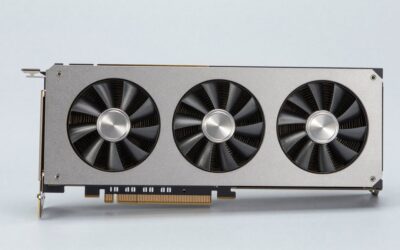
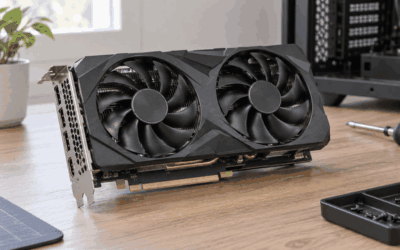
Thermal management is a critical factor that is frequently overlooked during the component selection process. Rendering tasks push graphics cards to 100 percent utilization for hours, or even days, on end. Open-air axial fan coolers are fantastic for standard desktop towers, as they exhaust heat into the chassis while keeping noise levels remarkably low during sustained processing sessions.
However, if you are building a multi-GPU render node where cards are stacked tightly together with minimal clearance, blower-style cards become necessary. Blower coolers pull air from within the chassis and exhaust it directly out the back of the case, preventing heat from getting trapped between adjacent cards. Assess your physical enclosure carefully before committing to a specific cooling layout to prevent thermal throttling.
Power Supply Unit (PSU) Requirements and Multi-GPU Scaling
Power delivery is another area where cutting corners can lead to catastrophic system instability. High-end rendering GPUs draw massive amounts of power under full load, often experiencing sharp transient spikes that can trip standard over-current protection mechanisms in inferior power supply units. Investing in a high-efficiency, adequately rated PSU with native support for modern power connectors is non-negotiable.
If you plan to scale up by adding a second graphics card down the line for faster distributed rendering, calculate your total system wattage requirements with a comfortable safety margin. Multi-GPU setups require robust power distribution rails and exceptional case ventilation to handle the cumulative thermal output safely and efficiently.
Software Optimization and Engine Compatibility (Blender, V-Ray, Octane)
Hardware performance is ultimately dictated by how well your chosen software interacts with the GPU. Different render engines leverage proprietary APIs and hardware features in unique ways. For instance, some production renderers rely exclusively on specific parallel computing frameworks, meaning hardware optimizations that shine in one application might yield mixed results in another.
Before finalizing your hardware budget, audit your primary software tools—whether you use Blender, V-Ray, Octane, or Redshift—and check their official hardware scaling guidelines. Ensuring seamless driver support and optimized engine integration guarantees that your investment delivers tangible performance gains across your entire creative pipeline.
When to Invest in Flagship Hardware Versus Mid-Range Value
Deciding how much money to spend requires a balanced look at your commercial output and turnaround expectations. Flagship components deliver maximum computational throughput and massive VRAM buffers, making them ideal for studios or freelancers working under tight client deadlines with massive, uncompressed assets. The time saved on rendering hundreds of frames quickly justifies the upfront capital expense.
Conversely, if you are a hobbyist, student, or working on smaller-scale projects where occasional render times do not directly impact your revenue, mid-range cards offer an incredible value proposition. They provide a high percentage of professional rendering capability at a fraction of the cost, allowing you to allocate your remaining budget toward a faster CPU, more system memory, or robust storage solutions.
Related Guides
To further refine your hardware search, explore our carefully curated resources. If you need a comprehensive overview of the market, check out our guide on best graphics cards for 3D rendering. For those focusing specifically on CAD, building design, and spatial visualization workflows, our breakdown of specialized architecture rendering GPUs offers tailored recommendations to suit your professional design studio needs.
FAQ
How much VRAM do I actually need for professional 3D rendering?
For basic hobbyist work and moderate scene complexity, a moderate VRAM allocation is usually sufficient. However, professional production work involving high-resolution textures, heavy particle simulations, and dense geometry typically requires substantially more framebuffer capacity to avoid crashing or severe performance penalties.
Is multi-GPU scaling linear in render engines like Blender or Octane?
Multi-GPU scaling is exceptionally efficient in most modern production renderers, often coming very close to linear performance gains when adding a second or third identical card. Keep in mind that your total available VRAM does not stack; instead, each card processes its own assigned tiles using its own local memory pool.
Do I need an enterprise workstation GPU, or is a consumer gaming card sufficient?
For the vast majority of modern 3D artists, consumer-grade graphics cards offer the best balance of price and rendering performance. Enterprise workstation cards are primarily recommended if your production pipeline specifically requires specialized driver certifications, extensive error-correcting code memory, or ultra-dense multi-card configurations.
How important is system RAM when utilizing GPU rendering?
System RAM is crucial because it acts as the staging ground where your scene assets are loaded and preprocessed before being transferred to the GPU. If your system lacks sufficient memory, your operating system will struggle to stage complex assets, creating a system-wide bottleneck even if your graphics card is top-tier.







Write Your Review
No reviews yet. Be the first to share your experience!