
A graphics card’s advertised wattage is a design ceiling, not a live reading. TGP (“total graphics power”) tells you what the board is engineered to pull under sustained heavy load; the 40W you see at idle, the 160W in an esports title and the brief 500W spike in a shader-heavy scene are all the same card behaving normally. Sizing a PSU means planning for the ceiling plus the invisible millisecond spikes above it.
- TDP, TGP and Board Power Are Not the Same Number
- Why Your GPU Reports 38-48W (And Why That Is Fine)
- Transient Spikes: Why a “Big Enough” PSU Still Shuts Down
- GPU Power Consumption Comparison by Tier
- How to Size a PSU Properly
- Performance Per Watt Is the Metric That Matters
- What Decides GPU Power Consumption
- How to Measure Your Own Draw
- Troubleshooting
- Frequently Asked Questions



TDP, TGP and Board Power Are Not the Same Number
TDP (thermal design power) began as a cooling specification: the heat, in watts, the cooler must dissipate continuously. Since nearly all electrical input to a GPU becomes heat, it ends up close to the electrical figure — but it was never meant as a power-supply number.
TGP is NVIDIA’s term for the budget of the entire board: die, memory, VRM losses, fans and lighting. That is the number to plan around. AMD’s near-equivalent is TBP (total board power). Separately, monitoring tools often report “GPU Power” or “GPU Core Power”, which excludes memory and board losses — on a 16GB or 24GB card that gap is not trivial, since memory modules draw power whether or not they are being read. If you are weighing capacities, our breakdown of how much VRAM modern games actually use covers the other half of that decision.
Then there is measured draw, the thing that actually happens. The board’s microcontroller samples rail current many times a second and cuts clocks the moment the running average crosses the cap, so a 250W card averages 250W in a stress test and 160W in a competitive shooter.
Why Your GPU Reports 38-48W (And Why That Is Fine)
This is the most common misreading in power monitoring, so plainly: a card showing 38W, 45W or 48W is idle or lightly loaded. It is not broken, throttled or stuck in a bad state. Modern GPUs gate off unused blocks and drop core clocks to a few hundred megahertz when nothing is asking for frames.
What stops idle going lower is usually memory. VRAM cannot always downclock while the display pipeline is busy, and three situations reliably hold it up: multiple monitors (especially at mismatched refresh rates), a single very high-refresh panel, and hardware video decode running in a background tab. A card idling at 38-48W with two high-refresh displays attached is behaving exactly as designed.
The figure only deserves attention if it stays there during a game — which points at a frame cap, a power-limit slider left low, a monitor plugged into the motherboard instead of the card, or a CPU bottleneck. If frame rates are the real complaint, our guide to spotting a CPU bottleneck in games is the faster route.
Transient Spikes: Why a “Big Enough” PSU Still Shuts Down
GPU draw is not a smooth line. It is a sawtooth of microsecond excursions as thousands of cores switch together, and those spikes can momentarily approach double the card’s rated TGP. They are far too brief for software monitoring, which samples a few times per second — your log shows a tidy 300W average while the rail actually sees 550W bursts.
A PSU’s over-current protection, however, reacts in microseconds. When it trips the machine cuts out instantly: no blue screen, no error log, just black. That signature — instant shutdown under load, perfectly stable at the desktop — is the fingerprint of transients, not of insufficient continuous capacity.
ATX 3.0 and 3.1 units are specified to ride out excursions well above their rated output for defined durations, which is exactly the problem being solved. An older high-quality platform can still work; it just needs more nameplate headroom to survive the same spikes.
GPU Power Consumption Comparison by Tier
Board partners ship factory-overclocked variants with raised limits and generational targets shift, so tiers are more useful than pretending every SKU has a fixed number. The PSU column assumes a mainstream 6-to-8-core CPU and normal peripherals.
| Tier | Typical board power | Connector | Sensible PSU (ATX 3.x) | Notes |
|---|---|---|---|---|
| Entry / slot-powered | 50-75W | None (PCIe slot only) | 400-450W | Drops into prebuilts with no PSU swap. |
| Entry gaming (x50 class) | 100-150W | 1 x 8-pin or 12V-2×6 | 500-550W | Usually the best performance per watt in the stack. |
| Mid-range (x60 / x60 Ti) | 160-220W | 1 x 8-pin or 12V-2×6 | 600-650W | NVIDIA specifies 600W for the 5060 Ti class. |
| Upper mid-range (x70) | 220-300W | 12V-2×6 or 2 x 8-pin | 750W | Cable quality and case airflow start to matter here. |
| High end (x80) | 300-400W | 12V-2×6 | 850-1000W | Use a native PSU-side cable, not a daisy-chained adapter. |
| Halo (x90, 24GB+) | 450-600W | 12V-2×6 (600W) | 1000-1200W | Large VRAM pools add meaningfully to board power. |
How to Size a PSU Properly
- Start with GPU board power — the TGP for your exact model, including any factory overclock.
- Add peak CPU package power (PPT/PL2, not base TDP): roughly 90W for a modest chip, 150-200W mainstream, 250W+ for a high-core-count part.
- Add 75-100W for board, RAM, drives, fans and pump.
- Target 50-60% of the PSU’s rating. That leaves transient headroom, keeps the unit in its most efficient band, and lets it run cooler and quieter — which is what makes a PSU last.
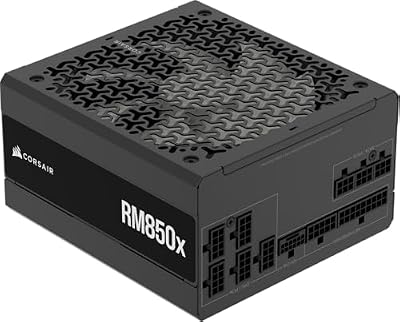
A 250W card plus a 150W CPU plus 90W of everything else is 490W of real load. An 850W ATX 3.1 unit puts that at 58%: comfortable and quiet. A 600W unit would technically work while living at 82% load, hot and close to its protection thresholds.
The 12V-2×6 and ATX 3.1 Situation
The connector story has settled. The original 12VHPWR plug had a real flaw: partial insertion could concentrate current on a few pins and overheat. The revised 12V-2×6 connector, standard on ATX 3.1 supplies, shortens the sense pins and lengthens the power terminals so an incompletely seated plug simply fails to power the card rather than running hot. Three rules follow: use the native cable that shipped with the PSU instead of stacking adapters, push until the latch clicks with no gold visible at the plug face, and give the cable an inch or two of straight run before any bend. Our guide to choosing a power supply goes deeper on platforms and efficiency ratings.
Performance Per Watt Is the Metric That Matters
Raw wattage says little about whether a card is good. Frames per watt describes the engineering, and it decides your power bill, your case temperatures and your noise floor. Calculate it yourself: run a repeatable benchmark, log average fps and average board power, divide. A 150W card at 90 fps (0.60 fps/W) is doing more with less than a 320W card at 160 fps (0.50 fps/W), even though the second is plainly faster.
Two things follow. Efficiency collapses at the top of the stack — the last 10% of performance routinely costs 30-40% more power, because sustaining the final few hundred megahertz needs higher voltage and power scales with the square of voltage. And you can buy that efficiency back: undervolting, or simply setting an 80% power limit in the driver, typically costs 3-7% of frame rate while cutting 20-30% of draw. Our notes on undervolting a graphics card safely walk through the curve editor.
What Decides GPU Power Consumption
Process node and architecture dominate: a newer node does the same work at lower voltage, which is why a current mid-range card can match an old flagship at half the wattage. Clocks and voltage come next, with that quadratic relationship explaining why factory-overclocked cards run so much hotter for so little gain. Memory configuration — capacity, bus width, generation — adds a real baseline. Workload matters enormously: ray tracing pushes draw toward the ceiling, while upscalers like DLSS often reduce it by rendering fewer pixels. Finally, cooling: silicon leaks more current as it heats, so a card at 60C draws measurably less than the same card at 83C doing identical work — making case airflow and fan configuration an efficiency decision, not just a thermal one.
How to Measure Your Own Draw
Software sensors (HWiNFO64, GPU-Z, MSI Afterburner) read the card’s telemetry — log a 10-15 minute session and read the average and maximum rather than watching a live counter. Free, fine for efficiency math, blind to transients. A wall meter measures the whole system including PSU conversion losses; subtract an idle baseline to isolate what the game added. That is the honest number for electricity cost. A DC clamp meter on the PCIe cables gets closest to real board draw and can catch spikes software never sees — overkill for most people, the right tool if you are chasing a shutdown.
Troubleshooting
Instant shutdown under load: set a 70-80% power limit in Afterburner. If it stops, transients are the cause and the fix is an ATX 3.1 unit, not merely a bigger old-standard one. GPU stuck at low wattage while gaming: check for a frame cap or V-Sync, confirm the Windows power plan, verify the cable runs to the card rather than the motherboard, then look for a CPU bottleneck. Idle above 80W: usually multi-monitor memory clocks — try matching refresh rates. Card never reaches its rated TGP: it may be thermally or voltage limited instead; monitoring tools expose which limiter is active, and our reference on safe GPU temperatures covers where those ceilings sit.
Frequently Asked Questions
Is a 38W or 48W GPU power reading good or bad?
It is neither — it simply means the card is idle or under a very light load, which is normal and healthy. Modern GPUs power-gate unused blocks and drop clocks when nothing demands frames, while multi-monitor setups and high-refresh panels keep memory clocks up and hold idle draw right around that 38-48W band. The reading only indicates a problem if it persists while you are actually gaming, which points to a frame cap, a lowered power limit or a CPU bottleneck rather than a faulty card.
What power supply does an RTX 5060 Ti need?
NVIDIA specifies a 600W power supply for the 5060 Ti, which sits in the roughly 180W board-power class, assuming a mainstream desktop CPU and normal peripherals. If you are pairing it with a high-core-count processor, plan to upgrade the graphics card later, or want the unit running in its quietest and most efficient load band, a quality 750W ATX 3.1 supply is the better buy — the price difference is small and the headroom is genuinely useful.
Why does my PC shut down under load when my PSU is rated high enough?
Almost always transient spikes. Graphics cards produce microsecond excursions that can momentarily approach double their rated board power, far too brief for software monitoring to capture but fast enough to trip a power supply’s over-current protection. The remedy is either an ATX 3.0 or 3.1 supply, which is specified to ride out those excursions, or capping the card’s power limit to 70-80% in an overclocking utility, which confirms the diagnosis within minutes.
Does more VRAM increase power consumption?
Yes, though it is rarely the dominant factor. Memory modules draw power whether or not the data in them is being accessed, so a 24GB card carries a higher baseline than a 12GB card built on comparable silicon, and faster memory generations such as GDDR6X and GDDR7 add more still. The GPU core remains the larger share of board power in nearly every case, which is why the chip-only reading in monitoring tools sits noticeably below total board power.
How do I calculate performance per watt for my graphics card?
Run a repeatable benchmark or a fixed in-game route, log average frame rate and average board power simultaneously with a tool such as HWiNFO64 or MSI Afterburner, then divide frames per second by watts. Compare cards only at identical resolution, settings and scene, since any change moves both numbers. Undervolting or applying an 80% power limit usually improves the resulting figure substantially, because the top of the voltage-frequency curve is where efficiency collapses.

Write Your Review
No reviews yet. Be the first to share your experience!