
- Top Pick: NVIDIA GeForce RTX 4070 Founder's Edition (FE) Graphics Card – Titanium and Black (900-1G141-2544-000)
- Best Value: MSI Gaming RTX 4080 Super 16G Expert Graphics Card (NVIDIA RTX 4080 Super, 256-Bit, Extreme Clock: 2625 MHz, 16GB GDRR6X 23 Gbps, HDMI/DP, Ada Lovelace Architecture)
- Premium Choice: NVIDIA – GeForce RTX 4080 Super 16GB GDDR6X Gra
1440p has become the sweet spot for PC gaming, delivering a sharp visual upgrade over 1080p without the brutal hardware demands of 4K. Nvidia’s RTX 40-series lineup, built on the efficient Ada Lovelace architecture with DLSS 3 frame generation, is purpose-built to dominate this resolution, offering high refresh rates across a range of price points.
- Watch: Best Nvidia RTX 40-Series GPUs for 1440p Gaming 2026 — Video Review
- How to Choose
- The Best Picks Reviewed
- Choose by Monitor First, Not by Card Name
- Power Supply, Connectors, and Case Fit Checklist
- Pairing a Processor and Memory With the Card
- Who Should Skip the RTX 40 Series Entirely
- Common Mistakes at This Resolution
- More Picks Worth Considering
- Frequently Asked Questions
- Final Thoughts
- Related Articles
- Related Guides
But the 40-series spans everything from the entry RTX 4060 to the enthusiast RTX 4080 Super, and matching the right card to your monitor and games matters more than ever in 2026. This roundup ranks the best RTX 40-series GPUs for 1440p gaming, from value picks to high-refresh champions, so you can lock in smooth, crisp performance without overspending.
As an Amazon Associate we earn from qualifying purchases at no extra cost to you.


⚡ Save on Your Next PC — Amazon Prime
Prime members get fast free shipping on the systems above, plus early access to Prime Day & Black Friday PC deals. New members get a 30-day free trial.
Watch: Best Nvidia RTX 40-Series GPUs for 1440p Gaming 2026 — Video Review
How to Choose
- Refresh rate goal: For 60-100 fps at high settings, a 4060 Ti or 4070 suffices; for 144 fps and above, step up to the 4070 Super or 4080 Super.
- VRAM headroom: 12GB is comfortable for 1440p today; 16GB futureproofs against rising texture demands.
- DLSS 3 support: All 40-series cards offer frame generation, dramatically boosting fps in supported titles at 1440p.
- Ray tracing appetite: Heavy RT users should favor the 4070 Super or higher for playable frame rates with effects maxed.
- Power and case fit: Higher-tier cards need beefier PSUs and larger cases, so confirm clearance and wattage before buying.
The Best Picks Reviewed
ASUS TUF Gaming RTX 4070 OC Edition
The RTX 4070 is the 1440p sweet spot, and the ASUS TUF version wraps it in rugged cooling and a factory overclock. With 12GB GDDR6X and DLSS 3, it holds high frame rates at max settings in most modern titles, making it the best-balanced pick for the resolution.
MSI Gaming RTX 4080 Super 16G Expert
For 1440p gamers who never want to compromise, the MSI RTX 4080 Super Expert delivers overkill performance: 16GB GDDR6X, a 2625 MHz extreme clock, and effortless 144-plus fps with ray tracing on. It is the card for high-refresh 1440p monitors and future 4K aspirations.
ZOTAC Gaming RTX 4080 16GB Trinity OC
The ZOTAC RTX 4080 Trinity OC pairs 16GB GDDR6X with IceStorm 2.0 cooling and Spectra RGB, providing enthusiast-tier 1440p muscle. It runs cool and quiet under sustained load, ideal for marathon high-settings sessions.
NVIDIA GeForce RTX 4070 Founders Edition
The Founders Edition RTX 4070 offers Nvidia’s clean reference design in a compact titanium-and-black shell. It delivers the same excellent 1440p performance in a smaller footprint, perfect for tidy builds that still want strong high-settings frame rates.
Gigabyte RTX 4060 Eagle OC
The entry point to 1440p, the Gigabyte RTX 4060 Eagle OC leans on DLSS 3 to reach playable frame rates at the resolution. With 8GB GDDR6 and dual DisplayPort and HDMI outputs, it is the budget-conscious choice for 1440p gamers willing to tune settings.
Choose by Monitor First, Not by Card Name
The most common buying error at this resolution is matching the card to a favourite game instead of to the monitor actually on the desk. Use the table below as a starting point, then adjust for ray tracing, which lowers frame rates in every tier.
| Monitor target | Sensible card tier | Settings expectation | Notes |
|---|---|---|---|
| Standard refresh, high settings | Entry Ti class | High with selective reductions | Upscaling helps in demanding titles |
| High refresh, high settings | Mainstream 4070 class | High to maximum in most titles | The balanced choice for most buyers |
| High refresh, maximum settings | Super class | Maximum with stronger ray tracing | Extra memory headroom helps longevity |
| Very high refresh or ultrawide | Ti Super and above | Maximum with headroom to spare | Confirm case length and power first |
Ultrawide monitors deserve special care, because their extra horizontal pixels push the workload partway toward a higher resolution. A card that feels generous on a standard panel can feel merely adequate on an ultrawide, especially with ray tracing enabled.
Power Supply, Connectors, and Case Fit Checklist
Before ordering any card in this family, confirm four physical points. First, check the maker guidance for power supply capacity and compare it with the age and quality of the current unit, not just its headline rating. Second, confirm which power connectors the specific partner card needs and whether an adapter is included, and never force a sharp bend in a high-power cable near the connector. Third, measure usable case length from the expansion slots to the front fan or radiator, and allow extra room beyond the listed card length for cables. Fourth, count occupied slots, since thick coolers can block a neighbouring slot needed for a capture or network card. Skipping these checks is the main reason an otherwise correct purchase turns into a return.
Pairing a Processor and Memory With the Card
A graphics card cannot deliver its full frame rate if the processor cannot prepare frames quickly enough, and this shows most clearly in competitive titles at high refresh rates and in simulation games with many objects to track. As a practical rule, pair entry and mainstream cards here with a modern six-core or better gaming processor, and pair Super and Ti Super cards with a stronger recent processor so high-refresh play stays consistent. System memory matters too: a current gaming system should have enough capacity to keep the game, voice chat, and background apps open together without swapping. Finally, install the card in the primary expansion slot and confirm it runs at its expected link width in the system information, because a partially seated card can quietly cost performance.
Who Should Skip the RTX 40 Series Entirely
Skip this generation if the current card already holds the target frame rate on the monitor in use, since a side-grade brings little visible benefit. Skip the highest tiers if the monitor is a standard-refresh panel, because frames the screen cannot display are wasted money. Skip any long or thick model when the case measurement is borderline, and skip an eight-gigabyte card for a long-term build if maximum texture settings matter, because memory limits tend to appear gradually and then suddenly. Buyers planning a full new system soon may also prefer to wait and plan the whole platform, including power supply and case, around one purchase.
Common Mistakes at This Resolution
One mistake is judging a card only by average frame rate while ignoring the lowest moments, which are what feel like stutter. Another is turning every setting to maximum at once instead of raising textures and viewing distance first, which usually give the clearest visual gain. A third is assuming upscaling looks identical in every game; its quality varies by title and by the chosen quality mode, so leave room in the performance budget to run a higher quality mode. Keeping drivers, game settings, and monitor refresh configuration checked after installation avoids the surprisingly common problem of a capable card running while the display is still set to a low refresh rate.
More Picks Worth Considering
GIGABYTE AORUS GeForce RTX 4070 Super Master 12G
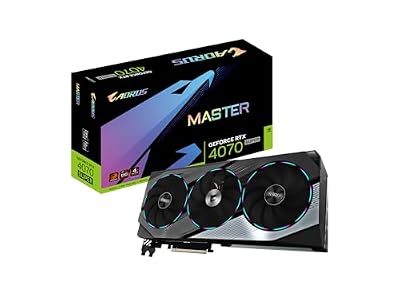
This premium Super-class card fits players on high-refresh panels who want stronger performance than the standard 4070 class, a large triple-fan cooler, and dual BIOS flexibility in a flagship-style build. Its twelve gigabytes of fast memory and frame generation support make it a confident choice for maximum settings in most current titles, with ray tracing kept at sensible levels. It does not fit small cases, because the cooler is long and thick, nor buyers with an ageing low-capacity power supply. It is also more card than a standard-refresh monitor can use, so value-focused buyers should look lower in the range.
ASUS TUF Gaming GeForce RTX 4070 Ti Super OC Edition

This card fits players who want a clear step above the Super class, with sixteen gigabytes of memory for heavier texture loads, ultrawide panels, and longer service before an upgrade feels necessary. The TUF cooler and reinforced construction suit systems that run long sessions daily, and the performance headroom handles demanding ray-traced titles more comfortably at this resolution. It does not fit compact builds, buyers whose processor would hold back a card of this level, or anyone on a standard-refresh screen. It also asks for a careful power and clearance check before ordering, like every large card in this tier.
MSI GeForce RTX 4060 Ti Ventus 3X 8G OC

This card fits players stepping up from older mainstream hardware who mainly play esports and lighter titles, plus demanding games at high rather than maximum settings with upscaling enabled. The triple-fan Ventus design suits cases that benefit from extra airflow, and its modest power needs make it an easy addition to many existing systems without a power supply change. It does not fit players who insist on maximum textures in the newest releases, because its eight gigabytes of memory is the clear limit here, nor high-refresh ultrawide owners. For a long-term maximum-settings build, a higher tier is the safer choice.
Frequently Asked Questions
What is the best value RTX 40-series card for 1440p?
The RTX 4070 hits the ideal balance of price and performance, delivering high-settings 1440p gaming with DLSS 3 headroom. The 4070 Super is a worthy step up if your budget allows.
Is 8GB of VRAM enough for 1440p gaming?
It is workable with tuned settings and DLSS, as on the RTX 4060, but you may hit texture limits in demanding titles. For a smoother, more futureproof experience, 12GB or more is recommended.
Do I need an RTX 4080 Super for 1440p?
Only if you want maxed ray tracing at very high refresh rates or plan to move to 4K. For most 1440p gamers, the 4070 or 4070 Super delivers excellent results at a lower cost.
How much does DLSS 3 help at 1440p?
Significantly. Frame generation can boost fps by 50 percent or more in supported games, letting even mid-tier 40-series cards achieve high refresh rates at 1440p with the visual settings turned up.
Final Thoughts
The RTX 40-series covers 1440p brilliantly at every budget in 2026. The RTX 4070 stands as the best all-around choice, the 4080 Super serves high-refresh enthusiasts, and the RTX 4060 opens the door for tighter budgets willing to lean on DLSS. Match the card’s power to your monitor’s refresh rate and your ray-tracing appetite, and any of these picks will deliver the crisp, fluid 1440p experience that makes this resolution so rewarding.

Write Your Review
No reviews yet. Be the first to share your experience!