
Black Friday arrives on November 27, and the RTX 50-series is the card family most PC builders are watching. Every tier has partner cards available, yet the right move differs by buyer: a clear buy for a 1080p gamer can be the wrong pick for 4K, and a tempting card can still fit the wrong case or power supply.
This guide sorts the five 50-series tiers into buy-now and wait-and-see, names five partner cards worth a look, and explains what to check before you order. Offers change through the sales period, so check the current price and offers on the Amazon product page first.
As an Amazon Associate, we earn from qualifying purchases.
Quick answer
Buy now if you need a card for 1080p or 1440p gaming and your power supply and case already fit: the RTX 5060, 5060 Ti 16GB, and 5070 are the sensible Black Friday picks. Wait if you want a 5080-class card at a calmer street level, or if your monitor is 1080p and your current card still plays your games well.
The buy-or-wait map
RTX 5060 — buy. The entry Blackwell card, with 8GB of GDDR7 memory, built for 1080p gaming and first builds, and the natural upgrade from a GTX-era card. Its limit is the 8GB of video memory: texture-heavy games at 1440p will press against it, so buy it for 1080p.
RTX 5060 Ti 16GB — buy. This pick fixes the 8GB model’s main weakness: 16GB of GDDR7 gives real headroom for 1440p textures and local AI tools, and DLSS 4 stretches it further. The trap: the 8GB version carries the same name with half the memory.
RTX 5070 — buy. Twelve gigabytes of GDDR7 and the 1440p sweet spot. It handles high-refresh 1440p and entry-level 4K, and it is where most builders should stop unless they own a 4K monitor. It needs a 750W supply and a 16-pin connector.
RTX 5070 Ti — buy if your setup is ready. Sixteen gigabytes of GDDR7, a 750W supply, and a triple-fan cooler — the sensible 4K entry card. Buy it if your monitor is 1440p high-refresh or 4K and your case and power supply already fit; if any of the three is missing, fix that first.
RTX 5080 — wait, unless you game at 4K today. The strongest card in this guide, and the tier most likely to see steadier availability after the sales rush. It wants an 850W supply, a 16-pin connector, and room for a triple-fan card. If you already game at 4K and the rest of your system is ready, it is a fine buy; everyone else should wait.
The five cards worth checking
1. GIGABYTE GeForce RTX 5060 Gaming OC 8G — the entry buy

The Gaming OC is a triple-fan 5060: three WINDFORCE fans cool a 145W card in a 281 mm, two-slot body that fits most mid-tower cases. The factory overclock reaches 2595 MHz, with three DisplayPort 2.1b outputs and one HDMI 2.1b.
Buy it if your monitor is 1080p and your current card is two generations old. Do not stretch it to 4K: 8GB of memory makes it a 1080p card first.
Specs: 8GB GDDR7, 128-bit, boost clock 2595 MHz, 281 mm, 2-slot, triple WINDFORCE fans, 8-pin connector, 550W PSU recommended, 3x DisplayPort 2.1b, 1x HDMI 2.1b. ASIN: B0F6NJT2K6. Verdict: buy.
2. GIGABYTE GeForce RTX 5060 Ti Gaming OC 16G — the 1440p buy
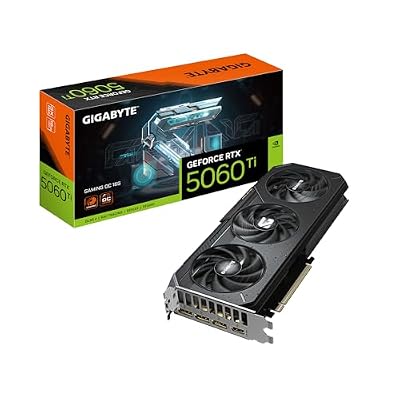
Sixteen gigabytes of GDDR7, a 2647 MHz boost clock, and a triple-fan WINDFORCE design with Hawk fans — the fans stop at idle. At 281 mm and two slots thick, it fits the same cases as the 5060 above.
Pick it over the 8GB version for memory headroom: texture packs and local AI workloads eat video memory, and 16GB gives you room to grow.
Specs: 16GB GDDR7, 128-bit, boost clock 2647 MHz, 281 mm, 2-slot, triple WINDFORCE fans, Dual BIOS, PCIe 5.0, 3x DisplayPort 2.1b, 1x HDMI 2.1b, 650W PSU recommended. ASIN: B0F5BD1X83. Verdict: buy.
3. ASUS Prime GeForce RTX 5070 OC Edition 12GB GDDR7 — the 1440p sweet spot

The Prime OC is the 5070 for builders who want a triple-fan card that still fits small-form-factor rules: three Axial-tech fans cool a 250W card in a 304 mm, 2.5-slot, SFF-Ready body, and the factory overclock reaches 2587 MHz in OC mode. Twelve gigabytes of GDDR7 is the right amount for high-refresh 1440p, and DLSS 4 covers the games where raw power falls short.
Before you order, confirm a 750W supply and a 16-pin 12V-2×6 connector — an older unit without it means an adapter or a new power supply.
Specs: 12GB GDDR7, 192-bit, boost clock 2587 MHz in OC mode, 304 mm, 2.5-slot, triple Axial-tech fans, Dual BIOS, 16-pin connector, 750W PSU recommended, 3x DisplayPort 2.1b, 1x HDMI 2.1b. ASIN: B0DS6WPTLL. Verdict: buy.
4. GIGABYTE GeForce RTX 5070 Ti Gaming OC 16G — the 4K entry

The Gaming OC is a large triple-fan 5070 Ti: a 342 mm WINDFORCE cooler on a 300W card, with a 2588 MHz boost clock. It is the 4K entry card in this guide and the longest card here — measure your case before you order.
This is the buy for a 1440p high-refresh monitor or a 4K display. The 750W requirement is firm, and the box includes a 16-pin adapter, so check your spare connectors first.
Specs: 16GB GDDR7, 256-bit, boost clock 2588 MHz, 342 mm, triple WINDFORCE fans, 300W, 16-pin connector with adapter included, 750W PSU recommended, 3x DisplayPort 2.1a, 1x HDMI 2.1b. ASIN: B0DTGPC5KR. Verdict: buy if your monitor, case, and power supply are ready.
5. MSI Gaming RTX 5080 16G Ventus 3X OC White — the wait-unless card

The Ventus 3X OC White is the strongest card in this guide: 16GB of GDDR7, a 2640 MHz boost clock, and a triple-fan cooler on a 360W card. The white shroud suits light-colored builds, aimed at 4K gaming with DLSS 4. It is also the most demanding to set up: an 850W supply, a 16-pin connector, and room for a triple-fan card.
One listing quirk: the spec block lists GDDR6X in one field while the description says GDDR7, which is correct for the RTX 5080 — trust the description, not the stray field. Buy this card only if you game at 4K today and your system is already ready.
Specs: 16GB GDDR7, 256-bit, boost clock 2640 MHz, triple TORX 5.0 fans, 360W, 16-pin connector, 850W PSU recommended, 3x DisplayPort 2.1a, 1x HDMI 2.1b, white. ASIN: B0DSWQNGYF. Verdict: wait, unless you game at 4K today.
Three checks before you buy
Power supply and connector. The 5060 and 5060 Ti use a standard 8-pin connector; the 5070 and above use the 16-pin 12V-2×6 connector. Check the wattage guidance for your tier — 550W, 650W, 750W, 750W, and 850W from the 5060 up to the 5080 — and make sure the connector seats fully and clicks.
Case fit. Measure before you order. Length matters most: the 5060 is 281 mm, the 5070 is 304 mm, the 5070 Ti is 342 mm. Slot thickness matters next: a 2.5-slot card can block the PCIe slot below it, and a triple-fan card needs front clearance.
Monitor match. Match the tier to the screen you own. A 5080 on a 1080p monitor wastes most of the card, and a 5060 on a 4K monitor disappoints. The honest pairing is 1080p with the 5060, 1440p with the 5060 Ti 16GB or 5070, and 4K with the 5070 Ti or 5080. A weak CPU also holds back a strong card at 1080p.
How to choose
Start with your monitor’s resolution and refresh rate — that sets the tier. Then check video memory: 8GB is enough for 1080p today, 12GB is the minimum for 1440p, and 16GB is what you want for 4K or for a card you plan to keep for years. Then check the power supply and the case, in that order — a card you cannot power or fit is not a bargain.
Partner cards differ more in cooling and size than in speed. A dual-fan card fits small cases and runs warmer; a triple-fan card runs quieter but needs more room. Small factory overclocks change frame rates by a small margin, so pick the cooler and size that fit your build, not the highest clock on the box.
Who should skip
- 1080p gamers whose current card still runs their games well — a new card will not change what you see on that screen.
- Anyone whose power supply lacks the wattage or the 16-pin connector and who does not want to replace it.
- Small-form-factor builders whose case cannot take a triple-fan card — the 5060 here is 281 mm long, so measure first and look for a shorter dual-fan model if it does not fit.
- Anyone buying a card to match a monitor they do not own yet — buy the monitor first.
- Anyone eyeing the 8GB RTX 5060 Ti. It carries the same name as the 16GB version with half the memory.
FAQ
Is Black Friday the right time to buy an RTX 50-series card?
For the 5060, 5060 Ti 16GB, and 5070, yes — these are the tiers where a Black Friday window most rewards a ready buyer. Offers change through the sales period, so check the current price and offers on the Amazon product page first, and only buy a card that fits your supply, case, and monitor.
Should I buy the 8GB or the 16GB RTX 5060 Ti?
Buy the 16GB version. The two cards share a name and a chip, but the 8GB version runs out of video memory sooner at 1440p, and that shows up as stutter in texture-heavy games. The 16GB version stays useful longer.
Will an RTX 50-series card work with my old power supply?
It depends on wattage and connectors. The 5060 and 5060 Ti use a standard 8-pin connector, while the 5070 and above use a 16-pin 12V-2×6 connector and need 650W to 850W by tier. Check the guidance numbers against your unit’s label; if the connector is missing, budget for an adapter or a new power supply.
Do I need a new monitor with a new graphics card?
No, but the card should match the screen you own. A 5060 suits 1080p, the 5060 Ti 16GB and the 5070 suit 1440p, and the 5070 Ti and 5080 suit 4K. A card far above your monitor wastes the card, and one far below it wastes the monitor.
Final verdict
Buy the RTX 5060, the 5060 Ti 16GB, or the 5070 if you need a card now and your power supply, case, and monitor already fit. Buy the 5070 Ti if all three are ready and you play at 1440p high-refresh or 4K. Wait on the 5080 unless you game at 4K today. Whatever you choose, check the current price and offers on the Amazon product page first, and measure your case and power supply.







Write Your Review
No reviews yet. Be the first to share your experience!