
- Top Pick: NVIDIA GeForce RTX 2070 Super Founders Edition Graphics Card (Renewed)
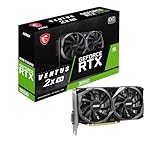
- Best Value: msi Gaming RTX 3050 Ventus 2X 6G OC Graphics Card (NVIDIA RTX 3050, 96-Bit, Boost Clock: 1492 MHz, 6GB GDDR6 14 Gbps, HDMI/DP, Ampere Architecture)
- Premium Choice: Sparkle Intel Arc A380 ELF, 6GB GDDR6, Single Fan, SA380E-6G
If you are shopping for the best 20 series GPU in 2026, you are almost certainly shopping the used market. The RTX 20 cards were the first GeForce generation with dedicated ray tracing hardware and the first to carry DLSS, and the single most useful thing they still offer today is DLSS upscaling. That feature is why a card that is several generations old can still make modern games playable at 1440p.
- Why Turing still has a place
- The best RTX 20 series card for each budget: four compared
- RTX 2080 Ti: the one to buy if you can find a clean one
- RTX 2080 Super: the sensible runner-up
- RTX 2070: balanced and approachable
- RTX 2060: the entry ticket
- Buying used Turing without getting burned
- When to skip this whole generation
- Our verdict
- FAQ
The decision is rarely “which one is fastest.” It is a question of how much VRAM you can live with, how much power your supply can deliver, and how much risk you are willing to take on a card that has probably run for years. Below, the four cards that matter, an honest look at what each gets right, and a checklist for buying one without regret.
As an Amazon Associate we earn from qualifying purchases at no extra cost to you.




Why Turing still has a place
RTX 20 cards support DLSS upscaling, but not the frame generation introduced with RTX 40, and not the multi frame generation that is exclusive to RTX 50. In practice that means you can turn on DLSS Super Resolution in supported games and trade a little image quality for a large frame-rate gain, while skipping frame generation entirely. Older Turing silicon also lacks some newer encoder features, so streamers should read the spec page for the specific card.
The other reality is memory. Cards in this lineup carry 6GB, 8GB or 11GB of GDDR6. That range decides most of the ranking.
The best RTX 20 series card for each budget: four compared
People searching for the best 20 series graphics card usually want one name, but the honest answer is a short ladder. Whatever the best RTX 20 series card means for you depends on whether VRAM or price comes first.
| Card | VRAM | Board power | Launch MSRP | Best for |
|---|---|---|---|---|
| RTX 2080 Ti | 11GB | 250W | $999 | 1440p with DLSS, heavy texture settings |
| RTX 2080 Super | 8GB | See spec page | $699 | 1440p at tuned settings |
| RTX 2070 | 8GB | 175W | $499 | Balanced 1080p to 1440p builds |
| RTX 2060 | 6GB | 160W | $349 | 1080p with DLSS, tight budgets |
Those MSRPs are launch prices from when each card was introduced. They do not reflect what a used card costs now. Always check the current price on the listing and compare it to newer options before buying.
RTX 2080 Ti: the one to buy if you can find a clean one
The 2080 Ti is the top of the family and the only one with 11GB of VRAM. That memory pool is what keeps it relevant, because games that choke 8GB cards at high texture settings often run comfortably within 11GB. At 250W it also draws less power than a 3080-class card, so many 650W to 750W supplies of good quality can handle it. Read the requirements on the specific board you are buying, since factory-overclocked models vary.
- 11GB of VRAM, the best in the family
- Strong 1440p card when paired with DLSS
- Skip it if: the seller cannot show it has been stable, since early units had a reputation for memory-related failures; a used 2080 Ti with no return window is a gamble
RTX 2080 Super: the sensible runner-up
The 2080 Super gives up the extra VRAM but keeps most of the performance character of the 2080 Ti in a package that is easier to find and typically easier on the wallet at resale. For 1440p gaming at tuned settings, it is a competent card. The 8GB limit is the thing to respect: do not expect to run maximum texture quality in recent open-world titles.
- Fast enough for 1440p with DLSS enabled
- Widely sold, so you can compare several listings
- Skip it if: you want to play at 4K, or you want headroom for future memory-hungry releases
RTX 2070: balanced and approachable
At 175W, the 2070 asks very little of a power supply and fits into mid-size cases without drama. It is the card I would suggest to someone upgrading a Ryzen 5 3600 or 5600X system that currently relies on integrated graphics or something like a GTX 1060. It gives you RT hardware, DLSS, and respectable 1080p performance, and it still handles 1440p with upscaling in many games.
- Moderate power draw
- DLSS support at a small outlay
- Skip it if: you need more than 8GB of VRAM or want to run ray tracing seriously, where this card runs out of steam quickly
RTX 2060: the entry ticket
The 2060 is the cheapest way into DLSS on this list, and its 160W budget makes it painless to install. The catch is 6GB of VRAM. That is workable at 1080p with medium to high settings in many games, but it will force compromises in newer titles. Treat it as a bridge card for a build you plan to upgrade later.
- Cheapest route to DLSS
- Easy on the PSU and case airflow
- Skip it if: you play recent releases at high settings, or you can find a 3060 12GB for a similar amount
Buying used Turing without getting burned
Ask about the usage history
A card from a gaming PC is generally a lower risk than one from a mining rig, though neither is a guarantee. Ask the seller directly, and prefer one who offers a return period.
Inspect thermals
Turing cards often shipped with thermal paste and pads that have dried out by now. Temperatures that climb quickly under load suggest the cooler needs a repaste. If you are not comfortable doing that, factor the cost of a shop doing it into your budget.
Check the video outputs and PCIe slot
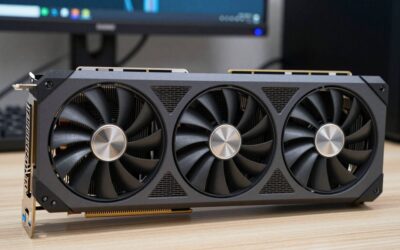
Test every port you plan to use. Also confirm the card fits your case: Turing cooler designs, particularly on 2080-class boards, can be long and thick.
When to skip this whole generation
If your budget reaches the used or new price of an RTX 3060 12GB or an RTX 4060, those later cards add frame generation support and better efficiency. A 2060’s $349 launch price and a 3060’s $329 launch price show how the later generation undercut the earlier one. Check current listings: if a 30 series card is within reach, it is usually the better buy.
Our verdict
Choose the 2080 Ti for the extra VRAM and the 2070 for the best balance of cost and ease of install. The 2060 is a stopgap, and the 2080 Super is a solid middle ground when the Ti is out of reach.
FAQ
What is the best RTX 20 series card for 1440p?
The 2080 Ti, thanks to its 11GB of VRAM. The 2080 Super works too if you tune texture settings.
Does the RTX 20 series support frame generation?
No. DLSS upscaling works, but frame generation requires RTX 40 or newer, and multi frame generation requires RTX 50.
Is a 2070 enough for a Ryzen 5600X build?
Yes. The CPU will rarely hold back the card at 1080p or 1440p.
Do I need a PCIe 4.0 slot?
No. These cards run on PCIe 3.0 without issues.
Ready to decide? Our #1 pick for 2026 is the RTX 2080 Ti.
Live price & availability on Amazon.

Write Your Review
No reviews yet. Be the first to share your experience!