
Simulation games ask a desktop to do two jobs at once. A city builder tracks thousands of citizens, vehicles and services while it renders every street, and a flight simulator streams terrain, weather and traffic while it holds a steady frame rate. The processor carries most of that simulation load, the graphics card draws the world it creates, and memory keeps the whole model close at hand. Picking a desktop for this genre means weighing the chip first, then the card, then the room to grow.
This guide is for players who spend evenings in Cities: Skylines II, Microsoft Flight Simulator, Farming Simulator and racing sims, and for anyone building a first rig around those worlds. The four desktops below were chosen from the names and specifications shown on their Amazon product pages, with attention to processor strength, memory, storage and cooling. Read the buying criteria first, then match a machine to the sims you play most.
Quick Picks
As an Amazon Associate we earn from qualifying purchases
| Product | Best for | Key spec from title |
|---|---|---|
| Skytech Azure 3 Plus | Demanding flight and city sims at high settings | Ryzen 7 7800X3D and RTX 5070 Ti 16GB |
| CyberPowerPC Gamer Supreme | Large modded worlds with room to spare | Ryzen 7 9800X3D and 2TB PCIe 4.0 SSD |
| CyberPowerPC Gamer Master | A first sim rig for 1080p and 1440p play | Ryzen 7 8700F and RTX 5060 Ti 8GB |
| iBUYPOWER Y40 PRO | Long sessions in a showpiece tempered-glass case | Ryzen 7 7800X3D and 240mm liquid cooling |
How to Choose
Processor Cache and Cores for Simulation
Simulation work is heavy on the processor because the game keeps calculating while you play. Traffic flow, weather systems, physics and AI routines all run on the CPU, so a chip with a large cache and strong single-core speed keeps a busy scene smooth. The Ryzen 7 7800X3D and 9800X3D in this guide carry a large stacked cache that suits simulation logic, while the Ryzen 7 8700F covers lighter titles. Check the processor model in the listing title before anything else, since it sets the ceiling for every sim you run.
Graphics Memory for Detailed Worlds
A simulation world is full of detail, from dense city blocks to cockpit instruments and long draw distances, and the graphics card needs enough memory to hold those textures. A card with 16GB of video memory handles high texture settings and wider resolutions with more headroom, while an 8GB card suits 1080p and 1440p play at moderate settings. Match the card to your monitor: a single 1440p display is less demanding than triple screens or a 4K panel, so count your displays before you decide.
Memory and Storage for Mods and Long Sessions
Mods, custom maps and long save files grow quickly in simulation games, and 32GB of memory gives the system room to keep a large world loaded without constant swapping. A 16GB build still runs most sims, but heavy mod lists and background tools such as mapping apps and voice chat push it harder. Storage matters just as much: a 1TB drive fills fast when one flight simulator install plus add-ons can take a large share of it, so a 2TB drive or a spare slot for a second drive is worth planning for.
Cooling, Ventilation and Safe Power Use
Long simulation sessions push a desktop for hours, so cooling and airflow deserve the same attention as raw speed. The Skytech listings in this guide name a 360mm liquid CPU cooler and ARGB fans, and the iBUYPOWER Y40 PRO lists a 240mm liquid cooling system, both designed to move heat out of the case during sustained loads. Keep the intake and exhaust vents clear, leave space around the case, set the tower on a hard flat surface, and use the supplied power cable with the listed power supply. Shut the machine down before moving it or opening the side panel.
The 4 Best Options
Skytech Azure 3 Plus
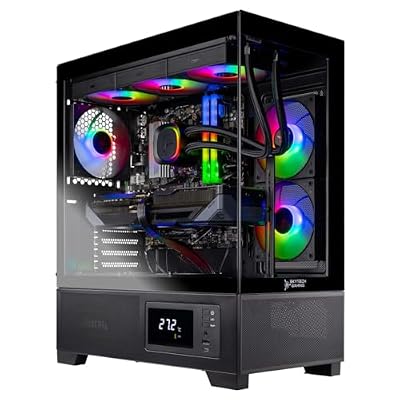
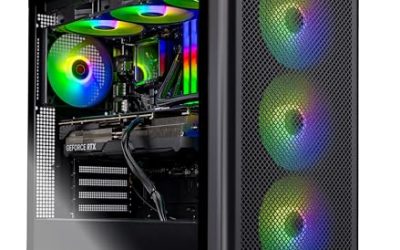
The Skytech Azure 3 Plus is the strongest all-round pick here for players who run demanding sims at high settings and want headroom for mods. Its Ryzen 7 7800X3D processor handles the heavy simulation logic of city builders and flight sims, while the RTX 5070 Ti with 16GB of video memory keeps detailed scenery and dense traffic looking sharp at 1440p. The 32GB of DDR5 memory and 360mm liquid cooler suit long sessions, and the tempered glass case shows off the build on your desk.
Specs
- AMD Ryzen 7 7800X3D processor, 4.2 GHz with 5 GHz turbo
- NVIDIA GeForce RTX 5070 Ti graphics card with 16GB GDDR7
- 32GB DDR5 RAM at 5600 MHz with RGB lighting
- 1TB Gen4 NVMe M.2 SSD
- 850W Gold ATX 3 power supply
- 360mm ARGB liquid CPU cooler
- Windows 11 Home 64-bit, Wi-Fi and tempered glass case
Best for: Flight and city simulation at high settings with heavy add-ons.
Watch out for: The 1TB drive fills quickly with large simulator installs, so plan for extra storage.
ASIN: B0F6MVVZSC — https://www.amazon.com/dp/B0F6MVVZSC
CyberPowerPC Gamer Supreme

The CyberPowerPC Gamer Supreme suits players whose sim worlds keep growing, because it pairs a newer Ryzen 7 9800X3D processor with a roomy 2TB drive. That combination keeps a large modded city or a flight simulator with many add-on regions loaded without constant juggling of installed content. The RTX 5070 Ti with 16GB of video memory covers high texture settings, and 32GB of DDR5 memory gives background tools room to run beside the game itself.
Specs
- AMD Ryzen 7 9800X3D processor
- NVIDIA GeForce RTX 5070 Ti graphics card with 16GB
- 32GB DDR5 memory
- 2TB PCIe 4.0 SSD
- WiFi ready
- Windows 11 Home
Best for: Large modded simulation worlds where storage and processor cache matter most.
Watch out for: Confirm the case dimensions and desk space before ordering, since prebuilt towers vary in size.
ASIN: B0DXVDBW3F — https://www.amazon.com/dp/B0DXVDBW3F
CyberPowerPC Gamer Master
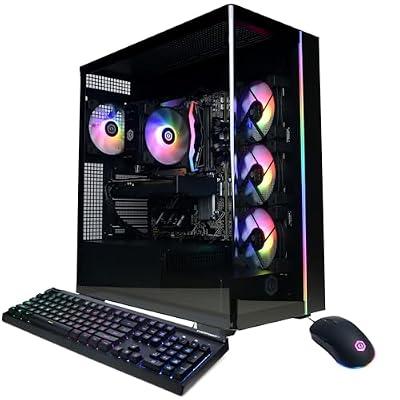
The CyberPowerPC Gamer Master is the sensible entry point for someone trying simulation games for the first time without committing to a flagship build. Its Ryzen 7 8700F processor and RTX 5060 Ti graphics card handle Farming Simulator, Euro Truck Simulator 2 and lighter city builders well at 1080p and 1440p, and the 1TB drive holds a handful of titles plus their early mods. It is a compact way to find out which sims you love before investing in a bigger machine.
Specs
- AMD Ryzen 7 8700F processor at 4.1 GHz
- NVIDIA GeForce RTX 5060 Ti graphics card with 8GB
- 16GB DDR5 memory
- 1TB PCIe 4.0 SSD
- WiFi ready
- Windows 11 Home
Best for: A first simulation rig for lighter sims at 1080p and 1440p.
Watch out for: 16GB of memory can feel tight with large mod lists, so check whether the board allows a memory upgrade.
ASIN: B0DW4BK2TW — https://www.amazon.com/dp/B0DW4BK2TW
iBUYPOWER Y40 PRO

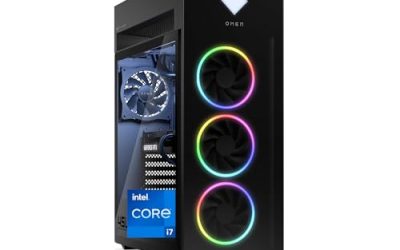
The iBUYPOWER Y40 PRO combines a proven simulation processor with a case that looks the part on a dedicated sim desk. Its Ryzen 7 7800X3D chip carries the same large-cache design as the top pick, and the 240mm liquid cooling system listed on the product page is built for the long, steady loads that racing and flight sessions create. With 32GB of DDR5 memory and a keyboard and mouse in the box, it arrives ready for an evening of driving or flying.
Specs
- AMD Ryzen 7 7800X3D processor
- NVIDIA GeForce RTX 5060 Ti graphics card with 8GB
- 32GB DDR5 RGB memory at 5200 MHz
- 1TB NVMe SSD
- 240mm liquid CPU cooling system
- Windows 11 Home, keyboard and mouse included
Best for: Long racing and flight sessions in a tempered-glass showpiece case.
Watch out for: The 8GB graphics card suits 1080p and 1440p better than 4K, so match it to your monitor.
ASIN: B0FMXXD6FS — https://www.amazon.com/dp/B0FMXXD6FS
Which One Fits Your Situation
You Play City Builders and Management Sims
Choose the CyberPowerPC Gamer Supreme. City builders lean on processor cache and memory as the population grows, and the 9800X3D paired with 32GB of DDR5 memory keeps late-game cities responsive. The 2TB drive also holds the many mods and custom assets that management players collect, so you can keep a full workshop library installed instead of rotating content in and out.
You Fly in Microsoft Flight Simulator
Choose the Skytech Azure 3 Plus. Flight simulation needs both a strong processor for terrain and traffic calculations and a graphics card with enough memory for detailed scenery, and this build covers both with the 7800X3D and the 16GB RTX 5070 Ti. The 360mm liquid cooler listed on the product page also suits the long, uninterrupted sessions that cross-country flights demand.
You Race with a Wheel and Triple Screens
Choose the iBUYPOWER Y40 PRO. Racing sims reward steady frame rates across wide fields of view, and the 7800X3D keeps physics and AI cars running smoothly while the 32GB of memory handles telemetry and timing tools in the background. The tempered-glass case and liquid cooling suit a permanent rig setup where the machine sits beside your wheel base.
You Want a First Sim Rig
Choose the CyberPowerPC Gamer Master. It covers the most popular entry-level sims at 1080p and 1440p without the cost of a flagship card, and the 1TB drive is enough for a starter collection. Spend your first months learning which genre holds your attention, then upgrade memory or storage later once you know where your library is heading.
Common Mistakes
- Choosing a graphics card first and ignoring the processor, even though simulation logic runs mainly on the CPU.
- Buying a 1TB drive for a genre where one install plus add-ons can take a large share of it.
- Pairing a strong desktop with a monitor that cannot show the frame rate it produces.
- Blocking the case vents by pushing the tower against a wall or into a closed cabinet.
- Installing dozens of mods at once instead of adding them a few at a time and checking stability.
Frequently Asked Questions
Is a Ryzen 7 7800X3D good for simulation games?
Yes, it is a strong choice for simulation because its large stacked cache suits the constant calculations behind traffic, weather and physics. City builders and flight simulators benefit more from that cache than from raw clock speed alone. Pair it with 32GB of memory and a graphics card with at least 8GB of video memory for a balanced build.
How much RAM do simulation games need?
Most current simulation games run well with 32GB of memory, which leaves room for mods, mapping tools and voice chat running beside the game. A 16GB build can still play lighter sims, but heavy mod lists and long sessions push it harder. If you plan to mod heavily, treat 32GB as the practical starting point.
How much storage should a simulation desktop have?
A 1TB drive covers a small collection, but simulation installs and add-ons grow fast, so 2TB is the safer choice for a dedicated sim rig. If you choose a 1TB build, check that the case and board have a spare slot for a second drive before you buy. Keeping some free space on the drive helps loading times stay consistent.
Do simulation games need liquid cooling?
Liquid cooling is not required, but it helps during the long, steady loads that simulation sessions create. The Skytech and iBUYPOWER builds in this guide list liquid coolers that move heat out of the case over hours of play. Good airflow, clear vents and a case with room to breathe matter just as much as the cooler type.




Write Your Review
No reviews yet. Be the first to share your experience!