
The main power cable is the thickest, stiffest lead in most builds, and it lands on the motherboard at the worst possible angle. A standard 24-pin plug points straight up from the board, so the cable arcs over the top edge, crowds the front fans, and strains the socket sideways. A right angle adapter plugs into the motherboard socket and turns the connection ninety degrees, so the cable arrives parallel to the board and runs straight toward the nearest cable management opening. This guide covers only motherboard 24-pin ATX adapters, chosen for seating quality, clearance, and clean routing.
- Quick Answer
- How to Choose
- Cooler Master ATX 24 Pin 90 Degree Adapter with Capacitors
- Unbranded 24 Pin 90 Degree ATX Adapter
- AsiaHorse Hydrus 24 Pin 90 Degree Right Angle Extension, White
- AsiaHorse ATX 24 Pin 90 Degree ARGB Motherboard Power Adapter
- EZDIY-FAB Shield 24 Pin Angle Adapter, Black, 180 Degree
- Who Should Skip It
- FAQ
- Final Verdict
- Product and ASIN Reference
As an Amazon Associate, we earn from qualifying purchases.
Quick Answer
For most builders, the Cooler Master adapter with built-in capacitors is the safest right angle choice, thanks to its documented dimensions, rigid housing, and brand support. Builders who want lighting should look at the AsiaHorse right angle options, while the simple unbranded adapter suits tight budgets and test benches. Check exit direction and nearby clearance before buying any of them.
How to Choose
Start with exit direction, because it decides whether the adapter helps or hurts. An adapter can turn the cable toward the front of the case or toward the rear, so picture where your cable management opening sits and choose the turn that points at it. An adapter exiting the wrong way forces an uglier loop than the stock plug. Some designs fold the cable back a full half turn, suiting boards where the nearest cutout lies in the opposite direction.
Clearance is the second check. An adapter adds height above the socket and width beside it, and that footprint can collide with tall memory heat spreaders, front radiator fans, or drive cages. Measure the space around your socket before ordering and compare it with published dimensions where a maker provides them. Lit adapters with decorative covers need noticeably more room than plain blocks.
Third, consider what sits between the power supply and the motherboard. A plain adapter is a straight pass-through with no electronics in between, and that simplicity is a virtue, but seating quality matters enormously. The adapter must click fully into the socket and grip the cable plug firmly, since a partially seated main power connection can cause shutdowns that look like other faults. One design here adds capacitors inside the housing to smooth power delivery at the board end.
Fourth, decide whether you want lighting. Several adapters add addressable lighting fed by a separate three-pin lead, which needs a matching motherboard header or a controller and adds one more cable to hide. If your case has no window, skip it and take the smaller, simpler part.
Finally, think about the cable itself. A compact adapter keeps your existing cable and changes its direction at the board. A right angle extension replaces the last stretch with its own wired section, helping when the stock cable is too short or stiff, but adds a second connection point. Never use an adapter at the power supply end of a modular cable, never stack two adapters, and never substitute a graphics card power adapter: those are entirely different connectors, and this guide covers the motherboard 24-pin class only.
Cooler Master ATX 24 Pin 90 Degree Adapter with Capacitors
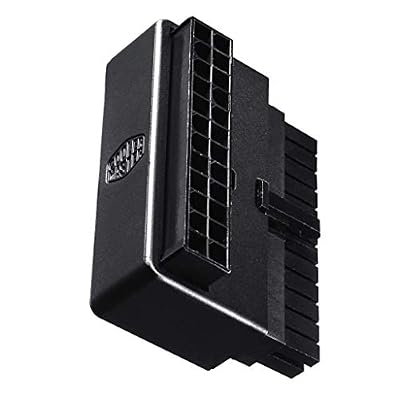
This is the reference design in the class and the easiest pick to recommend. Cooler Master sells a plain version and this version with capacitors built into the housing, and its published product sheet gives exact dimensions and materials, which is rare among small cable accessories. The housing measures forty-two by fifty-seven by twenty-seven millimetres, is moulded from black flame-retardant rated ABS plastic, and sits flat against the board so the cable leaves parallel to the motherboard toward the case edge.
Installation is simple: seat the adapter in the socket until it locks, then plug the power supply cable into it. Because the housing is rigid and comparatively tall, check the space above your socket first, especially under a front-mounted radiator. The maker backs the part with a multi-year warranty, which stands out in a category full of anonymous listings. For a permanent build, that documentation and support make this the low-risk choice.
Specs
| Item | Detail |
|---|---|
| Connector input | 24-pin ATX female |
| Connector output | 24-pin ATX male |
| Turn angle | 90 degrees |
| Dimensions | 42 x 57 x 27 mm |
| Housing material | ABS plastic, flame-retardant rated |
| Extra circuitry | Built-in capacitors |
| Colour | Black |
| Model code | CMA-CEMB01XXBK1 |
Unbranded 24 Pin 90 Degree ATX Adapter

At the opposite end of the market sits the simple pass-through adapter sold under generic listings: two 24-pin connectors joined back to back at a right angle on a small board, with no decoration, lighting, or added circuitry. Forum discussions describe this style accurately as two connectors soldered together, electrically identical to a short extension. That plainness is the appeal: it is the smallest, lightest way to turn the main cable, suiting test benches, budget builds, and compact cases where a taller branded housing would not fit.
The trade-offs are documentation and consistency. Generic listings rarely publish exact dimensions, tolerances vary between batches, and there is no meaningful warranty. Inspect the pins before installation, make sure both ends seat with a positive click, and avoid repeated removal, since the simple construction is not built for constant handling. Bought with those expectations, it does its one job: it turns the cable flat against the board and removes the big arc over the socket.
Specs
| Item | Detail |
|---|---|
| Connector input | 24-pin ATX female |
| Connector output | 24-pin ATX male |
| Turn angle | 90 degrees |
| Construction | Two connectors joined on a small board |
| Extra circuitry | None, straight pass-through |
| Lighting | None |
| Colour | Black |
| Pack contents | Adapter only |
AsiaHorse Hydrus 24 Pin 90 Degree Right Angle Extension, White

The Hydrus takes a different approach: instead of a rigid block, it is a wired extension whose board-end connector is built at a right angle, so the cable leaves the motherboard sideways and runs as a flexible thirty-centimetre extension to the power supply cable. The listing describes eighteen-gauge wire with plated conductors and a textured sleeve finish. The white version suits white motherboards and cases where a black block would stand out.
Because it is an extension, it adds length as well as direction, helping in larger cases where the stock cable barely reaches, and the flexible section dresses more neatly than a stiff cable forced around a corner. The design includes addressable lighting along the run, fed by a separate three-pin lead, so plan a header or controller for it. An extension also introduces a second plug-and-socket joint; seat it firmly and give it a gentle bend rather than a sharp fold. For show builds needing both the turn and the look, this is the most complete package here.
Specs
| Item | Detail |
|---|---|
| Connector input | 24-pin ATX female |
| Connector output | 24-pin ATX male |
| Turn angle | 90 degrees at the board end |
| Cable length | 30 cm extension section |
| Wire gauge | 18 AWG as listed |
| Lighting | Addressable lighting with separate lead |
| Colour | White |
| Model | HYDRUS |
AsiaHorse ATX 24 Pin 90 Degree ARGB Motherboard Power Adapter

AsiaHorse also sells a compact rigid adapter in the classic format: a small block that plugs into the socket, turns the connection ninety degrees, and adds addressable lighting across its face. The maker’s manual describes the package as the adapter plus a three-pin synchronisation cable, with lighting controlled through a compatible motherboard header. At just over an ounce, it adds almost no mass to the socket, and its low profile suits boards where memory slots or a front fan sit close to the power connector.
This suits builders who want the lit look without a full extension cable, because the stock cable already reaches and only its direction is wrong. Confirm a spare addressable lighting header, or budget for a controller, before ordering, and route the thin lighting lead behind the adapter body so it does not cross the memory slots. Seat the adapter first, confirm the lock, then connect the main cable, and attach the lighting lead last so it never takes the strain of the thick one.
Specs
| Item | Detail |
|---|---|
| Connector input | 24-pin ATX female |
| Connector output | 24-pin ATX male |
| Turn angle | 90 degrees |
| Lighting | 5V 3-pin addressable RGB |
| Included lead | ARGB synchronisation cable |
| Weight | About 1.13 ounces as documented |
| Colour | Black |
| Form | Rigid socket adapter block |
EZDIY-FAB Shield 24 Pin Angle Adapter, Black, 180 Degree
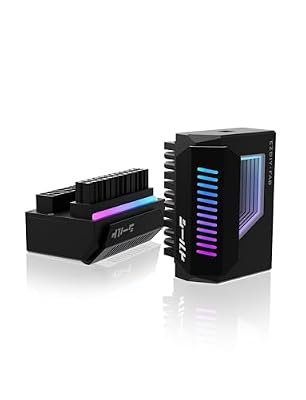
The Shield takes parallel routing one step further. Instead of a quarter turn, it folds the connection back a full half turn, so the cable leaves the socket parallel to the board but pointing back across it. That suits layouts where the nearest cable opening sits on the opposite side of the socket from where a ninety-degree turn would point. A wide decorative shield covers the connector, carrying an infinity mirror lighting effect fed by a five-volt three-pin header, and the listing confirms compatibility with ATX, micro ATX, and mini ITX boards using the normal 24-pin connection.
Be honest with your layout before choosing it. A half-turn fold needs clear space across the board beside the socket, and the broad cover is the largest footprint in this guide, so measure carefully around memory slots and tall components. The black version carries model code EZDPI231, and a white version is sold separately. If your case opening sits exactly where this fold points, nothing else here routes as directly; if not, the ninety-degree options above will serve you better.
Specs
| Item | Detail |
|---|---|
| Connector input | 24-pin ATX female |
| Connector output | 24-pin ATX male |
| Turn angle | 180 degrees, fold-back design |
| Lighting | Infinity mirror effect, 5V 3-pin sync |
| Board support | ATX, micro ATX, mini ITX as listed |
| Colour | Black |
| Model code | EZDPI231 |
| Pack contents | One adapter |
Who Should Skip It
Skip a right angle adapter if your current cable already routes cleanly. If the stock plug seats fully, reaches its opening without a hard bend, and presses against nothing, an adapter only adds another connection point. Also skip it if the space around your socket is occupied by memory slots, tall capacitors, or a shroud, since forcing an adapter body in can stress the socket.
Small form factor builders should measure twice, because some compact cases place the power supply or a drive bracket exactly where a turned cable would go. An adapter also cannot fix a short, stiff, or damaged main cable; an extension-style pick is the better answer when reach is the real problem. Finally, anyone troubleshooting an unstable system should remove variables, not add them: get the build stable on a direct connection first, then add routing hardware.
FAQ
Will a right angle adapter work with any motherboard?
Any board with a standard 24-pin ATX main power socket accepts the connector itself, since the pin layout is standardised. The real question is physical space. Adapter bodies differ in height, width, and exit direction, so compare the published dimensions with the clearance around your socket, especially near memory slots, shrouds, and front fans, before ordering.
Does an adapter affect power delivery?
A well-seated pass-through adapter simply extends the connection by a short distance, and the capacitor-equipped Cooler Master design adds smoothing components at the board end. The practical risk is mechanical, not electrical: a partially seated plug can cause shutdowns. Press every connection fully home until it locks, and recheck seating after moving the case or changing other cables.
Can I fit the adapter at the power supply end instead?
No. These adapters are designed for the motherboard end of the run, where the connector is a single standard 24-pin plug. Modular power supplies often split the board cable into two different plugs at the supply end, with maker-specific pin layouts, so a motherboard adapter does not belong there. Fit it at the board, exactly as the makers describe.
What is the difference between an adapter and a right angle extension?
An adapter is a compact rigid block that changes direction at the socket and keeps your existing cable. An extension, like the Hydrus in this guide, adds a wired section with the right angle built into its board-end connector, giving extra reach and a fresh, flexible run to dress neatly, at the cost of one more plug-and-socket joint to seat carefully.
Final Verdict
The Cooler Master capacitor adapter is the default recommendation: documented dimensions, a rigid housing, and real brand support in a category that badly needs all three. The unbranded pass-through covers budget and test-bench duty, the two AsiaHorse designs split the lit vote between a compact block and a full right angle extension, and the EZDIY-FAB Shield serves the narrow set of layouts that genuinely need a fold-back turn. Whichever you choose, measure the socket area first, confirm the exit direction matches your cable opening, and seat every connection fully.
Product and ASIN Reference
| Product | ASIN |
|---|---|
| Cooler Master ATX 24 Pin 90 Degree Adapter with Capacitors | B07HZ6B6R1 |
| Unbranded 24 Pin 90 Degree ATX Adapter | B07NZ5GXNF |
| AsiaHorse Hydrus 24 Pin 90 Degree Right Angle Extension, White | B0DSG6F6DT |
| AsiaHorse ATX 24 Pin 90 Degree ARGB Motherboard Power Adapter | B0BV6TQP55 |
| EZDIY-FAB Shield 24 Pin Angle Adapter, Black, 180 Degree | B0DCJL8V1F |


Write Your Review
No reviews yet. Be the first to share your experience!