
Gaming laptops squeeze desktop-class graphics into a thin chassis, and ports are the first casualty. Many models ship with one or two USB-C ports, a single HDMI output, and no Ethernet jack, which leaves a keyboard, mouse, headset, monitor, and wired network fighting over the same few sockets. A USB-C hub turns that single port into a full desk setup.
The five hubs below span a pocket-size travel hub to an 18-port Thunderbolt 4 dock. Two drive dual monitors, one pushes high-refresh HDMI for fast panels, and every pick charges the laptop over the same USB-C cable. This guide covers hubs and docks for gaming laptops only; the site already carries USB-C extension cables and MST hubs, which solve different problems.
As an Amazon Associate, we earn from qualifying purchases.
Quick Answer
For most gaming laptops, buy the Satechi 8-in-1 Multiport Adapter V3: high-refresh HDMI up to 4K at 120Hz, three 10Gbps data ports, and a travel-size body. The CalDigit TS4 is the premium Thunderbolt 4 dock, the Anker 575 the triple-display desktop dock, the UGREEN Revodok Pro 109 the value pick, and the Plugable 11-in-1 the dual-monitor portable pick.
Table of Contents
- Quick Answer
- 1. CalDigit TS4 Thunderbolt 4 Dock
- 2. Anker 575 USB-C Docking Station
- 3. Satechi 8-in-1 Multiport Adapter V3
- 4. UGREEN Revodok Pro 109
- 5. Plugable 11-in-1 USB-C Hub
- How to Choose
- Who Should Skip
- FAQ
- Final Verdict
- Product and ASIN Reference
1. CalDigit TS4 Thunderbolt 4 Dock

Best premium pick for a Thunderbolt 4 desk setup
The TS4 is the most complete dock here, with 18 ports fed by a single Thunderbolt 4 connection at 40Gb/s. It charges the laptop at up to 98W, carries 2.5GbE Ethernet for low-latency wired play, and drives a single 8K display or dual 6K displays. Three Thunderbolt 4 ports, three USB-C ports, and five USB-A ports all run at 10Gb/s, for an external SSD game library and a full set of peripherals. UHS-II SD and microSD readers, a 3.5mm audio jack, and an included 230W power supply round out the desk.
The catch is the host port. The TS4 needs a Thunderbolt 4 or USB4 port on the laptop, which most Intel gaming laptops have and many AMD gaming laptops do not, so check the laptop spec sheet before ordering. It is also a desk-bound dock with its own power brick, not a travel accessory.
Specs
- Brand: CalDigit
- Ports: 18 total, 3 x Thunderbolt 4, 3 x USB-C, 5 x USB-A
- Data speed: 40Gb/s Thunderbolt 4, 10Gb/s USB
- Display: 1 x DisplayPort 1.4, single 8K or dual 6K displays
- Charging: 98W to laptop, 230W power supply included
- Network: 2.5GbE Ethernet
- Card readers: UHS-II SD and microSD
- Audio: 3.5mm audio in and out
- Fit: Desktop dock, needs a Thunderbolt 4 or USB4 port
- Tier: Premium
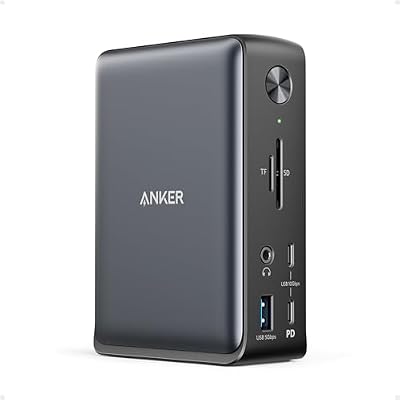
2. Anker 575 USB-C Docking Station (13-in-1)
Best desktop pick for a triple-display setup
The Anker 575 is the triple-display dock here, with two HDMI outputs and one DisplayPort output for three external screens from one USB-C cable. It charges the laptop at up to 85W, adds Gigabit Ethernet, SD and microSD card readers, and a 3.5mm audio jack, and its USB-C data port runs at 10Gbps while the USB-A ports run at 5Gbps.
Triple display works on Windows laptops with a full-featured USB-C port that supports DisplayPort Alt Mode, which covers most modern gaming laptops. The honest limit is bandwidth: three screens share one USB-C link, so this dock suits a monitor plus side screens rather than three high-refresh gaming panels.
Specs
- Brand: Anker
- Ports: 13 total, 2 x HDMI, 1 x DisplayPort, 1 x USB-C, 3 x USB-A
- Data speed: 10Gb/s USB-C, 5Gb/s USB-A
- Display: Triple display, 2 x HDMI and 1 x DisplayPort
- Charging: 85W to laptop
- Network: Gigabit Ethernet
- Card readers: SD and microSD
- Audio: 3.5mm audio
- Fit: Desktop dock with power supply
- Tier: Premium
3. Satechi 8-in-1 USB-C Multiport Adapter V3

Best pick for high-refresh gaming monitors
The Satechi V3 is the only hub here built around refresh rate. Its HDMI output reaches 8K at 30Hz, 4K at 120Hz, 2K at 144Hz, and 1080p at 240Hz on Windows, the right match for a fast gaming monitor that a plain 4K at 60Hz hub would hold back. Four USB data ports, three at 10Gbps, cover keyboard, mouse, headset dongle, and external SSD, while Gigabit Ethernet and an SD reader fill the remaining gaps. It takes a 100W charger input and passes up to 85W to the laptop, in a compact aluminum body.
The high-refresh figures are Windows-only: on a Mac host the same HDMI port tops out at 4K at 60Hz. That limit does not matter for this guide, since gaming laptops run Windows. For a single fast monitor and a bag that travels, this is the pick.
Specs
- Brand: Satechi
- Ports: 8 total, 1 x HDMI, 4 x USB data, 1 x Ethernet, 1 x SD
- Data speed: 3 x 10Gbps USB ports
- Display: HDMI up to 8K at 30Hz, 4K at 120Hz, 2K at 144Hz on Windows
- Charging: 100W input, 85W pass-through to laptop
- Network: Gigabit Ethernet
- Card reader: SD
- Build: Aluminum, compact travel size
- Tier: Mid-range
4. UGREEN Revodok Pro 109 9-in-1

Best value pick for everyday expansion
The Revodok Pro 109 covers the everyday desk at the lowest tier here. A 4K at 60Hz HDMI output drives one external monitor, three USB ports run at 10Gbps, and a fourth USB-A port runs at 5Gbps. Gigabit Ethernet keeps online play off Wi-Fi, SD and microSD readers run at up to 170MB/s, and the 100W Power Delivery input charges the laptop through the same cable.
Nothing here is exotic, and that is the point: a keyboard, mouse, headset, monitor, and wired network all connect through one hub with no driver and no power brick. The single HDMI output is the real limit, so a second monitor needs a different pick.
Specs
- Brand: UGREEN
- Ports: 9 total, 1 x HDMI, 2 x USB-C, 2 x USB-A, 1 x Ethernet, SD and microSD
- Data speed: 3 x 10Gbps USB ports, 1 x 5Gbps USB-A
- Display: 4K at 60Hz HDMI
- Charging: 100W Power Delivery input
- Network: Gigabit Ethernet
- Card readers: SD and microSD, up to 170MB/s
- Build: Aluminum, compact with attached cable
- Tier: Budget
5. Plugable 11-in-1 USB-C Hub

Best portable pick for dual monitors
The Plugable 11-in-1 is the portable dual-monitor hub here, with two HDMI outputs that each run 4K at 60Hz. Three USB-A ports and one USB-C port run at 5Gbps for keyboard, mouse, and headset, SD and microSD readers cover storage cards, and a 3.5mm audio jack takes a wired headset. A 100W charger plugged into the hub passes power through to the laptop.
Two notes matter. First, the dual displays extend on Windows but mirror on a Mac host, so this is a Windows-first hub. Second, there is no Ethernet port, so online play runs on Wi-Fi unless a separate adapter joins the bag.
Specs
- Brand: Plugable
- Ports: 11 total, 2 x HDMI, 3 x USB-A, 1 x USB-C, SD and microSD, audio
- Data speed: 5Gbps USB
- Display: Dual 4K at 60Hz HDMI
- Charging: 100W pass-through
- Network: No Ethernet port
- Card readers: SD and microSD
- Audio: 3.5mm audio
- Fit: Portable hub with attached cable
- Tier: Mid-range
How to Choose a USB-C Hub for a Gaming Laptop
Check the laptop USB-C port first
Video over a hub needs a full-featured USB-C port with DisplayPort Alt Mode, and the TS4 needs Thunderbolt 4 or USB4 on top of that. Most modern gaming laptops have at least one video-capable USB-C port, but a charging-only port will run the USB devices and nothing on the screen. Check the spec sheet before ordering.
Count the displays and the refresh rate
One 4K at 60Hz monitor suits the UGREEN and the Anker 575. Two monitors point to the Plugable 11-in-1 or the TS4, and three monitors point to the Anker 575. A fast panel changes the answer: only the Satechi V3 pushes 4K at 120Hz or 2K at 144Hz over HDMI.
Treat charging watts as a ceiling, not a promise
The hubs here deliver 85W to 98W to the laptop, which tops up the battery during browsing, streaming, and light play. A gaming laptop under full load draws far more than any hub supplies, so long sessions still belong on the barrel charger that shipped with the laptop.
Mind the network port
Wired play wants Ethernet, and the TS4 is the only pick here with 2.5GbE. The Anker 575, Satechi V3, and UGREEN carry Gigabit Ethernet, which covers online gaming comfortably. The Plugable 11-in-1 has no Ethernet at all, so it suits a desk with strong Wi-Fi.
A note on USB-C hub recalls
No CPSC recall covers USB-C hubs or docking stations as a class, and none covers any pick here. The general lesson still applies: use the charger and cable the hub maker specifies, and replace a hub whose cable or casing shows damage.
Who Should Skip a USB-C Hub
Skip a hub entirely if the laptop has no full-featured USB-C port, since a charging-only port cannot carry video. Skip the TS4 if the laptop lacks Thunderbolt 4 or USB4, and skip the triple-display Anker 575 if the desk holds a single monitor. Skip the portable hubs if the setup never moves, since a powered dock holds more ports. And skip hub charging as a gaming power source: for long sessions under load, the barrel charger stays plugged in.
Frequently Asked Questions
Do USB-C hubs work with any gaming laptop?
No. The laptop USB-C port must support DisplayPort Alt Mode for the hub video output to show a picture, and Thunderbolt docks need a Thunderbolt 4 or USB4 port. Most modern gaming laptops have one, but check the spec sheet first.
Can a USB-C hub charge a gaming laptop while gaming?
Only partly. The hubs here deliver 85W to 98W, which tops up the battery during light use but falls short of what a gaming laptop draws under full load. For long gaming sessions, keep the barrel charger plugged in.
Can I run two monitors from one USB-C hub?
Yes, on Windows. The Plugable 11-in-1 drives two 4K at 60Hz screens over HDMI, and the TS4 drives dual high-resolution displays over Thunderbolt. Dual-output hubs mirror the two screens on a Mac host instead of extending them.
Do I need Thunderbolt 4 for a USB-C hub?
No, for a plain hub. The Anker 575, Satechi V3, UGREEN, and Plugable picks work over a standard USB-C port with DisplayPort Alt Mode. Thunderbolt 4 matters only for the TS4, which uses the extra bandwidth for 40Gb/s data, 2.5GbE, and dual high-resolution displays.
Final Verdict
For most gaming laptops, buy the Satechi 8-in-1 Multiport Adapter V3: high-refresh HDMI, three 10Gbps data ports, and a body that travels. Step up to the CalDigit TS4 for a permanent Thunderbolt 4 desk, or the Anker 575 for three monitors on a Windows desk. Choose the UGREEN Revodok Pro 109 for one monitor at the lowest tier, and the Plugable 11-in-1 when two monitors must fit in a bag.







Write Your Review
No reviews yet. Be the first to share your experience!