
- Top Pick: ASRock Radeon RX 9070 Challenger 16GB OC Graphics Card, RDNA 4, 2520MHz Boost, 16GB GDDR6 256-bit, PCIe 5.0, Triple Fans, 0dB Silent, LED Indicator
- Best Value: ASRock Radeon RX 9060 XT Challenger 8GB GDDR6 OC Graphics Card | 3290 MHz Boost | Dual Fan | 0dB Cooling | Metal Backplate | PCIe 5.0 | DisplayPort 2.1a, HDMI 2.1b
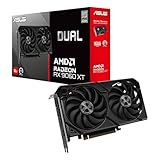
- Premium Choice: ASUS Dual Radeon RX 9060 XT 16GB GDDR6 Gaming Graphics Card | PCIe 5.0, HDMI 2.1b, DisplayPort 2.1a, 2.5-slot design, Axial-tech Fans, 0dB Technology
Buying a Radeon card for 1440p gaming sits in a sweet spot. The resolution is sharper than 1080p, yet it asks far less of a GPU than 4K, so you get a wide range of cards that can plausibly run it well. The real decision is which tier you are paying for: a 16GB RDNA 4 card that should hold up for years, a mid-tier 9060 XT that keeps costs down, or a renewed older card that trades longevity for a lower entry point.
This guide is for gamers with a 1440p monitor, or one in their plans for 2026, who want an AMD card and need to know where memory size, cooling and port support make a difference. Five cards from the shortlist fit that job. Three others in the listings, an older RX 580, an RX 550 and an Intel Arc card, were left out because they are entry-level or not Radeon models. Everything below comes from the listing details only.
Quick Picks
As an Amazon Associate we earn from qualifying purchases at no extra cost to you.




| Product | Best for | Key feature |
|---|---|---|
| ASRock RX 9070 Challenger 16GB OC | High-refresh 1440p with room to spare | 16GB GDDR6, 256-bit, triple fans, 0dB silent |
| ASRock RX 9060 XT Challenger 8GB OC | Cost-conscious 1440p builds | 8GB GDDR6, 3290 MHz boost, metal backplate |
| ASUS Dual RX 9060 XT 16GB | Memory-rich mid-range | 16GB GDDR6, 2.5-slot design, 0dB technology |
| ASRock RX 9070 XT Challenger 16GB OC | The most headroom in this list | 2970 MHz boost, triple fan, DisplayPort 2.1a |
| PowerColor Red Devil RX 6600 XT (Renewed) | A lower-cost older option | 8GB GDDR6, RDNA 2, HDMI 2.1 |
How to Choose
Video memory is the main 1440p divider
At 1440p, modern games use more video memory than they did at 1080p, especially with high texture settings. A 16GB card gives you headroom for several years, while 8GB can force you to lower texture quality in newer titles. Treat the memory size as the first filter and clock speeds as the second. A card with a wider memory bus, such as the 256-bit interface on the 9070 listings, also moves data faster than narrower designs, which tends to matter more as resolution climbs. If you also play older titles or esports games, memory matters less and you can lean toward the lower tiers.
Architecture and what it brings
RDNA 4 cards, such as the 9070 and 9060 XT models, are the newest here and list PCIe 5.0 and DisplayPort 2.1a. RDNA 2, as on the RX 6600 XT, is an older generation. Newer designs usually bring better efficiency and feature support, but older cards can still meet 1440p needs at medium settings. Ignore marketing around boost clocks when comparing across generations; a higher number on an older chip does not mean it will outperform a newer chip with a lower figure.
Cooling, noise and case fit
Triple-fan designs usually run cooler and quieter than dual-fan ones, and many listings mention 0dB modes that stop the fans at low load. Check the card’s slot width, as the ASUS model uses a 2.5-slot design. Budget models tend to cut corners on backplates and cooler size, so check for a metal backplate where it matters to you. If you game for long sessions in a warm room, cooler size and fan count deserve more weight than a small difference in clocks.
Power supply and ports
Match the listing’s wattage guidance with your power supply, because the RX 9070 XT entry mentions 800W. Also check that your monitor connects through HDMI 2.1b or DisplayPort 2.1a if you want high refresh rates at 1440p, and that your case has room for the card’s length. Remember to leave airflow space around the fans, since a crowded case can undo the benefit of a bigger cooler.
The 5 Best Options
ASRock Radeon RX 9070 Challenger 16GB OC
A 16GB RDNA 4 card with a 256-bit bus, 2520 MHz boost, triple fans, 0dB silent mode and an LED indicator. It fits the player who wants a premium-leaning 1440p card without moving to the top model, and who plans to keep the card through several game generations.
- Strength: 16GB and a 256-bit bus suit high-texture 1440p gaming.
- Strength: Triple fans and a 0dB mode favor quiet operation.
- Trade-off: Sits above the 9060 XT tier in cost and power needs.
Skip it if your monitor is 1080p or you are on a strict budget.
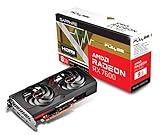
ASRock Radeon RX 9060 XT Challenger 8GB OC
An RDNA 4 mid-range card with 8GB GDDR6, a 3290 MHz boost listing, dual fans, 0dB cooling and a metal backplate. It suits buyers who want a modern architecture at a lower tier and are happy to adjust texture settings in the most demanding games to stay within memory.
- Strength: PCIe 5.0 plus DisplayPort 2.1a and HDMI 2.1b support.
- Strength: A metal backplate adds rigidity.
- Trade-off: 8GB can be tight at 1440p with high textures.
Skip it if you want long-term memory headroom.
ASUS Dual Radeon RX 9060 XT 16GB
The same 9060 XT family with 16GB of GDDR6, a 2.5-slot design, Axial-tech fans and 0dB technology. It suits players who want a mid-range tier but more memory, which helps at 1440p when games load large texture packs or run with high-detail settings.
- Strength: 16GB matches the memory of the higher tiers.
- Strength: Quiet-leaning cooling with 0dB mode.
- Trade-off: The 2.5-slot cooler needs case space.
Skip it if you have a small case.
ASRock Radeon RX 9070 XT Challenger 16GB OC
The strongest model here, listed at a 2970 MHz boost with RDNA 4, 16GB GDDR6, PCIe 5.0, DisplayPort 2.1a, HDMI 2.1b and triple-fan cooling. The listing mentions 800W, so plan your power supply. It suits high-refresh 1440p and gamers who may move to 4K later, and who already have a power supply and case that can handle a large card.
- Strength: The most headroom of the group for demanding titles.
- Strength: Triple-fan cooling and modern outputs.
- Trade-off: Power and case requirements are the highest here.
Skip it if your power supply is modest.
PowerColor Red Devil RX 6600 XT (Renewed)
A renewed RDNA 2 card with 8GB GDDR6 and HDMI 2.1, in a Red Devil design. It is the lowest-cost route here, aimed at buyers who accept medium settings at 1440p and are comfortable buying a renewed part, with the extra care that implies.
- Strength: A renewed unit can lower the entry cost.
- Strength: HDMI 2.1 supports modern displays.
- Trade-off: Older architecture and 8GB limit future headroom.
Skip it if you want a full warranty and long-term support.
Which One Fits Your Situation
You want high-refresh 1440p for years
The ASRock RX 9070 Challenger 16GB sits in the middle of the range with plenty of memory. If you want the highest ceiling, the RX 9070 XT adds more. Either card suits a 1440p monitor with a high refresh rate, because the extra memory and bus width help keep frame delivery steady when scenes get busy.
You want a balanced build
The ASUS Dual RX 9060 XT 16GB gives you memory without the largest power needs. It is a sensible compromise for a mid-range 1440p build, particularly if you share the PC with someone who also uses it for work or streaming.
You are working with a tighter plan
The RX 9060 XT 8GB or the renewed RX 6600 XT keep the cost down. Expect to lower texture settings in newer titles, and read the renewed seller’s return terms. If you pick the 8GB 9060 XT, keep an eye on memory use in newer games, and be ready to step texture quality down one notch when a title asks for more.
Whichever tier you pick, confirm your monitor’s native resolution and refresh rate first. A 1440p panel that tops out at 60Hz does not need the biggest card on the list, while a 144Hz or faster panel benefits from the extra headroom.
Common Mistakes
- Choosing 8GB for 1440p and then running into texture limits.
- Ignoring the power supply guidance on higher-tier cards.
- Forgetting to measure case clearance for a 2.5-slot or triple-fan design.
- Pairing a fast card with a monitor that does not support the refresh rate you want.
- Buying renewed without reading the warranty terms.
Related guides
- What Does Manage Gpu Performance Counters Mean On Nvidia Hardware
- Low Profile Nvidia Graphics Cards For Small Form Factor Pcs
- Nvidia App Error Your System Configuration Is Not Supported
Frequently Asked Questions
Is 16GB necessary for 1440p?
It is not strictly necessary, but it gives breathing room for future games and high texture settings. 8GB works today in many titles, though some will need lower settings.
Do I need DisplayPort 2.1 for a 1440p monitor?
Not usually. Most 1440p monitors work well with HDMI 2.1 or an earlier DisplayPort version. Check your monitor’s inputs, then match the card’s outputs. If the monitor only has HDMI, make sure the card’s HDMI version supports the refresh rate you paid for.
Are renewed graphics cards worth considering?
They can be, if the seller provides a clear return window and a warranty. Inspect the description for fans, condition and included accessories.
Will my power supply handle a 9070 XT?
Check the wattage and connector guidance in the listing against your unit. The 9070 XT entry mentions 800W, so a smaller supply may need an upgrade. It also helps to confirm that the supply has the right number of power connectors, not just enough total wattage.


Write Your Review
No reviews yet. Be the first to share your experience!