
Verdict at a glance
Short answer: the RTX 4090 is still faster at native 4K, by about 9% in TechPowerUp’s averages and 15-20% in several other reviews, and it has 24GB of VRAM versus 16GB. The RTX 5080 is the better new purchase for most gamers because it draws less power, supports DLSS 4.5 Multi Frame Generation, and is the card you can actually buy new in 2026. The 4090 makes sense mainly on the used market or for VRAM-heavy creative and AI work.
- Verdict at a glance
- Top RTX 4090 and RTX 5080 Picks for 2026
- The Quick Verdict and Benchmark Snapshot
- Sourced benchmark results by resolution and upscaler
- Deep Dive Face-Off Across Key Benchmarks
- How we compared
- Recommendations, Alternatives and Buying Timing
- Conclusion
- Related Guides
- More RTX 4090 vs RTX 5080 questions
- Frequently Asked Questions
- Related Articles
| Buy the RTX 4090 if… | Buy the RTX 5080 if… |
|---|---|
| You want the highest native 4K frame rates without frame generation | You want the newest features, including DLSS 4.5 6x Dynamic Multi Frame Generation |
| You need 24GB of VRAM for local AI models, 3D rendering or heavily modded games | 16GB covers your games and you want lower power draw and heat |
| You find a fairly priced used card with remaining warranty | You want a new card with a full warranty |
| Your power supply and case already handle a 450W card | You want an 850W power supply to be enough |
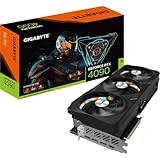
Products at a glance: best overall new card – GIGABYTE RTX 5080 Gaming OC 16G or ASUS TUF RTX 5080 (below); best step-up – GIGABYTE AORUS RTX 5090 Infinity 32G; best value alternative – GIGABYTE RTX 5070 Ti Eagle OC SFF 16G; best AMD alternative – ASRock RX 9070 XT Steel Legend 16GB.
How we compared: we did not bench-test either card. Figures below come from named independent reviews (TechPowerUp, PCWorld, Forbes, Gamers Nexus, TechRadar and GameGPU), with the source given for every number.
Top RTX 4090 and RTX 5080 Picks for 2026
Here are the current top RTX 4090 and RTX 5080 picks, compared on published benchmarks, specifications and features.
4090 vs 5080 benchmark results are the first thing buyers search before spending flagship money, and the numbers are closer than the two model names suggest. This comparison cuts through marketing with a data-first look at 4K rasterization, ray tracing, DLSS 4 frame generation, power efficiency, and real-world value. By the end you will know exactly which card wins each category, where the gaps actually appear, and which GPU deserves your money in 2026.
As an Amazon Associate we earn from qualifying purchases at no extra cost to you.


The Quick Verdict and Benchmark Snapshot
Some readers want the answer immediately, so this section opens with the verdict, then backs it with a side-by-side specification table and a short note on how to read benchmark numbers without being misled. The rest of the article defends every one of these conclusions with detail and context.
Quick Verdict – Who Wins the 4090 vs 5080 Benchmark
In raw native rasterization at 4K, the RTX 4090 generally holds a measurable lead thanks to its larger core count, wider memory bus, and 24GB of memory. If maximum native frame rate and VRAM headroom are your top priorities, the 4090 is the benchmark winner and the safer choice for heavy 4K and creative workloads.
The RTX 5080, however, wins on efficiency, newer DLSS 4 multi-frame generation, and typically a friendlier price. For most gamers building a system today, that combination makes the 5080 the smarter overall buy. This is the natural spot to compare current listings for both before reading the full breakdown below.
Head-to-Head Specifications
The specification table makes the structural differences between the two cards obvious, which is essential context for interpreting every benchmark that follows. Note especially the memory and bus-width gap, since that single difference explains much of the 4K performance story.
| Spec | RTX 4090 | RTX 5080 |
|---|---|---|
| Architecture | Ada Lovelace | Blackwell |
| Memory | 24GB GDDR6X | 16GB GDDR7 |
| Memory bus | 384-bit | 256-bit |
| TDP | 450W | 360W |
| Upscaling | DLSS 4.5 Super Resolution, 2x frame generation | DLSS 4.5 with Multi Frame Generation (up to 6x) |
| Best for | Native 4K, heavy VRAM and AI work | Efficient 4K, AI frame generation |
How We Read These Benchmark Numbers
A fair benchmark comparison fixes the variables: the same CPU, the same resolution, the same driver branch, and a clear separation between native and upscaled results. Mixing frame-generated numbers with native ones is the single most common way GPU comparisons quietly mislead buyers into the wrong purchase.
Throughout this article, rasterization figures refer to native rendering, while DLSS and frame-generation results are always called out explicitly. That separation is the only honest way to evaluate a 4090 vs 5080 benchmark, because the two cards use different DLSS versions that change the picture dramatically.
Driver maturity is another variable to keep in mind. The 4090 has years of optimized drivers behind it, while the newer 5080 continues to gain performance through updates, so today’s snapshot is not necessarily where the 5080 lands twelve months from now.
Sourced benchmark results by resolution and upscaler
Reviews disagree on the exact size of the gap, mostly because they use different games and settings. The tables below list each source’s result separately instead of blending them.
| Resolution / test | RTX 4090 vs RTX 5080 | Source |
|---|---|---|
| 4K native, multi-game average, no RT or DLSS | RTX 4090 about 9% faster | TechPowerUp |
| 4K native, multi-game average | RTX 4090 about 15% faster | PCWorld |
| 4K native, without Multi Frame Generation | RTX 4090 about 20% faster | Forbes |
| 4K, Black Myth: Wukong | RTX 4090 about 16% faster | Gamers Nexus |
| 1080p, Black Myth: Wukong | RTX 4090 about 6% faster | Gamers Nexus |
| 4K average | RTX 5080 about 7% slower | TechRadar |
The pattern is consistent: the 4090’s lead grows with resolution, because its 384-bit bus and extra cores matter most when the GPU is fully loaded. At 1440p and below, the gap often shrinks to single digits.
| Upscaler row: Cyberpunk 2077, 4K | RTX 4090 | RTX 5080 | Source |
|---|---|---|---|
| Native, ray tracing | Not in this test | 35 fps | TechPowerUp |
| DLSS 4 Quality (transformer), ray tracing | Not in this test | 62 fps | TechPowerUp |
| DLSS 4 Performance (transformer), ray tracing | Not in this test | 86 fps | TechPowerUp |
| DLSS 4 with 4x Multi Frame Generation | Not supported (2x maximum) | 120 fps | TechPowerUp |
| DLSS 4.5 Quality, no frame generation | 72 fps at about 399W | 61 fps at about 310W | GameGPU |
GameGPU’s DLSS 4.5 numbers show the 4090 about 18% ahead with upscaling alone, while the 5080 used roughly 22% less power. The 5080 only pulls ahead when Multi Frame Generation is enabled, since the 4090 is limited to 2x frame generation.
DLSS 4.5 and FSR 4: what each card gets
| Feature | RTX 4090 | RTX 5080 |
|---|---|---|
| DLSS 4.5 Super Resolution (second-generation transformer) | Yes | Yes |
| DLSS 4.5 Ray Reconstruction | Yes | Yes |
| Frame Generation | 2x | 2x, 3x, 4x and 6x |
| Dynamic Multi Frame Generation | No | Yes |
| FSR 4 (AMD’s machine-learning upscaler) | No, RX 9000 only | No, RX 9000 only |
| FSR 3.1 and XeSS | Yes, in supported games | Yes, in supported games |
DLSS 4.5 was announced at CES in January 2026; its Super Resolution model is available to all RTX cards through the NVIDIA app, while 6x and Dynamic Multi Frame Generation require an RTX 50 card and a recent driver.
Deep Dive Face-Off Across Key Benchmarks
With the verdict and the raw specs established, this section compares the two cards criterion by criterion rather than reviewing each in isolation. Each face-off isolates a single variable so the trade-offs stay clear, quantified, and directly useful to your decision.
Rasterization and 4K Gaming Benchmarks
In pure native 4K rasterization, the 4090’s extra cores and wider bus typically translate into a double-digit percentage lead across many demanding titles. For uncapped native frame rates with no upscaling, it remains the stronger raw performer and the better match for 4K display owners chasing high refresh.
The 5080 closes much of that gap at 1440p and in less memory-bound scenarios, where its newer Blackwell architecture and fast GDDR7 keep it highly competitive. The practical reading is straightforward: the heavier and more memory-bound the 4K workload, the more the 4090 pulls ahead, while lighter loads narrow the difference to a margin many players would never notice.
CPU pairing influences these results more than buyers expect. At 4K both cards are largely GPU-bound, but at 1440p a slower processor can cap the 5080 and mask its architectural gains, so a balanced platform is essential before drawing conclusions from any benchmark chart.
VRAM is the quiet decider here. At 24GB versus 16GB, the 4090 has clear headroom for ultra texture packs and future titles, which is exactly where some 16GB cards begin to stutter under the most extreme settings. In long-term terms this means the 4090 is less likely to need a settings compromise two or three years from now, an argument that matters more to buyers who keep a GPU for a full upgrade cycle rather than flipping cards every generation.
It is worth stressing that averages hide variance. In a handful of well-optimized titles the gap shrinks to single digits, while in the heaviest path-traced or high-texture scenes it can widen considerably. Reading a range of benchmarks rather than a single headline number is the only way to set realistic expectations for the specific games you play.
Ray Tracing, DLSS 4 and AI Performance
Ray tracing keeps the 4090 ahead at native resolution, because both cards lean heavily on Nvidia’s proprietary acceleration hardware. Here the experimental edge belongs to the 5080, whose DLSS 4 multi-frame generation can produce higher smoothed frame rates in supported titles than the 4090’s 2x frame generation can match.
This is the forward-looking variable worth testing against your own games: as more titles adopt DLSS 4, the 5080’s effective performance ceiling rises over time, giving it a longevity argument that pure rasterization numbers miss. Image quality has also improved with newer DLSS revisions, so the visual cost of upscaling keeps shrinking, which makes the 5080’s frame-generation advantage more usable in practice than early skeptics expected. Buyers who value future AI-driven optimization should weigh this heavily rather than judging the cards purely on today’s native results.
The caveat is real, though. Frame generation adds a small amount of latency and only helps in supported games, so it complements rather than fully replaces the 4090’s raw output, especially for fast competitive play where input response matters most.
Tensor throughput also feeds creative and AI workflows. For local model inference, upscaling, and accelerated rendering, both cards perform strongly, though the 4090’s larger memory pool again becomes the deciding factor once datasets or scene complexity grow beyond what 16GB can comfortably hold.
Power, Thermals, Real-World Value and Pros/Cons
On efficiency the gap is meaningful: the 5080’s 360W TDP versus the 4090’s 450W changes thermals, PSU sizing, case airflow requirements, and electricity cost over years of ownership. For many builders that 90W difference is the deciding practical factor once raw performance is close enough.
Acoustics follow from those thermals. The lower-power 5080 is generally easier to keep quiet under load, while the 4090’s higher heat output asks more of case fans and cooler design to stay silent during extended sessions.
RTX 4090 – Pros: highest native 4K performance, 24GB VRAM, excellent for creative and AI workloads. Cons: high power draw, large physical footprint, premium price that has stayed stubbornly high.
RTX 5080 – Pros: excellent efficiency, DLSS 4, lower price, easier cooling and PSU requirements. Cons: only 16GB VRAM, narrower 256-bit bus, and slower in the most VRAM-bound native 4K titles.
Translated into a buying decision, the value math usually favors the 5080 for pure gaming because you pay less up front, spend less on power, and lose performance only in edge cases. The 4090 justifies its premium for users whose work or play genuinely exercises its extra memory and raw cores, where the higher price buys capability rather than just bragging rights.
Resale value tilts the long-term math too. Flagship cards historically hold their price better than mid-range models, so part of the 4090’s premium can be recovered at upgrade time – a small but real factor for buyers who plan ahead.
How we compared
We did not bench-test the RTX 4090 or RTX 5080. This comparison is built from official specifications and independent published results from TechPowerUp, PCWorld, Forbes, Gamers Nexus, TechRadar, Hardware Unboxed/TechSpot and GameGPU, plus NVIDIA’s DLSS 4.5 documentation. We list each source’s numbers separately, keep native and frame-generated results apart, and note where reviews disagree. Owner reports informed the notes on power, noise and connector fit.
Before you buy either card
- Power supply: plan for 850W with the RTX 5080 and 850-1000W with the RTX 4090, using an ATX 3.1 unit with a native 12V-2×6 cable. Seat the connector fully and avoid sharp bends near the plug.
- Used RTX 4090 checks: ask for proof of purchase, check whether the warranty transfers, inspect the power connector for discoloration, and run a stress test plus a few games on arrival.
- Case clearance: many 4090 and 5080 models exceed 330mm in length and three slots in thickness; check both.
- Monitor match: at 1440p the two cards are closer than at 4K, so the 5080’s features and efficiency usually win; at native 4K high refresh, the 4090’s raw lead matters more.
Recommendations, Alternatives and Buying Timing
Benchmarks only matter once they are matched to your budget, workload, and timing. This final section adds a smarter third option for buyers who find both cards overkill, factors in current pricing pressure, and closes with a clear recommendation tailored to each type of buyer.
The Alternative – A Smarter Third Option
If both flagships feel like too much money, an RTX 4070 Ti Super or a 5070-class card delivers strong 1440p and capable 4K performance at a far lower price, while keeping full DLSS support and Nvidia’s feature set. For many real-world libraries that is more than enough.
For buyers whose genuine target is high-refresh 1440p rather than maxed native 4K, that alternative often makes more practical sense than paying flagship prices for headroom they will rarely, if ever, actually use in the games they play.
Display pairing should guide the decision as much as raw benchmarks. A 4K 240Hz panel rewards the 4090’s extra horsepower, whereas a 1440p high-refresh or 4K 144Hz setup lets the 5080 stretch its legs without leaving much performance on the table. Matching the GPU to the monitor you actually own prevents overspending on frames you can never display.
A third group should also consider the used market, where previous-generation flagships occasionally appear at prices that undercut both cards. The trade-off is the usual one – no warranty and unknown history – so the savings only make sense for buyers comfortable assessing a second-hand card. Checking warranty transferability and running a short stress test on arrival are simple steps that reduce the risk considerably.
GIGABYTE AORUS GeForce RTX 5090 Infinity 32G

If the reason you are looking at the RTX 4090 is that the RTX 5080 is not fast enough, the real step up in 2026 is the RTX 5090. GIGABYTE’s AORUS Infinity version carries 32GB of GDDR7 on a 512-bit bus, a listed 2,730 MHz core clock, PCIe 5.0 and three DisplayPort 2.1 outputs, with the RTX 5090’s 21,760 CUDA cores and a 575W reference board power fed through a 12V-2×6 connector.
TechPowerUp measured the RTX 5090 roughly 48% faster than the RTX 5080 at 4K, which also puts it well ahead of the RTX 4090. It has more memory than either (32GB versus 24GB and 16GB), and it gets the full DLSS 4.5 feature set including 6x Multi Frame Generation.
Strengths: the fastest gaming GPU available, 32GB VRAM for AI and 3D work, a premium AORUS-class cooler and build.
Drawbacks: the highest price tier by a wide margin, needs a 1000W-class power supply, very large card.
How it compares: beats both cards in this comparison on every metric except power and price. Only worth it for 4K high-refresh gaming or professional workloads.
GIGABYTE GeForce RTX 5070 Ti Eagle OC SFF 16G

The article’s “smarter third option” in a specific model. The RTX 5070 Ti uses a cut-down version of the RTX 5080’s GB203 chip with 8,960 CUDA cores and the same 16GB of GDDR7 on a 256-bit bus, at about 300W. GIGABYTE’s Eagle OC SFF is a compact triple-fan design built to NVIDIA’s SFF-Ready guidelines.
Because it shares the RTX 5080’s memory configuration, it does not give up any VRAM headroom, only roughly 15-20% of raw performance. Hardware Unboxed measured it at just under 75 fps average at 4K across 16 games, level with the RX 9070 XT. It supports DLSS 4.5 and Multi Frame Generation, which the RTX 4090 does not.
Strengths: same 16GB as the RTX 5080, full DLSS 4.5 feature set, compact, a lower tier.
Drawbacks: clearly slower than both cards at native 4K; smaller coolers can be louder under load.
How it compares: the value choice for 1440p high refresh and 4K with upscaling. Use a 750W power supply.
ASRock Radeon RX 9070 XT Steel Legend 16GB

For buyers open to AMD, the RX 9070 XT is the high-end Radeon in 2026. ASRock’s Steel Legend version has a 2,970 MHz boost clock, 64 RDNA 4 compute units, 16GB of GDDR6 on a 256-bit bus, PCIe 5.0 and a white-accented triple-fan cooler, with standard 8-pin power.
It matches the RTX 5070 Ti in raster at 4K according to Hardware Unboxed, which places it below the RTX 5080 and well below the RTX 4090. Its appeal is value: 16GB of memory and FSR 4 upscaling in a tier well below either card in this comparison.
Strengths: strong raster value, 16GB VRAM, FSR 4, no 12V-2×6 connector.
Drawbacks: heavy ray tracing and path tracing fall far behind both NVIDIA cards, and there is no Multi Frame Generation equivalent.
How it compares: not a 4090 or 5080 rival in raw speed, but a sensible alternative if both feel too expensive and you play mostly raster games.
Pricing Trends That Affect Your Decision Now
Timing matters because laptop and PC component prices have been trending upward, pushed by tight memory supply and intense AI demand across the industry. Flagship GPUs are particularly exposed to that pressure, so waiting for a large discount on either the 4090 or 5080 is a risky bet in the current climate.
Adding to that pressure, recent clearance for Nvidia to sell H200 AI chips to China increases data-center demand for the same memory and fabrication capacity that consumer GPUs depend on. While that news does not change gaming benchmarks directly, it reinforces why prices on both cards are unlikely to fall sharply in the near term and may even firm up.
The practical conclusion is to buy when you find a fair price rather than holding out for a drop the supply situation does not support – and to prioritize the card that genuinely fits your workload over chasing the absolute top of the stack for bragging rights.
Final Verdict – Who Should Buy 4090 vs 5080
Buy the RTX 4090 if you need maximum native 4K frame rates, 24GB of VRAM for creative or AI work, and you are not constrained by power budget or wallet. It remains the benchmark leader for raw output and the most future-proof on memory.
Buy the RTX 5080 if you want the best blend of efficiency, DLSS 4, and value for high-refresh gaming – the choice most buyers will be happiest with day to day. Compare current listings for both cards and pick the one that matches your resolution target, power setup, and budget.
See More:
- Rtx 4070 ti super vs rtx 4070 super
- 5080 vs 4080 super benchmark
- 4070 ti super vs 4080 super benchmark
- Rtx 4070 ti super vs rtx 4090
- Rtx 4070 ti vs rtx 4070 ti super
Conclusion
The 4090 vs 5080 benchmark story is not a blowout but a genuine trade-off: the 4090 wins raw native 4K and VRAM headroom, while the 5080 wins efficiency, DLSS 4, and price. With component prices trending up, the smartest move is to match the card to your real workload and buy at a fair price rather than wait for a discount that may not come. Review the current options for both GPUs and choose the one that best fits your build and goals in 2026.
More RTX 4090 vs RTX 5080 questions
Is the RTX 5080 faster than the RTX 4090?
Not at native rendering. Reviews put the RTX 4090 about 9-20% ahead at 4K. The RTX 5080 only shows higher frame rates when its 3x to 6x Multi Frame Generation is enabled, which the 4090 cannot use.
Does the RTX 4090 get DLSS 4.5?
Partly. It gets the DLSS 4.5 second-generation transformer Super Resolution and Ray Reconstruction models, but not Multi Frame Generation, 6x mode or Dynamic Multi Frame Generation, which are RTX 50 exclusives.
Is 16GB on the RTX 5080 enough for 4K?
For gaming in 2026, yes in nearly all titles. The 4090’s 24GB matters more for local AI models, large 3D scenes and extreme texture mods than for typical games.
Which uses less power?
The RTX 5080, rated at 360W versus 450W for the RTX 4090. GameGPU’s DLSS 4.5 test measured about 310W for the 5080 against about 399W for the 4090 in the same scene.
Frequently Asked Questions
Which is the better buy in 2026, the RTX 4090 or the RTX 5080?
For most gamers buying new, the RTX 5080 (for example the GIGABYTE RTX 5080 Gaming OC 16G) is the better buy: it is widely available, draws less power and supports Multi Frame Generation. The RTX 4090 makes sense mainly as a fairly priced used card or for VRAM-heavy creative and AI work.
How do the two cards compare on price?
Both sit in the premium tier. New RTX 4090 stock is scarce, so most listings are used or from third-party sellers and often cost more than a new RTX 5080. Compare against each card’s recent price history rather than its launch price.
What should I check before buying either card?
Confirm your power supply (850W for the RTX 5080, 850-1000W for the RTX 4090) has a native 12V-2×6 cable, measure case clearance for length and thickness, and for a used RTX 4090 check warranty transfer and the condition of the power connector.
How were these picks chosen?
Picks are based on published independent benchmarks, official specifications and owner reports about noise, coil whine and connector fit, with native and frame-generated results kept separate.
Write Your Review
No reviews yet. Be the first to share your experience!