
The Short Answer
Most graphics cards use one of three power connector types: a 6-pin PCIe connector, an 8-pin PCIe connector, or an 8-pin connector made as a detachable 6+2-pin plug. Newer, higher-power GPUs may use a compact 12VHPWR or 12V-2×6 connector instead.
A 6-pin PCIe connector is rated to deliver up to 75 watts. An 8-pin PCIe connector is rated for up to 150 watts. A 6+2-pin cable fits either socket because the two extra pins separate from the main six-pin section. These ratings are in addition to the up-to-75 watts supplied through the motherboard’s PCIe slot.
As an Amazon Associate we earn from qualifying purchases at no extra cost to you.


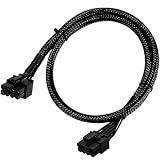
The connector’s physical size is relatively standardized, but the cable length is not. A typical PCIe plug is approximately 0.52 inches wide by 0.33 inches high (1.32 by 0.84 cm), excluding the latch, housing bevels, and cable insulation. Measure the available routing space inside your case rather than choosing a cable by connector size alone.
For a 2026 gaming PC, check the graphics card manual and the power supply label before buying a cable. A connector that physically fits may still be electrically incompatible, particularly when using modular power supplies from different brands.
Standard Sizes
The following measurements describe common PCIe GPU power connectors and cable formats. Manufacturer housings can vary by a few millimeters, so treat these as practical sizing figures rather than machining specifications.
| Connector or cable type | Approximate plug dimensions | Typical cable length | Maximum rated power | Common use |
|---|---|---|---|---|
| 6-pin PCIe | 0.52 in W × 0.33 in H (1.32 × 0.84 cm) |
18–24 in (46–61 cm) |
75 W | Entry-level and midrange graphics cards |
| 8-pin PCIe | 0.52 in W × 0.33 in H (1.32 × 0.84 cm) |
18–30 in (46–76 cm) |
150 W | Midrange and high-performance GPUs |
| 6+2-pin PCIe | 0.52 in W × 0.33 in H (1.32 × 0.84 cm) |
18–30 in (46–76 cm) |
Up to 150 W when used as 8-pin | Flexible replacement for 6-pin or 8-pin sockets |
| 12VHPWR, 16-position | Approximately 0.59 in W × 0.35 in H (1.50 × 0.90 cm) |
12–24 in (30–61 cm) |
Up to 600 W, depending on cable and system | Some newer high-power graphics cards |
| 12V-2×6 | Approximately 0.59 in W × 0.35 in H (1.50 × 0.90 cm) |
12–24 in (30–61 cm) |
Up to 600 W, depending on cable and system | Updated high-power GPU connection |
These dimensions cover the plug body, not the full clearance required to install it. Leave at least 1 inch (2.5 cm) of working room in front of a standard PCIe plug so your fingers can press the release latch. For 12VHPWR and 12V-2×6 connectors, avoid sharply bending the cable immediately at the plug. A gentle bend with at least 1.4 inches (3.5 cm) of straight cable is a safer practical allowance, although the graphics card and cable maker’s instructions take priority.
Cable gauge also matters. Many PCIe GPU cables use 16 AWG or 18 AWG wire. Lower AWG numbers indicate thicker wire. An 18 AWG cable is common for ordinary 6-pin and 8-pin connections, while a 16 AWG cable may provide more current capacity and lower resistance over longer runs. Do not assume a thicker third-party cable is compatible with a modular PSU; the PSU-side pinout can differ even when the GPU-side connector looks identical.
How to Measure Your Space
- Read the GPU power requirement. Count the sockets on the graphics card. A card with one 6-pin socket needs one 6-pin connection; a card with two 8-pin sockets needs two separate 8-pin connections unless the manufacturer specifically permits another arrangement.
- Measure from the PSU to the GPU. Follow the route behind the motherboard tray, around the case edge, or through cable-management openings. Add roughly 4–6 inches (10–15 cm) for routing, bends, and connector reach.
- Check the case width and side-panel clearance. A thick cable can press against the side panel. Allow at least 0.75 inch (1.9 cm) behind the connector for a normal bend; allow more for a rigid or sleeved cable.
- Measure connector spacing. If two power sockets sit side by side, measure the distance between them. A single daisy-chain cable may have connectors spaced about 5–8 inches (13–20 cm) apart, but a short spacing can pull sideways on the plugs.
- Confirm the PSU connection. Use a cable made for your exact PSU model or series. Never connect a modular cable from a different power supply simply because both ends are labeled “PCIe.”
- Check insertion depth. Push the connector into the GPU until the latch engages. The plug should sit flush, with no visible gap between the connector housings.
By Room or Use Case
Compact Mini-ITX or Small-Form-Factor Cases
Small cases commonly need a 12–18-inch cable (30–46 cm), depending on whether the PSU is mounted beside or above the graphics card. A cable that is too long can obstruct airflow and make the side panel difficult to close. Measure the direct route and add only about 3–4 inches (8–10 cm) rather than buying a standard 30-inch lead.
Standard Mid-Tower Gaming PCs
A 20–24-inch cable (51–61 cm) is a practical starting point for most mid-tower builds. Choose a 6+2-pin cable when the GPU has either 6-pin or 8-pin sockets. Typical replacement cables and simple adapters cost about $6–$15. A 6-pin-to-8-pin adapter may cost about $6–$10, but an adapter does not increase the power supply’s capacity.
Full-Tower or Bottom-Mounted PSU Systems
Large cases often need 24–30 inches (61–76 cm), especially when the cable must travel behind the motherboard and emerge near the top or bottom edge of a long graphics card. A direct PSU-to-GPU cable is preferable to chaining multiple extensions. Allow 2–4 inches (5–10 cm) beyond the measured route for clean bends and future component changes.
High-Power GPUs
Cards using 12VHPWR or 12V-2×6 connections require the correct native cable or an approved adapter. Check the graphics card’s required wattage and the PSU’s recommended capacity. Do not substitute several ordinary 8-pin cables unless the GPU manufacturer explicitly supplies and approves that adapter. Keep the high-power connector fully seated and avoid forcing the cable sideways against the plug.
Replacement or Upgrade Cables
Common replacement options include a short 4-inch (10 cm) 6-pin-to-8-pin adapter, a 2-foot (61 cm) 6+2-pin PCIe cable, and longer 24–26-inch (61–66 cm) cables for full-size cases. Product prices commonly range from $6 to $20, depending on length, wire gauge, sleeving, and whether the cable is a PSU-specific replacement. Match the GPU-side connector and the PSU-side connector before ordering.
Common Sizing Mistakes
- Confusing 6+2-pin PCIe with an 8-pin CPU connector: They may look similar, but EPS/CPU cables are not interchangeable with GPU cables.
- Buying by plug size alone: A connector can fit physically while the cable pinout is wrong for a modular PSU.
- Using one daisy-chained lead for a demanding card: When a card has two or three sockets, separate PSU cables are often the safer installation choice.
- Ignoring cable bend clearance: The plug may fit while the cable presses against the case panel or stresses the GPU socket.
- Assuming an adapter adds wattage: A 6-pin-to-8-pin adapter changes the plug format, not the power supply’s output capability.
- Leaving a partial connection: The latch should click into place, and the connector should be fully flush with the GPU socket.
FAQ
What size power connector does a GPU need?
Most GPUs need a 6-pin, 8-pin, or 6+2-pin PCIe connector. Higher-power models may require a 12VHPWR or 12V-2×6 connector. The exact requirement is printed in the graphics card specifications and installation guide.
Is a 6-pin GPU connector the same size as an 8-pin?
The six-pin and eight-pin PCIe plugs use a similar housing footprint, approximately 0.52 by 0.33 inches (1.32 by 0.84 cm). An 8-pin plug adds two power-sensing or ground contacts and supports a higher rated power level, so the connectors are not electrically interchangeable without the correct cable.
How long should a GPU power cable be?
Choose about 12–18 inches (30–46 cm) for a compact case, 20–24 inches (51–61 cm) for a typical mid-tower, and 24–30 inches (61–76 cm) for a full tower or a PSU mounted far from the graphics card.
Can I use any modular PCIe cable with my GPU?
No. The GPU-side connector may be standardized, but the modular PSU-side pinout is not universal. Use the cable supplied with the PSU or one explicitly listed as compatible with its exact model or series.











Write Your Review
No reviews yet. Be the first to share your experience!