
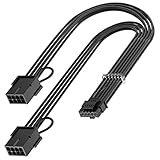
- Top Pick: 6 Pin Female to 8 Pin Male Video Card GPU Power Supply Cable (8.6inch 22cm)
- Best Value: EZDIY-FAB GPU VGA PCIe 8 Pin U Turn 180 Degree Angle Connector Power Adapter Board for Desktop Graphics Card-Reverse Type 3-Pack
- Premium Choice: COMeap 8 Pin 180 Degree Adapter, GPU VGA PCIe 8 Pin U Turn 180 Degree Angle Connector Power Adapter Board for Desktop Graphics Card
The easiest mistake to make with GPU power connectors is treating them as interchangeable accessories. They are not. A connector that physically fits may have the wrong pinout, too little current capacity, inadequate clearance for a side panel, or a bend that puts stress on a high-power graphics card socket. Shoppers also often buy an inexpensive extension when they actually need a native PSU cable, or choose a 180-degree adapter without confirming whether their card needs a standard or reverse orientation.
In 2026, the best choice is usually the simplest one: a direct, manufacturer-approved cable from a suitably rated power supply, with enough length to route cleanly and enough clearance to avoid sharply bending the connector. Adapters and extensions can be useful for case fitment and cable management, but they add another connection point and require more careful shopping.
As an Amazon Associate we earn from qualifying purchases at no extra cost to you. Product prices and availability are accurate as of the date shown and are subject to change.


Decide These 3 Things First
- Identify your GPU input. Check the graphics card itself, not just the product listing. Common inputs include one or more 6-pin or 8-pin PCIe sockets, or a 16-pin 12V-2×6/12VHPWR-style socket. An 8-pin PCIe connector is not the same as an 8-pin CPU/EPS connector.
- Check your power supply type and available outputs. A modular PSU cable must match the exact PSU brand and series specified by its maker. PSU-side modular connectors can look alike while using different wiring layouts. Never use a modular cable from another power supply unless the PSU manufacturer explicitly lists it as compatible.
- Measure the route before ordering. Measure from the GPU power socket to the cable-routing opening or PSU shroud, then add roughly 2 to 4 inches for a relaxed path. Also measure the distance from the GPU socket to the case side panel; this matters especially for 16-pin connectors.
Connector Standard and Electrical Compatibility
Start with the connector family. Older and midrange cards may use a 6-pin PCIe input, an 8-pin PCIe input, or combinations such as two 8-pin sockets. A 6-pin PCIe connector is commonly associated with up to 75 watts through the cable, while an 8-pin PCIe connector is commonly associated with up to 150 watts through the cable. The motherboard PCIe slot can supply up to 75 watts, but do not use simple addition as permission to exceed a GPU manufacturer’s stated power requirements.
Newer high-performance cards may use a 16-pin connector. You may see it called 12VHPWR or 12V-2×6. The latter is the newer connector implementation intended to improve contact engagement, but buyers should still follow the GPU and PSU instructions closely. A properly specified 16-pin connection can support cards with power limits up to 600 watts, though your particular GPU may require far less.
If your PSU includes a native 16-pin GPU cable, use it instead of a multi-8-pin adapter whenever possible. If the GPU package includes a 2×8-pin, 3×8-pin, or 4×8-pin-to-16-pin adapter, connect the required number of separate PCIe cables from the PSU. Do not power a 3×8-pin adapter with one PCIe cable that merely has multiple daisy-chained plugs unless both the PSU and GPU documentation specifically permit that arrangement.
A small 6-pin-female-to-8-pin-male adapter may be appropriate only for a low-demand situation specifically supported by the card and power-supply documentation. It does not magically turn a 75-watt cable into a 150-watt cable. For a $5 to $8 adapter, compatibility matters more than the price.
Size and Case Clearance
Connector dimensions and cable length affect whether a build closes neatly or becomes a side-panel problem. Standard PCIe cable extensions are commonly 11.8 to 13.8 inches long, while short conversion cables may be only 8 to 9 inches. A short 8.6-inch adapter can work in a compact case when the PSU cable already reaches the card, but it will not solve a cable-routing problem by itself.
For 16-pin GPU connectors, leave a straight, unstressed section of cable immediately after the plug. A practical target is at least 1.4 inches (35 mm) before a significant bend, unless the GPU, cable maker, or PSU maker explicitly gives a different clearance requirement. Some cases have less than 1.6 inches between the GPU connector area and the glass side panel, which can make a conventional cable difficult to route safely.
A 180-degree adapter can reduce visible cable bulk, but orientation is crucial. “Standard” and “reverse” versions turn in opposite directions. Before buying a $10 to $20 angled adapter, look at the GPU connector with the card installed and determine whether the cable needs to turn toward the backplate, the fans, the top of the case, or the bottom. The wrong orientation can press the cable against the cooler or prevent the panel from closing.
Also account for GPU sag brackets and vertical mounts. A vertical GPU mount may place the power connector much closer to the side panel, even if the same card fit comfortably in a conventional horizontal position.
Wire Materials and Construction
Look for copper conductors, secure terminal crimps, and a connector housing that feels rigid rather than thin or loose. Quality cable listings usually state the wire gauge. For mainstream PCIe extensions, 18 AWG copper wire is common. For higher-current applications, 16 AWG wiring is preferable when available because it has a larger conductor diameter and lower resistance than 18 AWG.
Do not assume “sleeved” means electrically better. Braided nylon or PET sleeving can improve appearance and abrasion resistance, but the important details are the wire gauge, conductor material, terminal quality, and connector fit. Avoid listings that do not clearly state the connector type, cable gauge, intended use, or compatible PSU models.
At the 16-pin end, inspect the plug after installation. It should be fully inserted, with no obvious gap between the connector body and GPU socket. The cable should not be under sideways tension, and the latch should engage normally. If the plug feels unusually loose, sits crookedly, or requires force beyond a firm push, stop and recheck compatibility.
Rigid adapter boards deserve extra scrutiny. They can create a clean look, but they transfer leverage directly to the GPU socket if the cable pulls downward or the side panel presses against the connection. Use them only when there is enough space for the adapter body plus the cable bend.
Performance and Cable Routing
For GPU power, “performance” means stable power delivery, correct installation, and a route that does not strain connectors. The most reliable setup is usually one native cable per required PSU output. For example, if a GPU adapter requires three 8-pin PCIe inputs, use three separate PSU PCIe cables when your power supply provides them.
Keep cable runs away from radiator fans, sharp metal edges, and fan blades. Use two or three soft Velcro ties rather than tightly cinching the cable with hard zip ties near the connector. Leave about 0.5 to 1 inch of slack at the GPU end so normal case movement does not pull on the socket.
Extensions are generally best used for aesthetics or extra reach, not as a remedy for an undersized power supply. If a system shuts down under load, smells hot, shows discolored plastic, or has intermittent GPU detection, turn it off and investigate the PSU, cable arrangement, and GPU connector immediately. Do not keep reseating a damaged connector and hoping the issue disappears.
Price Tiers and Value
Budget: $5 to $12. This range covers short 6-pin-to-8-pin adapters, basic 8-pin extensions, and single-purpose conversion leads. Buy only when the electrical requirement is clearly understood. These products are best for low-complexity builds and modest cable-management adjustments.
Midrange: $12 to $25. This is the practical range for better 180-degree PCIe adapters, quality 12V-2×6/12VHPWR extension cables, and branded cable sets with stated 18 AWG or 16 AWG wiring. A 13-inch 16-pin extension with two 8-pin female inputs may cost around $18 to $22, but verify that its required input arrangement matches the GPU adapter or PSU cable you are using.
Premium: $25 to $60 or more. Expect manufacturer-specific native PSU cables, individually sleeved sets, custom-length cables, and cables designed for high-end power supplies. This is the right tier for high-wattage GPUs, showcase builds, and systems where a native cable eliminates an adapter connection.
Do not spend extra for looks before confirming fit, pinout, and rated use. A well-made $15 cable that matches your PSU is better than a $40 cable with unclear compatibility.
Warranty, Delivery, and Assembly
Prioritize cables and adapters with a clearly stated warranty and a seller that identifies the exact product model. A 1-year warranty is common for accessories; longer coverage is a positive sign, but it does not replace correct installation. For modular replacement cables, the most reassuring option is a cable sold directly by the PSU manufacturer or explicitly approved for your exact PSU series.
When the package arrives, compare the connector count, orientation, and length against your plan before installing it. Check for bent pins, cracked housings, missing latch tabs, or loose terminals. Do not assemble the system with the PSU switched on, and do not force any connector.
After installation, run the system with the side panel off first. Confirm that all fans spin normally, the GPU is detected, and the cable is not touching a fan. Then shut down, inspect the connector once more, close the panel gently, and recheck that the panel is not pushing against the cable.
Spec Checklist
| Spec | Budget | Mid | Premium |
|---|---|---|---|
| Typical price | $5-$12 | $12-$25 | $25-$60+ |
| Best use | Basic adapter or short extension | Clean routing or angled connection | Native PSU cable or custom build |
| Wire gauge to seek | Clearly stated 18 AWG | 18 AWG or 16 AWG | 16 AWG where available |
| Typical length | 8-12 inches | 12-14 inches | Custom or PSU-specific |
| Connector options | 6-pin/8-pin PCIe | 8-pin, angled 8-pin, 16-pin extension | Native 16-pin or exact PSU-series cable |
| Documentation | Basic connector description | Gauge, orientation, and compatibility notes | Exact PSU model compatibility and warranty |
Red Flags
- A modular PSU cable advertised as “universal” without a precise PSU compatibility list.
- An 8-pin connector described only as “8-pin power,” with no distinction between PCIe and CPU/EPS.
- No stated wire gauge, no conductor information, and no clear product photos of both ends.
- A 16-pin cable bent immediately at the connector or pressed hard against a glass side panel.
- Using a splitter or adapter to compensate for a power supply that lacks the required PCIe outputs.
- Heat discoloration, melted plastic, a burnt odor, loose pins, or a connector that repeatedly disconnects.
- A 180-degree adapter purchased without confirming standard versus reverse orientation.
FAQ
Can I use a CPU 8-pin cable for a GPU?
No. CPU/EPS and PCIe 8-pin connectors are wired differently despite their similar shape. Use only PCIe/VGA cables for a graphics card.
Is a 16-pin GPU extension as good as a native PSU cable?
A properly specified extension can work well, but a native cable from the PSU manufacturer removes one connection point. For a high-power GPU, a native 16-pin cable is usually the preferred option.
Do I need separate PCIe cables for every 8-pin socket?
For demanding GPUs, separate PSU PCIe cables are the safer default. Follow the GPU and PSU manuals if they provide a specific approved cable configuration.
Are 180-degree GPU power adapters safe?
They can be suitable when they match the connector type, orientation, power requirement, and available case clearance. Avoid them if the side panel presses on the adapter or cable, or if the adapter’s compatibility information is vague.







Write Your Review
No reviews yet. Be the first to share your experience!