
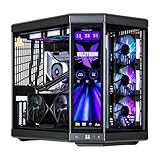
- Top Pick: Velztorm LCD Black Praetix Custom Built Y70 Touch Gaming Desktop PC (GeForce RTX 5090 32GB (>4090), Liquid Cooled Intel i9-14900K, 32GB DDR5, 2TB PCIe SSD, 1000W PSU, WiFi 6E, Win11Home)
- Best Value: Velztorm Black Praetix 3D Custom Built Y60 Gaming Desktop PC (GeForce RTX 5080 16GB (>4090), Liquid Cooled AMD Ryzen 7 9800X3D, 32GB DDR5, 2TB PCIe SSD, 1000W PSU, WiFi 7, Win11Home)
- Premium Choice: Graphics Card Cooling Fans Suitable for NVIDIA RTX 4080 4090 Founders Edition FE Series Desktop AD4A31K04 AD4A31K05 115mm 12V 0.63A 6Pin Video Card Cooler Fans GPU Fan (Fan-A)
Top Rtx 4090 Rtx 5090 New Picks for 2026
Here are our current top rtx 4090 rtx 5090 new picks, compared on real Amazon owner reviews, price, and features. Live prices update below.
- Top Rtx 4090 Rtx 5090 New Picks for 2026
- RTX 4090 vs RTX 5090: Quick Verdict and Spec Sheet
- Deep Dive Face-Off: Gaming, Power, and AI Capability
- Flagship GPU Prices in 2026: Two Forces Pushing Costs Up
- Final Verdict: Who Should Buy Which Flagship?
- Conclusion
- Related Guides
- Frequently Asked Questions
- Related Articles


Save $1.00


Dropped $159.05

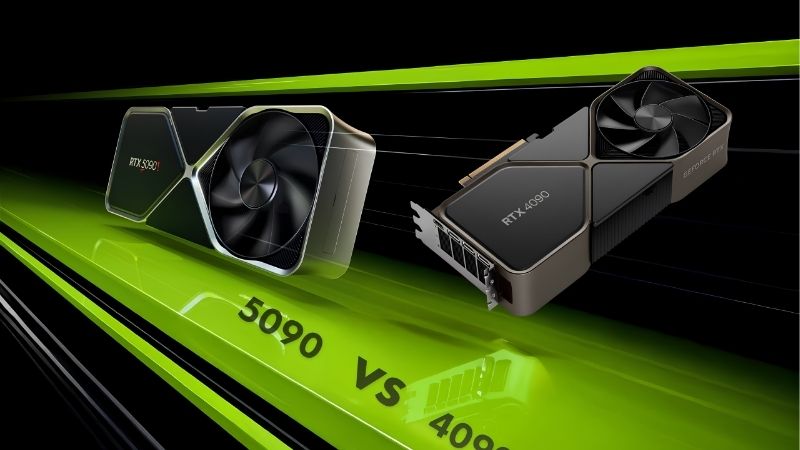
RTX 4090 vs RTX 5090 is the heavyweight title fight of the GPU world: Nvidia’s two most powerful consumer cards, separated by one generation and a sizable stack of cash. The 4090 launched in 2022 at $1,599 and dominated everything for over two years. The 5090 arrived at $1,999 with 32GB of GDDR7, a 512-bit bus, and DLSS 4 Multi Frame Generation. Both remain expensive, both remain in demand, and the right choice depends heavily on your resolution, workload, and tolerance for current market pricing. This comparison lays out the specs, benchmarks, power realities, and market forces so you can decide rationally.
As an Amazon Associate we earn from qualifying purchases at no extra cost to you. Product prices and availability are accurate as of the date shown and are subject to change.



RTX 4090 vs RTX 5090: Quick Verdict and Spec Sheet
The headline numbers tell a clear story: the 5090 is a larger chip in nearly every measurable dimension. But the size of the price gap — and the state of the used 4090 market — keeps this comparison genuinely competitive.
The Quick Verdict for Busy Buyers
The RTX 5090 is the faster card by roughly 25 to 35 percent in raster at 4K, and by considerably more in path-traced and DLSS 4 scenarios, where Multi Frame Generation can multiply effective frame rates. For 4K 240Hz gaming, 8K experimentation, or AI work that needs 32GB of VRAM, it is the only answer.
The RTX 4090 remains a monster, however. If you can find one near $1,200 to $1,400 used while 5090 street prices sit well above $1,999, the older flagship is arguably the better value per frame. Check live pricing on Amazon for both — the spread between them changes week to week and should drive your decision.
Specification Comparison Table
Here is the quantitative gap between the two flagships. The memory subsystem is where Blackwell pulled furthest ahead.
| Specification | RTX 4090 | RTX 5090 |
|---|---|---|
| Architecture | Ada Lovelace (2022) | Blackwell (2025) |
| CUDA Cores | 16,384 | 21,760 |
| VRAM | 24GB GDDR6X | 32GB GDDR7 |
| Memory Bus | 384-bit | 512-bit |
| Memory Bandwidth | 1,008 GB/s | 1,792 GB/s |
| Board Power | 450W | 575W |
| DLSS | DLSS 3 (Frame Generation) | DLSS 4 (Multi Frame Generation) |
| Launch Price | $1,599 | $1,999 |
The 5090 carries 33 percent more cores, 33 percent more VRAM, and 78 percent more memory bandwidth. That bandwidth figure is the single most consequential line for 4K gaming and AI inference alike.
Pros and Cons of Each Flagship
Any serious RTX 4090 vs RTX 5090 evaluation must weigh strengths against very real drawbacks, because at this price tier the weaknesses cost four figures.
RTX 4090 pros: still beats every non-5090 GPU on the market; 24GB handles most AI and creative workloads; mature drivers; lower 450W power draw. Cons: discontinued, so new units carry scarcity pricing; no DLSS 4 Multi Frame Generation; used examples may have years of heavy compute use; the 16-pin connector demands careful seating.
RTX 5090 pros: the fastest consumer GPU available, full stop; 32GB GDDR7 future-proofs AI and 8K workflows; DLSS 4 and the complete Blackwell feature set; full warranty. Cons: 575W board power is a genuine system-design problem; street prices frequently exceed MSRP by hundreds of dollars; diminishing returns if you game below 4K.
Deep Dive Face-Off: Gaming, Power, and AI Capability
Flagship buyers tend to be either high-refresh 4K gamers or professionals monetizing GPU compute. The three sections below compare the cards along exactly those lines.
4K and Path-Traced Gaming Performance
At native 4K raster, the 4090 delivers roughly 90 to 120 fps in demanding AAA titles; the 5090 pushes the same games to 120 to 160 fps. Both are excellent — the question is whether your monitor can display the difference. On a 4K 144Hz panel, the 4090 is rarely the bottleneck. On 4K 240Hz, the 5090’s headroom is genuinely usable.
Path tracing changes the calculus. In fully path-traced games, the 4090 needs DLSS Performance mode to stay fluid, while the 5090 with Multi Frame Generation can quadruple presented frames and hold 200+ fps with remarkably low input latency thanks to Reflex.
One-percent lows also favor the 5090 by a wider margin than averages suggest — the 1,792 GB/s of bandwidth keeps frame times flat in scenes that briefly stagger the 4090. At ultrawide 1440p resolutions, by contrast, both cards routinely hit CPU limits in many engines, so pairing either flagship with anything weaker than a current top-tier processor leaves measurable performance unclaimed.
VR deserves a mention as well: high-resolution headsets running at 90Hz or 120Hz per eye are among the few workloads that saturate even a 5090, and its bandwidth advantage translates directly into fewer dropped frames and reduced reprojection artifacts compared with the 4090.
Power Delivery, Cooling, and Case Fit
This is where practical planning matters most. The 5090’s 575W rating means a 1,000W ATX 3.1 power supply is the sensible minimum, with 1,200W recommended for heavily loaded systems. The 4090’s 450W works on a quality 850W to 1,000W unit. Both use the 12V-2×6 connector; seat it fully and avoid tight bends within 35mm of the plug.
Thermals are manageable on both thanks to enormous coolers, but those coolers are physically serious: many partner 5090 models occupy 3.5 to 4 slots and exceed 340mm in length. Measure your case, and check the GPU’s weight support — an anti-sag bracket is effectively mandatory.
Factor electricity into total cost too. A 5090 gaming four hours daily at full load consumes roughly 150 to 200 kWh more per year than a 4090, a small but real recurring expense.
AI Workloads, VRAM, and Future-Proofing
For local AI work, the comparison tilts hard toward Blackwell. The 5090’s 32GB of VRAM fits larger language models entirely in memory, and its fifth-generation Tensor Cores with FP4 support deliver inference throughput the 4090 cannot match. For image and video generation pipelines, generation-over-generation speedups of 40 to 70 percent are common.
The 4090’s 24GB remains very capable — it runs most mainstream local models comfortably — but if your workload already brushes against 24GB, the upgrade pays for itself in capability, not just speed. Add improved AV1 encoders and DisplayPort 2.1 for future monitors, and the 5090 is built for a longer horizon.
Content Creation, Rendering, and Streaming Performance
Creators monetize render minutes, so the productivity numbers deserve their own analysis. In GPU renderers such as Blender’s OptiX path, the 5090 finishes typical production scenes 35 to 50 percent faster than the 4090 — a larger margin than its gaming lead, because offline rendering scales cleanly with core count and bandwidth. For a studio billing hourly, that delta compresses real deadlines; for a freelancer, it shortens every iteration loop of the workday.
Video work tells a similar story. The 5090 carries upgraded ninth-generation NVENC encoders with improved AV1 quality and additional encoder throughput, letting it scrub and export multi-layer 8K timelines in editing suites that bring the 4090 to its knees. Streamers gain too: AV1 streaming at higher quality per bitrate, with encoding overhead so low that game performance is effectively untouched on either card, though the 5090 leaves more headroom for simultaneous capture, overlays, and local recording.
The practical caveat is that many creator workloads are not GPU-bound end to end. If your pipeline bottlenecks on storage, CPU effects, or plugin code, the 5090’s advantage shrinks toward zero. Audit where your time actually goes before paying the flagship premium: a creator whose renders already finish overnight gains nothing measurable, while one iterating interactively all day gains the most of any buyer profile in this comparison.
Flagship GPU Prices in 2026: Two Forces Pushing Costs Up
Timing matters unusually for this matchup, because both cards sit directly in the path of current supply-chain dynamics. Two recent developments are actively shaping what you will pay.
Nvidia’s H200 Approval for China and Flagship Supply
The US has approved Nvidia to sell the H200 — among its most powerful AI chips — to Chinese customers, reopening one of the largest data-center markets in the world. Every H200 order competes with GeForce flagships for the same advanced packaging, memory supply, and fab priority.
The consumer impact lands hardest at the top of the stack: the 5090 shares the most production DNA with data-center parts, and Nvidia’s incentive to prioritize higher-margin accelerators grows with every approved export. Tight 5090 supply and above-MSRP pricing are the predictable result, and it also explains why discontinued 4090s have stopped depreciating.
Rising Laptop and Component Costs
In parallel, laptop and component prices are climbing industry-wide, with memory leading the increases. GDDR7 — used by the 5090 — and GDDR6X both compete for constrained DRAM fab output against server and laptop memory, which keeps GPU build costs elevated.
The practical conclusion: neither card is likely to get cheaper this year. If a 5090 appears at $1,999 or a clean 4090 at a fair used price, hesitation has a measurable cost. Watching Amazon listings with price alerts is the most efficient way to catch the brief windows when flagship stock hits MSRP.
Buy Now or Wait for a Refresh?
A potential Super-series refresh always looms, but flagship refreshes historically arrive late and launch at premium prices into the same constrained supply. Waiting six months for a hypothetical card while paying nothing for your current bottleneck only makes sense if your existing GPU still meets your needs.
If you are buying in 2026, buy when you find acceptable pricing — the supply-demand balance argues against patience this cycle.
Final Verdict: Who Should Buy Which Flagship?
Both GPUs are exceptional; the deciding factors are workload, monitor, and the live price gap. Here is the breakdown, plus a smarter option if neither price is palatable.
Who Should Buy the RTX 4090
Buy the 4090 if you find one between $1,200 and $1,500, game at 4K up to 144Hz, and your AI or creative workloads fit within 24GB. At that price it delivers roughly 80 percent of the 5090 experience for substantially less money.
Prefer listings with buyer protection, and stress-test immediately — many used 4090s spent their lives rendering or training models around the clock.
Who Should Buy the RTX 5090
Buy the 5090 if you want the absolute fastest card, run a 4K 240Hz display, work with large local AI models, or simply refuse to compromise for the next four to five years. Nothing else matches its 32GB of GDDR7 and DLSS 4 capability.
When stock appears at or near $1,999, it sells out within hours — keep an eye on Amazon availability and be ready to act.
The Alternative: RTX 5080
If both flagships exceed your budget, the RTX 5080 at $999 MSRP delivers outstanding 4K gaming with 16GB of GDDR7 and the full DLSS 4 feature set. It trails the 5090 significantly in raw compute but costs roughly half as much.
For pure gamers without 24GB-plus AI requirements, it is the rational value pick — compare its current Amazon price against both flagships before committing.
See More:
- Nvidia Reflex low latency
- RTX 4070 vs 5060 Ti
- Zephyr RTX 4070
- RTX 3080 Ti price
- Nvidia RTX 2060 Super
Conclusion
The RTX 4090 vs RTX 5090 decision reduces to a price-per-need calculation: the 5090 is 25 to 35 percent faster, carries 32GB of GDDR7, and owns DLSS 4 — but it commands flagship pricing in a supply-constrained market. The 4090 remains a near-peerless card whose value depends entirely on finding fair used pricing. With the H200 China approval absorbing production capacity and component costs rising, neither card is trending cheaper. Settle your side of the RTX 4090 vs RTX 5090 debate, then check current Amazon listings and secure your card while the price is right.
Frequently Asked Questions
What is the best rtx 4090 rtx 5090 in 2026?
The best rtx 4090 rtx 5090 depends on your budget and how you plan to use it. The options compared above are our top-rated picks based on real customer ratings, build quality, and overall value — start with the highest-rated model that fits your budget.
How much should I expect to spend on a rtx 4090 rtx 5090?
Prices vary by brand and features. Budget options cover the essentials, while mid-range and premium models add durability, performance, and extra features. Compare the prices in the list above to find the best value for your needs.
What should I look for when buying a rtx 4090 rtx 5090?
Focus on what matters most for your use case — build quality, compatibility, performance, warranty, and verified customer reviews. Every pick above is selected to balance these factors.
Are budget rtx 4090 rtx 5090 options worth it?
Yes. For most people a well-reviewed budget or mid-range rtx 4090 rtx 5090 delivers excellent value. You only need to spend more if you specifically require premium materials or top-tier performance.
How did we choose these rtx 4090 rtx 5090 picks?
We compare current Amazon ratings, review counts, key features, and price to surface the options with the best real-world value. The list is refreshed as ratings and availability change.







Write Your Review
No reviews yet. Be the first to share your experience!