
Undervolting an NVIDIA GPU means forcing the card to hold its normal boost clock at a lower voltage. Because power scales roughly with voltage squared, a 100-150 mV reduction typically cuts 15-25% of board power and 8-15°C of core temperature while frame rates stay within a percent or two of stock. Results vary per card.
- What Undervolting Actually Does (And Why FPS Usually Does Not Drop)
- Before You Start
- Method 1: The MSI Afterburner Curve Editor, Step by Step
- Method 2: The Power Limit Slider (Simpler, Often Good Enough)
- NVIDIA GPU Undervolt Results: Before and After
- How to Validate Stability
- Troubleshooting
- When Undervolting Will Not Help
- How to Revert Safely
- Frequently Asked Questions
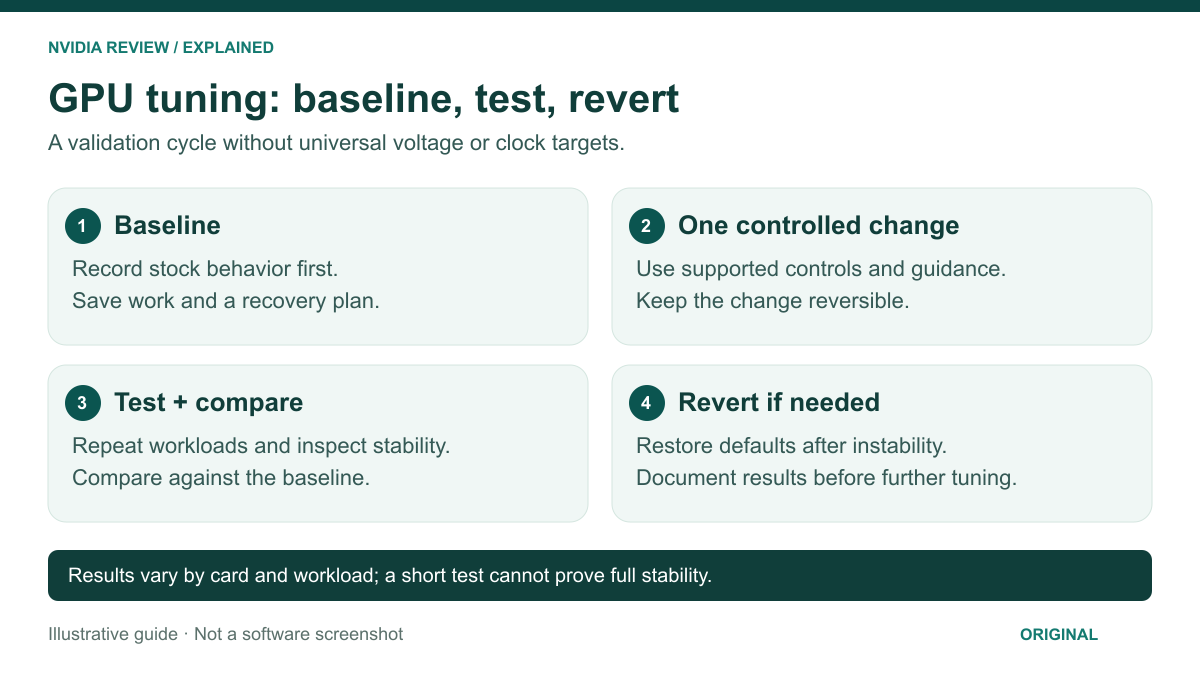
What Undervolting Actually Does (And Why FPS Usually Does Not Drop)
Every GeForce card ships with a voltage/frequency curve: a list of core clocks and the voltage NVIDIA guarantees will run them on the worst silicon that left the factory. Your chip is almost never the worst chip. It will usually hold its rated boost at 900 mV even though the stock curve asks for 1000-1050 mV.
Undervolting rewrites that curve. You are not lowering the clock — you are lowering the voltage the card requests to reach the clock it was already targeting. Less voltage means less power, less heat and lower fan speed. In sustained play the card can even run faster: a stock card that hits its power or thermal limit down-clocks itself, while an undervolted card never reaches that ceiling and holds a flat clock all session.
The trade-off is stability. You are operating outside the factory’s guaranteed margin, so a curve 20 mV too aggressive will eventually cause a driver reset. Validation is half the job, and every number below is a starting point, not a setting to copy blindly. If temperatures are already poor at stock, fix case airflow and GPU fan curves first — that beats any curve edit.
Before You Start
Install MSI Afterburner (it works on any GeForce card, not just MSI ones) and HWiNFO64 for sensor logging. Update the driver, then record a baseline in one repeatable scene: peak core temperature, hotspot, board power, average clock and FPS. Without it you cannot tell whether the undervolt helped. See our roundup of GPU stress-test and benchmarking utilities for loops worth using.
Method 1: The MSI Afterburner Curve Editor, Step by Step
- Open the curve editor. Launch Afterburner and press Ctrl+F. You will see a graph with voltage (mV) on the X axis and core clock (MHz) on the Y axis.
- Find your stock operating point. Run a game for five minutes and note the voltage the card sits at under load — usually 950-1100 mV.
- Pick a target voltage. Roughly 100 mV below that load voltage. For most Ada and Blackwell cards, 900-925 mV is a sensible first stop. Do not start at 800 mV; you will just chase crashes.
- Set the clock for that voltage. Click the point at your target voltage and drag it up to the clock you want to hold — a conservative choice is your observed stock boost clock, or 30-60 MHz below it for the first test.
- Flatten the curve. Press Enter. Afterburner flattens every point to the right of your chosen voltage, so the card can never request more. If it does not flatten, hold Shift, box-select the points to the right and pull them level with your target point.
- Apply and lock it in. Click the check mark, save the profile to a slot, and enable the Windows startup icon so the curve re-applies after every reboot. Otherwise a restart quietly returns you to stock.
Leave the memory clock alone on your first pass. Mixing a memory overclock into an undervolt makes failures impossible to diagnose. Tune one variable at a time, as you would in a full Afterburner overclocking pass.
Method 2: The Power Limit Slider (Simpler, Often Good Enough)
If the curve editor feels fussy, drag the Power Limit slider down to 70-80% and apply. The card manages its own voltage to stay inside that budget. It is one control, it cannot be set to an unstable value, and it survives driver updates more gracefully.
It works because the top of the V/F curve is brutally inefficient: the last 10% of clock costs 25-30% of the power. Cutting a 320 W card to 70% usually costs 3-6% of frame rate. Use it if you want a quiet card in ten seconds, or if curve editing is locked on your machine; use the curve method if you want the best performance-per-watt.
NVIDIA GPU Undervolt Results: Before and After
Realistic ranges for a well-executed curve undervolt on a desktop card with adequate airflow. Your chip will land somewhere on this spread, not necessarily in the middle.
| Metric | Stock | After a good undervolt | What it means |
|---|---|---|---|
| Core voltage under load | ~1000-1100 mV | ~875-950 mV | The variable you are actually changing |
| Board power | 100% of TGP | 72-85% of TGP | Less heat dumped into the room, smaller PSU transients |
| Core temperature | Baseline | -8 to -15°C | Hotspot usually falls further than edge temperature |
| Sustained core clock | Drops as card heats | Flat for the whole session | The main reason FPS holds up |
| Average FPS | Baseline | -2% to +3% | Gains come from removing thermal/power throttling |
| Fan noise | Baseline | Noticeably lower | Often the real motivation |
By class the pattern is consistent. High-TGP flagships gain the most in absolute watts and degrees because they are pushed hardest out of the box. Mid-range cards such as a 4070, 5070 or 5070 Ti typically shed 40-60 W and 8-12°C. Entry cards at 160 W or less have little headroom left, so the benefit is mostly acoustic — see the best GPUs for 1440p gaming and our RTX 5070 breakdown for where each tier sits.
How to Validate Stability
A synthetic stress test alone is not enough. Run this sequence:
- 30 minutes of a demanding real game — ideally a heavy ray-traced or UE5 title, since those hammer the shader units with varied loads.
- A looping benchmark for another 30-60 minutes to catch thermal drift.
- Menus, cutscenes and alt-tabs. Undervolt instability often shows up in light load, where the card boosts high at the low voltage you set.
Watch for one symptom: a momentary black screen followed by “display driver stopped responding and has recovered”. That driver timeout means the voltage is too low for the clock you asked for — drop 15-25 MHz (or add 15 mV) and retest. A crash to desktop in one game while everything else is stable usually means the same thing.
Troubleshooting
Curve reverts after reboot: the startup icon in Afterburner is not enabled, or a driver update reset it. Re-apply and save the profile.
Clock does not hold the flat line: the card is still hitting a power or temperature limit. Check the limit reason in HWiNFO; if it says thermal, this is a cooling problem, not a curve problem — consider a repaste or thermal pad refresh on an older card.
Crashes only under transient spikes: if the system reboots entirely rather than the driver resetting, suspect the PSU, not the curve. Undervolting reduces those spikes, so if reboots persist, review your power supply headroom.
Stable but temps barely moved: your card was never voltage-limited. Check normal GPU temperature ranges before assuming something is wrong.
When Undervolting Will Not Help
It does nothing for a CPU-bound game. It barely touches VRAM temperatures, since memory voltage is not part of the core curve — hot GDDR6X is a thermal pad problem. It will not rescue a failing fan or a clogged heatsink. And on many laptops and OEM prebuilts the curve editor is locked, leaving only the power limit.
How to Revert Safely
Click the reset (circular arrow) icon in Afterburner to restore the stock curve, then apply. If the card crashes during boot, start Windows in Safe Mode and remove Afterburner from startup — the GPU stores nothing, so a clean boot without Afterburner is always stock. Uninstalling reverts the card completely.
Tools That Help Lower GPU Temperatures
A fresh thermal paste or pad and a sag bracket are the cheapest hardware fixes to pair with the settings above.
As an Amazon Associate we earn from qualifying purchases at no extra cost to you. Prices as of Oct 5, 2026 and subject to change.


Frequently Asked Questions
Is undervolting an NVIDIA GPU safe?
Yes, in the sense that you are reducing voltage rather than raising it, so you are not adding electrical stress or heat. The realistic worst case is instability: a driver reset or a game crash, both recoverable. The settings live in software, not in the card, so a reboot without Afterburner returns the GPU to factory behaviour. The one genuine risk is losing unsaved work when an unstable curve crashes a game, which is why you validate before trusting it.
How much performance do I lose when I undervolt?
With a curve undervolt done properly, essentially none — expect anywhere from a 2% loss to a 3% gain, because removing thermal and power throttling often outweighs the slightly lower peak clock. With the power limit method at 70-75%, expect a 3-6% frame rate reduction in GPU-bound scenes. Both are small enough that you will not perceive them in play, while the drop in fan noise and case temperature is immediately obvious.
What voltage should I use for an RTX 5070 or similar mid-range card?
Start at 900-925 mV and target roughly your observed stock boost clock, then adjust from there. Some chips hold full clocks at 875 mV; others need 950 mV for the same frequency. Silicon quality varies between individual cards of the same model, so any specific figure you read online is a starting point for your own testing, not a setting to copy. Test, back off when it resets, and keep 15-25 MHz of margin.
Does undervolting void my warranty?
No. Changing the voltage/frequency curve in third-party software is a reversible user setting, not a hardware modification, and it lowers rather than raises voltage. Board partners do not track it, and there is no physical evidence left on the card. This is different from hardware-level modifications such as shunt mods or BIOS flashing, which can be detected and can genuinely affect coverage. Undervolting leaves nothing behind once the software is removed.
Should I undervolt or just lower the power limit?
Lower the power limit if you want a fast, foolproof result or if the curve editor is locked on your system — one slider, no stability testing, a few percent of frame rate. Use the curve editor if you want the best possible efficiency, want a perfectly flat sustained clock, and are willing to spend an hour validating stability. Many people start with the power limit and move to a curve later once they know their card.

Write Your Review
No reviews yet. Be the first to share your experience!