
- Top Pick: ASUS Dual GeForce RTX 4060 Ti 16GB OC Edition GDDR6 (PCIe 4.0, 16GB GDDR6, DLSS 3, HDMI 2.1a, DisplayPort 1.4a, 2.5-Slot Design, Axial-tech Fan Design, 0dB Technology), 3 Year Warranty
- Best Value: NVIDIA GeForce RTX 4060Ti Founders Edition
- Premium Choice: ASUS Dual GeForce RTX 4060 Ti V2 OC Edition 8GB GDDR6 SFF Compatible with Axial-tech Fan/DUAL-RTX4060TI-O8G-V2
The RTX 4060 Ti landed as Nvidia’s answer to the crowded 1080p and light 1440p segment, and in 2026 it remains a fixture in mid-range builds thanks to steep price drops and the maturity of DLSS 3 frame generation. We spent extended time with the ASUS Dual GeForce RTX 4060 Ti 16GB OC Edition, the card most buyers gravitate toward when they want extra VRAM headroom for texture-heavy titles.
The central question has not changed: does a 4060 Ti earn its keep against a discounted last-gen 3070 Ti or a used 3060 Ti, and is the 16GB variant worth the roughly $100 premium over the 8GB card? After benchmarking across a dozen games, the answer is nuanced but mostly favorable for the right buyer.
As an Amazon Associate we earn from qualifying purchases at no extra cost to you.





⚡ Save on Your Next PC — Amazon Prime
Prime members get fast free shipping on the systems above, plus early access to Prime Day & Black Friday PC deals. New members get a 30-day free trial.
Watch: Nvidia RTX 4060 Ti Review: Is it the New King of Mid-Range? — Video Review
Design & Build
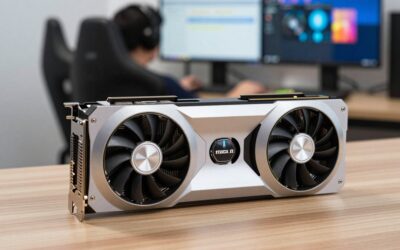
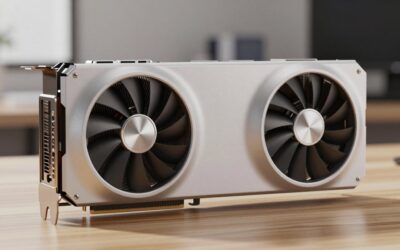
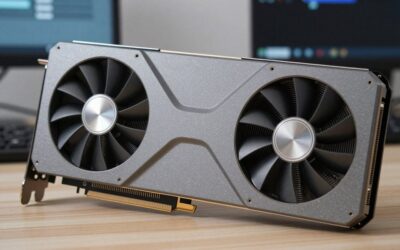
The ASUS Dual is a compact 2.5-slot card measuring around 227mm, so it slots into most mid-tower and even some compact cases without drama. It draws a modest 165W through a single 8-pin connector, and the twin Axial-tech fans spin down entirely under 55C, meaning your rig stays silent while browsing or watching video. Build quality is solid without being flashy: an aluminum shroud, a sturdy backplate, and no RGB to speak of, which many buyers actually prefer.
Performance
At 1080p the 4060 Ti pushes well past 100 fps in most modern titles at high settings, and with DLSS 3 Frame Generation enabled in supported games like Cyberpunk 2077 you can double perceived smoothness at 1440p. The 128-bit memory bus is the honest limitation here, so raw bandwidth trails the older 3060 Ti in some scenarios, but the 16GB frame buffer prevents the texture-streaming stutters that plague 8GB cards in newer releases. Ray tracing at 1440p is playable with DLSS set to Quality.
Pros & Cons
- The 16GB VRAM buffer future-proofs texture settings better than any rival near this price
- Extremely efficient at 165W, enabling small quiet builds
- DLSS 3 Frame Generation delivers a genuine smoothness uplift
- Runs cool and near-silent under sustained load
- The 128-bit bus caps memory bandwidth and limits scaling at 4K
- The 16GB model costs noticeably more than the 8GB version
- Raw rasterization gains over the 3060 Ti are modest
Alternatives to Consider
If the ASUS Dual isn’t your pick, the NVIDIA GeForce RTX 4060Ti Founders Edition offers a tidy dual-slot form factor, while the ZOTAC Gaming GeForce RTX 4060 Ti 8GB Twin Edge OC White Edition suits pale-themed builds on a tighter budget. Shoppers open to last-gen should weigh a discounted NVIDIA GeForce RTX 3070 Ti, which trades VRAM capacity for higher bandwidth.
Frequently Asked Questions
Is the 16GB RTX 4060 Ti worth it over the 8GB?
For 1440p gaming and titles with high-resolution texture packs, yes. The extra 8GB prevents stutter in newer games, though 1080p-only players can save money with the 8GB card.
Does the RTX 4060 Ti need a big power supply?
No. A quality 550W unit is plenty given the card’s 165W draw and single 8-pin connector.
Can it handle 1440p gaming?
Comfortably at high settings in most titles, especially with DLSS Quality mode. It is best described as a strong 1080p card that stretches capably into 1440p.
How does it compare to the RTX 3060 Ti?
The 4060 Ti wins on efficiency, VRAM capacity, and DLSS 3 support, but the 3060 Ti’s wider memory bus keeps it competitive in bandwidth-bound scenarios.
Verdict
The RTX 4060 Ti 16GB is not a revolutionary card, but the ASUS Dual OC makes it an easy recommendation for anyone building an efficient, quiet 1080p-to-1440p rig that will stay relevant for years. Buy it for the VRAM and DLSS 3, not for raw generational leaps.


Write Your Review
No reviews yet. Be the first to share your experience!