
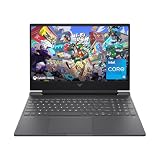
- Top Pick: HP NVIDIA GeForce RTX 4050 Laptop Gamer Victus 13420H 16GB RAM 512GB SSD 15.6" Windows 11 Home English Keyboard
- Best Value: HP Victus 15.6 inch Laptop, FHD 144Hz Display, Intel Core i5-12500H, 16 GB RAM, 512 GB SSD, NVIDIA GeForce RTX 4050 GPU (6 GB Dedicated), Windows 11 Home, 15-fa1040nr (2023)
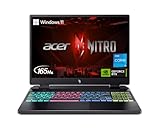
- Premium Choice: Acer Nitro V Gaming Laptop | Intel Core i5-13420H Processor | NVIDIA GeForce RTX 4050 Laptop GPU | 15.6" FHD IPS 165Hz Display | 8GB DDR5 | 512GB Gen 4 SSD | Wi-Fi 6 | Backlit KB | ANV15-52-586Z
The Nvidia RTX 4050 Laptop GPU has become the default entry point into modern gaming laptops, appearing in affordable machines from HP, Acer, and others. It promises Ada Lovelace features like DLSS 3 frame generation in a budget-friendly package, but its 6GB of VRAM and mobile power limits mean managing expectations is key before you buy.
So what can you realistically expect from an RTX 4050 laptop, and which models make the best use of it? This roundup sets clear performance expectations and highlights the standout RTX 4050 gaming laptops of 2026, matching processors, displays, and cooling to help you find the best value machine for 1080p gaming on the go.
As an Amazon Associate we earn from qualifying purchases at no extra cost to you.






⚡ Save on Your Next PC — Amazon Prime
Prime members get fast free shipping on the systems above, plus early access to Prime Day & Black Friday PC deals. New members get a 30-day free trial.
Watch: Nvidia RTX 4050 Laptop GPU: Performance Expectations and Best Laptops — Video Review
How to Choose
- Target 1080p: The RTX 4050 is a 1080p card; expect high frame rates at that resolution with settings tuned, aided by DLSS 3.
- CPU pairing: A capable chip like the Intel Core i5-13420H or i7-13620H prevents bottlenecks and improves overall responsiveness.
- Display refresh rate: High-refresh 144Hz or 165Hz panels let you feel the frame rates the 4050 produces in esports titles.
- RAM and storage: 16GB of DDR5 and a fast Gen 4 SSD keep the system smooth; 8GB models feel cramped for modern games.
- Cooling and build: Better thermal designs let the GPU sustain its power limit, so cooling quality directly affects real performance.
The Best Picks Reviewed
Acer Nitro V (i7-13620H, 16GB, 1TB)
This Acer Nitro V configuration pairs the RTX 4050 with a Core i7-13620H, 16GB DDR5, and a spacious 1TB Gen 4 SSD, plus a 165Hz display. The stronger CPU and generous storage make it one of the most well-rounded RTX 4050 laptops for gaming and everyday use.
Acer Nitro 16 (i5-13500H, 16-inch 165Hz)
The Acer Nitro 16 stands out with a larger 16-inch 2560×1600 165Hz G-SYNC display, giving the RTX 4050 a crisp, high-refresh canvas. Its i5-13500H handles gaming and multitasking well, making it a great pick for those who want more screen real estate.
HP Victus 15.6 (i5-12500H, 144Hz)
The HP Victus 15.6 is a dependable value machine, combining the RTX 4050 (6GB) with a Core i5-12500H, 16GB RAM, and a 512GB SSD on a 144Hz FHD panel. It is a solid, no-frills entry into 1080p gaming with a trusted brand behind it.
Acer Nitro V (i5-13420H, 8GB, 512GB)
A more affordable Acer Nitro V option pairs the RTX 4050 with an i5-13420H and a 165Hz display. Its 8GB of RAM is the main compromise, but it remains a budget-friendly route into DLSS 3 gaming for lighter titles.
HP Victus 15.6 (Ryzen 7 7445HS, 16GB)
This HP Victus swaps in an AMD Ryzen 7 7445HS alongside the RTX 4050 and 16GB DDR5 RAM, offering strong multi-core performance. It is a compelling choice for gamers who also value productivity muscle from a capable processor.
Frequently Asked Questions
What performance can I expect from an RTX 4050 laptop?
Expect smooth 1080p gaming at high settings in most titles, with DLSS 3 boosting frame rates further. Esports games run at very high frame rates, while demanding AAA titles may need settings tuned.
Is 6GB of VRAM enough on the RTX 4050?
For 1080p it is generally sufficient, especially with DLSS. Some texture-heavy games at max settings can approach the limit, so lowering textures a notch occasionally helps maintain smooth performance.
Should I get 8GB or 16GB of RAM?
16GB of DDR5 is strongly recommended for modern gaming and multitasking. 8GB models are noticeably more cramped and can stutter in demanding games, so the extra memory is worth prioritizing.
Does the CPU matter with an RTX 4050?
Yes. A capable CPU like the i7-13620H or Ryzen 7 7445HS prevents bottlenecks and keeps the system responsive, improving both gaming consistency and general performance.
Final Thoughts
The RTX 4050 Laptop GPU delivers genuine modern gaming on a budget, provided you set 1080p expectations and pair it wisely. The Acer Nitro V and Nitro 16 with 16GB RAM and high-refresh displays offer the best balance, while the HP Victus models bring dependable value. Prioritize 16GB of memory, a strong CPU, and good cooling, and an RTX 4050 laptop will handle smooth, DLSS-enhanced 1080p gaming throughout 2026.

Write Your Review
No reviews yet. Be the first to share your experience!