
- Top Pick: NVIDIA 945-12897 Shield Streaming Media Player
- Best Value: NVIDIA GeForce RTX 4060Ti Founders Edition
- Premium Choice: NVIDIA L4
NVIDIA game streaming is the rare topic where almost every guide you will find is describing software that no longer exists. GameStream — the free feature that streamed your own games from your own PC to your TV — was killed, removed from Shield devices by a forced update, and followed by a proposed class action. What replaced it is genuinely better in some ways and considerably worse in others, and NVIDIA changed the terms again on the first day of this year. Here is the accurate picture.
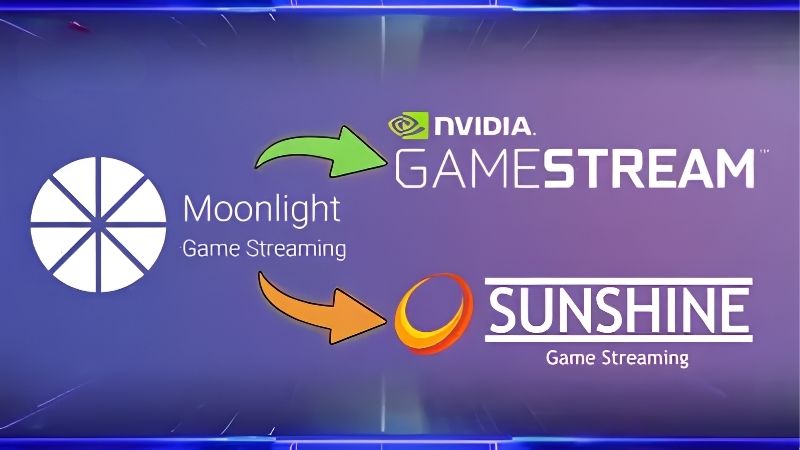
NVIDIA Game Streaming in 2026: What Actually Exists
Three separate things get called “NVIDIA game streaming” and confusing them is why people end up frustrated. One is dead. One is a paid cloud service that is not a replacement for the dead one. The third is free, community-built, and better than what NVIDIA took away.
GameStream Is Dead — Here Is the Timeline
The dates matter, because they explain why your Shield stopped doing something it used to do.
NVIDIA issued an end-of-service notice in December 2022. GameStream was then removed from Shield TV through a mandatory update on 29 March 2023 — not deprecated, not left alone, removed from devices people already owned. A proposed class action followed within weeks, on the grounds that customers had paid for a feature that was then taken away.
The second blow landed quietly. GeForce Experience, which hosted GameStream, was itself discontinued in favour of the NVIDIA app. The NVIDIA app does not support GameStream, and installing it removes GeForce Experience. There is no version of NVIDIA’s current software that does this.
So if a video tells you to open GeForce Experience and enable GameStream, it is not out of date in a minor way. It is describing a product that has been actively deleted from your machine.
The Three Things That Replaced It
| Option | Cost | Streams from | Best for |
|---|---|---|---|
| Sunshine + Moonlight | Free | Your own PC | Anyone who owns a gaming PC |
| Steam Link / Remote Play | Free | Your own PC | Steam-only libraries |
| GeForce NOW | 9.99 – 19.99/month | NVIDIA’s servers | People without a gaming PC |
NVIDIA’s own suggestion when it killed GameStream was Steam Link. That works, and it is a real option — Steam supports both the NVIDIA encoder and the NV FrameBuffer capture method under Remote Play advanced host options, and Valve’s built-in VirtualHere licence gives you rumble and microphone support for USB controllers.
The catch is scope. Steam Link is driven by the Steam client, which makes it awkward for games from other launchers and poor for anything that is not a game. GameStream handled desktop and non-gaming work over LAN; Steam Link is not built for that.
GeForce NOW Is Not GameStream
This is the substitution NVIDIA wanted and it is worth being precise about why it is not equivalent.
GameStream streamed your games from your PC for free. GeForce NOW runs games on NVIDIA’s servers for a monthly fee — Performance at 9.99 and Ultimate at 19.99.
Then the terms changed. On 1 January 2026, NVIDIA added a 100-hour monthly playtime cap to all subscriptions. Past the cap you buy more in 15-hour blocks: 2.99 on Performance, 5.99 on Ultimate, with up to 15 unused hours rolling over. NVIDIA has said the cap affects roughly 6 percent of users.
For someone who used GameStream to play their own library for hours at a stretch, a metered cloud subscription is a hard sell. Not a bad product — a different product, sold to a different person.
Sunshine and Moonlight: The Free Replacement
Here is the good news, and it is better news than the situation deserves. When NVIDIA removed the feature, the community did not petition. It rebuilt it — and the rebuild does things the original never could.
How the Two Halves Fit Together
Two pieces, two machines.
Sunshine is the host. It runs on your gaming PC and does the job GeForce Experience used to do. It is open source, GPL-3.0, maintained by LizardByte, and it works on NVIDIA, AMD, and Intel hardware — which GameStream never did.
Moonlight is the client. It runs on whatever screen you want to play on: TV, Shield, phone, tablet, another PC, a handheld. Moonlight is what kept the protocol alive in the first place, by reverse-engineering it.
The pairing matters strategically as well as technically. Because the host is no longer NVIDIA’s, no single company can unilaterally delete this again.
Setting It Up in Five Minutes
The process is genuinely short:
- Install Sunshine on your gaming PC.
- Open its web interface at
https://localhost:47990and create a login. - Install Moonlight on your streaming device and let it find the PC on your network.
- Pair them using the PIN that Moonlight displays.
- Pick a game in Moonlight and start streaming.
That is the whole setup. No account with NVIDIA, no subscription, no telemetry.
What Sunshine Does That GameStream Never Could
This is the part that surprises people who assumed the community version would be a downgrade.
GameStream’s protocol limitations blocked features for years. Microphone support was built for GeForce NOW but never for GameStream. PS4 and Xbox controller emulation, trigger rumble, client-side cursor rendering, and AV1 encoding were all impossible under the host and protocol constraints.
Sunshine implements them. Freed from the requirement to stay compatible with NVIDIA’s protocol decisions, the project added the things GameStream users had been asking for across a decade.
The honest caveat: GameStream’s raw quality and reliability were excellent, and long-time users report it as a high bar. Sunshine has closed most of the gap and exceeded it on features, but expect some tuning rather than a perfect first run.
Pros and Cons of Each Streaming Route
The right choice depends almost entirely on whether you already own a gaming PC, and secondarily on your network. Neither answer is universal, and the honest comparison is less flattering to the cloud than the marketing suggests.
Where Local Streaming Wins
Cost is the obvious one. Sunshine and Moonlight are free, forever, with no hour caps and no metering.
Your library is the second. You stream what you own, from any launcher — Steam, Epic, GOG, itch, an emulator, your desktop. Cloud services stream what they have licensed, which is never everything you own.
Latency is the third and it is structural rather than incidental. Your LAN is a few metres of cable. NVIDIA’s servers are tens or hundreds of kilometres away. Physics does not negotiate.
Where GeForce NOW Wins — and the 100-Hour Cap
Be fair about this: GeForce NOW is genuinely excellent for a specific person. If you do not own a gaming PC, it gives you access to RTX-class hardware for a monthly fee that is a fraction of a graphics card.
It also works away from home. Local streaming over the internet is possible and fiddly; the cloud is built for it.
The cap is the thing to understand before subscribing. 100 hours a month sounds generous until you divide it: roughly 3.3 hours a day. A weekend gamer never touches it. Someone who plays four hours most evenings will, and then pays 2.99 or 5.99 for each additional 15-hour block. NVIDIA’s own figure is that this affects about 6 percent of subscribers — which is a small share and a large number of people.
The Network Is Your Real Bottleneck
Whichever route you pick, this is what actually determines whether it works, and it is where most disappointment comes from.
Use Ethernet on both ends where you can. This is the single highest-impact change available. A 4K stream is fine on Wi-Fi right up until someone else in the house starts a download, at which point it hitches mid-scene.
If you cannot run cable to the TV, a powerline adapter carries a wired connection over your existing electrical wiring and is usually better than Wi-Fi for this specific job. If Wi-Fi is unavoidable, a Wi-Fi 6 router on 5 GHz with the TV close to it is the realistic minimum for a stable 1080p60 stream.
A decent controller that pairs with phones, TVs, and handhelds is the other thing worth having — couch streaming with a keyboard balanced on your knee gets old immediately.
If you are setting this up, the router and the powerline adapter are where your money actually matters — check current pricing on both before you spend anything on the software side, because there is nothing to spend it on.
Cloud or Your Own GPU? The 2026 Cost Question
There is a calculation underneath all of this that has shifted in the last two years. Local streaming assumes you own a gaming PC. If you do not, the question is whether to buy one or rent one — and the answer depends on numbers that have moved sharply.
What a Gaming PC Costs to Replace Right Now
Component costs never drifted back toward 2024 levels — they kept climbing, with memory the main driver. The most concrete illustration arrived this month: NVIDIA restarted production of the five-year-old RTX 3060 12GB and returned it to shelves near its original 2021 price, because rebuilding old silicon on an idle node had become cheaper than manufacturing something current.
Read what that says about the buy side. When a manufacturer’s most economical option is resurrecting a 2021 design, the graphics card in your hypothetical build is not about to get cheaper.
That is the case for the cloud, and it is a real one. Against a GPU that has not fallen in price, 19.99 a month for RTX-class hardware you do not have to buy, house, power, or cool is a legitimate answer rather than a compromise.
Prices Flat, Not Falling
The good news deserves accurate reporting rather than spin. The steep escalation of late 2025 has levelled off. Framework and other manufacturers have described a stretch of comparative steadiness — while stating plainly that they do not consider the volatility over.
The distinction decides your move. A plateau removes the penalty for thinking it over. It does not create a reward for waiting. Prices stopped rising; nobody has reported them coming down.
Capacity is being added on a public schedule — Micron has two new fabrication plants going up in Idaho, and CXMT in China has widened the DDR5 supplier pool manufacturers draw from. But the Idaho facilities are not scheduled to produce until the 2027 to 2028 window, and forecasts do not expect meaningful consumer price relief before late 2027 at the earliest.
Doing the Maths on Cap vs Capital
Put the numbers together honestly, because this is the decision.
Rent if you play under roughly 100 hours a month and do not own a gaming PC. At 19.99, eighteen months to late 2027 costs about 360 — well under a capable GPU at current pricing, with nothing to maintain.
Buy if you play more than the cap, want your own library, or care about latency. Overage at 5.99 per 15 hours compounds quickly, and a heavy player pays cloud pricing that starts to look like hardware pricing without ever owning anything.
And if you already own a gaming PC, none of this applies to you. Install Sunshine, install Moonlight, spend the money on a cable to the TV instead. That is the whole answer, and it costs nothing.
See More:
- NVIDIA
- NVIDIA DeepStream
- NVIDIA GPU driver update
- NVIDIA GeForce NOW download
- NVIDIA RTX A2000 12GB driver
Conclusion
NVIDIA game streaming in 2026 means one of three things, and only one of them is what you probably came looking for. GameStream is gone — end-of-service in December 2022, force-removed from Shield devices in March 2023, and unsupported by the NVIDIA app that replaced GeForce Experience. No amount of searching brings it back.
If you own a gaming PC, the answer is Sunshine and Moonlight. Free, open source, works on NVIDIA, AMD, and Intel, and it does things GameStream never could — AV1 encoding, controller emulation, microphone support, trigger rumble. Five steps and a PIN.
If you do not own a gaming PC, GeForce NOW is a fair deal at 9.99 to 19.99 — provided you know about the 100-hour monthly cap that arrived on 1 January 2026 and the 15-hour top-up blocks beyond it. And whichever route you take, run Ethernet. The network is what breaks these setups, not the software.
Frequently Asked Questions
Is NVIDIA GameStream still available?
No. NVIDIA retired GameStream from GeForce Experience in early 2023, and the NVIDIA App does not include it. Local PC to device streaming now runs through the open source Sunshine host paired with Moonlight clients, which uses the same NVENC hardware path and generally performs as well or better.
What replaced it for streaming to a TV or handheld?
Sunshine and Moonlight for self hosted local streaming, Steam Remote Play for anything in the Steam library, and GeForce NOW for cloud streaming that does not need a local GPU at all. Moonlight clients exist for Android TV, Shield, Steam Deck, iOS and browsers.
What hardware do I need on the host PC?
Any GeForce card with NVENC from GTX 900 series onward works, though Turing and later produce noticeably better quality at the same bitrate, and Ada and Blackwell add AV1 encoding. A wired gigabit connection on the host matters far more than GPU choice for a stable, low latency session.
Will streaming add noticeable input lag?
Over wired ethernet or a clean 5GHz or 6GHz WiFi link, end-to-end latency typically lands between 10 and 25 milliseconds, which is fine for most single player games. Competitive shooters remain better on the host machine directly. Enabling Reflex on the host and capping the stream frame rate reduces variance considerably.
What bitrate should I use?
Around 20 to 30Mbps for 1080p60, 40 to 50Mbps for 1440p, and 60 to 80Mbps for 4K if your network is wired. Higher settings look better but increase the chance of dropped frames on congested WiFi. Lower it first when you see macroblocking or stuttering rather than reducing resolution.
As an Amazon Associate we earn from qualifying purchases at no extra cost to you.












Write Your Review
No reviews yet. Be the first to share your experience!