
- The Quick Verdict for the RTX 5060 Ti 8GB vs 16GB Choice
- RTX 5060 Ti 8GB vs 16GB Specs and Where the Only Difference Lies
- Deep Dive Face-Off: Gaming, Ray Tracing and Creation
- Why Memory Prices Make This Decision Trickier Now
- Final Verdict and Recommendation
- Related Guides
- Frequently Asked Questions
- Related Articles


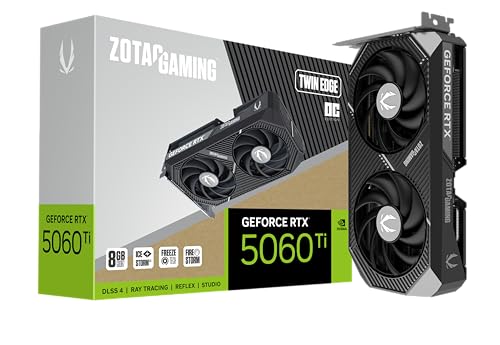
RTX 5060 Ti 8GB vs 16GB is one of the few GPU choices where the two cards are, under the hood, almost the same product. The GPU die, the core count and the clocks are identical; the only real difference is the size of the memory pool. That makes this a pure question of how much VRAM you actually need, and this comparison walks through exactly when the extra 8GB earns its price and when it does not.
The Quick Verdict for the RTX 5060 Ti 8GB vs 16GB Choice
Because the raw performance is identical, the decision hinges entirely on memory. The short version is that the 16GB card is the safer buy for most people today, while the 8GB card only makes sense in specific, narrow situations.
The Best Buy for Most People
For the majority of buyers, the 16GB RTX 5060 Ti is the smarter pick. The premium over the 8GB version is relatively small compared to the total cost of a build, and it removes the single biggest weakness the card would otherwise have.
Games are trending toward higher memory use, not lower, so the 16GB buffer future-proofs the purchase in a way raw clock speed cannot. You are paying a modest amount now to avoid stutter and forced settings compromises later.
Unless your budget is razor-thin or your use case is genuinely light, the 16GB version is the default recommendation. It is the same card without the one flaw that ages the 8GB model early. Resale value leans the same way. As memory demands rise across new releases, a 16GB card stays desirable for longer on the used market, so the premium you pay now is partly recovered whenever you eventually upgrade.
When the 8GB Version Is Still Enough
The 8GB card is not a bad product; it is a situational one. If you play mostly esports titles, older games, or competitive shooters at 1080p, 8GB is comfortably enough and you will not notice a difference in daily play.
It also makes sense when the price gap on the day you shop is unusually large. If memory pricing pushes the 16GB card well above its normal premium, the 8GB version can become the sensible value choice for a 1080p gamer.
In short, the 8GB model suits a specific buyer: someone gaming at 1080p, on a tight budget, who is not chasing maxed textures or heavy ray tracing. For that person it is perfectly capable. It is worth being honest about your own habits, though. Many buyers assume they only play light games, then install a demanding new release six months later. If there is any chance your library will grow heavier, the 8GB card is a riskier bet.
When the 16GB Version Is Essential
There are cases where the 16GB card is not just nicer but necessary. If you game at 1440p with high textures, the 8GB buffer can fill up and cause stutter that the identical GPU on the 16GB card avoids entirely.
The same is true for ray tracing and frame generation, both of which consume extra memory on top of the game itself. Turn several of these features on at once and 8GB starts to feel cramped in modern titles.
Creators and anyone experimenting with local AI models should treat 16GB as mandatory. Video timelines, large project files and AI workloads spill out of an 8GB card quickly, and there the extra memory transforms what the card can do. The gap is starkest in local AI work. Image generation and small language models often need more than 8GB just to load, so on the smaller card some tasks simply will not run, while the 16GB version handles them without complaint.
RTX 5060 Ti 8GB vs 16GB Specs and Where the Only Difference Lies
It is worth stressing just how identical these two cards are on paper. Every performance-related spec matches; the memory capacity is the sole variable, which makes the comparison unusually clean.
Core Specs and Architecture Side by Side
The table below shows why this matchup is really a one-line difference. Same architecture, same cores, same bandwidth, same power; only the VRAM figure changes, along with the price.
| Spec | RTX 5060 Ti 8GB | RTX 5060 Ti 16GB |
|---|---|---|
| Architecture | Blackwell | Blackwell |
| CUDA cores | 4,608 | 4,608 |
| Memory | 8GB GDDR7 | 16GB GDDR7 |
| Memory bandwidth | ~448 GB/s | ~448 GB/s |
| Typical board power | ~180W | ~180W |
| Upscaling / FG | DLSS 4 (Multi FG) | DLSS 4 (Multi FG) |
| Launch price | $379 | $429 |
Because everything except capacity is shared, any performance gap you see in reviews is caused purely by one card running out of memory. When neither card is memory-limited, their frame rates are effectively identical.
What Actually Happens When 8GB Runs Out
Running out of VRAM does not behave like running out of raw power. Instead of a smooth drop in frame rate, you get sudden stutter, texture pop-in, and occasional hitching as the card shuffles data in and out of memory.
This is why the 8GB card can post a similar average frame rate yet feel worse to play. The averages hide the momentary spikes in frame time that break immersion in a fast-moving game.
The 16GB card sidesteps this entirely in the same scenario, delivering steadier frame pacing. That difference in smoothness, rather than peak numbers, is the real prize the extra memory buys. This is also why review headlines can mislead. A benchmark that reports similar average frame rates for both cards can hide a very different feel in motion, so pay attention to frame-time consistency, not just the headline average, when memory is in play.
Bandwidth Is Equal, Capacity Is Not
A common misconception is that more VRAM makes a card faster. It does not; bandwidth and core count set the speed, and those are identical here. What capacity changes is the ceiling before performance falls apart.
Think of it as a desk size rather than a work speed. Both cards work at the same pace, but the 16GB card simply has more room to keep everything it needs close at hand.
For workloads that stay under 8GB, the two are indistinguishable. The 16GB advantage only appears once a game or app asks for more than the smaller card can hold.
Deep Dive Face-Off: Gaming, Ray Tracing and Creation
With the theory established, here is how the difference plays out across the situations you actually care about, from esports to editing.
1080p and Esports: Where They Tie
At 1080p, and especially in esports titles, the two cards are a dead heat. These games rarely approach 8GB of memory use, so the extra capacity sits idle and delivers no benefit.
If your monitor is 1080p and your library is competitive shooters or lighter titles, you are the exact buyer who can safely save money with the 8GB version. The experience is genuinely identical.
This is the one scenario where paying for 16GB is hard to justify on pure gaming grounds. Any advantage there is insurance for the future rather than a present-day gain.
1440p, Ray Tracing and Texture-Heavy Games
Move up to 1440p and the gap opens. Higher resolution textures and larger assets push memory use past 8GB in a growing number of recent releases, and that is where the 8GB card starts to stutter.
Ray tracing and DLSS 4 frame generation add their own memory overhead on top of the game. Stack them together at 1440p and the 8GB buffer can hit its limit, while the 16GB card carries on smoothly with the identical GPU.
For a 1440p gamer who wants to keep textures high and effects on, the 16GB version is clearly the better long-term match. This is the resolution where the memory choice truly matters.
Pros and Cons of the 8GB and 16GB Versions
Here is the honest ledger for the RTX 5060 Ti 8GB vs 16GB decision, based on how each version behaves in real use.
8GB — Pros: lower price, identical performance in 1080p and esports, lower total build cost. Cons: stutter and texture issues at 1440p, cramped for ray tracing plus frame generation, weak for creation and AI, ages faster.
16GB — Pros: smooth at 1440p and with heavy features, strong for creation and local AI, far more future-proof, same raw speed as the 8GB card. Cons: higher price, no benefit at all in light 1080p workloads where memory is never the limit.
Why Memory Prices Make This Decision Trickier Now
This particular comparison is unusually exposed to the current market, because the entire difference between the two cards is memory, and memory is exactly what has been getting more expensive.
Why the 16GB Premium Is Rising
Across the industry, prices for modern DRAM have been climbing, and graphics cards compete for the same tight supply as the rest of the market. Since the 16GB card is defined by carrying twice the memory, its price is the most sensitive to that pressure.
The practical effect is that the gap between the 8GB and 16GB versions can widen beyond the usual premium. On a bad pricing day, the extra memory costs more than it normally would, which changes the value calculation.
The takeaway is to check the live price gap, not the launch figures. If the premium is close to normal, the 16GB card is an easy call; if it has ballooned, the 8GB version becomes more defensible for a 1080p build.
Why Real Relief Is Still Far Off
There is faint good news. Prices have at least stopped climbing as steeply as they did in late 2025, and parts of the hardware market have seen a spell of relative stability, though makers still warn that volatility is not over.
New supply is being built, with expanded DDR5 sourcing and new memory fabs under construction. The problem is timing, since those facilities largely come online around 2027 to 2028, so meaningful relief is years away.
For this decision that means the memory premium is unlikely to shrink soon. If you want the 16GB card and the price is fair today, waiting for the extra memory to get cheaper is not a plan that pays off in the near term.
The Alternative: A Third Option to Weigh
If the 16GB premium feels steep but the 8GB card feels limiting, there are other routes. A slightly higher-tier card with 12GB or more can offer both extra memory and extra raw speed for a bit more money.
On the AMD side, competing cards in this bracket sometimes ship with generous VRAM at aggressive prices, which is worth checking if capacity is your priority and DLSS 4 is not a dealbreaker.
The goal is simply to get enough memory for your resolution without overpaying in an inflated market. There is usually a sensible middle path if neither 5060 Ti version fits cleanly.
See more:
- Nvidia gear store
- Nvidia number of employees
- Nvidia Jetson Xavier Developer Kit
- GeForce graphics driver
Final Verdict and Recommendation
In the RTX 5060 Ti 8GB vs 16GB decision, most buyers should choose the 16GB version, because it fixes the card’s only real weakness for a modest premium and stays comfortable at 1440p, with ray tracing, and in creative work. The 8GB version remains a smart value only for 1080p and esports players on a tight budget, or when memory pricing pushes the 16GB card unusually high. Since the two cards are otherwise identical, this really is a question of matching memory to your resolution and workload. Check the current live price gap between the 8GB and 16GB versions through the link below before you buy.
Frequently Asked Questions
Do the 8GB and 16GB RTX 5060 Ti differ in anything besides memory capacity?
No. Both use the same GB206 GPU with 4608 CUDA cores, the same 128-bit GDDR7 bus and identical clock targets. Only the memory capacity and board power differ slightly. That means any performance gap you see in benchmarks comes purely from running out of VRAM, not from a cut-down chip.
At what settings does the 8GB card actually run out of memory?
Problems appear most often at 1440p with ultra textures, ray tracing enabled, or frame generation active, since frame generation itself consumes extra VRAM. Titles with large open worlds and high-resolution texture packs are the usual offenders, producing frame-time spikes, blurry pop-in textures or hard stutter rather than a simple lower average.
Is the price premium for 16GB worth it?
Usually yes if the gap is around fifty dollars. That premium buys headroom for several more years of games, higher texture settings at the same frame rate, and better resale value. If the 16GB model costs enough to reach the next tier of GPU, compare that tier before committing.
Does the extra VRAM help outside gaming?
Considerably. Local AI workloads, Stable Diffusion image generation, running small language models, video editing with large timelines and 3D rendering all benefit directly from capacity. Many models simply refuse to load in 8GB or fall back to painfully slow system memory, so creators should treat 16GB as the baseline.
What PSU and slot requirements should I plan for?
The RTX 5060 Ti draws roughly 180W and uses a single 8-pin PCIe connector on most partner cards. A good 550W supply is comfortable. The card runs a PCIe 5.0 x8 interface, so on older PCIe 3.0 boards you may lose a few percent, mostly when VRAM is already tight.
