
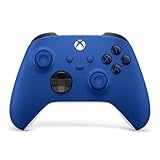
- Top Pick: XBOX Wireless Gaming Controller | Shock Blue | Textured triggers and bumpers, Hybrid D-pad, XBOX Wireless, Bluetooth, USB-C, Play across Console & PC & Cloud Devices
- Best Value: GameSir G7 Pro Wired Controller for Xbox Series X|S, Xbox One, Wireless Gamepad for PC&Android with TMR Sticks, Hall Effect Analog Triggers, 1000Hz Polling Rate, 3.5mm Audio Jack – Black
- Premium Choice: 8Bitdo Ultimate 2C Wireless Controller for Windows PC and Android, with 1000 Hz Polling Rate, Hall Effect Joysticks and Triggers, and Remappable L4/R4 Bumpers (Green)
The best Xbox controller for PC depends on how you play: the standard Xbox Wireless Controller is the simplest and most compatible choice, the Xbox Elite Series 2 Core suits players who want adjustable triggers and a premium build, and licensed third-party pads such as the 8BitDo Ultimate 3-mode for Xbox or the GameSir Kaleid Flux suit buyers who want Hall effect sticks. All of them work with Windows, but the connection method and drift risk differ.
- How Xbox Controllers Connect to a PC
- Comparison Table
- Xbox Wireless Controller: The Default Pick
- Xbox Elite Series 2 Core: Premium Build
- 8BitDo Ultimate 3-mode for Xbox: Hall Effect Alternative
- GameSir Kaleid Flux: Wired and Light
- 8BitDo Ultimate 2
- Pick X If
- Compatibility Notes
- Alternatives
- Stick Drift and Sensor Types Explained
- Wired Versus Wireless on PC
- Features Worth Paying For
- Battery Options and Charging
- Care and Warranty Tips
- Frequently Asked Questions
As an Amazon Associate we earn from qualifying purchases at no extra cost to you.


How Xbox Controllers Connect to a PC
Microsoft’s standard Xbox Wireless Controller connects to consoles over Xbox Wireless and to Windows 10 and 11 PCs, tablets, iOS and Android devices over Bluetooth. USB-C provides a wired connection only. It uses AA batteries rated by reviewers at up to 40 hours, and a rechargeable pack is sold separately and not included in every package. When wired, no batteries are needed. Plugging in USB does not recharge ordinary AA cells.
Many players use Bluetooth because it needs no extra hardware, but a wired cable gives the lowest latency and avoids pairing issues. A dedicated Xbox wireless adapter is another route for players who want a stable wireless link without Bluetooth.
Comparison Table
| Controller | Best for | Key stated specs | Limits |
|---|---|---|---|
| Xbox Wireless Controller (Series X|S) | Everyday play and widest game support | Bluetooth and Xbox Wireless, USB-C wired, AA batteries up to about 40 hours | No Hall effect sticks; no back paddles |
| Xbox Elite Series 2 Core | Competitive and customizable play | Xbox Wireless, Bluetooth, USB-C, about 40 hours battery per reviewers, 3 profiles | Lacks paddles, spare sticks and dock out of the box; standard potentiometer sticks |
| 8BitDo Ultimate 3-mode (Xbox licensed) | Hall effect sticks and triggers with extra buttons | 2.4G wireless or wired USB for Windows, Bluetooth for Apple and Android, Hall effect triggers and sticks, two back paddles, 3.5mm audio jack, 1000mAh battery | Third-party software and feel |
| GameSir Kaleid Flux | Light wired pad with Hall effect sticks | Detachable USB-C cable, Hall effect joystick, RGB lighting, about 213 g | Wired only |
| 8BitDo Ultimate 2 (PC) | Players who want a charging dock and low-latency wireless | Listing names TMR sticks, Hall or tactile triggers, 2.4G wireless, 1000Hz polling, motion control, charging dock | Check its Xbox licensing and platform support on the maker page |
Xbox Wireless Controller: The Default Pick
For most PC players, the standard Xbox controller is the baseline: familiar layout, strong driver support in Windows, and automatic recognition in nearly every PC game. The trade-offs are the AA battery design, which some players replace with a rechargeable pack, and conventional sticks that can drift over time. It is the lowest-tier option in this guide and, reviewers argue, enough for most players. One reviewer suggests pairing the standard controller with a wireless adapter and moving to the Elite only if adjustable triggers and rear paddles matter.
Xbox Elite Series 2 Core: Premium Build
Reviews broadly rate the Core as a top premium choice for PC. Eneba’s roundup lists it as its best overall PC controller, citing Xbox Wireless, Bluetooth and USB-C connectivity, up to about 40 hours of battery and three profiles. Best Buy reviewers describe it as a notable step up from the standard pad even without the extras.
What to know before buying: the Core does not include the paddles, spare thumbsticks or charging dock that come with the full Elite, though these can be bought separately according to The Gaming Void. The main complaint in reviews is that Microsoft still uses standard potentiometer sticks rather than Hall effect or TMR sensors, so drift is a risk over time, and one retailer reviewer reports drift after six months to a year. Windows Central says the Elite Series 2 bumpers tend to fail after about six months in its experience of the pad. These are reviewer reports rather than maker statements.
8BitDo Ultimate 3-mode for Xbox: Hall Effect Alternative
The maker lists 2.4G wireless or wired USB for Xbox and Windows PC, Bluetooth for Apple and Android, Hall effect triggers and joysticks, two pro back paddles, a 3.5mm audio jack and a 1000mAh Li-ion battery. Hall effect sensors are designed to avoid the physical wear of potentiometers, which is the reason many drift-conscious players choose them. A dock-style charging approach and a rechargeable battery also remove the AA question.
GameSir Kaleid Flux: Wired and Light
Described with a detachable USB-C cable, Hall effect joystick, RGB lighting and a listed net weight of 213 g, the Kaleid Flux is the budget-friendly wired option. It suits desktop players who always sit near the PC and want no battery or pairing.
8BitDo Ultimate 2
The listing names TMR joysticks, Hall or tactile triggers, an 8Speed 2.4G link, a 1000Hz polling rate, motion control, an RGB fire ring and a charging dock. TMR is a different sensing technology from Hall effect. Because the product is positioned for PC, confirm its supported platforms on the maker page.
Pick X If
| Pick | If you |
|---|---|
| Xbox Wireless Controller | want simple, reliable and widely supported |
| Elite Series 2 Core | want adjustable triggers, profiles and a premium build and accept the stick type |
| 8BitDo Ultimate 3-mode | want Hall effect sticks, paddles and a 2.4G dongle |
| GameSir Kaleid Flux | play at a desk and want a light wired pad with Hall effect sticks |
| 8BitDo Ultimate 2 | want a dock and low-latency wireless |
Compatibility Notes
- Windows: Xbox controllers use the XInput standard, which most PC games support natively.
- Steam: Steam Input can remap any of these pads. Third-party pads sometimes need mode switches between XInput and other modes.
- Bluetooth versions: older PCs may have weak Bluetooth, and a wired cable is the fix.
- Batteries: a rechargeable pack or a pad with a built-in battery avoids replacing AAs.
Alternatives
- Standard Xbox controller plus a wireless adapter: a simple wireless setup.
- Razer and other licensed Xbox pads: Windows Central’s roundup covers Razer and GameSir options.
- Full Elite Series 2: includes the accessories the Core omits.
Stick Drift and Sensor Types Explained
The most common complaint about controllers is stick drift, where the cursor or camera moves without input. Standard controllers use potentiometers, which rely on physical contact and can wear. Hall effect sensors measure magnetic field changes without contact, and TMR is another contactless approach. Makers promote both as more durable options, but actual lifespan depends on use, and no sensor type is immune to dust or damage. If drift matters to you, a Hall effect or TMR pad is a reasonable choice, and warranty terms deserve a look.
Wired Versus Wireless on PC
- Wired: no battery, minimal latency, and the simplest setup. Best for desk play.
- Bluetooth: convenient, with no dongle, but the PC’s Bluetooth quality varies.
- 2.4G dongle: used by 8BitDo pads, it offers a stable, low-latency link at the cost of a USB port.
- Xbox Wireless adapter: a dedicated route for Microsoft’s pads with a more dependable connection than some PC Bluetooth chips.
Features Worth Paying For
- Back paddles: extra buttons that let you keep your thumbs on the sticks. The Elite Core lacks them out of the box, while the 8BitDo Ultimate 3-mode lists two.
- Trigger locks and adjustable stops: useful in shooters and racing games, and a selling point of the Elite line.
- Profiles: the Elite Series 2 Core lists three profiles for different games.
- 3.5mm audio jack: the 8BitDo Ultimate 3-mode lists one, handy for headsets.
- Rechargeable battery: avoids AA replacement.
Battery Options and Charging
The standard Xbox controller uses AA batteries, which means either disposable cells or a rechargeable pack sold separately. Pads from 8BitDo list built-in rechargeable batteries, and the 8BitDo Ultimate 3-mode lists a 1000mAh Li-ion cell. A charging dock, as listed for the Ultimate 2 and available for the Elite line, keeps the controller ready without cable fuss. For desk setups that run wired, battery life is irrelevant.
Care and Warranty Tips
Keep sticks and triggers free of dust, avoid spills, and use the maker’s recalibration tools if drift appears. Warranty terms differ by maker, and a pad that develops drift early is worth contacting support about. Keep the original receipt for the length of the coverage period.
Frequently Asked Questions
Does an Xbox controller work on PC without extra software?
Yes. Windows 10 and 11 recognize it over USB or Bluetooth, and most PC games support it natively. Steam also supports it through Steam Input.
Is the Elite Series 2 Core worth it over the standard pad?
Reviewers praise its build and adjustability, but its sticks are conventional and some report wear after months. Buy it if you will use the profiles and adjustable triggers.
What are Hall effect sticks?
They sense position using magnets, which avoids the contact wear of traditional sticks. Makers present this as a way to reduce drift.
Should I use Bluetooth or a cable?
Bluetooth is convenient, while a cable is the most stable and needs no battery. A wireless adapter is a good middle path.
Can I use an Xbox controller on PC with rechargeable batteries?
Yes, with a rechargeable pack sold separately by Microsoft or compatible AA rechargeables. Charging through USB works only with the maker’s rechargeable pack.
Why does my controller drift?
Wear in the stick sensors is a common cause. Recalibration may help, and if the pad is under warranty, contact the maker.





Write Your Review
No reviews yet. Be the first to share your experience!