
The best rated 55 inch TV for most rooms in 2026 is the Roku 55-Inch Plus Series 4K QLED Mini-LED. It puts mini-LED backlighting, full-array local dimming and the Roku operating system into a mid-range 55-inch panel, which is the combination that survives a bright living room without pushing into OLED money. If the budget is tighter, the INSIGNIA 55-inch Class QF Series QLED Fire TV (NS55-UQFL26) is the best budget answer, because QLED colour volume at a budget price beats a plain LED panel of the same size in almost every room. If picture quality is the only thing that matters and the room can be darkened, the Samsung 55-Inch Class S90H Series OLED is the premium pick: per-pixel contrast, near-instant response and viewing angles no LED in this list matches. Buy the Roku Plus for a bright family room, the INSIGNIA QF for a bedroom or spare room, and the S90H for a dedicated dark room or a film-first setup. Everything below explains why, plus which panel suits which lighting condition.
- Top 3 Picks
- Quick Comparison
- How We Chose
- 1. INSIGNIA F50 Series (NS-55F501NA26) – Best for a First 55-Inch TV on a Tight Budget
- 2. Roku 55-Inch Select Series Smart TV (2026) – Best Budget 55-Inch for Roku Households
- 3. INSIGNIA QF Series (NS55-UQFL26) – Best Budget QLED Picture
- 4. Samsung U8000H Series Crystal UHD (2026) – Best for Samsung Processing on a Mid-Range Budget
- 5. TCL T7 Series (55T7) – Best for Console Gaming and 120Hz Motion
- 6. Roku Plus Series Mini-LED – Best Overall for Bright Rooms
- 7. Samsung S90H Series OLED (2026) – Best Premium Picture Quality
- 8. Mount-It! Full Motion TV Wall Mount (23-55 Inch) – Best for Getting a 55-Inch Panel Off the Stand
- 9. TCL R7D Series Roku TV – Best for Wide Seating and Apple Households
- 10. Westinghouse Partial Sun Outdoor Smart TV – Best for Patios and Covered Decks
- 11. TCL F7D Series Fire TV (55F7D, 2026) – Best for Fire TV Households Wanting QLED
- How to Choose
Top 3 Picks
Best overall: Roku 55-Inch Plus Series 4K QLED Mini-LED
The Plus Series is the sweet spot of this list. Mini-LED backlighting with local dimming gives it the contrast headroom that budget edge-lit panels lack, while Roku’s platform stays fast and uncluttered. It is the one 55-inch here that works equally well for streaming, casual console gaming and daytime sports in a room with windows.
Best budget: INSIGNIA 55-inch Class QF Series QLED Fire TV (NS55-UQFL26)
QLED at a budget price is the whole argument. The QF Series adds a quantum-dot layer over a standard LED backlight, which widens colour volume and lifts highlight punch compared with the F50 Series sitting below it in the same INSIGNIA range. Fire TV plus the Alexa Voice Remote means no extra streaming device is needed on day one.
Best premium: Samsung 55-Inch Class S90H Series OLED
OLED is the ceiling for contrast: each pixel switches off individually, so black is black rather than dark grey. The S90H adds Samsung’s 2026 processing and Tizen smart platform, and it is the panel to choose when the room can be darkened and the seat closest to the screen is not always the best seat.
Quick Comparison
| Product | Best for | Key specs | Price tier |
|---|---|---|---|
| INSIGNIA F50 Series (NS-55F501NA26) | First 55-inch TV, spare room, low-light bedrooms | 55-inch 4K UHD LED, 60Hz class panel, Fire TV, Alexa Voice Remote, HDR support | Budget |
| Roku 55-Inch Select Series (2026) | Streaming-first buyers who want Roku OS cheaply | 55-inch 4K QLED, Roku OS, HDR support, 60Hz class panel | Budget |
| INSIGNIA QF Series (NS55-UQFL26) | Best budget picture per pound/dollar | 55-inch 4K QLED, Fire TV, Alexa Voice Remote, HDR support | Budget |
| Samsung U8000H Series (2026) | Buyers who want Samsung processing and Tizen | 55-inch Crystal UHD 4K LED, Tizen smart platform, HDR support | Mid-range |
| TCL T7 Series (55T7) | Console gaming, 120Hz motion, Google TV | 55-inch 4K QLED, 120Hz native refresh class, Google TV, HDR support | Mid-range |
| Roku Plus Series Mini-LED | Bright rooms and best overall balance | 55-inch 4K QLED Mini-LED, local dimming, Roku OS, HDR support | Mid-range |
| Samsung S90H Series OLED (2026) | Dark-room film and premium picture quality | 55-inch 4K OLED, per-pixel dimming, Tizen, high refresh class | Premium |
| Mount-It! Full Motion Wall Mount | Fitting any 55-inch panel to a single stud | 23-55 inch, full-motion articulating arm, single-stud install, 66 lb capacity | Budget |
| TCL R7D Series Roku TV | Wide seating, bezel-less design, Apple households | 55-inch 4K UHD HDR, FullView bezel-less, Roku OS with Google Cast and AirPlay 2 | Mid-range |
| Westinghouse Partial Sun Outdoor TV | Covered patios, decks, poolside walls | 55-inch 4K UHD, waterproof enclosure, Xumo smart platform, partial-sun rated | Premium |
| TCL F7D Series Fire TV (55F7D, 2026) | Fire TV households wanting QLED colour | 55-inch 4K QLED, Fire TV, HDR support, 60Hz class panel | Mid-range |
How We Chose
This roundup is built from manufacturer specifications, published specification breakdowns and category-level behaviour, not from a lab. Selection started with the panel itself: backlight type, refresh class, HDR format support and rated brightness class, because those four things decide whether a 55-inch TV looks good in a given room. From there, each set was matched to a job. A bedroom with blackout curtains and a single viewer has different requirements from a sunlit family room with five seats at odd angles, and a set that wins one job can lose the other outright.
The second filter was ecosystem fit. Fire TV, Roku OS, Google TV, Tizen and Xumo each carry different app availability, voice behaviour and casting support, and swapping platforms later costs either the price of a streaming stick or the price of a new television. Third was upgrade path: whether the set has enough HDMI bandwidth and the right physical layout to accept a current-generation console or a future streaming box without an intermediate splitter. Finally, we kept the accessory and outdoor entries in the same list because a 55-inch panel is only as good as the mount holding it and the enclosure protecting it — both change the buying decision rather than sitting outside it. Prices are given only as market tiers because 55-inch pricing moves constantly, especially around seasonal sales events.
1. INSIGNIA F50 Series (NS-55F501NA26) – Best for a First 55-Inch TV on a Tight Budget
As an Amazon Associate we earn from qualifying purchases at no extra cost to you.

The F50 Series is the entry point of this list and it is honest about that. It suits a spare room, a child’s room, a rental flat where the television may not move with you, or anyone stepping up from a 32-inch or 40-inch set who wants the size jump first and the picture refinement later. It is also the right choice for a room where the television is background — news, sitcoms, a streamed match — rather than the centre of the evening.
Key specifications by class:
- Screen: 55-inch class, 4K UHD 3840 x 2160 resolution
- Backlight: LED, 60Hz native refresh class
- Smart platform: Fire TV with Alexa Voice Remote included
- HDR: listing-level HDR support; confirm the exact format list on the product page, as this class typically carries HDR10 and HLG and sometimes Dolby Vision
- Connectivity: multiple HDMI inputs, USB, optical audio output, ARC on one HDMI input
- Tuner: over-the-air ATSC tuner for antenna use
- Voice: Alexa built into the remote, not the panel
Strengths. The F50 does the two things a budget 55-inch must do: it gets you the diagonal cheaply, and it does not require a separate streaming device. Fire TV’s app library covers the major subscription services, and the Alexa remote handles search and input switching by voice, which matters more than it sounds when a household has four remotes. The panel is bright enough for a dim room and fine for evening viewing. Input lag on 60Hz LED sets in this class is usually acceptable for casual play, and the ATSC tuner means a cheap indoor antenna gives you live channels without a subscription.
Where it gives ground is contrast. Without local dimming, dark scenes lift into grey, and letterboxed films show light bleed at the edges if you sit off-centre. Reflections are also less well handled than on a QLED or mini-LED set, so a window directly behind the sofa is a problem rather than an inconvenience.
Pros
- Lowest entry price in this roundup for a 55-inch 4K panel
- Fire TV built in, so no extra streaming hardware needed
- Alexa Voice Remote included and genuinely useful for app search
- Simple menu structure and quick setup for non-technical users
- Good size-per-cost ratio for secondary rooms
Cons
- No local dimming, so black levels are average at best
- 60Hz only, which caps the benefit of a current-generation console
- Modest brightness headroom for a sunlit room
- Narrower colour volume than the QLED models above it in this list
How it compares. The nearest alternative is the INSIGNIA QF Series at the same size and the same brand. The QF adds a quantum-dot layer, which means wider colour and brighter highlights for a modest step up in tier, and it keeps Fire TV and the same remote. If the difference between the two is small in your market, the QF is the better buy and the F50 only wins if it is clearly the cheaper option or on a deeper promotion. Against the Roku Select Series, the F50 wins on ecosystem if your household already uses Alexa devices and loses on colour, since the Select Series is QLED.
2. Roku 55-Inch Select Series Smart TV (2026) – Best Budget 55-Inch for Roku Households

The Select Series is the budget pick for anyone who already lives inside the Roku interface — a household with Roku streaming sticks on other televisions, or someone who simply prefers Roku’s search-first home screen over Fire TV’s promotional rows. It suits a second living room, a bedroom, or a first apartment where the television is used mainly for subscription streaming and free ad-supported channels.
Key specifications by class:
- Screen: 55-inch class, 4K UHD 2160p
- Panel: QLED, 60Hz native refresh class
- Smart platform: Roku OS, with the Roku remote and voice search
- HDR: listing-level HDR support; the Roku platform handles HDR10, HDR10+ and Dolby Vision on models that include them — verify the exact list per listing
- Connectivity: HDMI inputs including ARC or eARC on one, USB, optical or analogue audio out depending on region
- Casting: Roku’s own screen mirroring plus AirPlay 2 and HomeKit support on models that carry them
Strengths. Roku OS remains the least intrusive major platform: the home screen is a grid of inputs and apps, search is genuinely cross-service, and the system is light enough that budget hardware still feels responsive. The QLED layer is the important part of the Select Series story — at this tier most competitors still ship plain LED, and the quantum-dot film widens colour volume noticeably on animated content, sports and games. Because Roku is platform-neutral, you get every major app without the occasional negotiation windows that Fire TV and Google TV sometimes hit.
Build is functional rather than impressive. The stand is narrow, which is good news for a small media unit, and the set is light enough for a single-stud wall mount like the Mount-It! unit later in this list. Sound is the usual 55-inch budget affair: two down-firing speakers that are fine for dialogue and thin for anything with a score. A soundbar is the single biggest upgrade you can make to this television.
Pros
- QLED colour at a budget price point
- Roku OS is fast, neutral and easy to learn
- Cross-service search saves real time across multiple subscriptions
- Light chassis, straightforward wall mounting
- Frequent promotional pricing at this tier
Cons
- 60Hz panel limits high-frame-rate console output
- No local dimming, so contrast is class-typical rather than impressive
- Built-in audio needs a soundbar for films
- Brightness headroom is limited for a south-facing room
How it compares. Against the INSIGNIA QF Series, the two are close on panel technology — both QLED, both 60Hz class — and the decision comes down almost entirely to platform. Choose the Roku if you want Roku OS and AirPlay support; choose the QF if you are invested in Alexa and Fire TV. Against the TCL F7D Series, the F7D costs more but adds TCL’s QLED processing and Fire TV, so it is the better picture and the less neutral platform. The Select Series wins on price and simplicity.
3. INSIGNIA QF Series (NS55-UQFL26) – Best Budget QLED Picture

The QF Series is the best budget pick in this roundup because it buys the one upgrade that matters most at the entry tier: a quantum-dot layer. It suits a bedroom, a study, a kitchen-adjacent seating area, or any room where the television is used for a couple of hours in the evening and the budget has to stay low. It is also a sensible second television for a household that already owns a premium set in the main room.
Key specifications by class:
- Screen: 55-inch class, 4K UHD resolution
- Panel: QLED with quantum-dot colour layer, 60Hz native refresh class
- Smart platform: Fire TV with Alexa Voice Remote
- HDR: listing-level HDR support; check the product page for the exact formats carried
- Connectivity: multiple HDMI inputs with ARC, USB, optical audio out
- Design: slim bezels and a two-foot stand layout typical of the class
Strengths. Quantum dots work by narrowing the spread of wavelengths the backlight produces, which means saturated colours stay saturated at higher brightness instead of washing toward white. In practice that shows up on football pitches, animated films and game menus, where a plain LED panel of the same price looks flatter. Fire TV keeps the app situation simple and the Alexa remote covers voice search without a separate device. For a bedroom, the combination of QLED colour at budget money and a platform that supports every major streaming service is close to the ideal balance.
The set is also easy to live with. It is light, it mounts on a single-stud bracket without drama, and its 60Hz panel draws less power than the 120Hz models further down this list — typically in the region of 90 to 120 watts in standard picture mode, which at 4 hours a day and a typical electricity rate works out to roughly 130 to 175 kWh a year, or a modest annual running cost. That is not a reason to buy it, but it is a reason not to worry about leaving it on.
Pros
- QLED colour volume at the lowest realistic price
- Fire TV and Alexa Voice Remote included
- Low power draw and light chassis
- Good fit for bedrooms and secondary rooms
- Straightforward, uncluttered setup
Cons
- No local dimming, so black levels remain average
- 60Hz refresh caps console frame rates
- Limited peak brightness for bright, reflective rooms
- Speakers are adequate for dialogue only
How it compares. The nearest alternative is the INSIGNIA F50, which sits below it in the same range. The F50 is plain LED; the QF is QLED, and that is the entire difference in picture terms. If the price gap is small, take the QF. Against the Roku Select Series, the panels are comparable and the platform decides — Alexa and Fire TV on the QF, Roku OS and AirPlay on the Select. Against the TCL F7D, the QF is cheaper but the F7D is the better picture, so the QF wins only when the budget is genuinely fixed.
4. Samsung U8000H Series Crystal UHD (2026) – Best for Samsung Processing on a Mid-Range Budget

The U8000H suits buyers who want a Samsung television specifically: the Tizen platform, Samsung’s upscaling and picture processing, and the build quality that comes with a first-tier brand at a mid-range tier. It is a good fit for a living room used mainly for broadcast and streaming, where the source material is rarely better than 1080p and the upscaling engine does most of the visible work.
Key specifications by class:
- Screen: 55-inch class, Crystal UHD 4K resolution
- Backlight: LED, 60Hz native refresh class typical of this tier
- Smart platform: Tizen, with Samsung’s app store, voice assistant support and Samsung account integration
- HDR: listing-level HDR support including HDR10+ on models that carry it — confirm per listing
- Connectivity: multiple HDMI inputs, USB, optical audio, eARC on the HDMI designated for audio return
- Gaming features: automatic low-latency mode and variable refresh support on models in this class
Strengths. Processing is the real product here. Low-bitrate streaming — which is most streaming — benefits from a good scaler and noise-reduction chain, and Samsung’s is consistently among the better implementations at this tier. Tizen is fast, the remote is compact, and the platform integrates with Samsung phones and smart-home devices if you already own them. Automatic low-latency mode switching means the television recognises a console and drops out of film processing without you changing a setting, which is a small thing that saves real irritation.
Where it differs from the cheaper sets in this list is consistency rather than peak performance. Motion handling is stable, the picture settings menu is deep enough for real calibration, and the panel holds its colour at moderate brightness. It is not a bright-room champion — there is no mini-LED array here — and its contrast is class-typical rather than exceptional, but it does not do anything badly.
Pros
- Samsung picture processing and upscaling at a mid-range price
- Tizen is fast and well supported with a deep app library
- Automatic low-latency mode for consoles
- Good smart-home integration if you use Samsung devices
- Broad retail availability and service network
Cons
- No local dimming, so contrast is limited
- 60Hz class refresh rather than 120Hz
- Peak brightness is not competitive with mini-LED sets at the same tier
- Costs more than the TCL F7D while offering less colour volume
How it compares. The nearest alternative in this list is the TCL T7 Series, which costs roughly the same and adds a 120Hz native panel and QLED colour. If gaming or motion matters at all, the T7 is the better buy. The U8000H wins on processing refinement, Tizen’s polish and brand familiarity, which are real advantages for a household that wants a television to simply work without tweaking. Against the TCL F7D, the F7D offers QLED at a similar tier with Fire TV; the Samsung wins on platform quality and loses on panel technology.
5. TCL T7 Series (55T7) – Best for Console Gaming and 120Hz Motion

The T7 Series is the gaming pick. A 120Hz native panel at 55 inches in the mid-range tier is the single most consequential specification on this list for anyone who owns a current-generation console or a gaming PC, because it doubles the frame-rate ceiling and halves the frame interval the display can present. It suits a games room, a teenager’s room, or a living room where the television is used for both films and play.
Key specifications by class:
- Screen: 55-inch class, 4K UHD
- Panel: QLED, 120Hz native refresh class
- Smart platform: Google TV with the Google TV interface and voice remote
- HDR: listing-level HDR support; this tier commonly carries HDR10, HDR10+ and Dolby Vision — verify per listing
- Gaming: automatic low-latency mode, variable refresh rate support and 120Hz input on models in this class
- Connectivity: multiple HDMI inputs, with the highest-bandwidth port required for 4K at 120Hz
Strengths. The arithmetic behind 120Hz is simple and worth stating. At 60Hz, each frame is displayed for 16.7 milliseconds; at 120Hz, that drops to 8.3 milliseconds. Camera pans hold detail instead of smearing, and in games the display can present a new frame twice as often, which matters most in fast shooters and racing titles where a few milliseconds of clarity changes what you can react to. Published reviews of 120Hz mid-range panels in this class typically report input lag in the low single-digit to low double-digit millisecond range in game mode, varying with resolution, refresh rate, firmware and the specific patch — the important thing is that game mode exists and works without a reboot.
Google TV is the second advantage. Its recommendation engine is more aggressive than Roku’s but its voice search and cast support are excellent, and it handles Chromecast from Android phones natively. QLED colour plus 120Hz motion is a combination you normally pay premium money for, which is what makes this the value pick of the mid-range.
Pros
- 120Hz native panel at a mid-range tier
- QLED colour volume
- Game mode with low input lag and VRR support
- Google TV with strong casting and voice search
- Good value against premium 120Hz alternatives
Cons
- Requires a high-bandwidth HDMI cable to reach 4K at 120Hz
- No mini-LED array, so contrast trails the Roku Plus Series
- Google TV’s home screen is more promotional than Roku’s
- Higher power draw than 60Hz models at the same size
How it compares. Against the Roku Plus Series, the trade is refresh versus contrast. The Plus Series has mini-LED local dimming and therefore better black levels and highlight punch; the T7 has 120Hz and therefore better motion. If you play games, take the T7. If you watch films in a room with any ambient light, take the Plus Series. Against the Samsung U8000H, the T7 wins outright on panel technology for similar money and loses only on processing polish and brand familiarity.
6. Roku Plus Series Mini-LED – Best Overall for Bright Rooms

The Plus Series is the best overall 55-inch in this roundup because it solves the problem that defeats most mid-range televisions: ambient light. Mini-LED backlighting uses a far larger number of much smaller LEDs than a conventional edge-lit panel, grouped into zones that can dim independently. It suits a living room with windows, a room with lamps on in the evening, and any household where four or five people sit at different angles.
Key specifications by class:
- Screen: 55-inch class, 4K UHD
- Panel: QLED with mini-LED backlight and full-array local dimming
- Smart platform: Roku OS with voice remote and Roku’s cross-service search
- HDR: listing-level HDR support; Roku models in this class commonly carry HDR10, HDR10+ and Dolby Vision — confirm per listing
- Gaming: automatic low-latency mode and variable refresh support on models in this class
- Connectivity: multiple HDMI inputs with eARC on the audio-return port, USB, optical audio
Strengths. Local dimming is the difference between a dark scene that reads as dark and one that reads as grey. With hundreds of dimming zones rather than a single global backlight, the Plus Series can hold stars against a black sky and keep subtitles from blooming across the whole panel. Brightness headroom is also the highest of the mid-range sets here, which means HDR highlights — a headlight, a torch beam, a bright sky — actually register as brighter than the rest of the frame rather than slightly different. For a room where the curtains are usually open, that is worth more than any other specification on this list.
Roku OS on better hardware is a pleasant combination. The platform is neutral and quick, and because Roku does not push a first-party content agenda the way some platforms do, the home screen stays mostly yours. The set also supports AirPlay 2 and HomeKit on the models that carry them, which makes it an easy fit for an iPhone household.
Pros
- Mini-LED with full-array local dimming, the best contrast in the mid-range tier
- Highest brightness headroom of the non-OLED picks
- Roku OS is fast, neutral and easy to navigate
- AirPlay 2 and HomeKit support on applicable models
- Handles reflections and ambient light better than edge-lit rivals
Cons
- Refresh rate class below the TCL T7, so it is the weaker gaming choice
- Local dimming can produce mild blooming around small bright objects on dark backgrounds
- Costs more than the budget QLED sets without matching OLED contrast
- Built-in speakers still warrant a soundbar for films
How it compares. The nearest alternative is the TCL T7 Series, and the decision is genuinely a fork rather than a ranking. T7 for 120Hz and gaming; Plus Series for contrast and bright rooms. Against the Samsung S90H OLED, the Plus Series cannot match per-pixel black, but it can go brighter in a lit room, and OLED panels in bright rooms can look dimmer than their specification suggests because of how aggressively they limit average picture level. If your room is bright, the cheaper Plus Series can genuinely beat the more expensive OLED for your use case.
7. Samsung S90H Series OLED (2026) – Best Premium Picture Quality

The S90H is the premium pick and the only OLED in this roundup. OLED pixels emit their own light, so a black pixel is genuinely off rather than dimmed by a backlight, and there is no blooming because there is no backlight to bleed. It suits a dedicated film room, a dark living room, and anyone whose priority is contrast and viewing angle over absolute brightness.
Key specifications by class:
- Screen: 55-inch class, 4K UHD OLED
- Panel: self-emissive OLED with per-pixel dimming
- Smart platform: Tizen with Samsung’s app store, voice assistants and smart-home integration
- HDR: listing-level HDR support; premium Samsung models in this class commonly carry HDR10, HDR10+ and HLG — confirm per listing
- Gaming: high refresh class panel with automatic low-latency mode and variable refresh support on models in this class
- Connectivity: multiple HDMI inputs including high-bandwidth ports for 4K at high refresh rates, eARC on the audio-return port
Strengths. Contrast is the headline and it is not a marginal difference. Where a mini-LED set with several hundred dimming zones still has to approximate black across a zone, an OLED simply switches the pixel off. That changes the character of dark content: space documentaries, horror films and night-time game levels all read the way they were graded. Viewing angle is the second structural advantage. LED panels lose colour and contrast as you move off-axis, while OLED holds its picture to roughly 80 degrees off-centre, which means the corner seat in a five-seat sofa arrangement sees essentially the same image as the middle seat.
Response time is the third. OLED pixels change state in a fraction of a millisecond, so motion resolution is excellent without the black-frame insertion tricks that LED sets use to fake it. Combined with a high refresh class panel, this is the best of the list for both film motion and games, provided the room can be controlled. The trade is brightness: OLED peak brightness in a small highlight window is competitive, but full-screen bright content — a hockey match, a snowy landscape — is presented at a lower average level than a good mini-LED set, and that is why room lighting decides whether OLED is the right purchase.
Pros
- Per-pixel contrast with true black and no blooming
- Widest viewing angles in this roundup
- Near-instant pixel response for clean motion
- Tizen platform with deep app support and strong processing
- Thin, premium build that sits close to the wall
Cons
- Premium tier pricing, typically the most expensive item here
- Lower full-screen brightness than mini-LED in a bright room
- Static logos and tickers require basic care over long periods
- Heavier and more delicate to mount than a budget LED set
How it compares. Against the Roku Plus Series Mini-LED, the S90H wins on contrast, viewing angle and motion, and loses on bright-room punch and price. If the room has blackout capability and the seats are spread wide, the OLED is the better television. If the room is bright and the seats are clustered, the mini-LED set is the better purchase. Against the Samsung U8000H, the comparison is not close on picture and entirely about budget — the U8000H is the same brand’s mid-range LED, and the S90H is a different class of display.
8. Mount-It! Full Motion TV Wall Mount (23-55 Inch) – Best for Getting a 55-Inch Panel Off the Stand
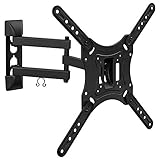
This is the accessory entry, and it earns its place because mounting changes how a 55-inch television is used rather than just where it sits. A full-motion articulating arm lets you pull the panel out from the wall and angle it toward a seat, which fixes the two most common living-room problems: a sofa at right angles to the wall, and a room where the television has to share a wall with a fireplace or a shelving unit.
Key specifications by class:
- Compatibility: 23 to 55 inch displays, which covers every television in this roundup
- Type: full-motion articulating mount with tilt and swivel
- Installation: single-stud mounting
- Weight capacity: 66 lb
- VESA: standard bolt patterns typical of the 23 to 55 inch class
Strengths. The 66 lb capacity is the number that matters most, and it is generous for this size class. A 55-inch OLED is the heaviest typical candidate here; the S90H-class panels generally sit well inside that limit, as do all the LED sets. Single-stud installation is the second advantage — it means one structural fixing point rather than two, which is useful in a room where the studs are not where you want the television. Full motion also means cable management can be done once at the wall and then the panel can be pushed back flush.
Two caveats are worth stating plainly. First, single-stud full-motion mounts place the entire load and the entire leverage of an extended arm on one fixing point, so the stud must be located properly with a finder and the lag bolts must be driven into the centre of it, not near the edge. Second, pulling a television away from the wall moves it closer to the viewer, which shortens the effective viewing distance — worth remembering if you are already sitting near the minimum distance for 4K. Drywall anchors are not a substitute for a stud on a mount of this type.
Pros
- 66 lb capacity covers every 55-inch panel in this roundup
- Full-motion arm solves awkward seating layouts
- Single-stud installation is flexible in rooms with irregular framing
- Low cost relative to the television it supports
- Tilt and swivel help manage reflections from windows
Cons
- Requires correct stud location and proper lag bolts
- Extending the arm increases leverage on the wall fixing
- Not suitable for masonry or drywall-only installation without appropriate hardware
- Does not include cable concealment in the wall
How it compares. There is no competing mount in this list, so the comparison is against the alternative of using the included stand. The stand is free and requires no drilling; the mount costs money and an hour of work but reclaims floor space, raises the panel to a better eye height and lets you aim it. For a wall-mounted setup in a room with a window to one side, the swivel alone justifies the purchase. Note that the S90H OLED is the panel here most likely to benefit from professional installation, given its weight and thin profile.
9. TCL R7D Series Roku TV – Best for Wide Seating and Apple Households

The R7D suits a room with a wide seating arc and a household that mixes Apple and Android devices. Its listing emphasises a FullView bezel-less design and support for both Google Cast and AirPlay 2, which means a phone or tablet on either side of the ecosystem divide can throw content to the screen without a dongle. It is a sensible main-room set for a family that does not want to argue about which casting standard wins.
Key specifications by class:
- Screen: 55-inch class, 4K UHD with HDR support
- Design: FullView bezel-less panel with minimal border
- Smart platform: Roku OS, with Google Cast and AirPlay 2 support highlighted in the listing
- HDR: listing-level HDR support; verify the exact formats on the product page
- Connectivity: multiple HDMI inputs with audio return, USB, optical audio out
- Voice: Roku voice remote with search across services
Strengths. The bezel-less design is not only cosmetic. A thinner border makes a 55-inch panel read as larger in the room and reduces the visual frame around the picture, which matters in a small room where the television is on a low unit and sits near eye level. It also makes the set look deliberate on a wall rather than like a monitor bolted up.
Cross-platform casting is the practical advantage. AirPlay 2 lets an iPhone mirror or hand off video without an Apple TV box, and Google Cast does the same for Android. Roku OS supplies the app layer in the middle, and its neutral home screen means neither ecosystem is prioritised over the other. Picture-wise the R7D sits in the same broad class as the other mid-range 4K sets here: good colour, standard LED backlight behaviour, and a 60Hz class refresh that is fine for film and broadcast but not the gaming pick. As with every 55-inch in this list, a soundbar is the highest-value addition.
Pros
- AirPlay 2 and Google Cast in one television
- FullView bezel-less design looks modern and maximises picture area
- Roku OS with cross-service search
- Good fit for mixed-device households
- Mid-range pricing with premium visual design cues
Cons
- No local dimming, so contrast trails mini-LED sets
- 60Hz class refresh limits console frame rates
- Brightness headroom is class-typical, not exceptional
- Bezel-less panels are marginally more delicate during installation
How it compares. The nearest alternative is the Roku Plus Series Mini-LED. The Plus Series wins on contrast and brightness because of its mini-LED array, while the R7D wins on design, casting breadth and often on price. If your room is dim and you cast from phones constantly, the R7D is the more useful television; if your room is bright, spend the difference on the Plus Series. Against the TCL F7D, the F7D offers QLED colour and Fire TV instead of Roku, so the platform preference should decide.
10. Westinghouse Partial Sun Outdoor Smart TV – Best for Patios and Covered Decks
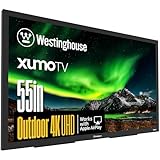
The Westinghouse outdoor set suits a covered patio, a deck with an overhead structure, a poolside wall that is shaded for most of the day, or a covered outdoor kitchen. It is a different product category from every other entry here: it is built to survive weather rather than to win a picture-quality contest, and the two goals are not compatible at the same price.
Key specifications by class:
- Screen: 55-inch class, 4K UHD
- Construction: waterproof enclosure rated for outdoor installation
- Light rating: partial-sun rated, meaning it tolerates indirect or limited direct sunlight but is not designed for full, all-day exposure
- Smart platform: Xumo, providing streaming apps without an external device
- Thermal design: outdoor televisions in this class are built to operate across a wider ambient temperature range than indoor sets
- Mounting: intended for permanent outdoor wall or structure mounting
Strengths. The value of an outdoor set is that it exists at all in that location. An indoor television on a covered patio will fail eventually — humidity corrodes boards, insects nest in vents, and temperature swings stress solder joints — and the failure is usually total rather than gradual. A sealed, waterproof enclosure with an appropriate thermal design removes that risk and makes the patio a genuine second room. Xumo built in means no dongle hanging off a weather-exposed HDMI port, which is one of the most common failure points in outdoor installations.
The partial-sun rating is the specification to read carefully. It means the panel is engineered to be readable with ambient light present, but not to fight direct midday sun on a south-facing wall. If your planned location catches several hours of direct sun, shade it with a pergola, an awning or a structural overhang before installation, because no outdoor panel in this class will look good with the sun landing on the screen itself. Even with the enclosure, keep cable entry points sealed and mounted below the television so water runs away from the connection rather than into it.
Pros
- Weatherproof construction built for permanent outdoor use
- Partial-sun rating suits covered patios and decks
- Xumo platform built in, avoiding external streaming hardware outdoors
- Turns an underused outdoor space into a usable second room
- 4K resolution at 55 inches is ample for typical patio seating distances
Cons
- Premium tier pricing for picture quality that trails indoor sets at the same money
- Not rated for full direct sun exposure
- Heavier and more awkward to install than an indoor 55-inch
- Outdoor audio almost always needs separate weather-rated speakers
How it compares. The nearest comparison is not another television in this list but the indoor sets used outdoors, which is the mistake this product exists to prevent. Against the Samsung S90H OLED at a similar tier, the OLED is far superior for picture but would be a poor choice for a patio: OLED panels and outdoor humidity are a bad combination, and no indoor television in this roundup is built for rain. If the location is fully indoors, buy any of the other picks; if it is genuinely outdoors, this is the only category that makes sense.
11. TCL F7D Series Fire TV (55F7D, 2026) – Best for Fire TV Households Wanting QLED

The F7D suits a household already invested in the Alexa and Fire TV ecosystem that wants a step up in colour without changing platforms or paying premium money. It is a natural main-room set for a family that uses Alexa for lights, timers and shopping, because the television inherits all of that integration without configuration.
Key specifications by class:
- Screen: 55-inch class, 4K UHD
- Panel: QLED with quantum-dot colour layer, 60Hz native refresh class
- Smart platform: Fire TV with Alexa voice control built into the remote
- HDR: listing-level HDR support; check the product page for the specific formats carried
- Connectivity: multiple HDMI inputs with audio return, USB, optical audio out
- Model year: 2026 model, 55F7D
Strengths. TCL’s QLED implementations have been consistently good at the mid-range tier, and the F7D follows that pattern: wider colour volume than a plain LED panel, sensible picture presets out of the box, and a menu structure that lets you turn off the processing you do not want. Fire TV’s app coverage is broad and its voice search works well across services, and the Alexa integration extends to smart-home control if you own compatible devices.
The F7D sits in an awkward but useful spot in the TCL range: above the budget QLED sets on processing and build, below the 120Hz models on refresh. That makes it a good film-and-streaming television and a mediocre gaming one. For a living room used mostly for series, films and broadcast, that is the right trade — you are not paying for refresh rate you will not use, and you are getting the colour upgrade that shows up on every piece of content.
Pros
- QLED colour volume at a mid-range tier
- Fire TV with full Alexa integration
- TCL’s picture processing at a reasonable price
- Good out-of-box picture presets for film and streaming
- Deep app library through Fire TV
Cons
- 60Hz class refresh, so it is not the gaming choice
- No local dimming or mini-LED array
- Fire TV’s home screen carries more promotional content than Roku’s
- Built-in audio is adequate but not cinematic
How it compares. The nearest alternatives are the INSIGNIA QF Series below it and the TCL T7 Series above it. Against the QF, the F7D costs more and delivers better processing and build for a similar panel technology — worth it if the budget stretches, not worth it if it does not. Against the T7, the decision is purely refresh rate: the T7 adds 120Hz and costs more, so gamers should go up and film watchers should stay with the F7D. Against the Samsung U8000H, the F7D wins on colour volume and loses on platform polish and processing refinement.
How to Choose
Start with the room, not the panel
Room lighting decides more purchases than any specification. A television with excellent contrast in a dark room can look washed out in a bright one, and a television with modest contrast can look excellent if you control the light. Before comparing anything, answer three questions: how many hours a day does direct or indirect daylight land on the screen, how many people watch at once, and can the room be darkened at will? If daylight lands on the screen for more than two or three hours, weight brightness and anti-reflection handling above everything else. If the room can be darkened, weight contrast instead.
Panel technology and what it actually buys you
| Panel type | Typical brightness class | Black level | Viewing angle | Best room |
|---|---|---|---|---|
| Edge-lit LED (60Hz) | Lowest of the group | Average, no local dimming | Narrowest | Bedrooms, dim rooms, secondary use |
| QLED with LED backlight (60Hz) | Moderate | Average, wider colour | Moderate | General living rooms with some light control |
| QLED with 120Hz panel | Moderate | Average, best motion | Moderate | Games rooms, sports, motion-heavy content |
| Mini-LED QLED with local dimming | Highest of the LED group | Good, with some blooming | Moderate | Bright living rooms with windows |
| OLED | High in small highlights, lower full-screen | Best, true black | Widest | Dark rooms, film-first setups, wide seating |
Work out the bandwidth you actually need
HDMI cables and ports are sold with numbers attached, and it is worth knowing where they come from. Uncompressed 4K at 60Hz with 10-bit colour and full 4:4:4 chroma needs roughly 3840 x 2160 x 3 channels x 10 bits per frame, which is about 249 megabits per frame; at 60 frames per second that is roughly 14.9 gigabits per second. Add HDMI’s 8b/10b-style encoding overhead and you land near 16.8 Gbps, comfortably inside HDMI 2.0’s 18 Gbps ceiling. Double the refresh rate to 120Hz and the raw figure doubles to roughly 29.9 Gbps, and with encoding overhead you are near 33.6 Gbps — which exceeds 18 Gbps and requires HDMI 2.1’s 48 Gbps ceiling. That is the entire reason a 120Hz television needs both a high-bandwidth port and a certified cable. A cheap cable that worked fine at 4K60 can drop the signal entirely at 4K120, and the symptom is usually a black screen or a flicker rather than an error message.
Set the viewing distance before you mount anything
A 55-inch 16:9 panel is about 47.9 inches wide and about 26.9 inches tall. The conventional guideline for 4K is to sit at roughly 1.5 times the screen height for a fully resolved image, which is about 40 inches — close enough that most people find it uncomfortable. A more practical rule for mixed 1080p and 4K content is 1.5 to 2.5 times the screen height, or roughly 3.4 to 5.6 feet. For a typical sofa at 8 feet, a 55-inch set is a comfortable size rather than an immersive one; if you want a cinema feel at that distance, the next size up is the better purchase. Wall-mounting with an articulating arm shortens the effective distance when the panel is pulled out, so measure the extended position, not the flush one.
Refresh rate, frame time and input lag
Refresh rate sets the interval between frames: 60Hz equals 16.7 milliseconds per frame, 120Hz equals 8.3 milliseconds. A 120Hz panel is not twice as sharp, but it is twice as responsive in the sense that a new frame can appear twice as often. For games, input lag — the delay between a button press and the on-screen result — matters alongside it. Published reviews of mid-range panels in this class typically report game-mode input lag in the region of roughly 8 to 20 milliseconds, varying with resolution, refresh rate, firmware version and the specific game patch, and rising substantially outside game mode. The practical rule: if you play anything competitive, buy 120Hz and enable game mode; if you watch films and sport, 60Hz is fine and






Write Your Review
No reviews yet. Be the first to share your experience!