
Our Short List of 3
All 3 Picks at a Glance
| Product | Specs | Action |
|---|---|---|
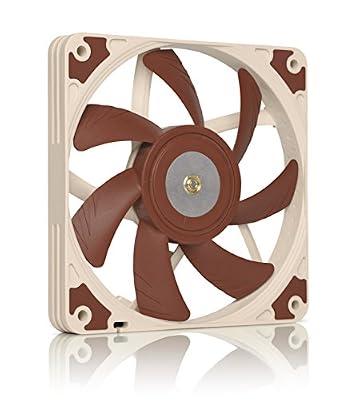 Noctua NF-A12x15 PWM | Check price on Amazon | |
 ARCTIC P12 Slim PWM PST | Check price on Amazon | |
 Thermalright TL-9015R | Check price on Amazon |
A standard case fan is 25mm thick, and in a small form factor build that extra depth is often the difference between a side panel that closes and one that does not. Slim fans solve the problem by cutting the frame to 15mm or less while keeping standard 120mm or 92mm mounting holes. That saved depth clears tall memory modules on low-profile coolers, fits under a graphics card in a sandwich-layout case, and lets a radiator sit where a thicker fan would foul the motherboard or power supply shroud.
The trade is physics. A thinner impeller moves less air at a given speed and builds less static pressure, so a slim fan has to spin faster, use smarter blade geometry, or accept lower peak output than a full-depth rival. The five fans below are the picks that manage that trade best, covering quiet premium cooling, pressure-focused radiator work, addressable lighting in a white frame, and a compact 92mm option for the smallest coolers. Every model here uses a standard 4-pin PWM connector, so speed control comes from the motherboard with no extra hardware.
As an Amazon Associate, we earn from qualifying purchases.
Quick Answer
For most builders, the Noctua NF-A12x15 PWM is the best slim PC fan: it pairs a 120x120x15mm frame with low noise, strong build quality, and useful accessories. Choose the SilverStone Air Slimmer 120 for maximum airflow through a radiator, the ARCTIC P12 Slim PWM PST for easy daisy-chained wiring, the Thermalright TL-C12015W-S for white ARGB builds, and the Thermalright TL-9015R when only a 92mm mount fits.
How to Choose
Start with the mount, not the brand. Measure the fan position and confirm both the frame size and the clearance above it. Most slim positions are 120x120mm, but low-profile CPU coolers and some compact cases use 92x92mm mounts, and the two sizes are not interchangeable. Then measure the actual gap: a nominal 15mm fan still needs room for its cable and for the anti-vibration pads, and some frames, like the SilverStone below at 15.6mm, run slightly over the nominal figure.
Next, match the fan to the job it will do. On a radiator or a dense low-profile heatsink, static pressure matters more than free-air airflow, because the fan has to push through fins. Look for higher pressure figures and a higher top speed. In an open case position, such as a bottom intake under a graphics card or a top exhaust, free-air airflow matters more and a slower, quieter fan usually wins. Check both numbers in each spec table rather than judging by revolutions alone, since blade design changes the result a lot at this thickness.
Connector and wiring choices are simple but worth checking. All five picks use 4-pin PWM, which lets the motherboard raise and lower speed with temperature. The ARCTIC model adds PWM Sharing Technology, so several fans can follow one header signal in a chain, which helps in cases with few headers. If you want lighting, the Thermalright TL-C12015W-S adds a separate 5V 3-pin addressable cable; that cable must go to a 5V addressable header, never a 12V RGB header.
Finally, think about orientation and bearing type. Fluid dynamic and similar sealed bearings handle horizontal mounting, such as a bottom intake facing up, better than basic sleeve designs and tend to stay quieter over time. Set a sensible fan curve after installation: slim fans often become audible well before their maximum speed, and a curve that caps everyday speed keeps a small build pleasant while still allowing full speed under sustained load.
Noctua NF-A12x15 PWM
The NF-A12x15 PWM is the reference point for slim 120mm fans, and it earns that position with balance rather than a single headline figure. Its Flow Acceleration Channels and Advanced Acoustic Optimisation frame are designed to keep airflow smooth and noise low, and the rated output of 55.4 CFM with 1.53 mm H2O of static pressure is enough for low-profile coolers, slim radiators, and case positions alike. At a rated 23.9 dBA at full speed, it is also one of the quieter fans in this group on paper.
The details suit careful builds. The SSO2 bearing is rated for a long service life, integrated anti-vibration pads reduce buzz against thin case panels, and the box includes a Low-Noise Adaptor that trims top speed for near-silent duty, plus extension and splitter cabling that helps in cramped cases where headers sit far from the fan position. The brown and beige finish will not match every build, and a black chromax variant exists in the same family, but the standard model remains the easiest recommendation for a quiet, dependable slim fan.
ARCTIC P12 Slim PWM PST
The P12 Slim PWM PST is the practical choice for builders who need several slim fans and simple wiring. Its headline feature is PWM Sharing Technology: a short pass-through lead lets one fan hand the PWM signal to the next, so a row of radiator or case fans can follow a single motherboard header and a single fan curve. In a small case with limited headers, that removes splitters and keeps cable runs short.
Performance is tuned for pressure work. The fan spins from 300 to 2100 RPM, the widest range in this roundup, and ARCTIC rates it at 42.1 CFM with 1.45 mm H2O of static pressure. The low minimum speed suits idle-quiet builds, while the high top end gives it headroom on a radiator. The frame is plain black with no lighting, which keeps the focus on function. If your build needs multiple slim fans under one curve and you value tidy wiring over accessories, this is the straightforward pick.
SilverStone Air Slimmer 120
The Air Slimmer 120, model SST-AS120B, is the output leader here. Its nine scimitar-shaped blades and all-copper fluid dynamic bearing deliver a rated 63.7 CFM and up to 2.05 mm H2O of static pressure at 1800 RPM, figures that lead this group and make it the natural choice for a slim radiator or a dense heatsink where pressure decides performance. Few 15mm-class fans push this hard, and that headroom means it can often run slower than rivals for the same cooling, offsetting its higher full-speed noise rating of 31.7 dBA.
Two cautions apply. First, the frame measures 15.6mm thick rather than a flat 15mm, so confirm the extra fraction fits before ordering for an extremely tight slot. Second, it draws a rated 0.32A, the highest here, so check the current rating of a shared header if you plan to run several on one connection. Neither point is a deal-breaker for most builds, and for a performance-first slim fan this is the strongest option in the list.
Specs
| Item | Detail |
|---|---|
| Size | 120 x 120 x 15.6 mm |
| Connector | 4-pin PWM |
| Speed | 0 to 1800 RPM |
| Airflow | 63.7 CFM |
| Static pressure | 2.05 mm H2O |
| Noise | 31.7 dBA |
| Bearing | All-copper fluid dynamic bearing |
Thermalright TL-C12015W-S
The TL-C12015W-S covers the builders the other picks ignore: white builds that want lighting in a slim slot. The white frame houses addressable RGB blades lit through a separate 5V 3-pin cable, so the fan can sync with motherboard lighting software while the 4-pin PWM cable handles speed. At 120x120x15mm it drops into the same positions as the other 120mm fans here, which makes it an easy aesthetic swap in a white small form factor case.
Cooling figures are moderate and quiet-leaning: up to 1500 RPM, 52 CFM of airflow, 1.24 mm H2O of static pressure, and a rated 24.1 dBA. That suits case intake and exhaust duty and lighter cooler work better than a thick radiator, where the pressure-focused picks above have an edge. The S-FDB bearing and rubber damping pads support the quiet brief. Choose this fan when the look of the build matters as much as airflow and the cooling load is modest.
Specs
| Item | Detail |
|---|---|
| Size | 120 x 120 x 15 mm |
| Connector | 4-pin PWM plus 5V 3-pin ARGB |
| Speed | Up to 1500 RPM |
| Airflow | 52 CFM |
| Static pressure | 1.24 mm H2O |
| Noise | 24.1 dBA |
| Bearing | S-FDB |
Thermalright TL-9015R
Not every tight spot takes a 120mm fan. The TL-9015R shrinks the formula to 92x92x15mm for low-profile coolers, compact cases, and replacement duty on heatsinks that ship with a 92mm slim fan. Despite the smaller frame it spins to 2700 RPM and delivers a rated 42.58 CFM with 1.33 mm H2O of static pressure, respectable figures for the size and enough to feed a small tower or down-draft cooler in a tight chassis.
The rated noise of 22.4 dBA is low for a fan spinning this fast, helped by the S-FDB bearing and four vibration damping pads. A fan curve matters here: at full speed a small impeller works hard, so tying speed to CPU temperature keeps everyday noise down. Check your mount before ordering, since 92mm holes sit closer together than 120mm holes and adapters are rarely worth the trouble. When the smaller mount is what your cooler or case actually has, this is the slim fan that fits it properly.
Who Should Skip It
Skip slim fans entirely if your case takes standard 25mm fans in the positions you care about. A full-depth fan moves more air at lower speed and lower noise, and there is no benefit to giving that up without a clearance problem to solve. Slim fans earn their place only where depth is genuinely limited, such as under a graphics card, over tall memory, or inside a sandwich-layout case.
Also skip this category if your priority is the lowest possible noise at high cooling load. Every slim fan here makes compromises against physics, and a build that needs heavy radiator cooling in silence is better served by a larger case that fits thicker fans and bigger radiators. Finally, skip the 92mm pick unless your mount is truly 92mm, and skip the ARGB model if your motherboard lacks a 5V addressable header, since the lighting cable would have nowhere correct to go.
FAQ
Will a slim fan cool as well as a standard 25mm fan?
Not at the same speed. A 15mm impeller has less blade area, so it usually needs more revolutions to match a thicker fan, and it may still trail on static pressure. In a position where a 25mm fan cannot physically fit, though, a good slim fan is far better than no fan or a blocked one.
Can slim fans be used on radiators?
Yes, and pressure-focused models such as the SilverStone Air Slimmer 120 and the ARCTIC P12 Slim PWM PST are intended for that work. Expect to run them a little faster than thick radiator fans for the same result, and confirm that your radiator screws suit the thinner frame before installation.
Do slim fans need special screws or mounting hardware?
Usually not, but check screw length. Screws supplied for 25mm fans can be too long for a 15mm frame and may strike a radiator core or case panel behind the mount. Use the screws supplied with the slim fan or with your radiator, and stop if a screw meets resistance early.
What fan curve works best for slim fans in a small case?
Start with a gentle curve that holds low speed at idle and light load, then rises steeply once CPU or GPU temperatures climb under sustained work. Slim fans become audible quickly at the top of their range, so reserving full speed for genuine heat keeps a small build comfortable day to day.
Final Verdict
The Noctua NF-A12x15 PWM is the default recommendation for most small form factor builds thanks to its balance of airflow, pressure, low rated noise, and thoughtful accessories. Pick the SilverStone Air Slimmer 120 when cooling output comes first, the ARCTIC P12 Slim PWM PST when several fans need to share one header cleanly, the Thermalright TL-C12015W-S for a white ARGB build with modest loads, and the Thermalright TL-9015R when only a 92mm slim mount will fit. Measure your clearance first, match pressure to the job, and any of these five will make a tight build work.
Product and ASIN Reference
| Product | ASIN |
|---|---|
| Noctua NF-A12x15 PWM | B071W6HJP6 |
| ARCTIC P12 Slim PWM PST | B08QDKGCCW |
| SilverStone Air Slimmer 120 | B09SMQPJ6X |
| Thermalright TL-C12015W-S | B0CKX3KDZN |
| Thermalright TL-9015R | B0D4JTZR8N |





Write Your Review
No reviews yet. Be the first to share your experience!