
Our Short List of 3
All 5 Picks at a Glance
| Product | Specs | Action |
|---|---|---|
 MOUNTUP Dual Monitor Stand | Check price on Amazon | |
 Amazon Basics Gas Spring Dual Monitor Arm | Check price on Amazon | |
 WALI Dual Monitor Mount GSDM002 | Check price on Amazon | |
 ErGear Dual Monitor Stand EGDS15B | Check price on Amazon | |
 Suptek Dual Monitor Mount MD9442 | Check price on Amazon |
Two monitors change what a desk mount has to do. A single arm only holds one screen at eye level, but a dual setup asks one base to carry two screens, keep them lined up edge to edge, and leave room behind them for cables and a keyboard. The wrong mount shows up fast: one screen sags lower than the other, or a heavy panel slowly drifts down during the day. Every arm in this guide is built for two screens from the start, with a separate height, tilt, and swivel adjustment for each screen, so a main display and a secondary panel can sit at different heights without dragging each other out of line.
As an Amazon Associate, we earn from qualifying purchases.
Quick Answer
For most two-screen desks, buy the MOUNTUP Dual Monitor Stand: gas-spring arms for two screens up to 32 inches and 4.4 to 17.6 pounds each, with clamp and grommet mounting. Choose the Amazon Basics Gas Spring Dual Monitor Arm for lighter screens, the WALI GSDM002 for heavier panels, the ErGear EGDS15B for screens up to 33 inches, and the Suptek MD9442 for a straightforward dual frame.
How to Choose
Weigh each screen without its factory stand
A dual arm carries two separate loads, and each arm has its own weight window with a floor as well as a ceiling. A gas-spring arm drifts upward under a screen lighter than its minimum and sags under one heavier than its maximum, so both screens have to land inside the window. Weigh each monitor with its factory stand removed, then match the heavier screen to the arm, not the lighter one. The MOUNTUP arms want 4.4 to 17.6 pounds each, the Amazon Basics arms 4.4 to 15.4 pounds each, the WALI arms up to 19.8 pounds each, and the ErGear and Suptek arms up to 22 pounds each.
Decide between one dual arm and two single arms
A single dual arm uses one base, one clamp, and one pole for both screens, which keeps the back of the desk clear and holds the two panels in line with each other. Two separate single arms give each screen a wider range of movement and let the screens sit further apart, but they need two desk clamps, two bases, and more room behind the desk.
Measure the desk edge before choosing the mount
A clamp mount needs a desk edge inside its thickness range and clear space underneath for the clamp body, while a grommet mount needs a hole through the desktop in the right size range. Glass tops and very thick edges need a different answer, so measure the edge rather than guessing. The ErGear lists a C-clamp range of 0.39 to 2.56 inches and a grommet range of 0.39 to 2.17 inches, and it recommends a wooden desk with no beams or panels blocking the underside. The MOUNTUP lists 0.39 to 2.76 inches for both mounting styles.
Match VESA patterns for two screens
Every arm here bolts to a VESA plate, so both monitors need VESA mounting holes on the back, spaced 75 by 75 or 100 by 100 millimetres apart. Check both screens before ordering, because a monitor with no VESA holes cannot use any arm in this guide. The two screens do not have to share the same VESA pattern, since each arm carries its own plate. Curved screens and ultrawides are usually heavier than flat panels of the same size, so check the weight first and the size second.
MOUNTUP Dual Monitor Stand
Best overall pick for most two-screen desks
The MOUNTUP Dual Monitor Stand leads this guide because it covers the screens most two-monitor desks actually hold, with gas-spring movement on both arms. Each arm carries a screen up to 32 inches and 4.4 to 17.6 pounds, so a pair of 27-inch panels sits comfortably inside its window, and a 32-inch main display beside a smaller secondary screen works too. The gas springs let each screen float to a new height or angle with one hand, across a 9.4-inch adjustment range, and the arms rotate a full 360 degrees for portrait use on either side. A C-clamp and a grommet base are both in the box. The listing crawl behind this pick is about a year old, and one crawl line conflicts with the buy signals on the page, so glance at the live offer before ordering.
Amazon Basics Gas Spring Dual Monitor Arm
Best pick for lighter screens on a smaller outlay
The Amazon Basics Gas Spring Dual Monitor Arm is the pick for two lighter screens, and it brings gas-spring movement to the smallest panels in this guide. Each arm holds a screen from 15 to 27 inches and 4.4 to 15.4 pounds, which covers a pair of 24-inch office monitors or a 27-inch main display beside a smaller secondary panel. The gas springs adjust with a tension screw on each arm, so the two sides can be set for different panel weights: a heavier main screen on one side and a lighter secondary screen on the other, each holding its position instead of drifting. The trade is the weight ceiling: a heavy 32-inch screen does not fit this arm at all.
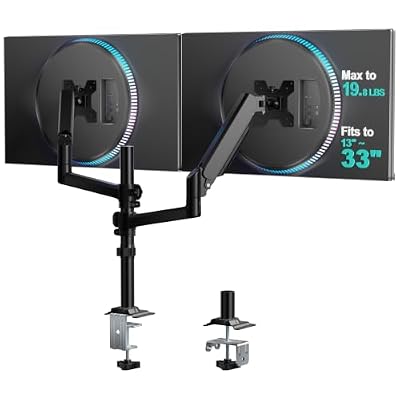
WALI Dual Monitor Mount GSDM002
Best pick for heavier screens
The WALI GSDM002 is the arm for a pair of screens that weigh more than the budget arms can hold. Each gas-spring arm carries a screen from 13 to 32 inches and up to 19.8 pounds, which covers heavy 27-inch and 32-inch panels that would sag on a lighter arm. The wider size range also helps on a mixed desk: a large main display on one arm and a smaller secondary screen on the other, both held by the same mount. Both mounting options are in the box, a C-clamp and a grommet base. The trade is the size floor: a very small secondary display under 13 inches falls outside the stated range.
ErGear Dual Monitor Stand EGDS15B
Best pick for larger screens up to 33 inches
The ErGear EGDS15B is the pick for the largest screens in this guide, and it is the only arm here rated for a 33-inch panel. Each gas-spring arm carries a screen from 17 to 33 inches and 4.4 to 22 pounds, so a pair of large displays, or a 33-inch main screen beside a smaller secondary panel, both fit inside its window. The gas springs are tested for 20,000 cycles, and each arm raises to 17.5 inches above the desk and extends 17.5 inches toward the user. A C-clamp fits desks from 0.39 to 2.56 inches thick, and a grommet mount fits desks from 0.39 to 2.17 inches thick. The trade is the size floor: a secondary screen smaller than 17 inches falls outside the stated range.
Suptek Dual Monitor Mount MD9442
Best pick for a straightforward dual frame
The Suptek MD9442 is the simplest dual arm in this guide, and it suits a desk where the two screens go up once and stay put. Each gas-spring arm holds a screen up to 27 inches and 22 pounds, so a pair of 24-inch or 27-inch panels sits inside its window with room to spare on weight. The higher per-arm ceiling is the honest advantage here: a heavy 27-inch panel that would press against the ceiling of a lighter arm sits comfortably on the Suptek, even though the size range stops at 27 inches. The trade is the size ceiling: a 32-inch screen does not fit this arm, no matter how light it is.
Who Should Skip It
Skip a dual monitor arm if either monitor has no VESA mounting holes, since every arm here bolts to a VESA plate. Skip the gas-spring picks if a screen falls outside their weight window: a too-light screen drifts upward and a too-heavy one sags, and the fix is a different arm, not a tighter screw. Skip the Amazon Basics arm for a heavy 32-inch screen, skip the ErGear arm for a secondary screen smaller than 17 inches, and skip the Suptek arm for any screen larger than 27 inches. Skip a clamp mount for a glass desktop, and skip a grommet mount for a desk with no hole.
FAQ
Can one dual monitor arm hold two different size screens?
Yes, when each screen fits the arm on its own. Check the size and weight of both screens against the per-arm limits, not the pair as a whole: a 32-inch main display beside a 24-inch secondary screen works on the MOUNTUP, WALI, and ErGear arms here, while the Amazon Basics and Suptek arms cap at 27 inches. Each arm adjusts its own height, tilt, and swivel, so the two panels can line up even when they differ in size.
Is a dual arm better than two single arms?
A dual arm is better for a desk where the two screens sit side by side and rarely move apart, because one base and one clamp hold the pair in line and free the desk underneath. Two single arms are better when one screen turns toward a second seat or slides away from the other during the day, because each arm moves on its own base.
What VESA pattern do I need for two monitors?
Both monitors need VESA mounting holes spaced 75 by 75 or 100 by 100 millimetres apart, which covers nearly every modern desktop display. Check both screens before ordering, because the two screens do not have to share the same pattern: each arm carries its own VESA plate, so one screen can use 75 by 75 and the other 100 by 100. A monitor with no VESA holes cannot use any arm in this guide.
Will a dual monitor arm damage my desk?
A clamp mount can mark a soft desk surface if overtightened, so fit a protective pad under the clamp on wood or laminate tops and check the desk edge thickness against the clamp range before ordering. A grommet mount spreads the load through a hole and leaves the edge untouched, but it needs a hole in the right size range. Two screens double the load on one base, so the desk itself has to be sturdy enough to carry the pair.
Final Verdict
For most two-screen desks, buy the MOUNTUP Dual Monitor Stand: gas-spring arms for two screens up to 32 inches and 4.4 to 17.6 pounds each, with clamp and grommet mounting in the box. Choose the Amazon Basics Gas Spring Dual Monitor Arm for a pair of lighter screens, the WALI GSDM002 for heavier panels up to 19.8 pounds each, the ErGear EGDS15B for screens up to 33 inches, and the Suptek MD9442 for a straightforward dual frame. Weigh both screens without their stands first, then match the heavier one to the arm.
Product and ASIN Reference
| Product | ASIN |
|---|---|
| MOUNTUP Dual Monitor Stand | B07Z7ZM8CJ |
| Amazon Basics Gas Spring Dual Monitor Arm | B0CQXPGNCH |
| WALI Dual Monitor Mount GSDM002 | B07DM7N5BH |
| ErGear Dual Monitor Stand EGDS15B | B0C7KQ7MX8 |
| Suptek Dual Monitor Mount MD9442 | B01LH0L52S |






Write Your Review
No reviews yet. Be the first to share your experience!